Introduction
This manual provides detailed instructions for the installation, operation, and maintenance of your Blaupunkt MEMPHIS440BT 6.2" In-Dash Touch Screen DVD Receiver. Please read this manual thoroughly before using the product to ensure proper functionality and to prevent damage.
Product Overview
The Blaupunkt MEMPHIS440BT is a versatile in-dash multimedia receiver featuring a 6.2-inch touch screen display. It supports DVD/CD playback, Bluetooth connectivity for hands-free calling and audio streaming, USB and SD card media playback, and AM/FM radio. The unit is designed to be the central entertainment system in your vehicle.

Image: Front view of the Blaupunkt MEMPHIS440BT in-dash receiver with its remote control. The receiver features a 6.2-inch touch screen displaying various function icons like Radio, Disc, USB, SD, and Bluetooth. The remote control has numerous buttons for navigation and media control.
Safety Information
- Always operate the vehicle safely. Do not operate the unit's functions that distract you from safe driving.
- Ensure proper wiring connections to prevent short circuits and electrical hazards.
- Consult a professional for installation if you are unsure about any steps.
- Do not expose the unit to moisture or extreme temperatures.
Setup and Installation
Package Contents
- Blaupunkt MEMPHIS440BT DVD Receiver
- Remote Control
- Wiring Harness
- Mounting Hardware
- User Manual (this document)
Wiring Diagram
Refer to the detailed wiring diagram provided in the separate installation guide for specific connections. Ensure all connections are secure and correctly matched to your vehicle's electrical system.
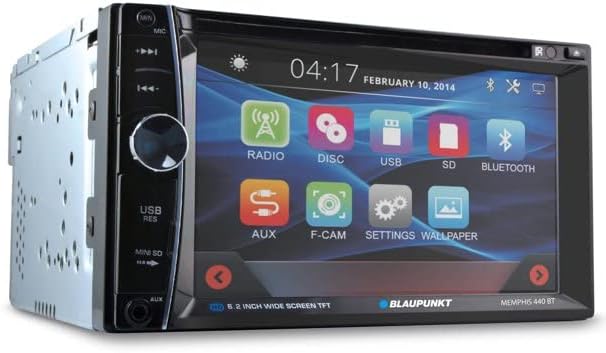
Image: Side view of the Blaupunkt MEMPHIS440BT receiver, illustrating the various ports and connections on the rear and side panels, including the USB and Mini SD slots on the front left side.
Mounting the Unit
- Remove the existing car stereo from the dashboard.
- Connect the wiring harness to the vehicle's wiring and the MEMPHIS440BT.
- Slide the MEMPHIS440BT into the dashboard opening until it clicks into place.
- Secure the unit using the provided mounting screws.
Operating Instructions
Power On/Off
Press the POWER button (usually a knob on the left side) to turn the unit on or off. Hold for 2 seconds to power off.
Touch Screen Interface
The 6.2-inch touch screen allows for intuitive control of all functions. Tap icons to select modes (Radio, Disc, USB, SD, Bluetooth, AUX, F-CAM, Settings, Wallpaper).

Image: Angled front view of the Blaupunkt MEMPHIS440BT receiver, highlighting the touch screen interface with its main menu icons and the physical control knob on the left side.
Bluetooth Pairing
- On the main menu, tap the Bluetooth icon.
- Enable Bluetooth on your mobile device and search for available devices.
- Select "MEMPHIS440BT" from the list.
- Enter the default PIN "0000" if prompted.
- Once paired, you can make/receive calls and stream audio.
Media Playback (DVD/CD/USB/SD)
- DVD/CD: Insert a disc into the slot. The unit will automatically switch to Disc mode.
- USB: Insert a USB drive into the USB port. Tap the USB icon to access files.
- SD: Insert a miniSD card into the SD card slot. Tap the SD icon to access files.

Image: Close-up view of the USB port and Mini SD card slot located on the front left side of the Blaupunkt MEMPHIS440BT receiver, beneath a protective flap.
Radio Operation
- Tap the Radio icon to enter radio mode.
- Use the touch screen controls to scan for stations, tune manually, or select preset stations.
- To save a station, tune to the desired frequency, then press and hold a preset button on the screen.
Maintenance
- Cleaning: Use a soft, dry cloth to clean the touch screen and unit exterior. Do not use abrasive cleaners or solvents.
- Disc Care: Handle discs by their edges. Keep them clean and free of scratches.
- Firmware Updates: Check the official Blaupunkt website periodically for any available firmware updates.
Troubleshooting
| Problem | Possible Cause | Solution |
|---|---|---|
| No power | Incorrect wiring; Blown fuse | Check power and ground connections; Replace fuse if necessary. |
| No sound | Volume too low; Mute activated; Speaker wiring issue | Increase volume; Deactivate mute; Check speaker connections. |
| Bluetooth not connecting | Device not in pairing mode; Incorrect PIN | Ensure device is discoverable; Re-enter PIN "0000". |
| Disc error | Dirty or scratched disc; Incorrect disc format | Clean disc; Try a different disc; Ensure disc is compatible. |
Specifications
- Screen Size: 6.2 Inches
- Display Type: LCD Touch Screen
- Media Type: DVD, CD, USB, SD
- Connectivity: Bluetooth
- Item Model Number: MEMPHIS440BT
- Item Weight: 4.25 pounds
- Package Dimensions: 9.69 x 9.17 x 6.85 inches
- Manufacturer: BLAUPUNKT
Warranty and Support
For warranty information and technical support, please refer to the warranty card included with your product or visit the official Blaupunkt website. Keep your purchase receipt as proof of purchase for warranty claims.
Blaupunkt Official Website: www.blaupunkt.com


