
ThermoPro TP410
ThermoPro TP410 Infrared Thermometer Gun User Manual
Model: TP410
1. Introduction
The ThermoPro TP410 Infrared Thermometer Gun is a non-contact laser thermometer designed for quick and accurate temperature measurements of surfaces. It is ideal for various applications including cooking, pizza ovens, griddles, grills, HVAC systems, and engine diagnostics. This device is not intended for human body temperature measurement.
Key features include a wide temperature range, adjustable emissivity for improved accuracy, a 12:1 distance-to-spot ratio for safe measurements from a distance, and a multi-temperature display showing maximum, minimum, and average readings.

Image 1.1: The ThermoPro TP410 Infrared Thermometer Gun, showing its compact design and laser pointer in action.
2. Product Features
- Pocket-Sized Design: Small, light-weight, convenient, and portable for both home and industrial use.
- High Accuracy: Utilizes a Thermopile Sensor for quick and precise measurements.
- Adjustable Emissivity: Allows customization (0.1 to 1.0) to match different surface textures for improved accuracy.
- Safe Non-Contact Measurement: 12:1 distance-to-spot ratio and 0.5-second response time enable safe temperature readings from a distance.
- Multi-Temperature Display: Shows maximum, minimum, and average temperatures for comprehensive analysis.
- Wide Measurement Range: -58°F to 1022°F (-50°C to 550°C).
- Backlight Display: Ensures readability in various lighting conditions.
- Auto-Off Function: Automatically shuts off after 90 seconds of inactivity to conserve battery.
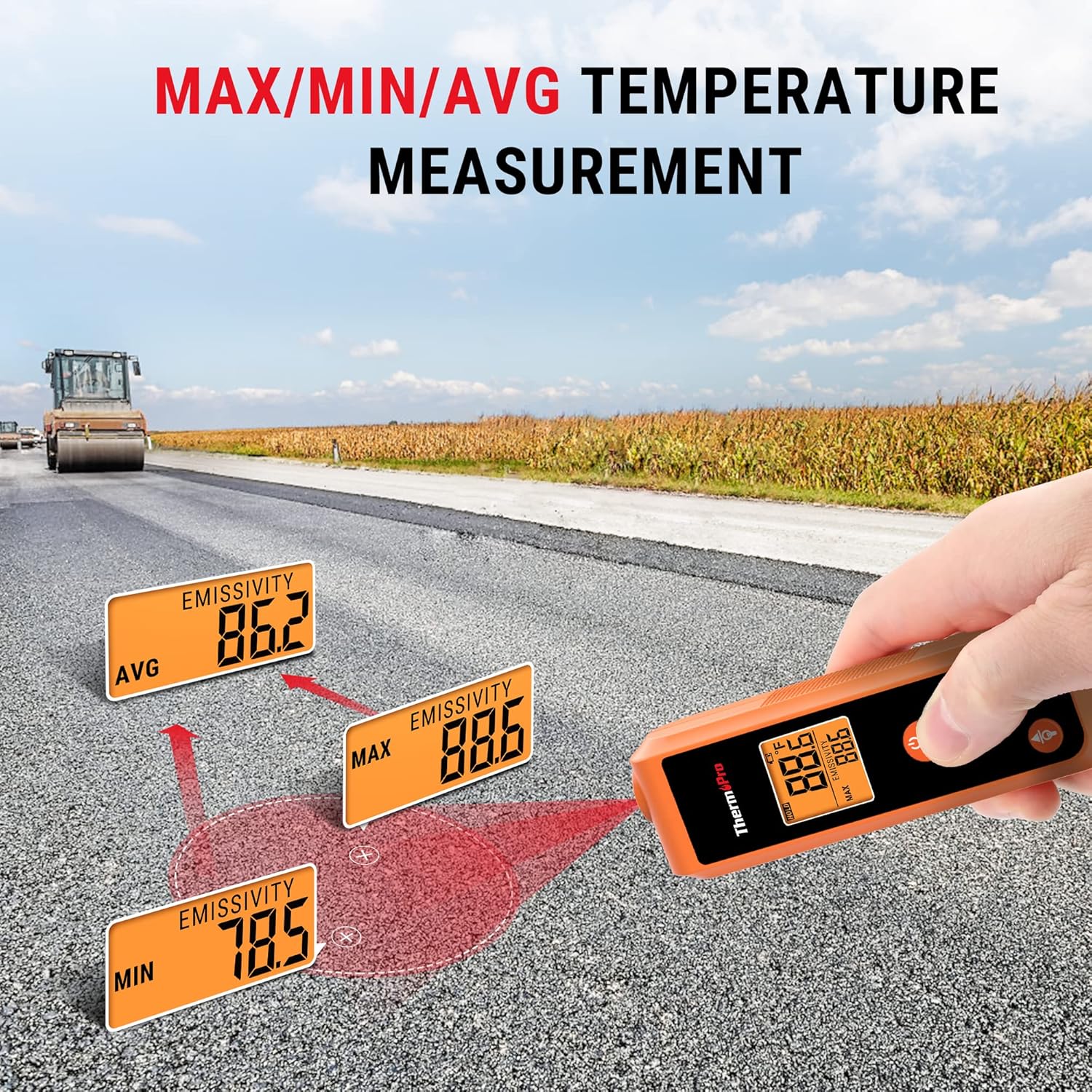
Image 2.1: Size comparison illustrating the compact, pocket-sized design of the ThermoPro TP410 compared to other larger thermometer guns.
3. Setup
3.1. Battery Installation
The ThermoPro TP410 requires 2 AAA batteries (included). To install the batteries:
- Locate the battery compartment cover on the back of the device.
- Slide the cover open.
- Insert the 2 AAA batteries, ensuring correct polarity (+ and -).
- Close the battery compartment cover securely.
3.2. Initial Power On
After installing batteries, press the SCAN button to power on the device. The display will light up, and the current temperature reading will be shown.
4. Operating Instructions
4.1. Taking a Temperature Reading
To measure the temperature of a surface:
- Point the laser pointer at the center of the surface you wish to measure.
- Press and hold the SCAN button. The temperature reading will appear on the display instantly.
- Release the SCAN button to hold the current temperature reading on the display.

Image 4.1: Demonstrating non-contact temperature measurement using the laser pointer to target a hot surface, such as inside a pizza oven.
4.2. Understanding Distance-to-Spot Ratio (D:S)
The TP410 has a 12:1 D:S ratio. This means that at a distance of 12 inches, the measurement spot size will be 1 inch. As you move further away, the spot size increases. For accurate readings, ensure the target area is larger than the spot size.
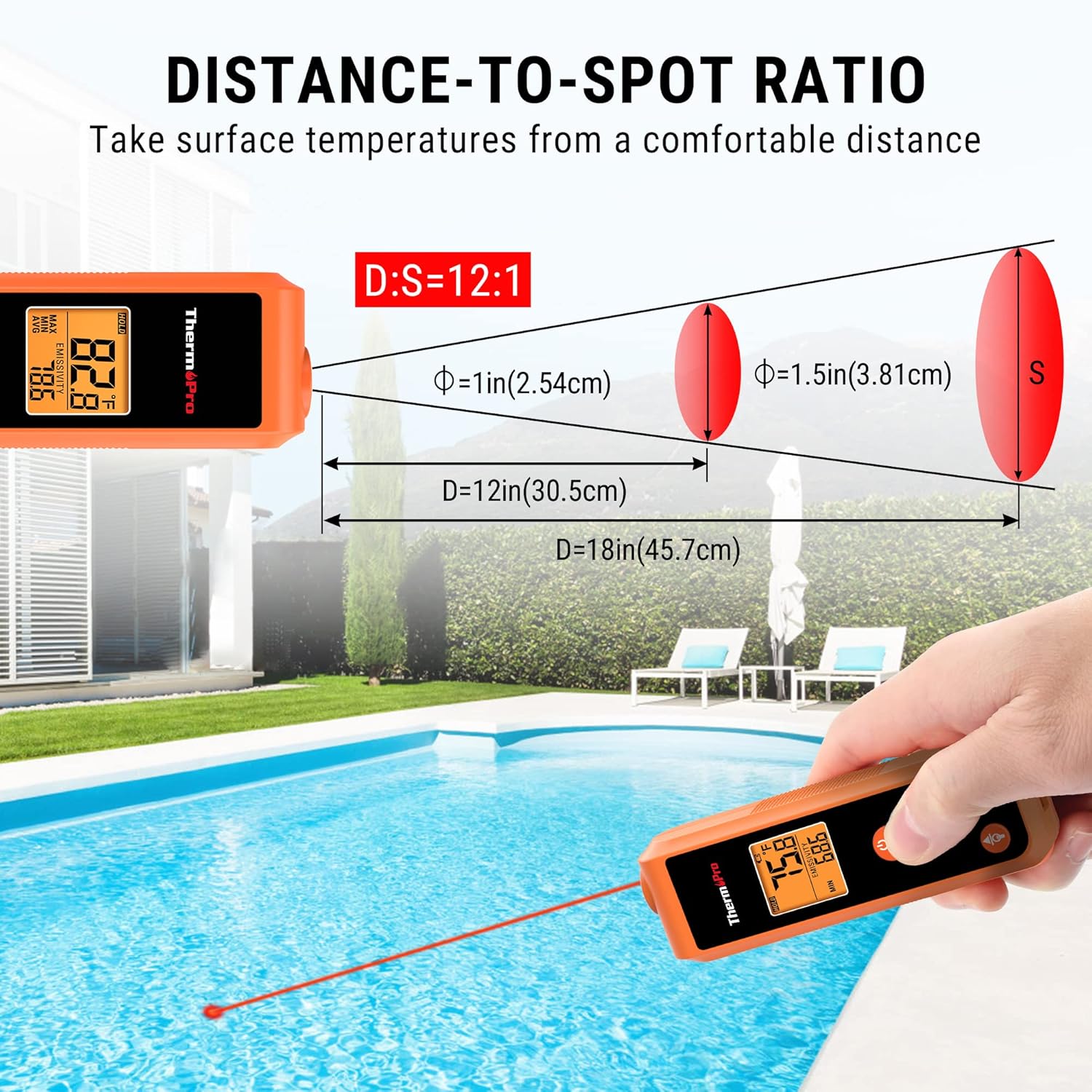
Image 4.2: Diagram illustrating the 12:1 distance-to-spot ratio, showing how the measurement area expands with increased distance from the target.
4.3. Adjusting Emissivity
Emissivity is the ability of a material to emit energy by radiation. Different materials have different emissivity values. For the most accurate readings, adjust the emissivity setting to match the surface being measured. The TP410 allows adjustment from 0.1 to 1.0.
- Press the MODE button to cycle through display modes until "EMISSIVITY" is shown.
- Use the Up and Down arrow buttons to adjust the emissivity value.
- Refer to common emissivity values for various materials (e.g., wood: 0.94, ice: 0.98, concrete: 0.95, oil: 0.94).
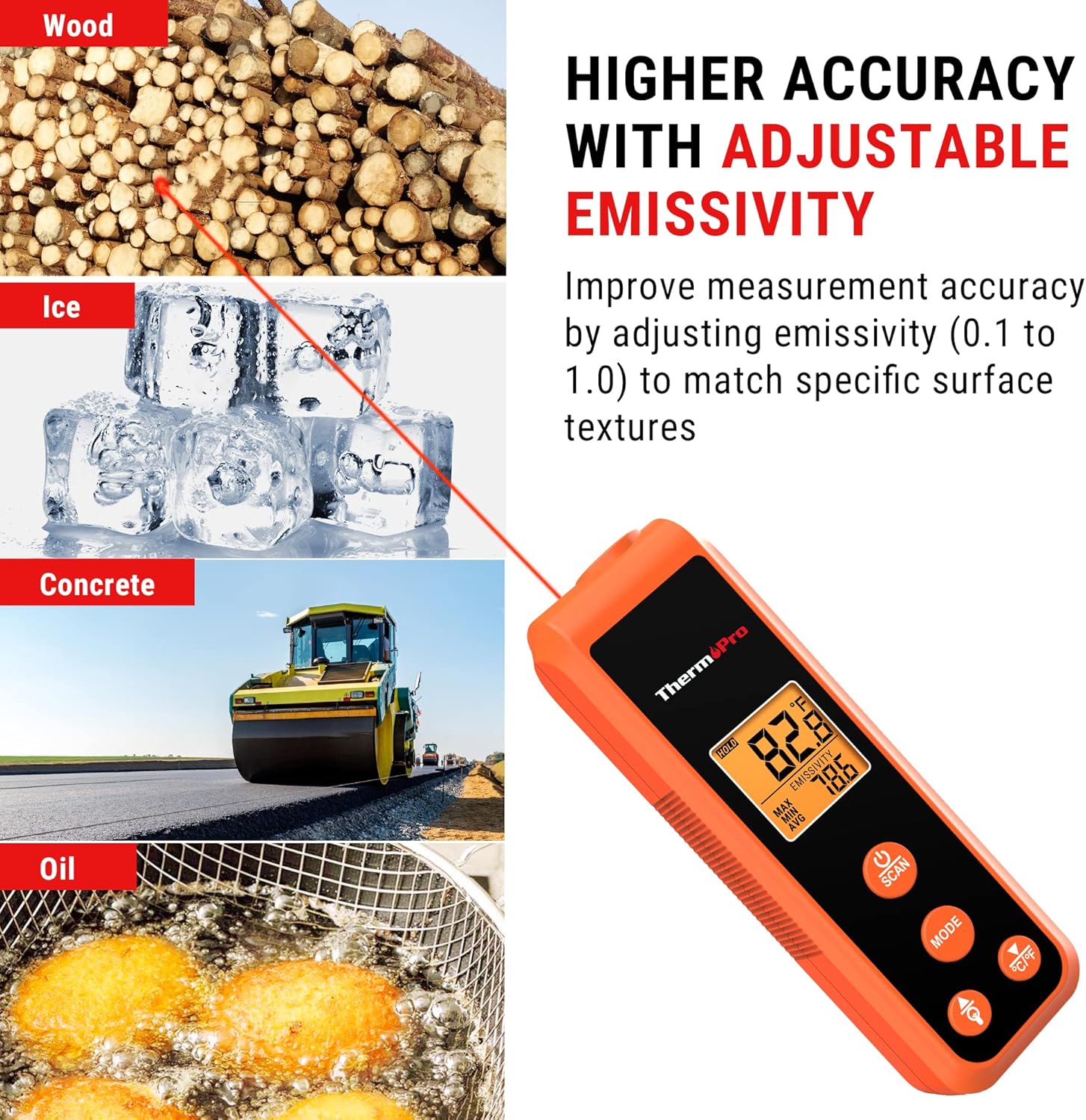
Image 4.3: Visual representation of how adjustable emissivity improves measurement accuracy across different surface types like wood, ice, concrete, and oil.
4.4. Multi-Temperature Display Modes
The TP410 can display various temperature readings:
- MAX: Displays the maximum temperature recorded during a scan.
- MIN: Displays the minimum temperature recorded during a scan.
- AVG: Displays the average temperature recorded during a scan.
Press the MODE button repeatedly to cycle through these display options.
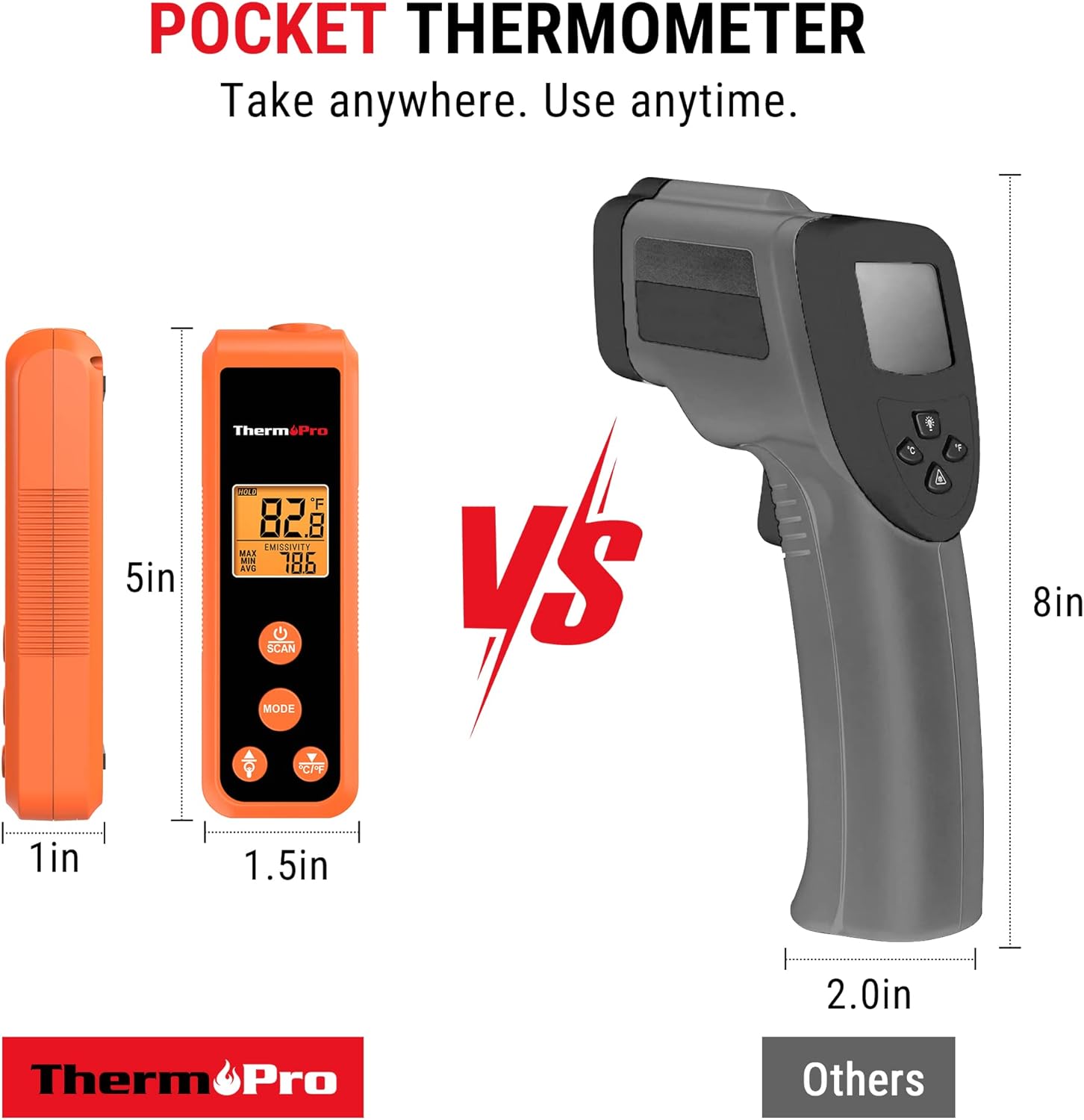
Image 4.4: The thermometer displaying maximum, minimum, and average temperature readings, useful for diagnosing temperature fluctuations across a surface.
4.5. Switching Temperature Units (°C/°F)
To switch between Celsius (°C) and Fahrenheit (°F), press the °C/°F button located on the device.
4.6. Backlight Control
To turn the display backlight on or off, press the Light Bulb button.
4.7. Automatic Shut-off
The device will automatically turn off after 90 seconds of inactivity to conserve battery life.
5. Multiple Applications
The ThermoPro TP410 is versatile and can be used for a wide range of home and industrial applications, including but not limited to:
- Food preparation (e.g., checking surface temperature of griddles, pizza ovens, oil for frying).
- HVAC system diagnostics (e.g., checking vent temperatures).
- Automotive maintenance (e.g., engine temperature checks).
- Home repairs and general temperature monitoring.

Image 5.1: Examples of the thermometer's diverse applications, including measuring temperatures for oil-fried foods, griddles, HVAC systems, and car engines.
5.1. Official Product Video: ThermoPro TP410 IR Pocket Infrared Thermometer
Video 5.1: An official product video from ThermoPro US showcasing the features and various uses of the TP410 Infrared Thermometer.
6. Maintenance
6.1. Cleaning
To clean the thermometer, wipe it with a damp cloth. Do not immerse the device in water or use abrasive cleaners. Ensure the lens is clean for accurate readings.
6.2. Storage
Store the thermometer in a cool, dry place when not in use. Remove batteries if storing for extended periods to prevent leakage.
7. Troubleshooting
| Problem | Possible Cause | Solution |
|---|---|---|
| Display is blank or dim. | Low batteries or incorrect battery installation. | Replace batteries with new AAA batteries, ensuring correct polarity. |
| Inaccurate readings. | Incorrect emissivity setting, dirty lens, or target too small/far. | Adjust emissivity to match material, clean the lens, ensure target is within D:S ratio. |
| Laser not visible. | Operating in bright light or laser malfunction. | Use in lower light conditions if possible. If persistent, contact support. |
8. Specifications
- Model Name: TP410
- Brand: ThermoPro
- Measurement Range: -58°F to 1022°F (-50°C to 550°C)
- Accuracy: ±3°F
- Distance-to-Spot Ratio (D:S): 12:1
- Response Time: 0.5 seconds
- Emissivity: Adjustable (0.1 to 1.0)
- Display Type: Digital with Backlight
- Power Source: 2 x AAA batteries (included)
- Item Weight: 5 ounces
- Dimensions (approx.): 4.9 inches (length)
- Special Feature: Non-Contact
- Certifications: CE, FCC
9. Warranty and Support
ThermoPro products come with a warranty. For specific warranty details and to register your product, please visit the official ThermoPro website or refer to the warranty card included in your product packaging.
For technical support, troubleshooting assistance, or any inquiries regarding your ThermoPro TP410, please contact ThermoPro Customer Service. Contact information can typically be found on the product packaging, the official ThermoPro website, or within the included documentation.
Official ThermoPro Store: Visit Store
Related documentsTP410


Ask a question about this manual
Ask about setup, troubleshooting, compatibility, parts, safety, or missing instructions. Manuals+ will review the question and use this page’s manual context to help answer it.