
1. Introduction
Thank you for choosing the GTPLAYER Gaming Chair with Speakers. This manual provides essential information for the assembly, operation, maintenance, and troubleshooting of your new gaming chair. Please read it carefully before use to ensure proper function and longevity of the product.

Image: The GTPLAYER Gaming Chair in Ivory, showcasing its ergonomic design and integrated footrest.
Key Features:
- Ergonomic Design: Conforms to body shape for optimal comfort during extended use, featuring a flexible headrest and memory foam lumbar pillow.
- Integrated Bluetooth 5.1 Speakers: Dual speakers provide immersive surround sound for gaming, music, and movies.
- High-Density Shaping Foam Cushion: 5.1-inch thick seat cushion designed to maintain structure and provide lasting comfort.
- Multi-functional Adjustments: 360° swivel, 150° recline with retractable padded footrest, and linkage armrests.
- Durable Material: Constructed with luxury breathable Retro PU Leather, offering a smooth, waterproof, and easy-to-clean surface.
Safety Information:
This chair is designed to hold up to 150 kilograms (approximately 330 pounds). Do not exceed this weight limit. Ensure all components are securely fastened before use. Keep hands and fingers clear of moving parts during adjustment.
2. Setup and Assembly
The GTPLAYER Gaming Chair is designed for straightforward assembly. A detailed instruction manual with all necessary accessories and tools is included in the packaging. Please follow the step-by-step guide provided to ensure correct and safe assembly.

Image: Detailed dimensions of the GTPLAYER Gaming Chair, including height, width, and depth measurements.
Assembly Tips:
- Unpack all components and verify against the parts list in your included manual.
- Assemble on a soft, clean surface to prevent scratching the chair or floor.
- Do not fully tighten all screws until the entire chair is assembled, then tighten them securely.
- Ensure the gas lift is correctly inserted into the base and seat mechanism.
3. Operating Instructions
Your GTPLAYER Gaming Chair offers various adjustments and features to enhance your experience.
Chair Adjustments:
- Height Adjustment: Use the lever located under the seat on the right side to raise or lower the chair.
- Recline Function: Pull the lever on the right side of the seat to recline the backrest up to 150°. Release the lever to lock the backrest in your desired position.
- Footrest: Pull out the padded footrest from under the seat for leg support when reclining. Push it back in when not in use.
- Linkage Armrests: The armrests are designed to move with the recline of the backrest, providing continuous support.
- Lumbar and Headrest Pillows: Adjust the position of the memory foam lumbar pillow and flexible headrest for personalized support.

Image: The chair in 'Work Mode', demonstrating an upright posture suitable for productivity.

Image: The chair in 'Game Mode', showing a comfortable position for extended gaming sessions.

Image: The chair in 'Chill Mode', fully reclined with the footrest extended for relaxation.
Bluetooth Speaker Operation:
The GTPLAYER Gaming Chair features dual Bluetooth 5.1 speakers for an immersive audio experience.
- Power On/Off: Locate the power button on the Bluetooth receiver. Press and hold to turn the speakers on or off.
- Pairing: Once powered on, the speakers will enter pairing mode. On your smartphone, tablet, or other Bluetooth-enabled device, search for 'GTPLAYER' in the Bluetooth settings and connect.
- Charging: The wireless Bluetooth receiver is charged via a USB cable. Ensure it is charged for optimal performance.
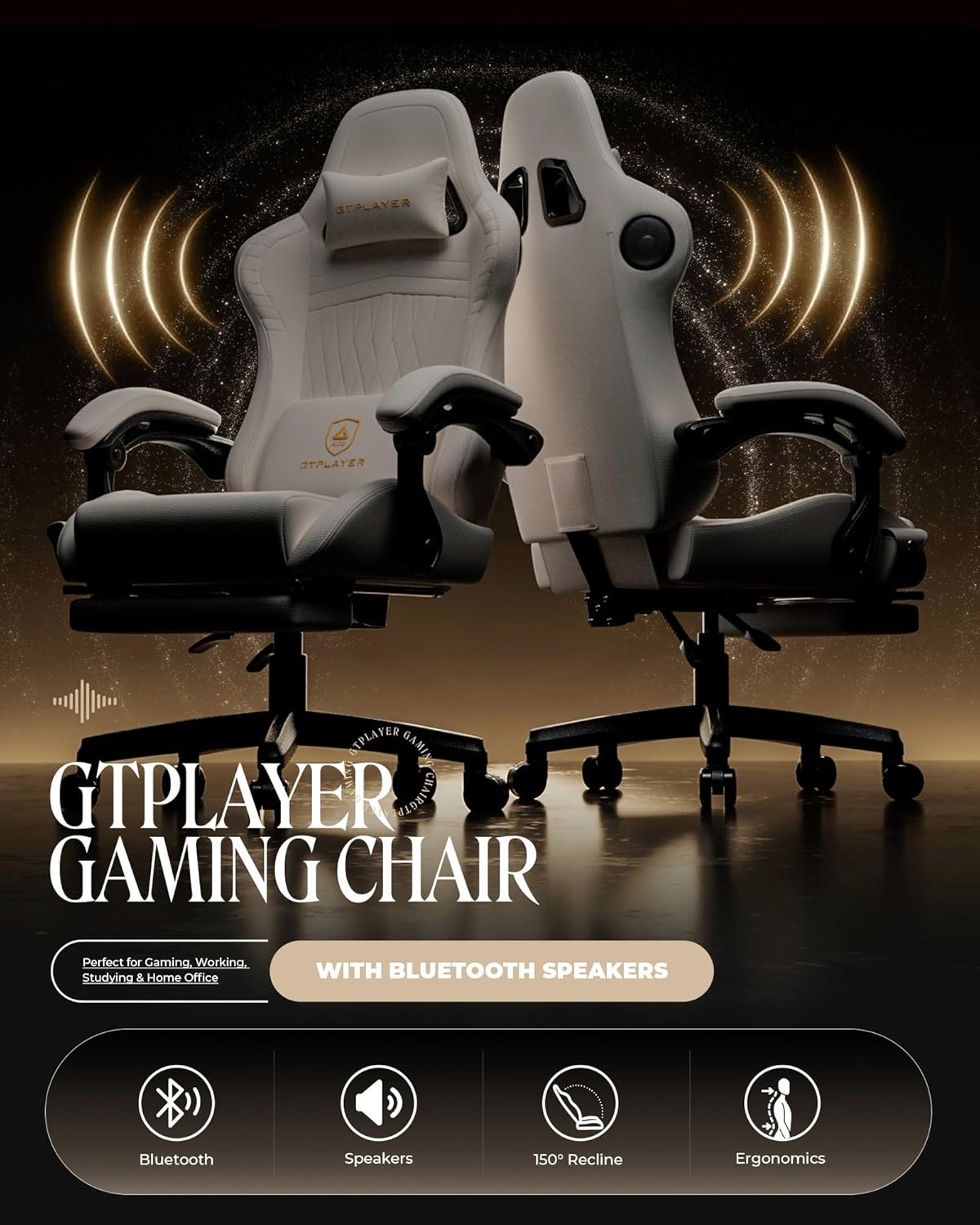
Image: A detailed view of the integrated Bluetooth speakers within the chair's headrest area.

Image: Illustration of the wireless Bluetooth receiver and its connection to the chair, highlighting the cable-free design.
4. Care and Maintenance
Proper care and maintenance will extend the life and appearance of your GTPLAYER Gaming Chair.
- Cleaning: The Retro PU Leather material is designed to be easy to clean. For general cleaning, wipe with a soft, damp cloth. For deeper cleaning, dry clean as per product care instructions. Avoid harsh chemicals or abrasive cleaners.
- Spills: Immediately blot any spills with a clean, dry cloth to prevent staining.
- Regular Checks: Periodically check all screws and bolts to ensure they are tight. Re-tighten if necessary to maintain stability and safety.
- Avoid Direct Sunlight: Prolonged exposure to direct sunlight can cause the material to fade or crack.
Image: Visual representation of the material's properties: smooth texture, waterproof capability, and ease of cleaning.
5. Troubleshooting
If you encounter any issues with your GTPLAYER Gaming Chair, please refer to the following common solutions:
- Chair Wobbles/Unstable: Ensure all assembly screws are securely tightened. Check that the chair is on a flat, even surface.
- Gas Lift Not Functioning: Verify that the gas lift is correctly inserted into both the base and the seat mechanism. If the issue persists, contact customer support.
- Bluetooth Speakers Not Connecting:
- Ensure the Bluetooth receiver is charged and powered on.
- Make sure your device's Bluetooth is enabled and within range.
- Forget the device in your Bluetooth settings and attempt to re-pair.
- If the issue persists, try charging the receiver for a longer period.
- Screws Coming Loose: Regularly inspect and re-tighten any loose screws. This is a common occurrence with furniture due to movement and use.
- Footrest Difficult to Extend/Retract: Check for any obstructions. Ensure the mechanism is clean and free of debris.
If you cannot resolve the issue using these steps, please contact GTPLAYER customer support for further assistance.
6. Specifications
| Feature | Detail |
|---|---|
| Brand | GTPLAYER |
| Model Name | GTPLAYER ACE-PRO GAMING CHAIR |
| Color | Ivory |
| Product Dimensions (D x W x H) | 23.2"D x 21.1"W x 51.6"H |
| Maximum Weight Recommendation | 330 Pounds (150 kg) |
| Material | Retro PU Leather, Memory Foam |
| Back Style | Solid Back |
| Special Features | Adjustable Height, Adjustable Lumbar, Arm Rest, Foot Rest, Bluetooth Speakers |
| Reclining Angle | Up to 150° |
| Arm Style | Linkage Armrest |
| Item Weight | 42 pounds |
| Batteries | 1 Lithium Polymer battery required (for Bluetooth receiver) |
7. Warranty and Support
GTPLAYER is committed to customer satisfaction. Your gaming chair comes with the following support:
- Free Replacement or Refund: Available within 30 days of purchase.
- Free Replacement or Repair: Available within 1 year of purchase.
For any questions, concerns, or support needs, please do not hesitate to contact GTPLAYER customer service. We are dedicated to providing the best possible assistance to our customers.
Contact Information: Please refer to the contact details provided in your product packaging or visit the official GTPLAYER website for support.


