
Plantronics E450
Plantronics Poly Edge E450 IP Desk Phone User Manual
Model: E450
1. Introduction
Welcome to the user manual for your Plantronics Poly Edge E450 IP Desk Phone. This document provides essential information for setting up, operating, and maintaining your device. The Poly Edge E450 is designed for modern communication needs, offering advanced features such as Wi-Fi connectivity, Bluetooth integration, and high-definition voice quality.

Figure 1: Poly Edge E450 IP Desk Phone
This phone is an Internet Protocol (IP) phone and requires a Voice over IP (VoIP) service and network connection for full functionality. It is not designed for traditional analog landline connections (RJ11).
2. What's in the Box
Please verify that all the following items are included in your package:
- Poly Edge E450 IP Desk Phone Unit
- Handset
- Handset Coil Cord
- Cat5E Ethernet Cable
- Base Stand
If any items are missing or damaged, please contact your vendor or Poly support.
3. Setup Instructions
Follow these steps to set up your Poly Edge E450 IP Desk Phone:
3.1. Attaching the Base Stand
- Align the base stand with the slots on the back of the phone unit.
- Gently push the stand into place until it clicks securely.
3.2. Connecting the Handset
- Plug one end of the handset coil cord into the port labeled with a handset icon on the phone unit.
- Plug the other end of the coil cord into the handset.
3.3. Network Connection
The Poly Edge E450 supports both wired Ethernet and Wi-Fi connectivity.
3.3.1. Wired Ethernet Connection
- Connect one end of the provided Cat5E Ethernet cable to the LAN port on the back of the phone (often labeled with a network icon or 'LAN').
- Connect the other end of the Ethernet cable to an available Ethernet port on your network router or switch.
3.3.2. Wi-Fi Connection
For wireless connectivity, the phone includes integrated Wi-Fi. After powering on the device, navigate to the phone's settings menu to configure your Wi-Fi network. Select your desired network and enter the password if prompted.
3.4. Power Connection
Connect the power adapter (not always included, may be sold separately) to the power port on the back of the phone. Plug the adapter into a standard electrical outlet. The phone will power on automatically.
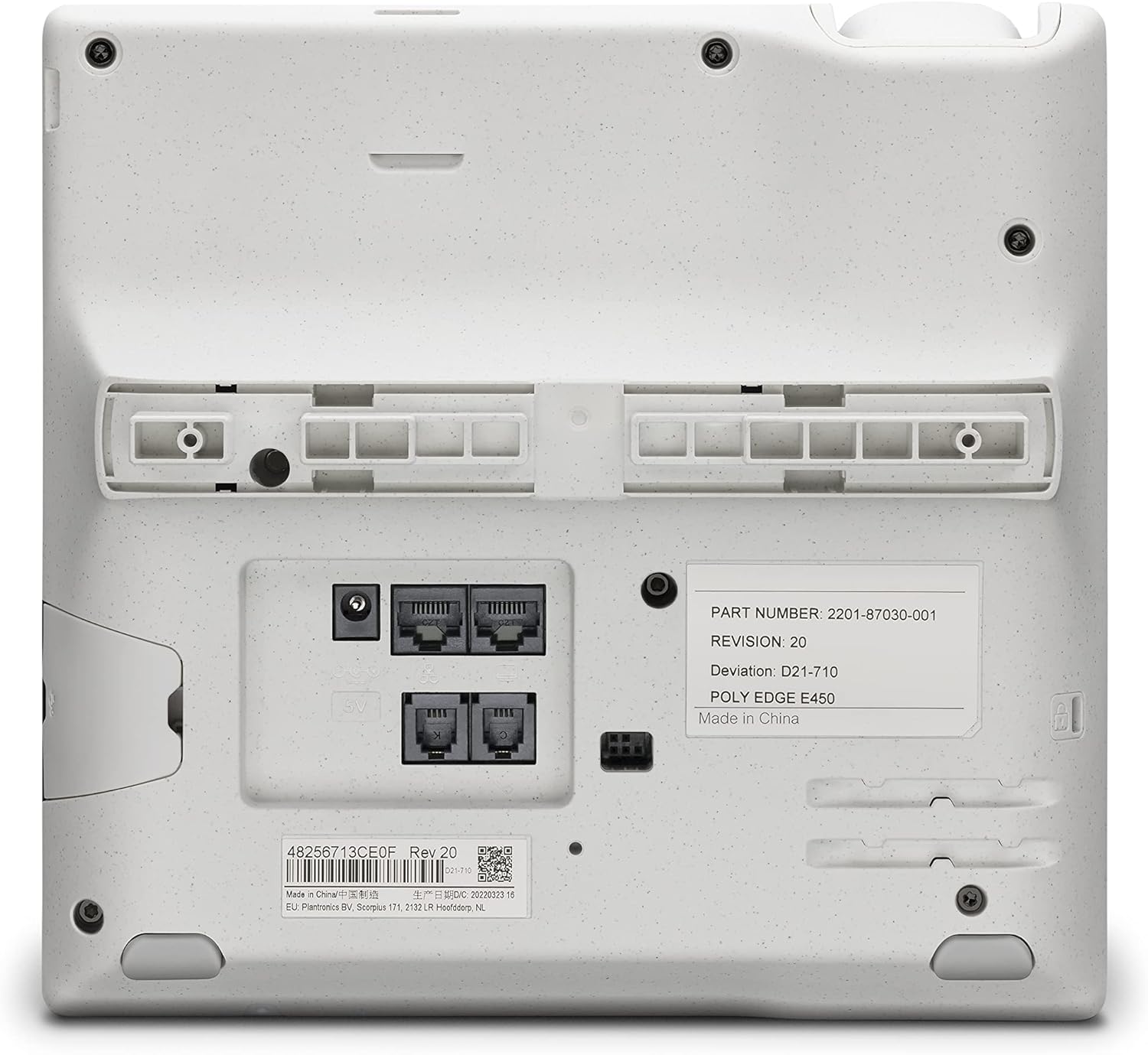
Figure 2: Rear view with connection ports
4. Operating Instructions
The Poly Edge E450 is designed for intuitive use. Here are key operational features:

Figure 3: Front view of the phone for operational reference
4.1. Basic Call Functions
- Making a Call: Lift the handset, dial the number, and press the 'Dial' soft key or wait for automatic dialing. Alternatively, use the speakerphone button.
- Answering a Call: Lift the handset or press the 'Answer' soft key/speakerphone button.
- Ending a Call: Replace the handset or press the 'End Call' soft key/speakerphone button.
- Multiple Calls: The phone supports 8-line keys, allowing management of up to 32 lines, features, and contacts simultaneously. Use the line keys to switch between active calls.
4.2. Speed Dialing
The phone features a second integrated 6-key display that supports 12 speed dials or contacts. To configure speed dial entries, navigate to the phone's menu and select the speed dial or contacts option. Follow the on-screen prompts to assign numbers to the dedicated keys.
4.3. Integrated Bluetooth
The Poly Edge E450 includes integrated Bluetooth for pairing with mobile phones or headsets. To pair a device:
- Access the phone's settings menu.
- Select 'Bluetooth' and ensure it is enabled.
- Put your mobile phone or headset into pairing mode.
- On the Poly Edge E450, search for available devices and select your device from the list.
- Confirm the pairing code if prompted.
4.4. Accessibility Features
The phone offers improved accessibility options:
- Text-to-Speech: Enables spoken feedback for on-screen text.
- Screen Color Adjustments: Options for color blindness and enhanced contrast.
- Bigger Font Settings: Adjust font size for improved readability.
These settings can typically be found in the 'Accessibility' section of the phone's menu.
4.5. Audio Quality and Noise Reduction
- Poly HD Voice: Ensures clear audio during calls.
- Bass Frequency Enhancing Speaker: Provides rich sound for speakerphone use.
- Poly Acoustic Fence: Blocks background noise when using the handset or a wired headset.
- Poly NoiseBlockAI: Reduces background noise when using the speakerphone.
5. Maintenance
To ensure the longevity and optimal performance of your Poly Edge E450 IP Desk Phone, follow these maintenance guidelines:
- Cleaning: Use a soft, dry, lint-free cloth to clean the phone's surfaces. For stubborn marks, slightly dampen the cloth with water. Avoid using harsh chemicals, abrasive cleaners, or solvents.
- Environment: Keep the phone in a clean, dry environment, away from direct sunlight, excessive heat, and moisture.
- Cables: Ensure all cables are securely connected and not kinked or strained.
6. Troubleshooting
This section addresses common issues you might encounter with your Poly Edge E450 IP Desk Phone.
| Problem | Possible Cause | Solution |
|---|---|---|
| Phone does not power on. | Power adapter not connected or faulty; power outlet issue. | Ensure power adapter is securely connected to the phone and a working electrical outlet. Verify the power adapter is functional (if applicable, test with another device). |
| Cannot make or receive calls. | No network connection; VoIP service not registered; incorrect phone configuration. | Check Ethernet cable connection or Wi-Fi status. Verify your VoIP service is active and the phone is registered with your provider. Consult your IT administrator or VoIP service provider for configuration details. |
| Poor audio quality. | Network congestion; faulty handset/headset; environmental noise. | Ensure a stable network connection. Test with a different handset or headset if possible. Utilize Poly Acoustic Fence or NoiseBlockAI features. |
| Bluetooth device not pairing. | Device not in pairing mode; Bluetooth disabled on phone. | Ensure the Bluetooth device is in pairing mode. Verify Bluetooth is enabled in the phone's settings. Try restarting both devices. |
| Phone is locked to a specific provider. | Device may be provisioned for a specific VoIP service. | Contact the seller or your VoIP service provider. Some IP phones are pre-configured and may require specific provisioning steps or may not be compatible with all services. |
7. Specifications
- Model Number: E450
- Brand: Plantronics
- Product Dimensions: 12.1 x 10.3 x 3.4 inches
- Item Weight: 2.55 pounds
- Color: Black
- Power Source: Corded Electric
- Dialer Type: Single Keypad
- Answering System Type: Digital
- Connectivity: Integrated Wi-Fi, Ethernet (Cat5E cable included), Integrated Bluetooth
- Line Keys: 8-line keys supporting up to 32 lines
- Speed Dial Display: Second integrated 6-key display supporting 12 speed dials
- Batteries: 1 Lithium Ion battery required (for internal clock/memory, typically pre-installed)
8. Warranty and Support
For warranty information, please refer to the documentation provided at the time of purchase or visit the official Plantronics (Poly) website. Technical support may be available through your product vendor or directly from Poly. Please have your model number (E450) and serial number ready when contacting support.
For further assistance, you may visit the Poly website.
Related documentsE450


Ask a question about this manual
Ask about setup, troubleshooting, compatibility, parts, safety, or missing instructions. Manuals+ will review the question and use this page’s manual context to help answer it.