
1. Introduction and Overview
The Technical Pro TPRX4CH is a powerful 1600-watt, 4-channel Bluetooth receiver designed for home audio systems, home theaters, and karaoke setups. It offers versatile connectivity options including RCA, USB, SD Card, and AUX inputs, along with two microphone inputs. Featuring a fluorescent display and comprehensive playback controls, this receiver provides high-quality amplified audio for up to eight speakers.

Figure 1.1: Front Panel of the TPRX4CH Receiver
2. Key Features
- 1600 Watts Peak Power: Delivers 120W RMS for high-quality amplified audio, suitable for home theater and karaoke.
- 4-Channel Output: Supports up to 8 speakers simultaneously with dedicated volume control for each channel.
- Bluetooth Connectivity: Wireless range of up to 30 feet, compatible with smartphones, tablets, and laptops.
- Multiple Inputs: Includes RCA, USB, SD Card, and AUX inputs for diverse audio sources.
- Dual Microphone Inputs: Features 1/4" mic inputs with independent volume, echo, and delay controls, plus a Mic Priority switch.
- EQ Controls: Rotary knobs for Treble, Bass, and Master Volume adjustments.
- Digital VFD Display: Built-in display with AM/FM radio tuner.
- Front Control Panel: Intuitive buttons and rotary controls with blue LED illumination for high visibility.
- Headphone Jack: Dedicated headphone output with volume control.
- Protection Features: Integrated over-current, short-circuit, and over-voltage protection.

Figure 2.1: Key Features Overview
3. Package Contents
Please check the box for the following items:
- Technical Pro 1600W 4-Channel Bluetooth Receiver (TPRX4CH)
- Remote Control
- FM Antenna
4. Setup and Connections
4.1 Rear Panel Overview

Figure 4.1: Rear Panel of the TPRX4CH Receiver
4.2 Connecting Speakers
The TPRX4CH receiver supports up to 8 speakers across 4 channels (A, B, C, D). Connect your speakers to the corresponding speaker terminals on the rear panel. Ensure correct polarity (positive to positive, negative to negative) for optimal sound quality. Each channel (A, B, C, D) has dedicated terminals for two speakers (e.g., Speaker A+ and Speaker A-).
4.3 Connecting Audio Sources
- RCA Inputs (DVD/LINE): Use RCA cables to connect external audio devices such as DVD players, CD players, or other line-level audio sources to the 'INPUT' section on the rear panel.
- USB/SD Card: Insert a USB flash drive or SD card into the respective slots on the front panel for digital audio playback.
- AUX Input: Connect portable audio devices using a 3.5mm AUX cable to the 'AUX IN' jack on the front panel.
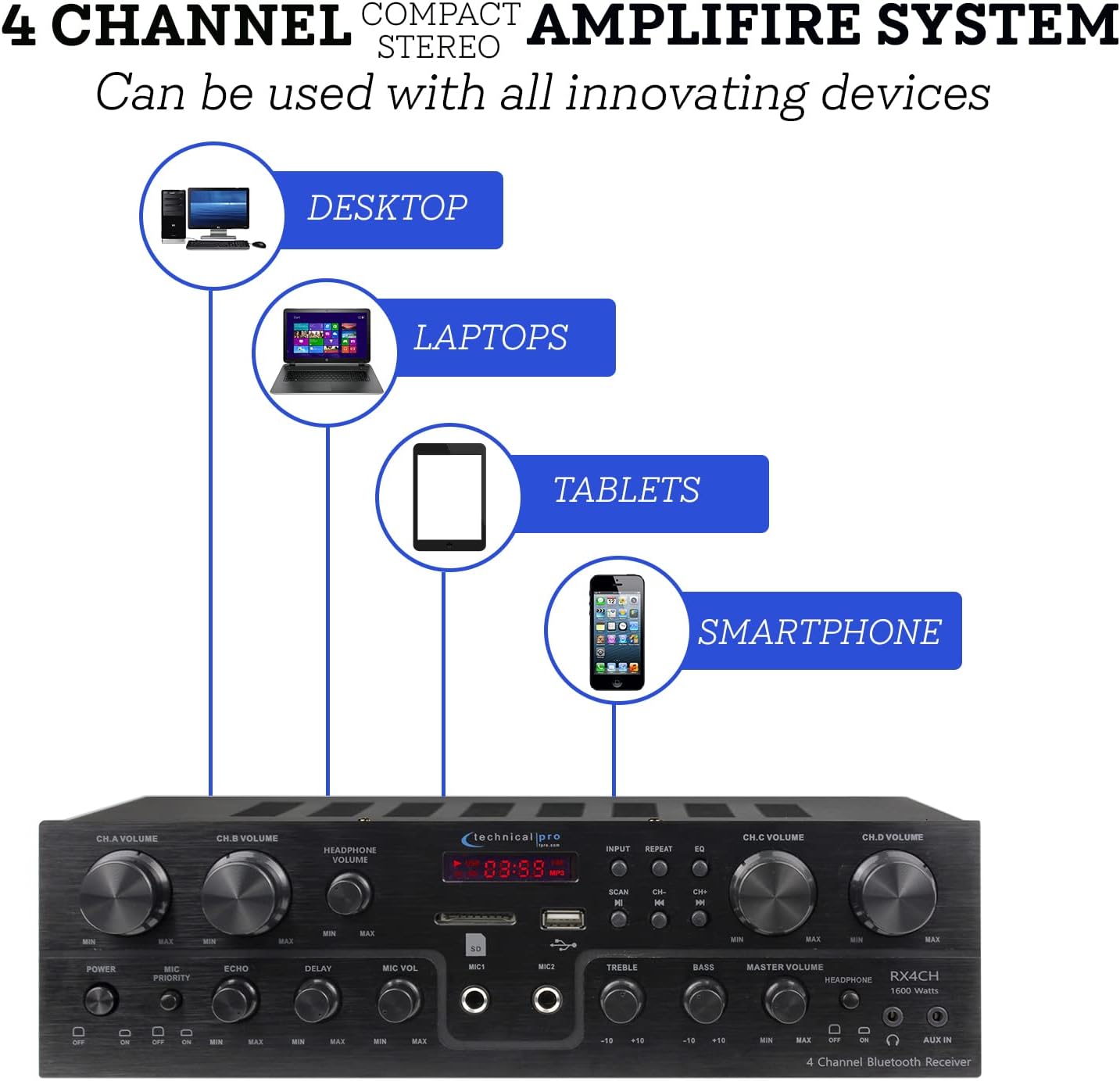
Figure 4.2: Device Connectivity Options
4.4 Connecting Microphones
Plug 1/4" microphone cables into the 'MIC1' or 'MIC2' jacks on the front panel.
4.5 Power Connection
Ensure the voltage selector on the rear panel is set to the correct voltage for your region (110V/60Hz or 230V/50Hz). Connect the power cord to the AC inlet on the rear panel and then to a suitable power outlet.
5. Operating Instructions
5.1 Powering On/Off
Press the 'POWER' button on the front panel to turn the unit on or off. The fluorescent display will illuminate when the unit is powered on.
5.2 Input Selection
Use the 'INPUT' button on the front panel to cycle through available audio sources: Bluetooth, USB, SD, AUX, and RCA (DVD/LINE).
5.3 Volume and EQ Controls
- Channel Volume (CH.A, CH.B, CH.C, CH.D): Adjust the individual volume for each speaker channel using the dedicated rotary knobs.
- Master Volume: Control the overall output volume of the system using the 'MASTER VOLUME' knob.
- Treble/Bass: Adjust the high and low frequency response using the 'TREBLE' and 'BASS' knobs to fine-tune your sound.
- Headphone Volume: Adjust the volume for connected headphones using the 'HEADPHONE VOLUME' knob.
5.4 Bluetooth Pairing
Select 'Bluetooth' as the input source. On your mobile device (smartphone, tablet, laptop), search for available Bluetooth devices and select 'Technical Pro' or similar from the list. Once paired, you can stream audio wirelessly to the receiver.
5.5 USB/SD Card Playback
Insert a USB drive or SD card with audio files into the respective slot. The receiver will automatically switch to USB/SD mode. Use the 'PLAY/PAUSE', 'PREVIOUS', and 'NEXT' buttons to control playback.
5.6 Microphone Functions (Karaoke)
- Mic Volume: Adjust the volume of the connected microphones using the 'MIC VOL' knob.
- Echo/Delay: Use the 'ECHO' and 'DELAY' knobs to add effects to the microphone audio for a richer vocal performance.
- Mic Priority: Activate the 'MIC PRIORITY' switch to automatically lower the background music volume when a microphone is in use, ensuring vocals are clear and prominent.

Figure 5.1: Built-in Microphone Talk-Over Function
5.7 AM/FM Radio
Extend the FM antenna connected to the rear panel for better reception. Select 'Tuner' or 'Radio' as the input source. Use the 'SCAN' button to automatically search for and save radio stations. Use the 'CH-' and 'CH+' buttons to navigate through saved stations.
6. Maintenance
- Cleaning: Use a soft, dry cloth to clean the exterior of the receiver. Do not use liquid cleaners or aerosols.
- Ventilation: Ensure the receiver is placed in a well-ventilated area to prevent overheating. Do not block the ventilation openings.
- Storage: If storing the unit for an extended period, disconnect it from power and store it in a cool, dry place.
7. Troubleshooting
| Problem | Possible Cause | Solution |
|---|---|---|
| No power | Power cord not connected; Power outlet faulty; Unit fuse blown | Check power cord connection; Try a different outlet; Contact service for fuse replacement |
| No sound output | Incorrect input selected; Speaker wires loose/incorrectly connected; Volume too low; Mute activated | Select correct input; Check speaker connections and polarity; Increase Master Volume; Deactivate mute if applicable |
| Buzzing noise | Ground loop issue; Interference from other electronics; Faulty cable | Ensure proper grounding; Move unit away from other electronics; Try different audio cables |
| Bluetooth not connecting | Device too far; Bluetooth not enabled on device; Receiver not in pairing mode | Move device closer to receiver; Enable Bluetooth on your device; Ensure receiver input is set to Bluetooth |
| USB/SD playback issues | Unsupported file format; Corrupted files; Drive/card not properly inserted | Ensure files are in supported format (e.g., MP3); Reformat drive/card; Reinsert drive/card firmly |
8. Specifications
| Feature | Specification |
|---|---|
| Model Number | TPRX4CH |
| Peak Power Output | 1600 Watts |
| RMS Power Output | 120 Watts |
| Channels | 4 Channel (supports 8 speakers) |
| Connectivity Technology | Bluetooth, RCA, USB 2.0, SD Card, AUX |
| Bluetooth Range | Up to 30 feet |
| Microphone Inputs | 2 x 1/4" Jacks |
| Audio Output Mode | Stereo |
| Special Features | Equalizer, Fluorescent Display, Mic Priority |
| Product Dimensions | 13 x 7.3 x 3.5 inches |
| Item Weight | 1.54 pounds |
| Color | Black |
| Manufacturer | Technical Pro |
| First Available Date | June 16, 2022 |

Figure 8.1: Product Dimensions
9. Warranty and Support
For warranty information and technical support, please refer to the documentation included with your purchase or visit the official Technical Pro website. You may also contact Technical Pro customer service directly for assistance with product setup, operation, or troubleshooting beyond the scope of this manual.
Technical Pro Store: Visit the Technical Pro Store on Amazon