
Introduction
This manual provides detailed instructions for the safe and efficient operation of your Naxa NDS-8502 Portable Wireless Dual 8-inch Party Speaker. Please read this manual thoroughly before using the device and retain it for future reference.
Safety Information
- Do not expose the unit to extreme temperatures, humidity, or direct sunlight.
- Keep the device away from water or other liquids.
- Do not attempt to disassemble or modify the speaker. This may void the warranty and cause damage.
- Use only the provided power adapter for charging.
- Ensure proper ventilation around the speaker during use.
- Keep out of reach of children.
Package Contents
Verify that all items are present in the package:
- Naxa NDS-8502 Portable Wireless Dual 8-inch Party Speaker
- Wired Microphone
- Remote Control
- UL Power Adapter
- User Manual
Product Overview
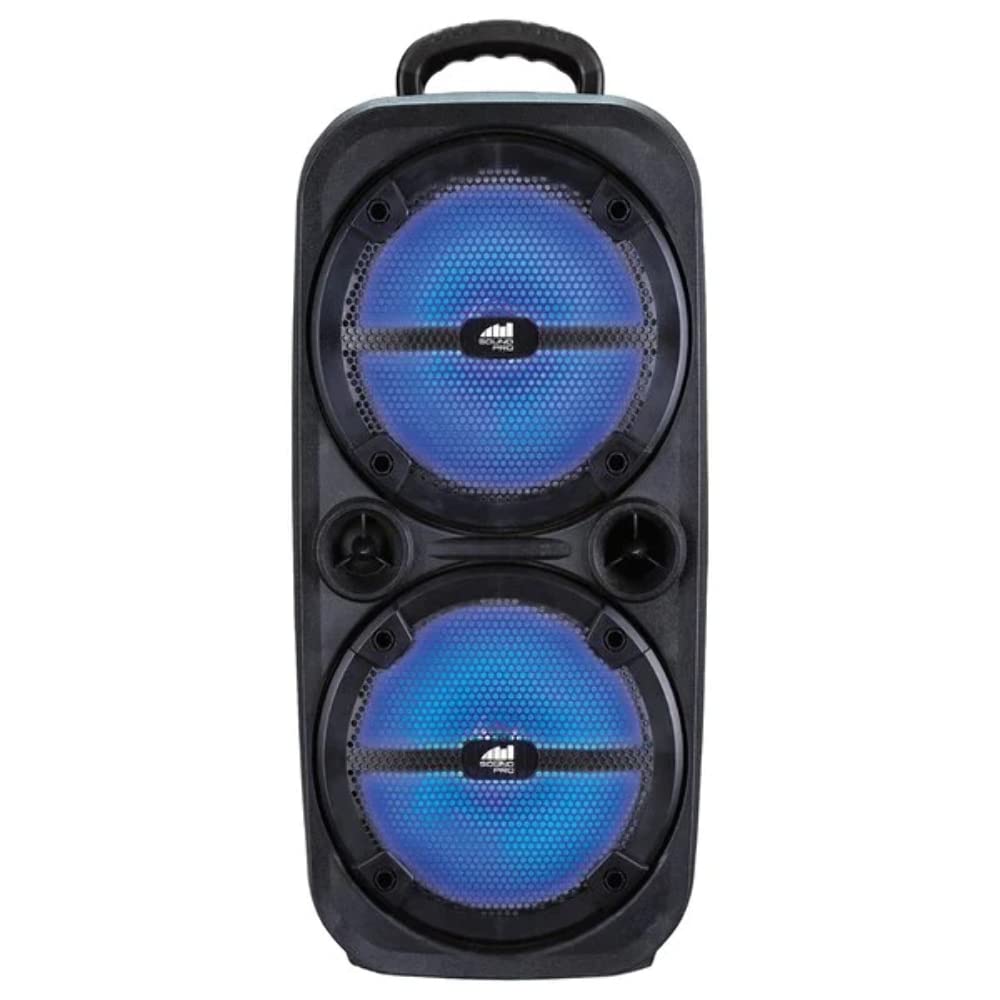
Image: Naxa NDS-8502 Portable Wireless Dual 8-inch Party Speaker. This image displays the overall design of the speaker, including its dual 8-inch drivers and integrated disco lights.
Controls and Ports (Typical Layout)
While the exact layout may vary slightly, the NDS-8502 typically features the following controls and ports:
- Power Button: Turns the speaker on or off.
- Mode Button: Switches between Bluetooth, FM Radio, USB, and Auxiliary input modes.
- Volume Control: Adjusts the master volume level.
- Play/Pause Button: Controls media playback.
- Previous/Next Track Buttons: Skips between tracks or tunes FM radio stations.
- Microphone Input (MIC IN): Connects the wired microphone.
- USB Port: For playing audio files from a USB flash drive.
- Auxiliary Input (AUX IN): Connects external audio devices via a 3.5mm cable.
- Charging Port: Connects the power adapter for charging the internal battery.
- LED Display: Shows current mode, track number, or FM frequency.
- Disco Light Button: Activates or deactivates the integrated disco lights.
Setup
- Unpack: Carefully remove the speaker and all accessories from the packaging.
- Charge the Speaker: Before first use, fully charge the speaker. Connect the UL Power Adapter to the speaker's charging port and plug it into a power outlet. The charging indicator will typically illuminate during charging and turn off or change color when fully charged.
- Power On: Press and hold the Power button to turn on the speaker. The LED display will light up.
Operating Instructions
Bluetooth Pairing
- Turn on the NDS-8502 speaker. It will automatically enter Bluetooth pairing mode, indicated by a flashing Bluetooth icon or an audible prompt.
- On your mobile device (smartphone, tablet, etc.), enable Bluetooth and search for available devices.
- Select "NDS-8502" from the list of devices.
- Once paired, the speaker will confirm with an audible sound, and the Bluetooth indicator will stop flashing.
True Wireless Stereo (TWS) Function
The NDS-8502 supports TWS, allowing two NDS-8502 speakers to connect wirelessly for a stereo sound experience.
- Ensure both NDS-8502 speakers are powered on and in Bluetooth mode, but not yet paired to any device.
- On one of the speakers, press and hold the TWS button (refer to your speaker's specific button layout if not labeled). The speaker will emit a sound indicating it's searching for another TWS speaker.
- The two speakers will automatically connect to each other. Once connected, one speaker will act as the master (left channel) and the other as the slave (right channel).
- Now, pair your mobile device to the master speaker via Bluetooth as described in the "Bluetooth Pairing" section.
USB Playback
- Insert a USB flash drive containing MP3 audio files into the USB port.
- Press the Mode button to switch to USB mode. The speaker will automatically begin playing music from the USB drive.
- Use the Play/Pause and Previous/Next Track buttons to control playback.
FM Radio
- Press the Mode button to switch to FM Radio mode.
- Press the Play/Pause button once to initiate an automatic scan for FM stations. The speaker will save all found stations.
- Use the Previous/Next Track buttons to navigate between saved FM stations.
Auxiliary Input
- Connect one end of a 3.5mm audio cable (not included) to the AUX IN port on the speaker.
- Connect the other end of the cable to the audio output jack of your external device (e.g., MP3 player, laptop).
- Press the Mode button to switch to AUX mode. Audio will now play through the speaker from your connected device.
Microphone Use
- Plug the wired microphone into the MIC IN port on the speaker.
- Adjust the microphone volume using the dedicated MIC VOL knob if available, or the main volume control.
- Speak into the microphone. The sound will be amplified through the speaker.
Disco Lights
The NDS-8502 features integrated disco lights.
- Press the Disco Light button (if available) to turn the lights on or off.
- Some models may have multiple light modes; press the button repeatedly to cycle through them.
Maintenance
- Cleaning: Use a soft, dry cloth to clean the exterior of the speaker. Do not use abrasive cleaners or solvents.
- Storage: When not in use for extended periods, store the speaker in a cool, dry place, away from direct sunlight and extreme temperatures.
- Battery Care: To prolong battery life, avoid fully discharging the battery frequently. Charge the speaker regularly, even if not in use.
Troubleshooting
| Problem | Possible Cause | Solution |
|---|---|---|
| Speaker does not power on. | Battery is depleted or power adapter is not connected. | Connect the power adapter and charge the speaker. Ensure the power outlet is functional. |
| No sound. | Volume is too low, incorrect mode selected, or device not properly connected. | Increase the volume. Press the Mode button to select the correct input source (Bluetooth, USB, AUX, FM). Ensure your audio source is playing and connected correctly. |
| Bluetooth pairing fails. | Speaker is not in pairing mode, or device is too far. | Ensure the speaker is in Bluetooth pairing mode. Move your device closer to the speaker (within 10 meters/33 feet). Turn off and on Bluetooth on your device. |
| TWS connection fails. | Speakers are too far apart or already paired to another device. | Ensure both speakers are in Bluetooth mode and not connected to any other device. Place them within close proximity (e.g., 1-2 meters) for initial pairing. |
| Microphone not working. | Microphone not fully plugged in or volume too low. | Ensure the microphone is securely plugged into the MIC IN port. Adjust the microphone volume. |
Specifications
| Feature | Detail |
|---|---|
| Brand | Naxa Electronics |
| Model Number | NDS-8502 |
| Connectivity Technology | USB, Auxiliary, Bluetooth |
| Color | Black |
| Compatible Devices | Laptop, Smartphone |
| Mounting Type | Tabletop |
| Power Source | Corded Electric |
| Connector Type | USB |
| Item Weight | 5.17 pounds |
| Item Dimensions (L x W x H) | 24.1 x 19.1 x 50.8 cm |
| Included Components | Speakers, Wired Microphone, Remote Control, UL Power Adapter, User Manual |
| UPC | 840005016626 |
| ASIN | B0B2L68R51 |
Warranty and Support
For warranty information or technical support, please refer to the warranty card included with your product or visit the official Naxa Electronics website. Do not attempt to repair the device yourself, as this may void the warranty.


