
1. Introduction
Thank you for purchasing the Dreamflame 72" WiFi-Enabled Electric Fireplace. This manual provides essential information for the safe and efficient operation of your new electric fireplace. Please read all instructions carefully before installation and use, and retain this manual for future reference.
This electric fireplace offers a modern design with a tempered glass panel, multi-color flame options, and smart control capabilities via a mobile application or voice commands through Alexa. It features two heat settings (750W/1500W) and can heat areas up to 400 square feet. The flame effect can be operated independently of the heat, allowing for year-round ambiance.
2. Important Safety Information
To reduce the risk of fire, electric shock, or injury, always follow these basic precautions:
- Read all instructions before using this fireplace.
- This appliance is hot when in use. To avoid burns, do not let bare skin touch hot surfaces. Keep combustible materials, such as furniture, pillows, bedding, papers, clothes, and curtains at least 3 feet (0.9 m) from the front of the fireplace and keep them away from the sides and rear.
- Extreme caution is necessary when any heater is used by or near children or invalids and whenever the fireplace is left operating and unattended.
- Do not operate any fireplace with a damaged cord or plug, or after the fireplace malfunctions, has been dropped, or damaged in any manner.
- Do not use outdoors.
- Do not run cord under carpeting. Do not cover cord with throw rugs, runners, or similar coverings. Arrange cord away from traffic area and where it will not be tripped over.
- To disconnect the fireplace, turn controls to off, then remove the plug from the outlet.
- Do not insert or allow foreign objects to enter any ventilation or exhaust opening as this may cause an electric shock or fire, or damage the fireplace.
- To prevent a possible fire, do not block air intakes or exhaust in any manner. Do not use on soft surfaces, like a bed, where openings may become blocked.
- This fireplace has internal overheat protection. If the heater overheats, the internal safety device will shut off the heater.
- Use this fireplace only as described in this manual. Any other use not recommended by the manufacturer may cause fire, electric shock, or injury to persons.
- This product is SGS certified, ensuring compliance with safety standards.
3. Package Contents
Carefully remove all components from the packaging and ensure all items are present before discarding packaging materials. If any parts are missing or damaged, do not attempt to assemble or operate the fireplace. Contact customer support for assistance.

Image: The electric fireplace unit, remote control, mounting hardware, decorative crystals, and log set are included in the package.
- Electric Fireplace Unit (Model BI72GP)
- Remote Control
- Mounting Bracket
- Mounting Screws and Wall Anchors
- Decorative Media (Crystals and Log Set)
- User Manual (this document)
4. Product Specifications
| Feature | Detail |
|---|---|
| Brand | Dreamflame |
| Model Name | BI72GP |
| Product Dimensions | 5.95"D x 72"W x 17.7"H |
| Material | Metal |
| Installation Type | Recessed or Wall Mount |
| Heat Output | 750W/1500W (5120 BTU) |
| Heating Coverage | Up to 400 square feet |
| Special Features | Adjustable Thermostat, Multi-Color Flame Effect, Smart Control (App/Alexa) |
| Power Source | Corded Electric |
| Color | Black |
| Item Weight | 85.1 Pounds |
| Burner Type | Quartz |
| Smart Home Compatibility | Yes |

Image: Detailed dimensions for recessed and wall-mounted installation, showing overall dimensions (72"W x 17.7"H x 5.9"D), firebox dimensions (70.82"W x 16.9"H x 5.5"D), and flame display dimensions (67.7"W x 10.8"H).
5. Installation
The Dreamflame electric fireplace can be installed in two ways: recessed into a wall or wall-mounted. Choose the method that best suits your space.
5.1 Wall-Mounted Installation
For wall-mounted installation, use the provided mounting bracket and hardware. Ensure the wall can support the weight of the fireplace (85.1 lbs). Locate a suitable position away from combustible materials and direct sunlight.
- Mark the desired height and position on the wall.
- Securely attach the mounting bracket to wall studs using appropriate screws. If studs are not available, use wall anchors suitable for your wall type.
- Carefully lift the fireplace and hook it onto the mounting bracket.
- Ensure the fireplace is level and securely seated on the bracket.
5.2 Recessed Installation
For recessed installation, a custom opening in the wall is required. Refer to the product dimensions in Section 4 for precise measurements. Ensure there is adequate clearance around the firebox for ventilation.
- Create a wall opening according to the firebox dimensions (70.82"W x 16.9"H x 5.5"D).
- Ensure the opening is structurally sound and can support the fireplace.
- Carefully slide the fireplace into the prepared opening.
- Secure the fireplace to the wall framing using appropriate screws through the designated mounting points.

Image: Visual guide for wall-mounted installation (top row) and recessed installation (bottom row), showing how to secure the bracket and insert the unit.
6. Operation
Your Dreamflame electric fireplace can be operated using the touch screen controls on the unit, the included remote control, or via the mobile app and Alexa voice commands.
6.1 Control Panel and Remote Control
The control panel is located on the fireplace unit. The remote control provides the same functionality for convenient operation from a distance.
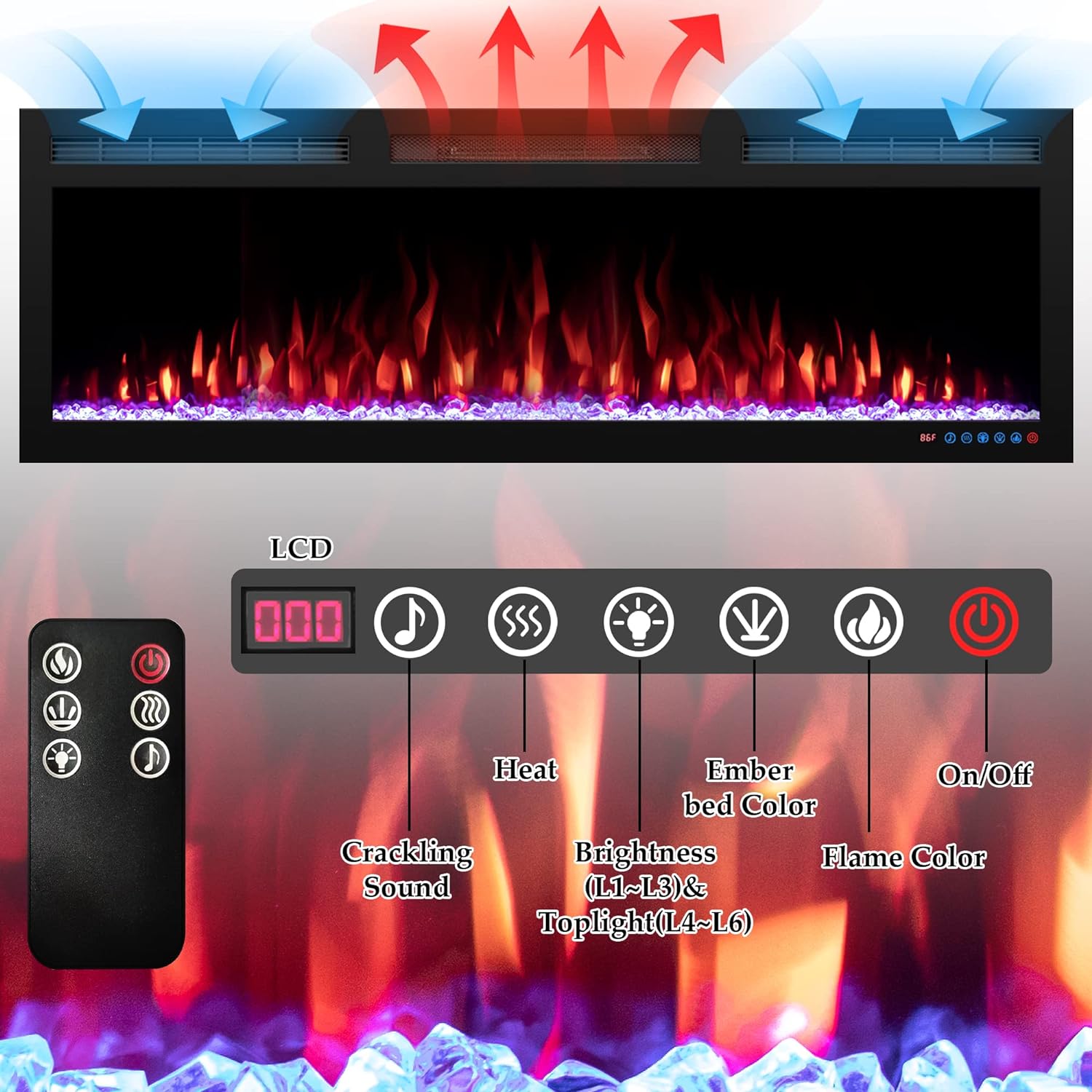
Image: Remote control and fireplace display showing buttons for On/Off, Heat settings, Crackling Sound, Flame Brightness (L1-L6), Ember Bed Color, and Flame Color.
- On/Off: Powers the unit on or off.
- Heat: Toggles between 750W (Low) and 1500W (High) heat settings. The heat function can be turned off independently of the flame effect.
- Crackling Sound: Activates or deactivates the simulated crackling fire sound.
- Brightness (L1-L6) & Toplight (L4-L6): Adjusts the brightness of the flame effect and the top lighting.
- Ember Bed Color: Cycles through 13 different ember bed color options.
- Flame Color: Cycles through 6 different flame color options.
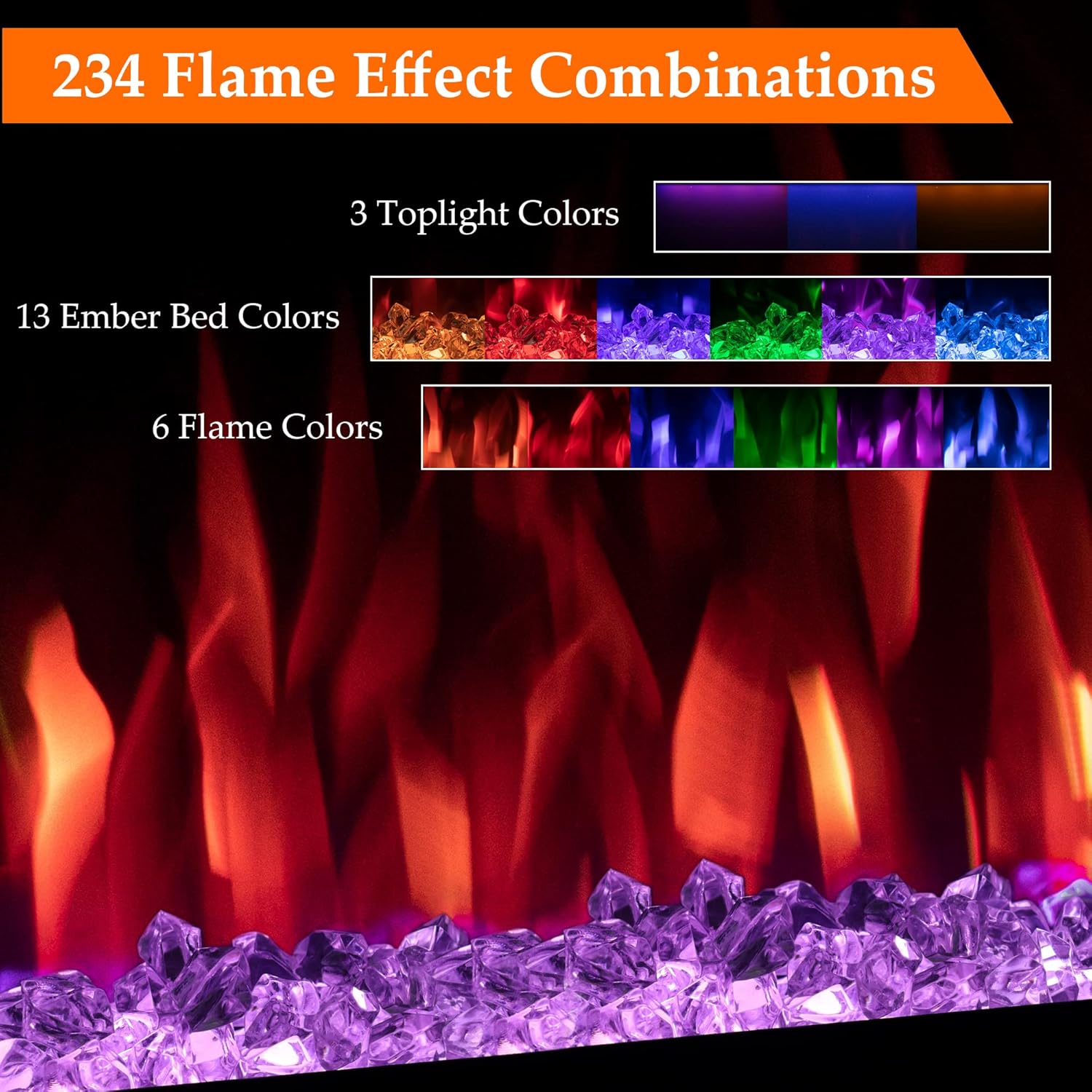
Image: The fireplace offers 234 flame effect combinations, combining 3 toplight colors, 13 ember bed colors, and 6 flame colors.

Image: Flame brightness can be adjusted through 3 levels, from dim to bright, to suit your preference.
Video: This video demonstrates the various flame effects, colors, and the different sizes of the Dreamflame electric fireplace, showcasing its versatility in different room settings.
6.2 Thermostat Control
The integrated thermostat allows you to set a desired room temperature. The heater will automatically turn on or off to maintain the set temperature, ensuring energy efficiency and comfort.
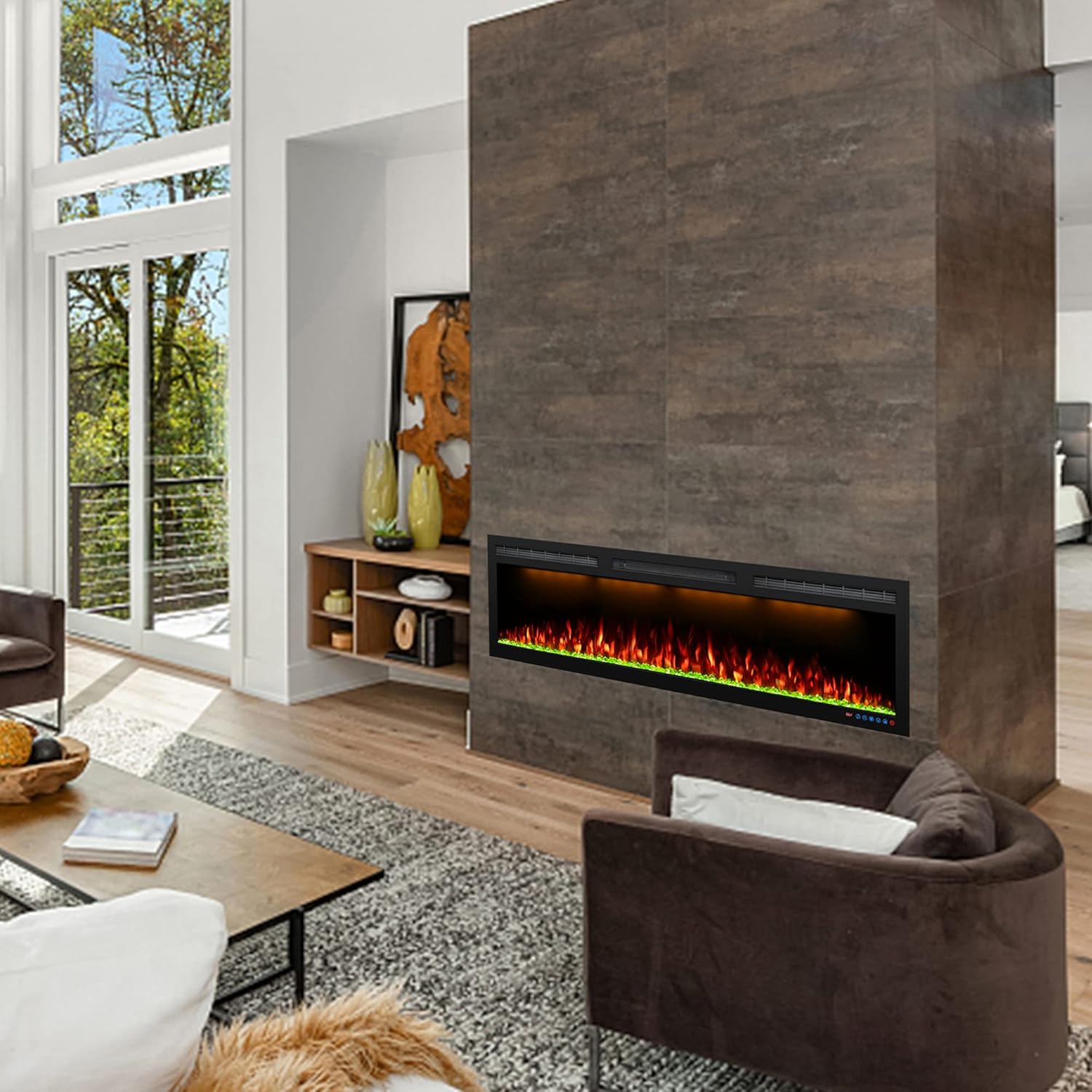
Image: The fireplace provides comfortable heat with low noise, offering two heat options: 750W (Low) and 1500W (High).
7. Smart Control via App and Alexa
Control your Dreamflame electric fireplace conveniently from your smartphone or with voice commands using Alexa.
7.1 App Connection Instructions

Image: The fireplace supports smart control via the Xaralyn Smart app and voice commands through Alexa.
- Download the App: Download the "Xaralyn Smart" app from your mobile's App Store (for Apple) or Google Play Store (for Android). You can find it by searching or scanning the QR code provided in the app connection image.

Image: Step-by-step guide for downloading the Xaralyn Smart app, including QR codes for Android and Apple devices. Ensure GPS is on and mobile is connected to a 2.4 GHz WiFi network.
Important: Ensure your mobile's GPS is turned on and it is connected to a 2.4 GHz WiFi network.
- Log In/Register: Register with your email ID or mobile number as the User Name. Input a 6-20 digit password.
- Prepare Fireplace for Connection: Turn on the electric fireplace. Press and hold the "WiFi" button on the fireplace's touch screen for more than 10 seconds. The LCD display will show "CCC". This indicates the fireplace is in pairing mode.
- Add Device in App: Open the Xaralyn Smart app. The app should automatically detect the fireplace. If not, manually add the device. Follow the on-screen prompts to connect the fireplace to your 2.4 GHz WiFi network by entering the password.
- Connection Confirmation: Once connected, the LCD screen will show "F1". You can then access the operation interface within the app.
If connection fails, repeat steps from 3 to 5. Ensure your device is near the router during the connection process.
7.2 Alexa Voice Control
Once connected to the Xaralyn Smart app, you can link your fireplace to Alexa for voice control. Follow the instructions within the Xaralyn Smart app or your Alexa app to enable the skill and discover your device.
- Example commands:
- "Alexa, turn on the fireplace."
- "Alexa, turn off the fireplace."
- "Alexa, set fireplace heat to high."
- "Alexa, change fireplace flame color to blue."
8. Maintenance
Regular maintenance ensures the longevity and optimal performance of your electric fireplace.
- Cleaning:
- Always disconnect power before cleaning.
- Wipe the exterior surfaces with a soft, damp cloth. Do not use abrasive cleaners or sprays.
- Clean the air intake and exhaust vents periodically with a vacuum cleaner or soft brush to prevent dust buildup.
- For the glass panel, use a glass cleaner and a soft cloth.
- Storage: If storing the fireplace for an extended period, unplug it and store it in a dry, dust-free location.
- Light Bulbs: The flame effect uses LED technology, which typically does not require replacement.
9. Troubleshooting
If you experience issues with your electric fireplace, refer to the following troubleshooting guide:
| Problem | Possible Cause | Solution |
|---|---|---|
| Fireplace does not turn on. | No power, circuit breaker tripped, power cord not fully plugged in. | Check power outlet, reset circuit breaker, ensure power cord is securely plugged in. |
| No heat, but flames are visible. | Heat function is off, thermostat set too low, overheat protection activated. | Activate heat function via remote/panel/app, increase thermostat setting, allow unit to cool down if overheat protection was triggered. |
| Remote control not working. | Dead battery, remote out of range, obstruction. | Replace remote battery (1 A battery required, included), ensure remote is within range and pointed at the fireplace, remove any obstructions. |
| App connection fails. | Incorrect WiFi password, 5GHz WiFi network, GPS off, fireplace not in pairing mode. | Verify WiFi password, ensure connection to a 2.4 GHz WiFi network, turn on mobile GPS, put fireplace in pairing mode ("CCC" on display). |
| Flame effect not working. | Flame effect turned off, internal issue. | Ensure flame effect is activated via remote/panel/app. If issue persists, contact customer support. |
For issues not covered here, please contact Dreamflame customer support.
10. Warranty and Customer Support
This Dreamflame electric fireplace comes with a limited warranty. Please refer to the warranty card included with your product for specific terms and conditions. For technical assistance, replacement parts, or warranty claims, please contact Dreamflame customer support.
Customer Support: Visit the Dreamflame Store on Amazon or refer to the contact information provided in your warranty documentation.

