
1. Important Safety Information
Please read and understand this entire instruction manual before attempting to assemble, operate, or install this electric fireplace. Failure to follow these instructions may result in electric shock, fire, property damage, or personal injury.
- This appliance is designed for use with a 110-120V, 15 Amp grounded outlet only. Do not use with extension cords or power strips.
- To prevent overheating, ensure the heater's air vents are not blocked. The unit features built-in overheating protection that will automatically shut off power if the heater becomes too hot or if the front vent is covered for an extended period.
- Do not insert foreign objects into any ventilation or exhaust opening as this may cause an electric shock, fire, or damage to the appliance.
- Keep combustible materials, such as furniture, pillows, bedding, papers, clothes, and curtains at least 3 feet (0.9 meters) from the front of the heater.
- Always unplug the fireplace when not in use.

Image: The electric fireplace features built-in overheating protection for user safety.
2. Package Contents
Carefully remove all components from the packaging and inspect for any damage. Ensure all items are present before proceeding with installation.
- Electric Fireplace Insert Unit
- Remote Control (requires 2 AAA batteries, included)
- Realistic Log Set
- Instruction Manual (this document)
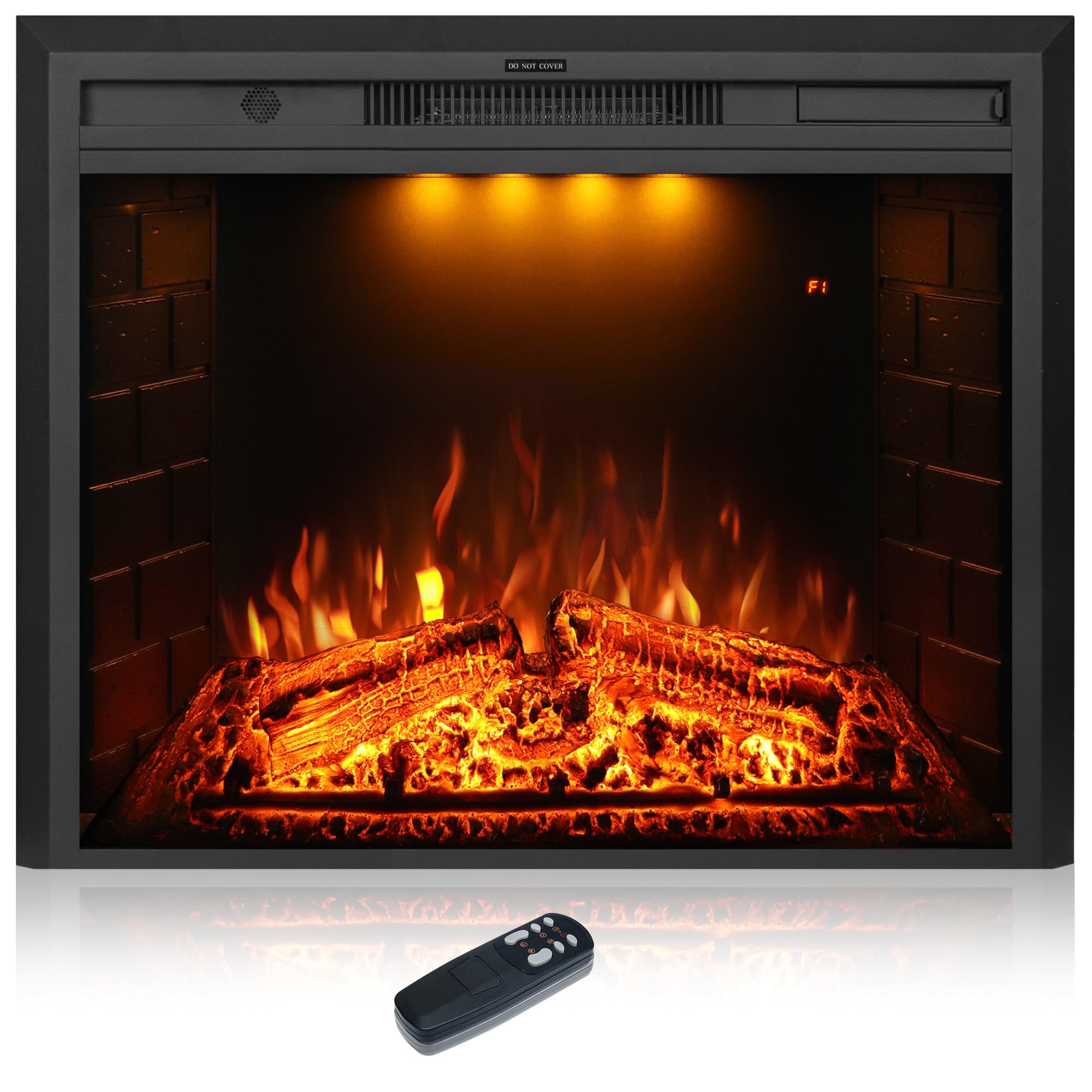
Image: The main electric fireplace unit with its remote control.
3. Product Features
The Dreamflame Electric Fireplace combines functionality with aesthetic appeal, offering a comfortable and stylish heating solution.
- Dual Heat Settings: Provides two heat options: Low (750W) and High (1500W), suitable for supplemental heating in rooms up to 400 square feet.
- Realistic Flame and Log Effect: Utilizes modern LED technology to create a lifelike burning wood fire, complete with a realistic log set.
- Adjustable Visuals: Features 3 colors of spotlights, 3 colors of flame, and 5 levels of flame brightness for customizable ambiance.
- Crackling Sound: Includes an optional crackling sound feature to enhance the authentic fireplace experience. This sound can be turned off separately.
- Timer Function: Programmable timer allows for automatic shut-off from 1 to 9 hours.
- Control Options: Can be operated conveniently via the included remote control or the integrated touch control panel on the unit.
- Overheating Protection: Built-in safety mechanism automatically cuts power if the unit overheats.
- Tempered Glass Panel: Durable and protective front tempered glass panel, easy to clean.
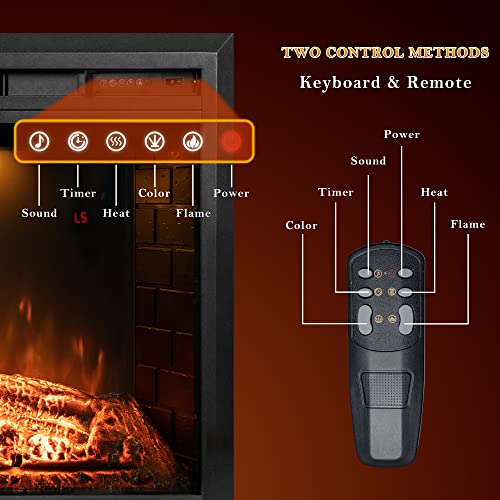
Image: The fireplace offers 3 colors for the top light, allowing for varied mood lighting.

Image: Detailed view of the realistic log set and flame effects, highlighting the crackling sound feature.
4. Setup and Installation
This electric fireplace is designed for insert installation and requires no assembly. It can be recessed into a wall, mantel, or TV stand opening.
Installation Requirements:
- Power Supply: Connects to a standard 110-120V, 15 Amp grounded electrical outlet. The unit comes with a 6-foot power cable.
- Opening Size: For optimal fit, the advised opening dimensions are approximately 27.5"-27.6" (Width) x 23.7"-23.8" (Height) x 8.86"-9.06" (Depth).
- Clearance: Ensure adequate clearance around the unit for proper ventilation and safety.
Installation Steps:
- Ensure the power outlet is easily accessible and meets the electrical requirements.
- Carefully slide the electric fireplace unit into the prepared opening.
- Plug the power cord into a grounded 110-120V, 15 Amp outlet.
- The unit is now ready for operation.
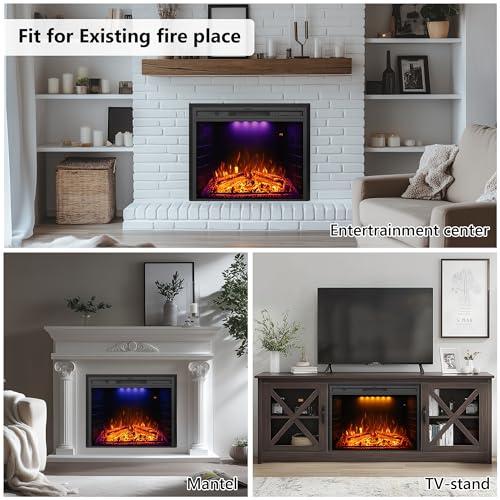
Image: Examples of the electric fireplace installed in different home environments, including existing fireplaces, mantels, and TV stands.
5. Operating Instructions
The fireplace can be controlled using the remote control or the touch control panel located on the unit.
Remote Control Functions:
- Power Button: Turns the unit ON/OFF.
- Heat Button: Toggles between Low (750W), High (1500W), and OFF heat settings.
- Flame Button: Adjusts flame color and brightness levels. There are 3 flame colors and 5 brightness settings.
- Color Button: Changes the color of the top spotlights (3 color options).
- Sound Button: Activates or deactivates the crackling sound effect.
- Timer Button: Sets the automatic shut-off timer from 1 to 9 hours.
Touch Control Panel:
The touch control panel on the unit provides access to the same functions as the remote control.
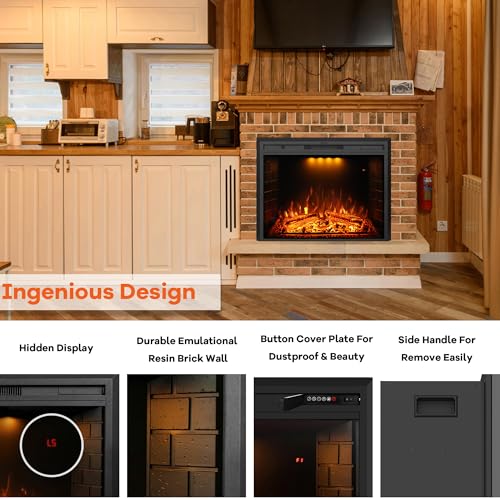
Image: Illustration of the two control methods: the touch panel on the unit and the handheld remote control.
Video: Demonstrates the realistic flame effects and how the fireplace can be integrated into a mantel setup. This video is provided by Dreamflame.
Video: Shows the Dreamflame electric fireplace inserts in operation, highlighting the crackling sound feature and various flame settings. This video is provided by Dreamflame.
6. Maintenance
Regular maintenance ensures the longevity and optimal performance of your electric fireplace.
- Cleaning the Glass Panel: The front tempered glass panel can be cleaned with a soft, damp cloth. Avoid abrasive cleaners or sprays directly on the glass.
- General Cleaning: Dust the exterior surfaces with a soft, dry cloth. Ensure the unit is unplugged before cleaning.
- Ventilation: Periodically check that the air intake and exhaust vents are clear of dust and debris to maintain proper airflow.
7. Troubleshooting
If you encounter any issues with your Dreamflame electric fireplace, refer to the following common problems and solutions:
| Problem | Possible Cause | Solution |
|---|---|---|
| Unit does not turn on. | No power, power cord not plugged in, main power switch off. | Ensure unit is plugged into a live 110-120V outlet. Check the main power switch on the unit. |
| No heat output. | Heat function not activated, overheating protection triggered. | Press the heat button on the remote or control panel. Check for blocked vents; if so, clear them and allow the unit to cool before restarting. |
| Flames are not visible or dim. | Flame brightness set too low, flame effect turned off. | Adjust flame brightness using the flame button. Ensure the flame effect is active. |
| Crackling sound is too loud or unpleasant. | Sound volume is fixed, personal preference. | The crackling sound feature can be turned off completely using the sound button on the remote or control panel. |
| Remote control not working. | Dead batteries, obstruction, remote out of range. | Replace remote batteries (2 AAA). Ensure no obstructions between remote and unit. Operate within effective range. |
8. Specifications
| Feature | Specification |
|---|---|
| Brand | Dreamflame |
| Model Name | EF28T |
| Product Dimensions (D x W x H) | 8.8" x 30.5" x 24.9" |
| Chamber Depth | 8.84 inches |
| Power Source | Corded Electric |
| Voltage | 110-120V, 15 Amp |
| Heat Output | 750W / 1500W (5000 BTUs) |
| Heating Coverage | Up to 400 sq ft |
| Material | Tempered Glass |
| Installation Type | Wall Mount / Recessed |
| Special Features | Dimmer, LED Flame, Safety Shut Off, Timer, Crackling Sound |
| Included Components | Log Set, Remote Control |
| Item Weight | 43.9 pounds |
9. Warranty and Support
Dreamflame is committed to providing quality products and excellent customer service.
- Certification: SGS Certification approved.
- Warranty: This product comes with a 1-Year Warranty.
- Technical Support: Lifetime Technical Support is provided by Dreamflame.
- Customer Service: For any questions or assistance regarding your electric fireplace, please contact Dreamflame customer service. We aim to provide feedback within 24 hours.


