
Insignia NS-AC06PWH1
Insignia NS-AC06PWH1 Portable Air Conditioner User Manual
Model: NS-AC06PWH1
Product Overview
The Insignia NS-AC06PWH1 is a versatile 3-in-1 portable air conditioner designed to provide efficient cooling, fan circulation, and dehumidification for spaces up to 250 square feet. This unit features a washable filter for easy maintenance, an auto shut-off function, a 24-hour timer, and multiple fan speeds and cool settings, including a sleep mode, to ensure optimal comfort.

Front view of the Insignia NS-AC06PWH1 portable air conditioner, showing its compact design and the included remote control.
Setup Guide
Follow these steps to properly set up your portable air conditioner for optimal performance.
- Unpacking: Carefully remove the unit and all accessories from the packaging. Ensure all components are present: main unit, exhaust hose, window exhaust adapter, window slider kit, remote control, and user manual.
- Placement: Place the air conditioner on a flat, stable surface near a window and a grounded electrical outlet. Ensure there is at least 20 inches (50 cm) of space around the unit for proper airflow.
- Install Exhaust Hose:
- Attach one end of the exhaust hose to the exhaust outlet on the back of the air conditioner.
- Attach the window exhaust adapter to the other end of the exhaust hose.

The portable air conditioner with its exhaust hose properly installed and vented through a window using the window slider kit.
- Install Window Slider Kit:
- Adjust the window slider kit to fit your window opening.
- Insert the window exhaust adapter into the opening of the window slider kit.
- Close the window securely against the kit to seal the opening.
- Power Connection: Plug the power cord into a grounded 110V AC electrical outlet.
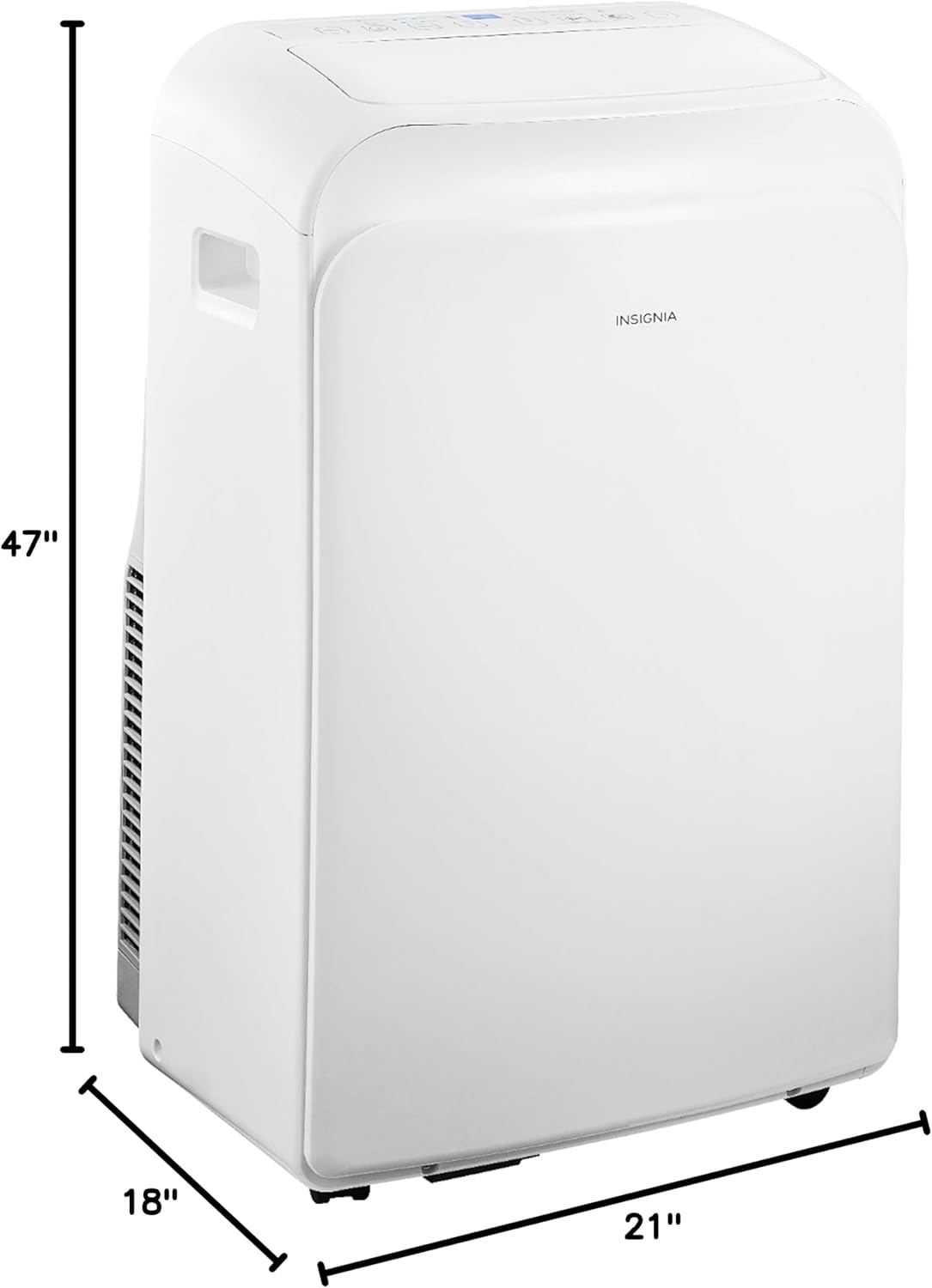
Diagram showing the dimensions of the Insignia NS-AC06PWH1 portable air conditioner: 47 inches height, 21 inches depth, 18 inches width.
Operating Instructions
Your Insignia portable air conditioner can be operated using the control panel on the unit or the included remote control.
Control Panel

Close-up view of the control panel located on the top of the Insignia portable air conditioner, showing various buttons and the digital display.
- Power Button (⏻): Turns the unit on or off.
- Mode Button (MODE): Cycles through operating modes: Cool, Fan, Dry (Dehumidifier), Auto.
- Temperature Adjustment (+ / -): Adjusts the desired temperature setting.
- Fan Speed Button (FAN): Selects fan speed: High, Medium, Low.
- Timer Button (TIMER): Sets the auto-on or auto-off timer (up to 24 hours).
- Sleep Mode Button (SLEEP): Activates sleep mode for quiet operation and gradual temperature adjustment.
- Swing Button (SWING): Controls the automatic swing of the air louvers.
Remote Control

The remote control for the Insignia portable air conditioner, featuring buttons for power, mode, temperature, fan speed, timer, sleep, swing, and 'Follow Me' function.
The remote control provides convenient access to all functions of the unit from a distance. It includes all buttons found on the control panel, plus a "Follow Me" function which senses the temperature at the remote's location for more precise cooling.
Operating Modes
- Cool Mode: Provides powerful cooling. Set your desired temperature and fan speed.
- Fan Mode: Circulates air without cooling. Choose from various fan speeds.
- Dry (Dehumidifier) Mode: Removes excess moisture from the air. The fan speed is automatically set to low in this mode.
- Auto Mode: The unit automatically selects the operating mode (Cool, Fan, or Dry) based on the ambient room temperature.
Maintenance
Regular maintenance ensures the longevity and efficiency of your air conditioner.
- Air Filter Cleaning: The unit is equipped with a washable air filter. Clean the filter every two weeks or more frequently depending on usage and air quality.
- Turn off and unplug the unit.
- Remove the filter from the back of the unit.
- Wash the filter with warm, soapy water. Rinse thoroughly and allow it to air dry completely before reinserting.
- Water Drainage: In Dry (Dehumidifier) mode or high humidity conditions, the unit may accumulate water.
- When the internal water tank is full, the unit will stop operating and display an error code (e.g., "FL").
- Place a shallow pan under the drainage port at the back of the unit.
- Remove the drain plug to allow water to flow out. Replace the plug once drained.
- Storage: If storing the unit for an extended period:
- Drain all accumulated water.
- Clean the air filter.
- Unplug the power cord and coil it neatly.
- Store the unit in a cool, dry place, preferably covered to protect from dust.
Troubleshooting
Refer to this section for solutions to common issues you might encounter.
| Problem | Possible Cause | Solution |
|---|---|---|
| Unit does not turn on. | No power, power cord unplugged, circuit breaker tripped. | Ensure unit is plugged in, check power outlet, reset circuit breaker. |
| Unit is running but not cooling. | Air filter dirty, exhaust hose not properly installed, room too large, windows/doors open. | Clean air filter, ensure exhaust hose is sealed, close windows/doors, check room size. |
| Unit is noisy. | Unit not on a level surface, fan speed too high. | Place unit on a level surface, reduce fan speed. |
| Water leakage. | Drain plug not secured, unit tilted, internal water tank full. | Secure drain plug, ensure unit is level, drain water tank. |
Technical Specifications
| Feature | Specification |
|---|---|
| Model Number | NS-AC06PWH1 |
| Cooling Capacity | 6,000 BTU |
| Coverage Area | Up to 250 Sq. Ft. |
| Functions | Cool, Fan, Dehumidifier |
| Filter Type | Washable Filter |
| Timer | 24-Hour Programmable |
| Fan Speeds | 3 (High, Medium, Low) |
| Control Console | Digital Display, Remote Control |
| Voltage | 110 Volts (AC) |
| Item Weight | 59.3 pounds |
| Dimensions (D x W x H) | 21" x 18" x 47" |
| Color | White |
Warranty and Support
This product is offered as an Amazon Renewed item, meaning it has been professionally inspected and tested to work and look like new. Amazon Renewed products are eligible for replacement or refund under the Amazon Renewed Guarantee if you are not satisfied with your purchase.
For further assistance, troubleshooting, or warranty claims related to your Amazon Renewed product, please refer to the Amazon Renewed program details or contact Amazon customer support directly.
Related Documents - NS-AC06PWH1
 |
Insignia Portable Air Conditioner User Guide: NS-AC06PWH1, NS-AC07PWH1, NS-AC08PWH1 Comprehensive user guide for the Insignia Portable Air Conditioner models NS-AC06PWH1, NS-AC07PWH1, and NS-AC08PWH1, covering installation, operation, maintenance, troubleshooting, and safety precautions. |
 |
Insignia Portable Air Conditioner User Guide Comprehensive user guide for Insignia portable air conditioners (models NS-AC06PWH1, NS-AC07PWH1, NS-AC08PWH1), covering installation, operation, maintenance, troubleshooting, and warranty information. |
 |
Insignia Portable Air Conditioner User Guide User guide for the Insignia Portable Air Conditioner, covering installation, operation, maintenance, and troubleshooting for models NS-AC06PWH1, NS-AC07PWH1, and NS-AC08PWH1. |
 |
Insignia 20-, 35-, or 50-Pint Dehumidifier User Guide Comprehensive user guide for Insignia 20-, 35-, or 50-Pint Dehumidifiers. Learn about features, setup, operation, maintenance, troubleshooting, and warranty information. |
 |
Insignia USB-C Wall Charger Quick Setup Guide Quick setup guide for Insignia USB-C wall chargers, detailing features, specifications, compatible devices, package contents, troubleshooting, safety information, and warranty. |
 |
Insignia 10,000/12,000 BTU Portable Air Conditioner User Guide Comprehensive user guide for the Insignia 10,000 and 12,000 BTU portable air conditioners (models NS-AC10PWH8/NS-AC12PWH8), covering setup, operation, safety, maintenance, troubleshooting, and warranty information. |
Ask a question about this manual
Ask about setup, troubleshooting, compatibility, parts, safety, or missing instructions. Manuals+ will review the question and use this page’s manual context to help answer it.