1. Introduction
The AIMIBO Wireless HDMI Transmitter G48TX provides a seamless solution for extending your display wirelessly. This device allows you to transmit high-definition audio and video from your source device to a display without the need for cables. Designed for ease of use, it features a plug-and-play setup, eliminating the need for complex software installations or drivers.
Important Note:
This product is a Transmitter (TX) unit only and requires a compatible AIMIBO Receiver (RX) unit (sold separately) to function as a complete wireless display system.

Image: The AIMIBO Wireless HDMI Transmitter G48TX unit.
2. Package Contents
The AIMIBO Wireless HDMI Transmitter G48TX package typically includes the following items:
- AIMIBO Wireless HDMI Transmitter (G48TX)
- USB Power Cable
- User Manual
3. Product Overview
Transmitter (TX) Unit

Image: Diagram of the AIMIBO Wireless HDMI Transmitter (TX) showing its components.
- HDMI Port: Connects to the HDMI output of your source device (e.g., laptop, PC).
- USB Port: Provides power to the TX unit. Connect to a USB power source (e.g., laptop USB port, USB power adapter).
- Button: Used for pairing with the Receiver (RX) unit and switching between multiple Transmitters.
- Indicator Light: Shows the status of the device (e.g., power, pairing, connection).
Compatible Receiver (RX) Unit
The G48TX Transmitter requires a compatible AIMIBO Receiver (RX) unit for operation. An example of a compatible RX unit is shown below:
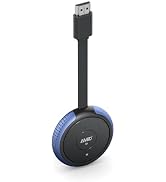
Image: A compatible AIMIBO Wireless HDMI Receiver (RX) unit.
The Receiver (RX) unit typically features HDMI, VGA, and audio output ports, along with antenna connectors for stable wireless reception.
4. Setup Instructions
Follow these steps to set up and pair your AIMIBO Wireless HDMI Transmitter with a compatible Receiver:

Image: The AIMIBO Wireless HDMI Transmitter (TX) and Receiver (RX) units, illustrating a complete wireless HDMI system.
- Connect the Receiver (RX): Plug the external antennas into the RX unit. Connect the RX unit to the HDMI input of your TV, projector, or monitor. Power the RX unit using its dedicated power supply (not included with this TX-only product).
- Connect the Transmitter (TX): Plug the G48TX Transmitter into the HDMI output of your PC, laptop, or other source device. Connect the USB power cable from the TX unit to a USB power source.
- Initiate Pairing on RX: Once both units are powered on, long press the button on the back of the RX unit for 3 to 5 seconds. The display connected to the RX should show "Ready to Pair".
- Initiate Pairing on TX: While the RX is in pairing mode, long press the button on the G48TX Transmitter for 5 to 8 seconds. The indicator light on the TX unit will start flashing.
- Confirm Pairing: After a few moments, the display should show "Pairing OK", and the indicator light on both units will light up normally, indicating a successful connection. Your source device's screen should now be mirrored or extended wirelessly to your display.
For a visual guide on the pairing process, please refer to the video below:
Video: A demonstration of connecting and pairing the AIMIBO Wireless HDMI Transmitter and Receiver, including switching between multiple transmitters.
5. Operating Instructions
Switching Between Multiple Transmitters (TX)
The AIMIBO Wireless HDMI system supports connecting multiple Transmitter (TX) units to a single Receiver (RX) unit. This allows for easy switching between different source devices.
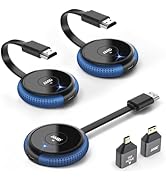
Image: A setup demonstrating two Transmitter (TX) units connected to different laptops, wirelessly transmitting to a single Receiver (RX) unit.
To switch between active Transmitter units:
- Simply press the button on the desired Transmitter (TX) unit. The Receiver (RX) will automatically switch to display the content from that TX unit.
- Ensure all TX units are powered and paired with the RX unit beforehand.
6. Troubleshooting
If you encounter issues with your AIMIBO Wireless HDMI Transmitter, please refer to the following common solutions:
- No Signal on Display:
- Ensure both the TX and RX units are properly powered.
- Verify that the HDMI cables are securely connected to both the source device and the display.
- Confirm that the display is set to the correct HDMI input source.
- Re-attempt the pairing process as described in Section 4.
- Intermittent Connection or Poor Quality:
- Reduce the distance between the TX and RX units.
- Ensure there are no significant physical obstructions (e.g., thick walls, large metal objects) between the units.
- Minimize interference from other wireless devices operating on similar frequencies (e.g., Wi-Fi routers, cordless phones).
- Ensure the RX unit's antennas are properly installed and oriented.
- Pairing Failure:
- Ensure both TX and RX units are powered on and their indicator lights are active.
- Follow the pairing steps precisely, paying attention to the duration of button presses.
- Try resetting both units by disconnecting and reconnecting their power, then attempt pairing again.
7. Specifications
| Feature | Specification |
|---|---|
| Brand | AIMIBO |
| Model Name | G48TX |
| Connectivity Technology | HDMI |
| Special Feature | Wireless |
| Resolution | 4K (3840x2160 pixels) |
| Video Codec | H.265/HEVC |
| Compatible Devices | Television |
| Form Factor | TV Stick |
| Color | Grey |
| Item Weight | 80 Grams |
| Item Dimensions (L x W x H) | 30 x 10 x 90 millimeters |
| UPC | 717666016961 |
| ASIN | B09KPTC1WQ |
8. Warranty and Support
The AIMIBO Wireless HDMI Transmitter G48TX comes with a 12-month warranty from the date of purchase. This warranty covers manufacturing defects and ensures reliable operation under normal use.
For technical assistance, troubleshooting, or warranty claims, please contact AIMIBO customer support. We strive to provide 24-hour service to address your inquiries promptly.
You can typically find contact information on the official AIMIBO website or through your retailer's support channels.