
PRUNUS J-409
PRUNUS J-409 Portable DAB/FM Radio User Manual
Model: J-409
Introduction
Thank you for purchasing the PRUNUS J-409 Portable DAB/FM Radio. This manual provides detailed instructions on how to set up, operate, and maintain your radio. Please read this manual carefully before use to ensure proper operation and to maximize your listening experience.
The PRUNUS J-409 is a versatile portable radio featuring DAB/DAB+ and FM reception, Bluetooth connectivity, dual alarm functions, and a clear LCD display. Its compact design and battery operation make it ideal for use at home or on the go.
Product Overview
Familiarize yourself with the components of your PRUNUS J-409 radio.
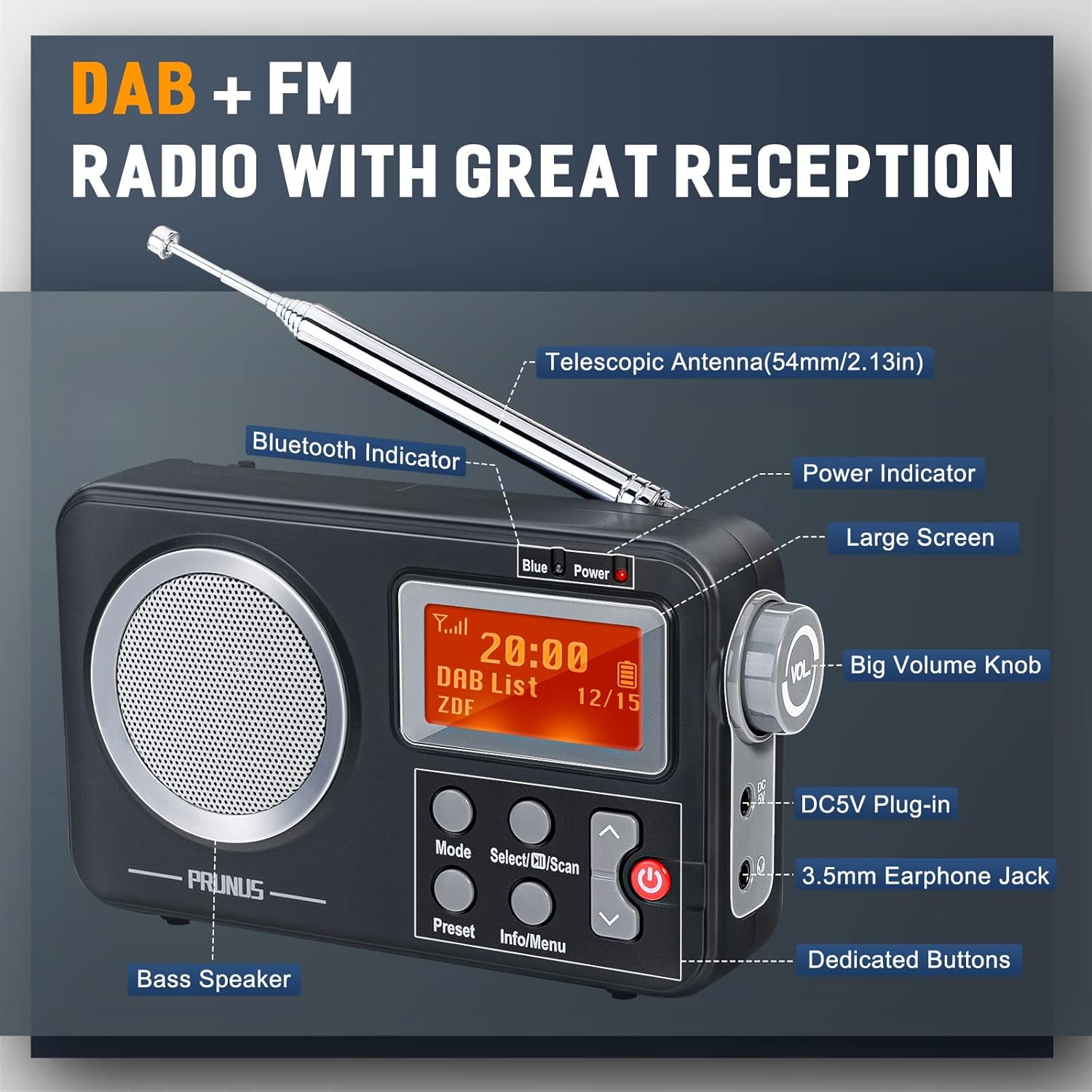
Image: Front view of the PRUNUS J-409 radio with key components labeled, including the telescopic antenna, Bluetooth indicator, power indicator, large screen, volume knob, DC5V plug-in, 3.5mm earphone jack, bass speaker, and dedicated buttons.
Key Features:
- DAB/DAB+ and FM Radio: Digital radio reception (DAB 174-240MHz) and FM reception (87.5-108MHz) for clear, stable audio.
- Bluetooth Connectivity: Easily connect your smartphone or other Bluetooth-enabled devices for audio streaming.
- Portable Design: Compact (14.5x8.5x3.5cm) and lightweight (200g) for easy carrying.
- Dual Power Options: Operates via DC5V power adapter (not included) or 4 x AA batteries (not included) for flexible use.
- Station Presets: Store your favorite DAB and FM stations for quick access.
- Dual Alarm Clock: Set two independent alarms with options for buzzer or radio wake-up.
- Sleep Timer: Program the radio to turn off automatically after a set period.
- 3.5mm Headphone Jack: For private listening.
- Clear LCD Display: Provides station information, time, and other relevant data.
Setup
Powering the Radio:
The PRUNUS J-409 can be powered by either a DC5V power adapter or AA batteries.
- Using DC5V Power:
Connect a compatible DC5V power adapter (not included) to the DC5V input port on the side of the radio. Plug the adapter into a standard wall outlet.
- Using AA Batteries:
Open the battery compartment cover on the back of the radio. Insert 4 x AA batteries (not included), ensuring correct polarity (+/-). Close the battery compartment cover securely.

Image: Illustration showing the PRUNUS J-409 radio with two power source options: an interior power adapter connection and exterior battery operation, highlighting its portability.
Antenna Adjustment:
Extend the telescopic antenna fully for optimal DAB and FM reception. Adjust its position for the best signal quality.
Operating Instructions
Turning On/Off:
Press the Power button (red button) to turn the radio on or off.
Mode Selection (DAB/FM/Bluetooth):
Press the Mode button to cycle through available modes: DAB, FM, and Bluetooth.
DAB Radio Operation:
- Switch to DAB mode using the Mode button.
- The radio will automatically scan for available DAB stations upon first use or if no stations are found. To perform a manual scan, press and hold the Select/Scan button.
- Use the Up/Down arrow buttons to navigate through the list of available stations.
- Press the Select/Scan button to confirm your station choice.

Image: A person sitting with the PRUNUS J-409 radio, illustrating its ability to receive a strong DAB signal for clear audio.
FM Radio Operation:
- Switch to FM mode using the Mode button.
- To auto-scan and store FM stations, press and hold the Select/Scan button. The radio will scan and save all strong signals.
- To manually tune, briefly press the Up/Down arrow buttons to fine-tune the frequency. Press and hold the Up/Down arrow buttons for automatic search to the next available station.
Saving and Accessing Presets:
The radio allows you to save your favorite DAB and FM stations for quick access.
- Tune to the desired station.
- Press and hold the Preset button until "Preset Store" appears on the display.
- Use the Up/Down arrow buttons to select a preset number (e.g., 1-20).
- Press the Select/Scan button to confirm and save the station.
- To recall a saved station, briefly press the Preset button, then use the Up/Down arrow buttons to select the desired preset number, and press Select/Scan to play.

Image: A three-step visual guide demonstrating how to save favorite radio stations using the preset function on the PRUNUS J-409. Step 1: Press and hold "Preset" to save. Step 2: Press "Previous / Next" to select a serial number. Step 3: Press "Confirm" to save it.
Bluetooth Operation:
- Switch to Bluetooth mode using the Mode button. The display will show "Bluetooth" and the Bluetooth indicator will flash.
- Enable Bluetooth on your device (e.g., smartphone, tablet) and search for "PRUNUS J-409".
- Select "PRUNUS J-409" to pair. Once connected, the Bluetooth indicator will stop flashing and remain solid.
- You can now play audio from your device through the radio's speaker. Use your device to control playback (play/pause, skip tracks).

Image: A PRUNUS J-409 radio on a wooden table, with a smartphone nearby, illustrating the Bluetooth connection feature for wireless audio streaming.
Volume Control:
Rotate the large Volume Knob on the side of the radio to adjust the listening volume.
Alarm Clock Function:
The radio features dual alarms. Time and date are automatically updated in DAB mode.
- Press the Info/Menu button to enter the menu.
- Use the Up/Down arrow buttons to navigate to "System" or "Alarm Setup" and press Select/Scan.
- Follow the on-screen prompts to set Alarm 1 and Alarm 2, including time, frequency (daily, once, weekends, weekdays), source (buzzer or last listened radio station), and volume.
- To snooze an active alarm, press the Select/Scan button. To turn off the alarm, press the Power button.
Sleep Timer:
The sleep timer allows the radio to turn off automatically after a set period.
- Press the Info/Menu button to enter the menu.
- Navigate to "Sleep" or "Sleep Timer" and press Select/Scan.
- Use the Up/Down arrow buttons to select the desired sleep duration (e.g., 15, 30, 45, 60, 90 minutes, or Off).
- Press Select/Scan to confirm.
Headphone Use:
Plug 3.5mm headphones into the headphone jack on the side of the radio for private listening. The internal speaker will be muted automatically.
Maintenance and Care
- Clean the radio with a soft, dry cloth. Do not use abrasive cleaners or solvents.
- Keep the radio away from direct sunlight, extreme temperatures, and high humidity.
- If not using the radio for an extended period, remove the batteries to prevent leakage.
- Do not attempt to disassemble or repair the radio yourself. Refer to qualified service personnel.
Troubleshooting
| Problem | Possible Cause | Solution |
|---|---|---|
| No power | Batteries are dead or incorrectly inserted; power adapter not connected or faulty. | Replace batteries, check battery polarity, ensure power adapter is securely connected and functional. |
| Poor radio reception (DAB/FM) | Weak signal, antenna not extended or positioned correctly, interference from other electronic devices. | Fully extend and adjust the telescopic antenna. Move the radio to a different location. Turn off nearby electronic devices that may cause interference. Perform a new scan for stations. |
| Bluetooth not connecting | Radio not in Bluetooth mode, device not in pairing mode, "PRUNUS J-409" not selected, too far from radio. | Ensure radio is in Bluetooth mode. Make sure Bluetooth is enabled on your device and it's searching for devices. Select "PRUNUS J-409" from your device's Bluetooth list. Keep devices within 10 meters. |
| No sound from speaker | Volume too low, headphones plugged in, mute function active. | Increase volume. Unplug headphones. Check if any mute function is active (though this model doesn't explicitly list one, it's a general troubleshooting step). |
Specifications
| Feature | Detail |
|---|---|
| Model | J-409 |
| DAB Frequency Range | 174 - 240 MHz |
| FM Frequency Range | 87.5 - 108 MHz |
| Power Input | DC 5V (via USB adapter, not included) |
| Battery Type | 4 x AA batteries (not included) |
| Speaker Output | 3W |
| Dimensions (L x W x H) | 14.5 x 3.5 x 8.5 cm (5.7 x 1.4 x 3.3 inches) |
| Weight | 200 g (0.44 lbs) |
| Connectivity | Bluetooth, 3.5mm Audio Jack |
| Display Type | LCD |
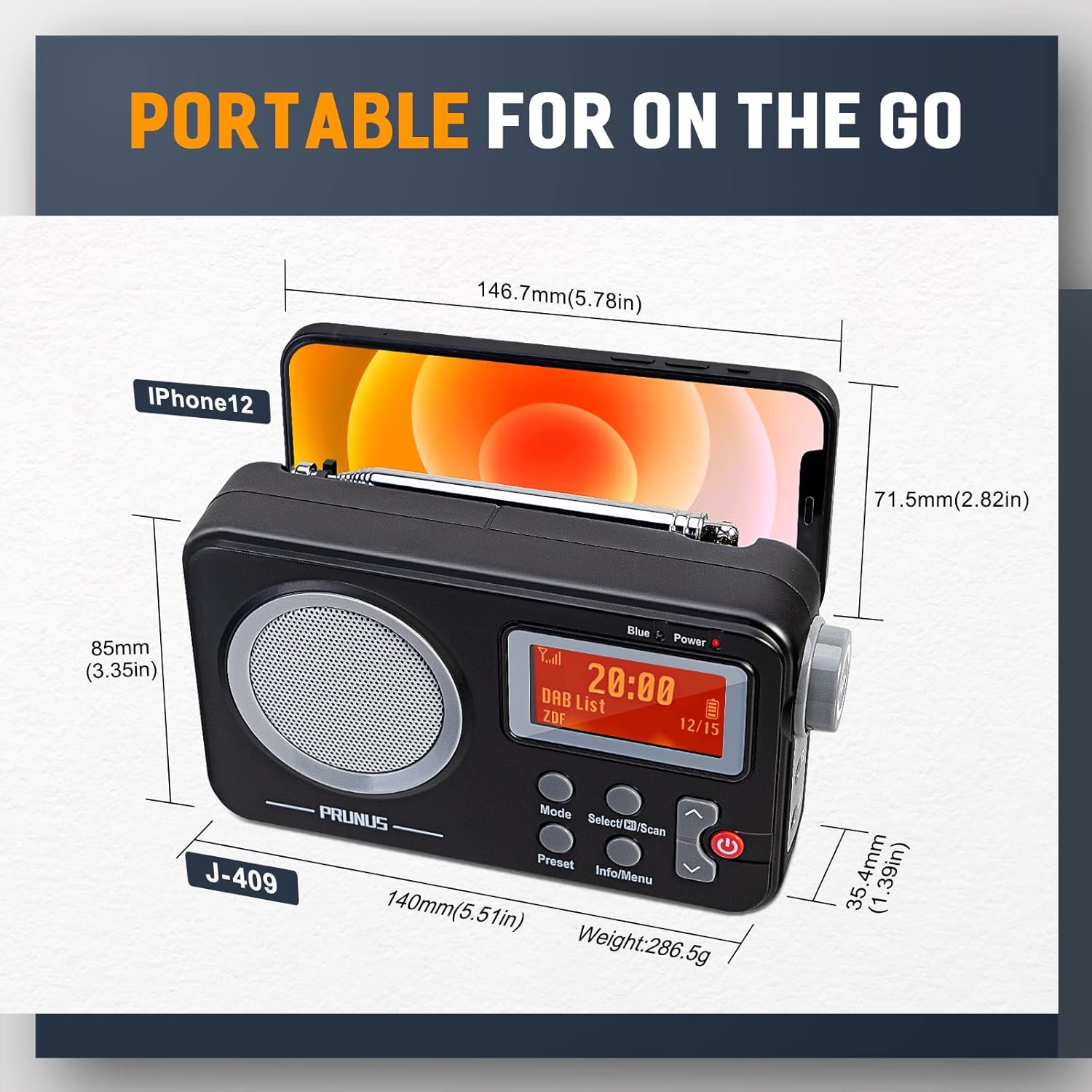
Image: A visual representation of the PRUNUS J-409 radio's dimensions (140mm x 85mm x 35.4mm) and weight (286.5g), shown next to an iPhone 12 for scale, emphasizing its compact and portable size.
Warranty and Support
PRUNUS products are designed and manufactured to the highest quality standards. For warranty information and technical support, please refer to the warranty card included in your product packaging or visit the official PRUNUS website.
For further assistance, you may contact PRUNUS customer service through the contact information provided on their official website or through your point of purchase.
Ask a question about this manual
Ask about setup, troubleshooting, compatibility, parts, safety, or missing instructions. Manuals+ will review the question and use this page’s manual context to help answer it.