
Soundcore Life P3 (A3939011-F0)
Soundcore Life P3 Noise Cancelling Earbuds User Manual
Model: Life P3 (A3939011-F0)
Introduction
The Soundcore Life P3 Noise Cancelling Earbuds offer an immersive audio experience with powerful thumping bass, crystal-clear calls, and versatile multi-mode noise cancellation. Designed for comfort and convenience, these earbuds feature wireless charging and can be customized via the Soundcore App.
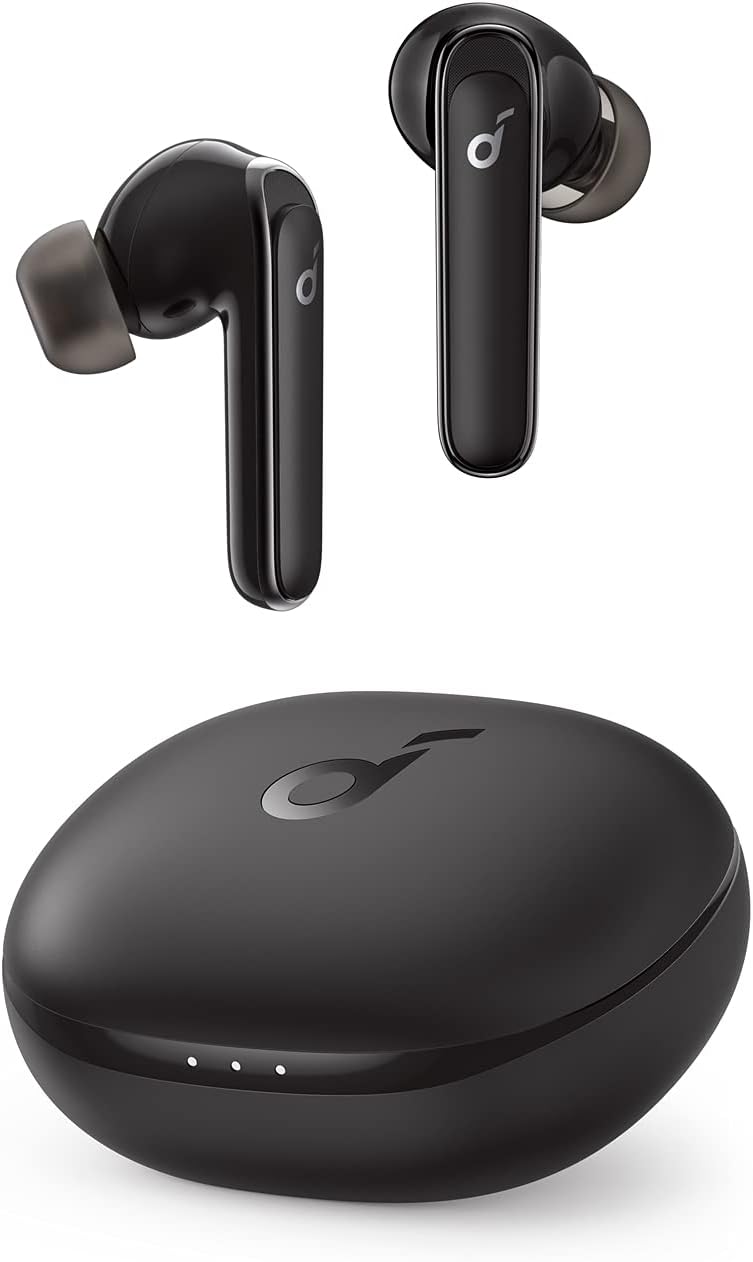
Image: Soundcore Life P3 Earbuds in black, shown with their compact charging case.
Key Features
- Thumping Bass: Equipped with custom 11mm composite drivers for powerful audio.
- Multi-Mode Noise Cancelling: Tailor your listening experience with Transport, Outdoor, and Indoor modes to block out irritating background noises.
- Clear Calls: Six integrated microphones ensure your voice is heard clearly during calls.
- Extended Playtime: Enjoy up to 35 hours of total playtime with the charging case.
- Wireless Charging: Conveniently charge your earbuds and case wirelessly.
- Soundcore App Customization: Personalize your sound with custom EQ settings, activate BassUp mode, and access various features.
- Bluetooth Connectivity: Stable connection up to 10 meters.

Image: Diagram illustrating the internal components of the Soundcore Life P3 earbuds, highlighting the drivers and microphones.
Video: An official overview of the Soundcore Life P3 Noise Cancelling Earbuds, showcasing their design, features, and functionality.
What's in the Box
- Soundcore Life P3 Earbuds
- Wireless Charging Case
- USB-C Charging Cable
- Multiple Sizes of Ear Tips (Ear Cushions)
Setup
- Initial Charge: Remove the protective film from the earbuds. Place both earbuds back into the charging case and close the lid. Charge the case and earbuds for at least 10 minutes using the provided USB-C cable or a wireless charger.
- Power On & Pairing: Open the charging case. The earbuds will automatically enter pairing mode (indicated by flashing lights). On your device, enable Bluetooth and select "Soundcore Life P3" from the list of available devices.
- Wearing the Earbuds: Place the earbuds gently into your ear canals. Rotate them slightly to ensure a secure and comfortable fit. Experiment with different ear tip sizes for optimal sound and noise cancellation.
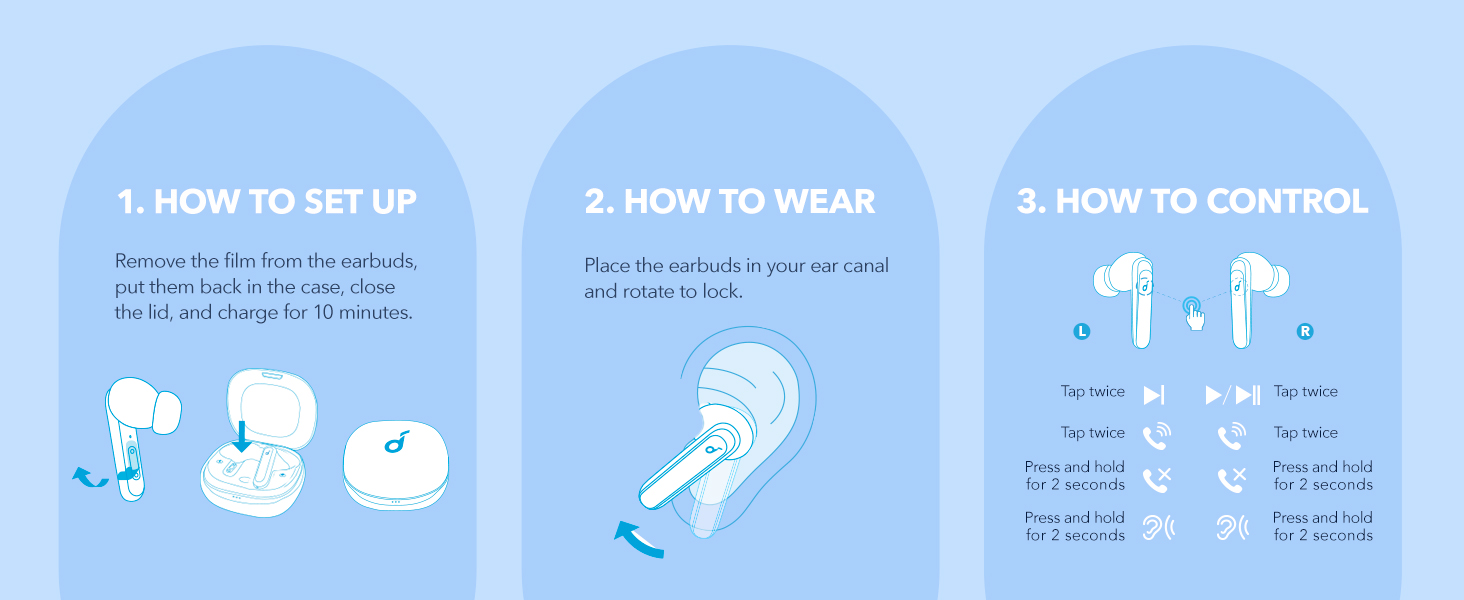
Image: Visual guide for initial setup, proper wearing technique, and touch controls of the earbuds.
Operating the Earbuds
Touch Controls
| Action | Function (Left Earbud) | Function (Right Earbud) |
|---|---|---|
| Tap Twice | Play/Pause, Answer/End Call | Play/Pause, Answer/End Call |
| Press and Hold (2s) | Switch Noise Cancelling Mode, Reject Call | Switch Noise Cancelling Mode, Reject Call |
Soundcore App Features
Download the Soundcore app from your device's app store to unlock the full potential of your Life P3 earbuds. The app allows for:
- Customizable EQ: Adjust audio frequencies to your preference or choose from preset sound profiles.
- Noise Cancelling Modes: Easily switch between Transport, Outdoor, and Indoor noise cancellation modes.
- Gaming Mode: Enhance your gaming experience with optimized audio.
- Sleeping Mode: Access a library of soothing sounds to aid relaxation and sleep.
- Find Device: Locate misplaced earbuds by emitting a sound.


Images: Screenshots of the Soundcore app interface for EQ customization, a user enjoying gaming mode, and a user relaxing with sleeping mode.
Maintenance
- Cleaning: Regularly clean the earbuds, especially the ear tips and charging contacts, with a soft, dry, lint-free cloth. Remove ear tips and clean them separately with mild soap and water if necessary, ensuring they are completely dry before reattaching.
- Storage: Always store the earbuds in their charging case when not in use to protect them and keep them charged.
- Avoid Liquids: Do not expose the earbuds or charging case to excessive moisture or immerse them in water.
- Temperature: Store and operate the earbuds within recommended temperature ranges to ensure optimal battery life and performance.
Troubleshooting
Common Issues and Solutions
- Earbuds Not Pairing:
- Ensure both earbuds are fully charged.
- Place earbuds back in the case, close the lid, wait 5 seconds, then open to re-enter pairing mode.
- Forget "Soundcore Life P3" from your device's Bluetooth list and try pairing again.
- Perform a factory reset (refer to Soundcore app or online support for specific steps).
- Mismatched Volume Between Earbuds:
- Clean the earbud's mesh and ear tips to ensure no blockage.
- Reset the earbuds as per the pairing troubleshooting steps.
- Check Soundcore app settings for any balance adjustments.
- Noise Cancellation Not Effective:
- Ensure a proper seal in your ear canal by trying different ear tip sizes.
- Switch between Transport, Outdoor, and Indoor modes in the Soundcore app to find the most suitable setting for your environment.
- Earbuds Not Charging:
- Clean the charging contacts on both the earbuds and inside the case.
- Try a different USB-C cable or wireless charging pad.
- Ensure the charging case itself has sufficient power.
Specifications
| Feature | Detail |
|---|---|
| Model Name | A3939011 |
| Connectivity Technology | Wireless (Bluetooth) |
| Audio Driver Type | Dynamic Driver (11mm Composite) |
| Noise Control | Active Noise Cancellation (Multi-Mode) |
| Microphones | 6 for Clear Calls |
| Battery Life (Single Playtime) | Up to 7 Hours |
| Total Playtime (with Charging Case) | Up to 35 Hours |
| Charging | USB-C, Wireless Charging Capable |
| Bluetooth Range | Up to 10 Meters |
| Control Method | Touch |
| Item Weight | 2.24 ounces (63.5 grams) |
| Product Dimensions | 2.56 x 1.97 x 1.18 inches |
| Manufacturer | Anker |
Warranty & Support
For warranty information, technical support, or further assistance, please visit the official Soundcore website or contact Soundcore customer service. Details can typically be found on the product packaging or on the Soundcore support page.
You can also refer to the product's detail page on Amazon for the most up-to-date information and support resources.
Related documentsLife P3 (A3939011-F0)


Ask a question about this manual
Ask about setup, troubleshooting, compatibility, parts, safety, or missing instructions. Manuals+ will review the question and use this page’s manual context to help answer it.