Introduction
The SHOKZ OpenMove headphones offer an innovative open-ear listening experience, utilizing bone conduction technology to deliver audio through your cheekbones. This design ensures situational awareness by keeping your ears open to your surroundings, making them ideal for sports, workouts, and daily use. This manual provides essential information for setting up, operating, maintaining, and troubleshooting your OpenMove headphones.

Figure 1: SHOKZ OpenMove Pink Headphones
What's in the Box
Upon unboxing your SHOKZ OpenMove headphones, you should find the following items:
- SHOKZ OpenMove Bone Conduction Sport Headphones
- USB-C Charging Cable
- Carrying Bag
- User Guide (this manual)
- Sticker Pack (for customization)

Figure 2: Included components with SHOKZ OpenMove headphones.
Setup
1. Charging Your Headphones
Before initial use, fully charge your OpenMove headphones. A full charge takes approximately 2 hours.
- Locate the USB-C charging port on the right transducer arm.
- Connect the provided USB-C charging cable to the port.
- Plug the USB-A end of the cable into a compatible USB power adapter (not included) or a computer's USB port.
- The LED indicator will show red during charging and turn blue when fully charged.
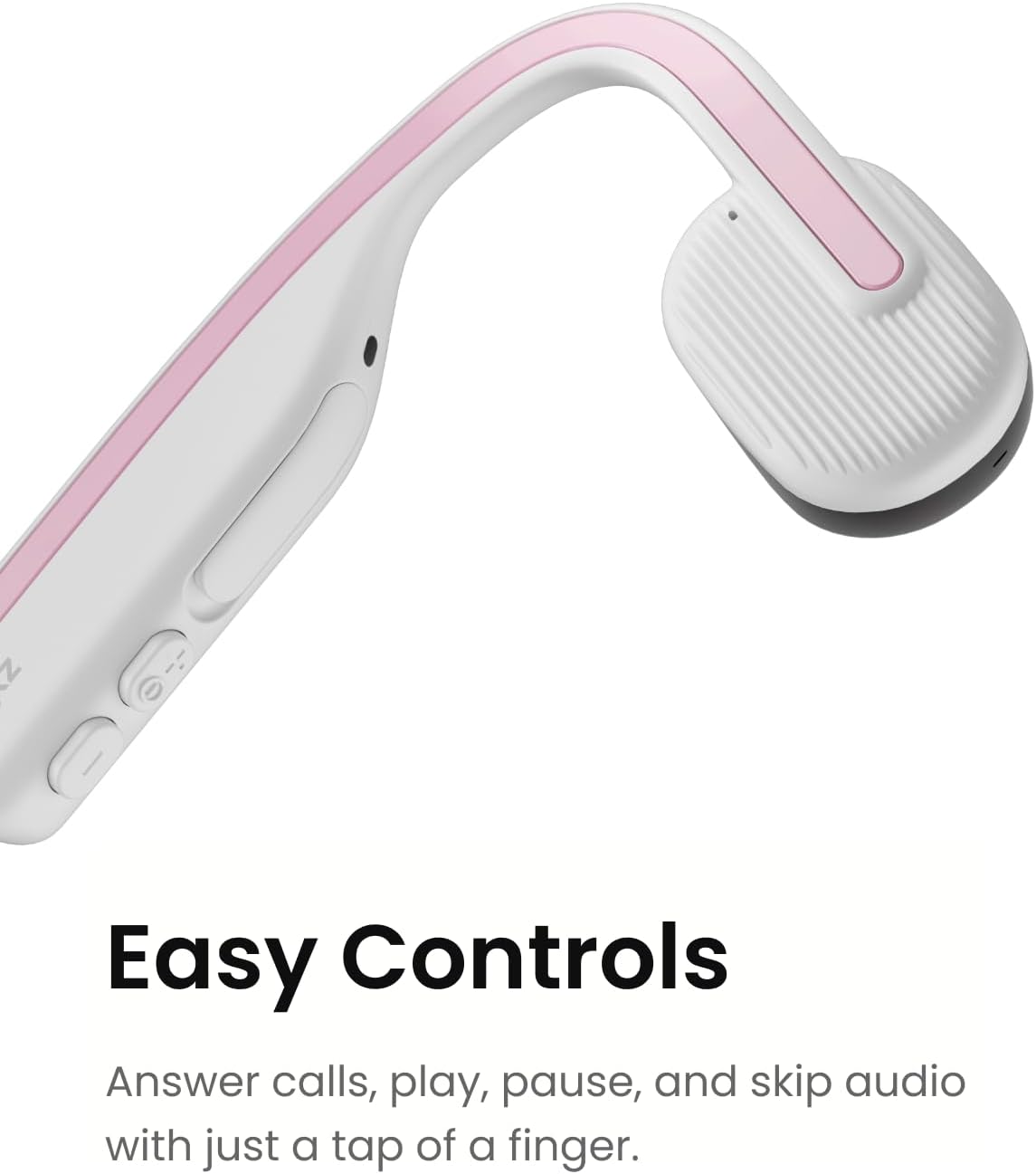
Figure 3: The control buttons and USB-C charging port.
2. Bluetooth Pairing
Pair your OpenMove headphones with your Bluetooth-enabled device (smartphone, tablet, computer) to begin listening.
- Ensure the headphones are turned off.
- Press and hold the Power/Volume+ button for 5-7 seconds until the LED indicator flashes red and blue alternately, indicating pairing mode.
- On your device, enable Bluetooth and search for available devices.
- Select "OpenMove by SHOKZ" from the list.
- Once connected, the LED indicator will flash blue once, and a voice prompt will confirm "Connected".
Operating Instructions
Wearing Your Headphones
The OpenMove headphones are designed for comfort and stability. Place the transducers on your cheekbones, just in front of your ears, with the neckband resting comfortably behind your head.

Figure 4: Proper placement of OpenMove headphones for optimal comfort and sound.
Controls
The OpenMove headphones feature intuitive controls for managing audio and calls:
- Power On/Off: Press and hold the Power/Volume+ button for 2 seconds.
- Volume Up: Press the Volume+ button.
- Volume Down: Press the Volume- button.
- Play/Pause: Press the Multi-function button (located on the left transducer).
- Next Track: Double-press the Multi-function button.
- Previous Track: Triple-press the Multi-function button.
- Answer/End Call: Press the Multi-function button during an incoming call or active call.
- Reject Call: Press and hold the Multi-function button for 2 seconds during an incoming call.
- Voice Assistant: Press and hold the Multi-function button for 2 seconds (when not on a call).
Maintenance
To ensure the longevity and optimal performance of your SHOKZ OpenMove headphones, follow these maintenance guidelines:
- Cleaning: Wipe the headphones with a soft, damp cloth. Avoid using harsh chemicals or abrasive materials.
- Storage: When not in use, store the headphones in the provided carrying bag to protect them from dust and damage.
- Water Resistance: The OpenMove headphones are water-resistant (IP55 rated), meaning they can withstand sweat and light rain. Do not submerge them in water. Ensure the charging port cover is securely closed before exposure to moisture.
- Temperature: Avoid exposing the headphones to extreme temperatures (hot or cold) as this can affect battery life and overall performance.
Troubleshooting
If you encounter issues with your SHOKZ OpenMove headphones, try the following solutions:
- No Power: Ensure the headphones are fully charged. Connect them to the charger and check the LED indicator.
- No Sound:
- Check the volume level on both the headphones and your connected device.
- Ensure the headphones are properly placed on your cheekbones.
- Verify that the headphones are successfully paired and connected to your device.
- Pairing Issues:
- Turn off Bluetooth on your device, then turn it back on.
- Forget the device in your device's Bluetooth settings and attempt to re-pair.
- Ensure no other Bluetooth devices are interfering with the connection.
- Poor Sound Quality:
- Adjust the placement of the transducers on your cheekbones.
- Ensure there are no obstructions between the transducers and your skin.
- Check for any physical damage to the headphones.
For more detailed troubleshooting or persistent issues, please refer to the official SHOKZ support resources.
Specifications
| Feature | Detail |
|---|---|
| Model Name | OpenMove |
| Model Number | S661 |
| Connectivity Technology | Wireless (Bluetooth 5.1) |
| Audio Driver Type | Bone Conduction Driver |
| Battery Life | Up to 6 Hours |
| Charging Time | Approx. 2 Hours |
| Water Resistance Level | Water Resistant (IP55) |
| Item Weight | 29 Grams (1.02 ounces) |
| Product Dimensions | 4.8 x 3.94 x 1.81 inches |
| Material | Plastic, Silicone |
| Special Features | Lightweight, Microphone Included, Multipoint Pairing, USB-C Charging, Volume Control |
Warranty & Support
SHOKZ Limited Corporation manufactures the OpenMove headphones. For detailed information regarding product warranty, returns, and technical support, please refer to the official User Guide PDF or visit the SHOKZ official website.
You can download the complete User Guide (PDF) for comprehensive details and support information here: SHOKZ OpenMove User Guide (PDF)


