
Introduction
Thank you for choosing the Altec Lansing HydraBlast Wireless Portable Bluetooth Speaker. This speaker is designed to provide high-quality audio in various environments, featuring robust construction and convenient functionalities. Please read this manual carefully to ensure proper use and to maximize your experience with the product.
Key features of your HydraBlast speaker include:
- Bold Bass and Clear Audio: Enjoy immersive sound with rich bass and clear highs.
- Portable and Easy to Carry: Lightweight design with a built-in carabiner for on-the-go use.
- 20 Hours of Playtime: Extended battery life for prolonged listening.
- Built-in Phone Charger: Conveniently charge your devices wirelessly or via cable.
- IP67 Everything Proof: Shockproof, Snowproof, Waterproof, and Dustproof for ultimate durability.

Setup
1. Charging the Speaker
Before first use, fully charge your HydraBlast speaker. Use the provided USB-C cable to connect the speaker to any compatible USB power outlet, laptop, or PC. The charging indicator light will show the charging status.
- Charging Time: Approximately 20 hours for a full charge (initial charge may vary).
- Playtime: Up to 20 hours on a full charge.
2. Powering On/Off
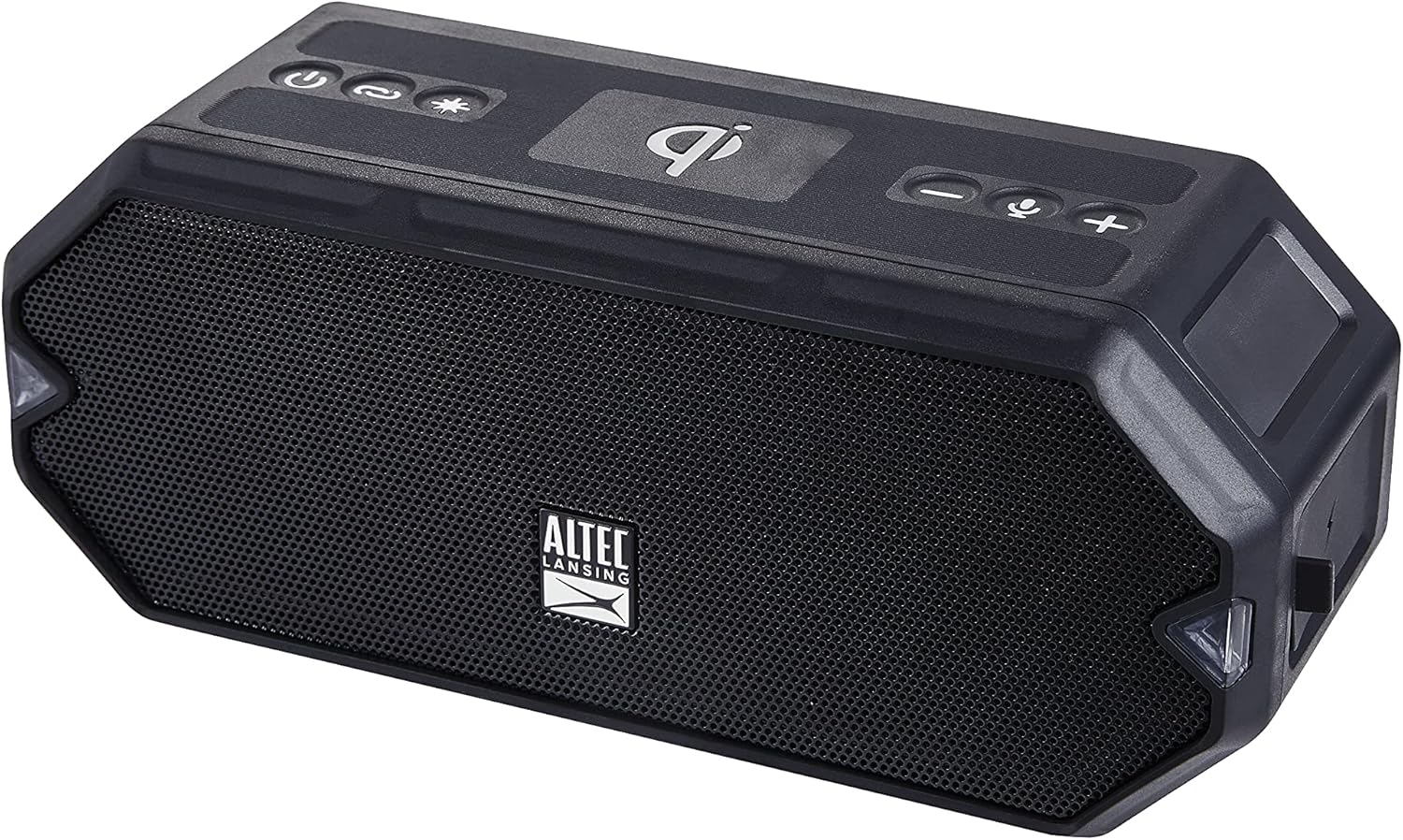
To power on the speaker, press and hold the Power button ( ) located on the top panel until you hear an audible cue and the LED lights illuminate. To power off, press and hold the same button until the lights turn off.
3. Bluetooth Pairing
Follow these steps to pair your device with the HydraBlast speaker:
- Ensure the speaker is powered on and in pairing mode. The Bluetooth indicator light will flash.
- On your mobile device, navigate to the Bluetooth settings.
- Select "Altec Lansing HydraBlast" from the list of available devices.
- Once connected, the Bluetooth indicator light on the speaker will become solid, and you will hear a confirmation tone.
4. True Wireless Pairing (TWS)
You can pair two HydraBlast speakers together for a stereo sound experience. Ensure both speakers are powered on and not connected to any other Bluetooth device. Press the Link button () on both speakers. They will automatically connect to each other. Then, pair your device to one of the speakers as described in step 3.

Operating the Speaker
1. Basic Controls
- Volume Up/Next Track: Press the + button () to increase volume. Press and hold to skip to the next track.
- Volume Down/Previous Track: Press the - button (
 ) to decrease volume. Press and hold to go to the previous track.
 - Play/Pause/Answer Call: Press the Voice Assistant/Answer Calls button () to play or pause music, or to answer/end a phone call. Press and hold to activate your device's voice assistant.
2. LED Light Modes
The HydraBlast speaker features 11 LED light modes to enhance your listening experience. Press the Color Change button () to cycle through the different light patterns and colors.
3. Wireless Phone Charging
Place your Qi-compatible smartphone on the designated wireless charging pad on top of the speaker. Ensure the phone is centered for optimal charging. The charging indicator on your phone will confirm that charging has begun.

4. Charging External Devices (USB-C Output)
The speaker also functions as a power bank. Connect your smartphone or tablet to the USB-C port on the speaker using a compatible cable to charge your device.

Maintenance
1. IP67 Everything Proof Rating
Your HydraBlast speaker is rated IP67, meaning it is Shockproof, Snowproof, Waterproof, and Dustproof. This allows for use in various outdoor and challenging environments. While it can withstand submersion up to 1 meter for 30 minutes, it is recommended to ensure all port covers are securely closed before exposure to water or dust.

2. Cleaning and Storage
- To clean the speaker, use a soft, damp cloth. Avoid using harsh chemicals or abrasive cleaners.
- Ensure the speaker is dry before charging or storing for extended periods.
- Store the speaker in a cool, dry place away from direct sunlight and extreme temperatures.
Troubleshooting
| Problem | Possible Cause | Solution |
|---|---|---|
| Speaker does not power on. | Low battery. | Charge the speaker fully using the provided USB-C cable. |
| No sound from speaker. | Volume too low; device not paired; incorrect audio source. | Increase speaker and device volume. Re-pair the device. Ensure correct audio output is selected on your device. |
| Bluetooth pairing fails. | Speaker not in pairing mode; device too far; interference. | Ensure speaker is in pairing mode (flashing Bluetooth light). Move device closer to speaker. Turn off other Bluetooth devices. |
| Wireless charging not working. | Phone not Qi-compatible; phone not centered; foreign objects. | Verify phone supports Qi wireless charging. Reposition phone on the charging pad. Remove any metal objects or thick cases. |
| Short battery life. | Speaker not fully charged; high volume usage; LED lights on. | Ensure speaker is fully charged. Reduce volume. Turn off LED lights when not needed. |
Specifications
| Model Name | IP67 |
| Item Model Number | IMW1300-BLK-STK-2 |
| Brand | Altec Lansing |
| Material | Durable Plastic or Rubber |
| Speaker Type | Outdoor |
| Special Feature | Portable |
| Connectivity Technology | Bluetooth, USB |
| Wireless Communication Technology | Bluetooth |
| Battery Life | 20 Hours |
| Charging Time | 20 Hours |
| Water Resistance Level | Waterproof (IP67) |
| Item Weight | 0.79 Kilograms (1.74 pounds) |
| Product Dimensions | 8.7"D x 4.4"W x 5.5"H |
| Speaker Maximum Output Power | 6 Watts |
| Included Components | Bluetooth Speaker |
| UPC | 021331023681 |
Product Videos
This video provides an overview of the Altec Lansing HydraBlast Waterproof Bluetooth Speaker, highlighting its key features and design.
A short video showcasing the Altec Lansing HydraBlast Wireless Portable Bluetooth Speaker in action.
Warranty and Support
The Altec Lansing HydraBlast speaker comes with a Standard Manufacturer Warranty. For detailed warranty information, terms, and conditions, please refer to the warranty card included with your product or visit the official Altec Lansing website.
For technical support, troubleshooting assistance beyond this manual, or to inquire about replacement parts, please contact Altec Lansing customer service. Contact information can typically be found on the product packaging or their official website: www.alteclansing.com
