
PETLIBRO 3L-Basic
PETLIBRO Automatic Pet Feeder User Manual
Model: 3L-Basic
Introduction
Thank you for choosing the PETLIBRO Automatic Pet Feeder. This device is designed to provide consistent and portion-controlled meals for your cat or dog, ensuring their well-being even when you are away. With features like freshness preservation, programmable feeding schedules, and dual power supply, this feeder offers convenience and peace of mind for pet owners.

Figure 1: PETLIBRO Automatic Pet Feeder (Granary White 3L-Basic)
Product Features
- Freshness Preservation: Features a patented rotor, secure twist-lock lid, built-in desiccant bag, and sealing strip to maintain food freshness and crunchiness.
- Programmable Feeding: Allows setting 1-6 meals daily with up to 50 portions per meal (20ml per portion). The tilt LED panel facilitates easy schedule adjustment and battery monitoring.
- Dual Power Supply: Operates via USB-C adapter or 3 alkaline D batteries (not included) as a backup, ensuring continuous feeding during power outages.
- Personalized Meal Call: Record a 10-second voice message that can be played 0-5 times per feeding, comforting your pet.
- BPA-Free and Easy to Clean: Constructed from BPA-free materials. The tank lid, tank, tank base, and food bowl are removable for thorough cleaning.
- Smart Infrared Detection: A built-in infrared sensor in the food outlet prevents overfilling by stopping food dispensing if the outlet is blocked.
- 304 Stainless Steel Bowl: The food-grade stainless steel bowl is hygienic and helps prevent feline acne.

Figure 2: Triple seal lock system for freshness.

Figure 3: Automated feeding schedule for balanced diet.
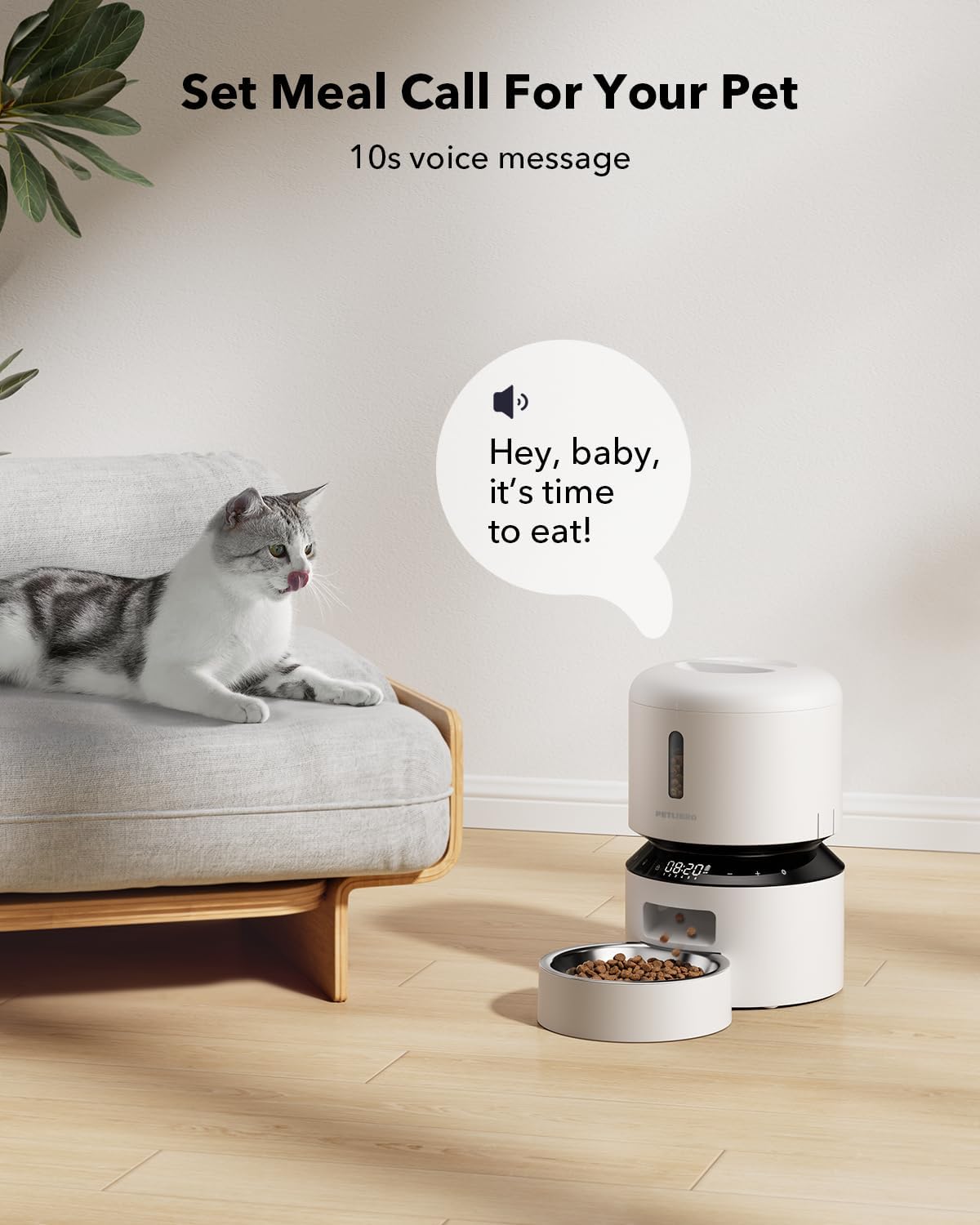
Figure 4: Record a personalized voice message for your pet.

Figure 5: Detachable design for easy and thorough cleaning.
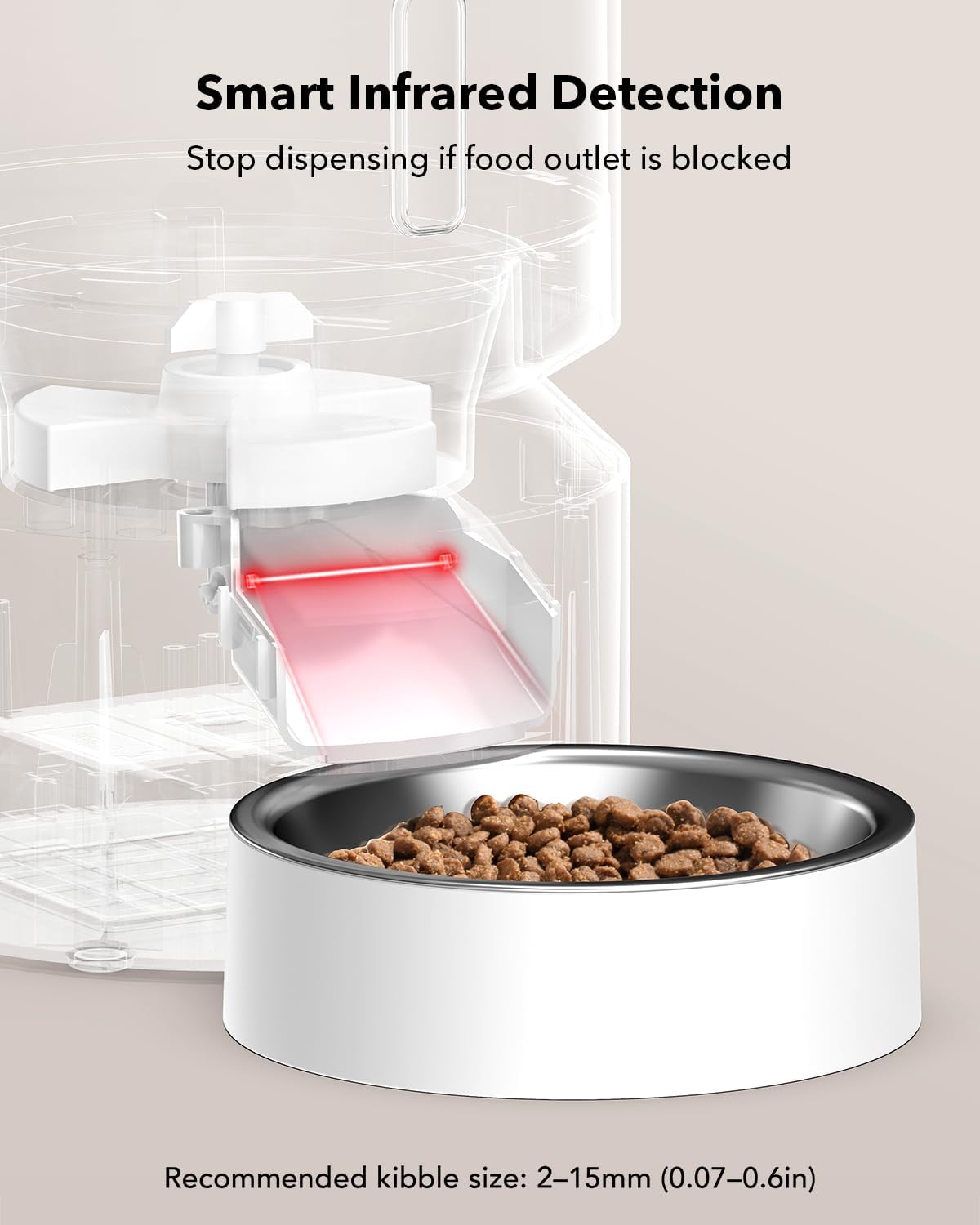
Figure 6: Infrared sensor prevents food blockage.
Package Contents
Please check the package contents upon unboxing:
- Automatic Pet Feeder x 1
- Charger x 1
- Desiccant Bag x 1
- Quick Guide x 1
- User Manual x 1
Setup
1. Assembly
Assemble the feeder by placing the food tank securely onto the base. Ensure the stainless steel bowl is properly seated in its designated slot.
2. Power Supply
Connect the feeder to a power outlet using the provided USB-C charger. For backup power, insert 3 alkaline D batteries (not included) into the battery compartment at the bottom of the unit. This ensures uninterrupted feeding during power outages.

Figure 7: Dual power options for reliability.
3. Filling the Food Tank
Open the twist-lock lid and fill the food tank with dry kibble. The feeder is designed for dry kibble with a diameter between 2-15mm. Do not use kibble over 15mm, as it may cause blockages. Ensure the desiccant bag is placed in its compartment to keep food fresh.

Figure 8: Filling the food tank and ensuring freshness.
4. App Connection (if applicable for your model)
Download the PETLIBRO app from your device's app store. Follow the in-app instructions to connect your feeder to your home Wi-Fi network. This model supports 5G Wi-Fi for stable connection. The app allows for remote control, scheduling, and monitoring.
Operating the Feeder
1. Setting a Feeding Schedule
Use the LED panel on the feeder or the PETLIBRO app to program your pet's feeding schedule. You can set up to 6 meals per day, with each meal consisting of 1 to 50 portions (20ml per portion). Adjust the portion size based on your pet's dietary needs and veterinarian recommendations.
2. Manual Feeding
To dispense food manually, press the manual feeding button on the feeder or use the "Feed Now" function in the app. This allows you to provide extra treats or meals as needed, up to 5 portions at a time.
3. Recording a Voice Message
Press and hold the record button on the feeder to record a 10-second voice message. This message will play during scheduled feeding times. You can set the playback frequency from 0 to 5 times via the app.
Maintenance
1. Cleaning the Feeder
For optimal hygiene, regularly clean the removable parts of the feeder. The tank lid, food tank, tank base, and stainless steel food bowl can be detached for thorough cleaning. Do not wash the main feeder base, as it contains electronic components. Wipe dry all parts completely before reassembly.
2. Desiccant Bag Replacement
The built-in desiccant bag helps keep the food dry and fresh. It is recommended to replace the desiccant bag every two weeks to maintain its effectiveness.
Troubleshooting
- Food Not Dispensing: Check if the food outlet is blocked. The built-in infrared sensor will stop dispensing if an obstruction is detected. Clear any blockages. Ensure the food tank is not empty and that the kibble size is within the recommended 2-15mm range.
- Power Interruption: If the feeder loses main power, the D batteries (if installed) will act as a backup. Ensure batteries are fresh and correctly inserted.
- Inconsistent Feeding Times: Verify your programmed schedule in the app or on the LED panel. Ensure the feeder is connected to a stable power source.
Specifications
| Specification | Detail |
|---|---|
| Brand | PETLIBRO |
| Model Name | Automatic Pet Feeder (3L-Basic) |
| Item Weight | 4.13 pounds |
| Item Dimensions (LxWxH) | 7.72 x 7.6 x 7.95 inches |
| Color | White |
| Material | Stainless Steel (bowl) |
| Recommended Kibble Size | 2-15mm |
| Power Source | USB-C Adapter, 3 x D Batteries (backup) |
| Max Meals/Day | 6 |
| Max Portions/Meal | 50 (20ml each) |

Figure 9: Product Dimensions.
Warranty and Support
The PETLIBRO Automatic Pet Feeder comes with a 24 Months Warranty. For any product inquiries, technical support, or warranty claims, please refer to the contact information provided in your Quick Guide or visit the official PETLIBRO website.
A digital version of this User Manual is available for download at: PETLIBRO User Manual PDF
Related documents3L-Basic


Ask a question about this manual
Ask about setup, troubleshooting, compatibility, parts, safety, or missing instructions. Manuals+ will review the question and use this page’s manual context to help answer it.