
Yaheetech YT-00106015
Yaheetech Console Table YT-00106015 User Manual
Model: YT-00106015
Introduction
This manual provides detailed instructions for the assembly, operation, and maintenance of your Yaheetech Console Table (Model: YT-00106015). Please read this manual thoroughly before assembly and use to ensure safe and correct operation.

Image: The Yaheetech Console Table fully assembled, demonstrating its aesthetic appeal and potential placement in a home environment.
Safety Information
Important Safety Precautions:
- Always follow the assembly instructions carefully.
- Use the provided anti-tipping unit to secure the table firmly to the wall to prevent tipping. This is a crucial safety measure.
- Do not overload the table or its shelves and drawer beyond their specified weight limits.
- Ensure all screws and fasteners are tightened securely before use. Periodically check for loose connections.
- Keep small parts away from children during assembly to prevent choking hazards.
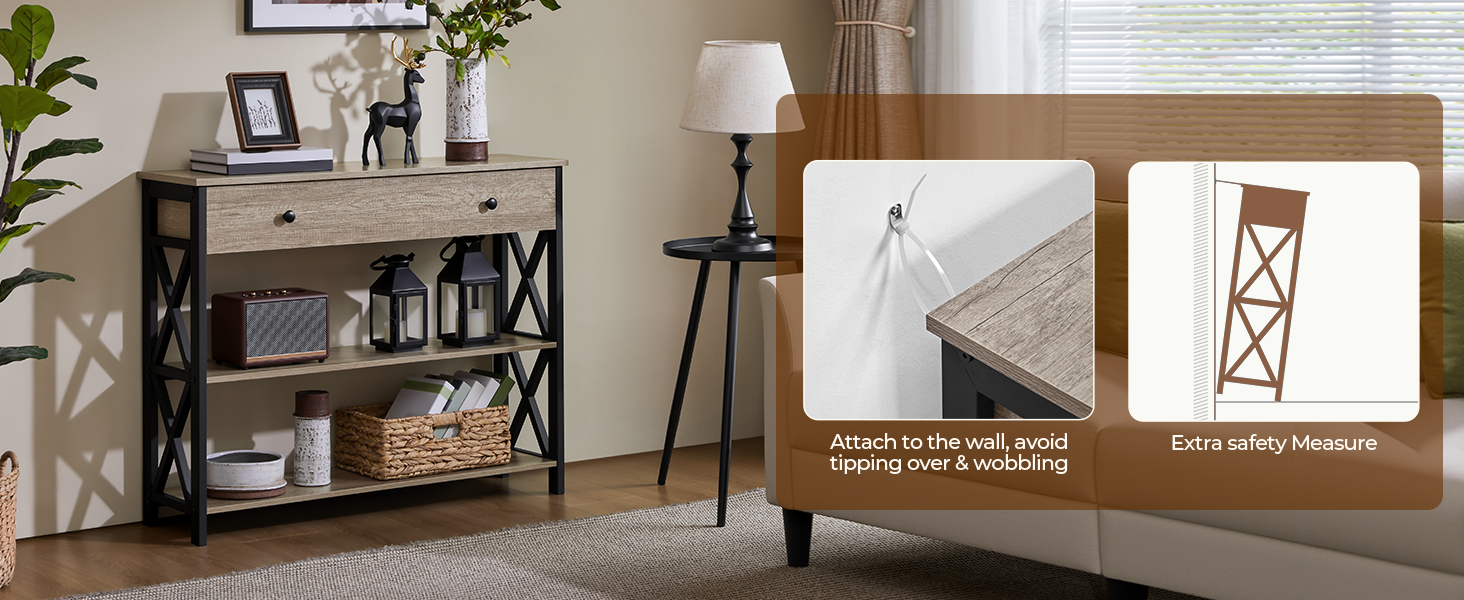
Image: Illustration of the anti-tipping unit, highlighting its function in securing the table to the wall for enhanced stability and safety.
Package Contents
Before beginning assembly, verify that all components listed below are present and undamaged. If any parts are missing or damaged, please contact customer support.
- Top Panel
- Drawer Components (Front, Back, Sides, Bottom)
- Side Frames (with X-shaped braces)
- Middle Shelf
- Bottom Shelf
- Hardware Pack (Screws, Dowels, Cam Locks, etc.)
- Assembly Guide
- Installation Tool (Allen Wrench)
Note: A screwdriver is recommended for assembly, but not included.
Assembly Instructions
Assembly typically requires two people. Follow the step-by-step instructions provided in the included Assembly Guide. Below are general steps and a specific video for drawer slide installation.
- Attach the side frames to the bottom shelf.
- Install the middle shelf.
- Assemble the drawer components.
- Install the drawer slides onto the table frame and the drawer.
- Insert the assembled drawer into the table.
- Attach the top panel.
- Install the anti-tipping unit to secure the table to the wall.
Drawer Slide Installation Video
For detailed guidance on installing the drawer slides, please refer to the official video below. Ensure the two sides are horizontally aligned when inserting the drawer.
Video: Official installation guide for the drawer slide mechanism, demonstrating proper alignment and insertion.

Image: Detail of the ball-bearing drawer slides, illustrating their smooth and strong design with buffer and anti-separation features.
Operating Instructions
The Yaheetech Console Table is designed for versatile storage and display.
- Drawer Usage: The drawer features ball-bearing slides for smooth and effortless opening and closing. It includes buffer and anti-separation functions to prevent accidental removal. Use the drawer for storing small, delicate items such as keys, glasses, or remote controls.
- Shelf Usage: The two open shelves provide ample space for books, decorative items, or storage baskets.
- Weight Capacity:
- Tabletop: Up to 198 lb (90 kg)
- Each Shelf: Up to 55 lb (25 kg)
- Drawer: Up to 22 lb (10 kg)
Do not exceed these weight limits to ensure stability and prevent damage.

Image: The console table's drawer opened, showing its capacity for organizing small household items.
Maintenance
To maintain the appearance and longevity of your console table, follow these simple care instructions:
- For general cleaning, wipe surfaces with a damp cloth.
- Immediately follow with a dry cloth to prevent moisture damage.
- Avoid using harsh chemicals or abrasive cleaners, as these can damage the finish.
- Periodically check and tighten all fasteners to ensure structural integrity.
Troubleshooting
If you encounter any issues with your console table, refer to the following common solutions:
- Wobbling or Instability:
- Ensure all screws and bolts are securely tightened.
- Verify that the table is placed on a level surface.
- Confirm the anti-tipping unit is correctly installed and secured to the wall.
- Drawer Not Sliding Smoothly:
- Check that the drawer slides are properly aligned and free of obstructions.
- Ensure the drawer is not overloaded beyond its weight capacity.
- Lubricate the drawer slides with a silicone-based lubricant if necessary.
- Missing Parts or Damaged Components:
- Refer to the "Package Contents" section to confirm all parts were received.
- Contact Yaheetech customer support for assistance with replacements.
Specifications
| Feature | Detail |
|---|---|
| Brand | Yaheetech |
| Model Number | YT-00106015 |
| Overall Dimensions (D x W x H) | 12" x 39.5" x 32" (30.5 cm x 100.3 cm x 81.3 cm) |
| Item Weight | 44.53 lbs (20.2 kg) |
| Frame Material | Iron |
| Top Material Type | Engineered Wood (CARB P2 MDF) |
| Number of Drawers | 1 |
| Number of Shelves | 3 (including top surface) |
| Tabletop Weight Capacity | 198 lbs (90 kg) |
| Each Shelf Weight Capacity | 55 lbs (25 kg) |
| Drawer Weight Capacity | 22 lbs (10 kg) |
| Color | Grey (as per current product variant) |
| Assembly Required | Yes (Recommended 2 people) |

Image: Technical drawing illustrating the precise dimensions of the console table and its components.
Warranty and Support
For warranty information, product support, or to order replacement parts, please contact Yaheetech customer service through their official website or the retailer where the product was purchased. Please have your model number (YT-00106015) ready when contacting support.
Related documentsYT-00106015


Ask a question about this manual
Ask about setup, troubleshooting, compatibility, parts, safety, or missing instructions. Manuals+ will review the question and use this page’s manual context to help answer it.