
1. Introduction
The BAOFENG UV-5R Pro is a high-performance, multi-functional two-way radio designed for reliable communication. It features long battery life, strong communication capabilities, flexible programming options, and multiple power adjustments, making it suitable for both professional and amateur radio enthusiasts. This manual provides essential information for the proper setup, operation, and maintenance of your device.
2. Package Contents
Please check the package carefully to ensure all items are present and in good condition. If any items are missing or damaged, contact your retailer.
- 1 × BAOFENG UV-5R Pro 8W Radio
- 1 × 3800mAh Li-ion Battery (Model: BL-5L)
- 1 × Support CHIRP Programming Cable
- 1 × Radio Case
- 1 × Handheld Microphone (MIC-01)
- 1 × Power Adapter
- 1 × Belt Clip
- 1 × Hand Strap
- 1 × User's Manual (this document)
3. Product Overview
Familiarize yourself with the main components of your BAOFENG UV-5R Pro radio and its accessories.

Figure 3.1: BAOFENG UV-5R Pro Radio. This image displays the front of the UV-5R Pro radio, showing the display screen, keypad, and various function buttons. The antenna is attached at the top.
3.1. Handheld Microphone

Figure 3.2: Handheld Microphone (Model: MIC-01). This image shows the handheld microphone accessory, which connects to the radio for external audio input and output. It features a speaker, microphone, and a coiled cable that can stretch up to 60 inches.
The included handheld microphone (MIC-01) provides convenient external control for transmitting and receiving audio. It features a speaker, microphone, and a push-to-talk (PTT) button. The coiled cable allows for flexible use.
3.2. Programming Cable

Figure 3.3: Programming Cable. This image illustrates the USB programming cable used to connect the radio to a computer for channel and setting configuration via software like CHIRP.
The programming cable allows you to connect your UV-5R Pro radio to a computer for advanced configuration using compatible software, such as CHIRP. This enables customization of channels, frequencies, and other operational parameters.
3.3. 3800mAh Li-ion Battery

Figure 3.4: 3800mAh Li-ion Battery (Model: BL-5L). This image shows the high-capacity Li-ion battery pack designed for the UV-5R Pro, providing extended operational time.
The radio is powered by a high-capacity 3800mAh Li-ion battery (Model: BL-5L), offering extended usage time. Proper battery installation and charging are crucial for optimal performance.
3.4. Radio Case
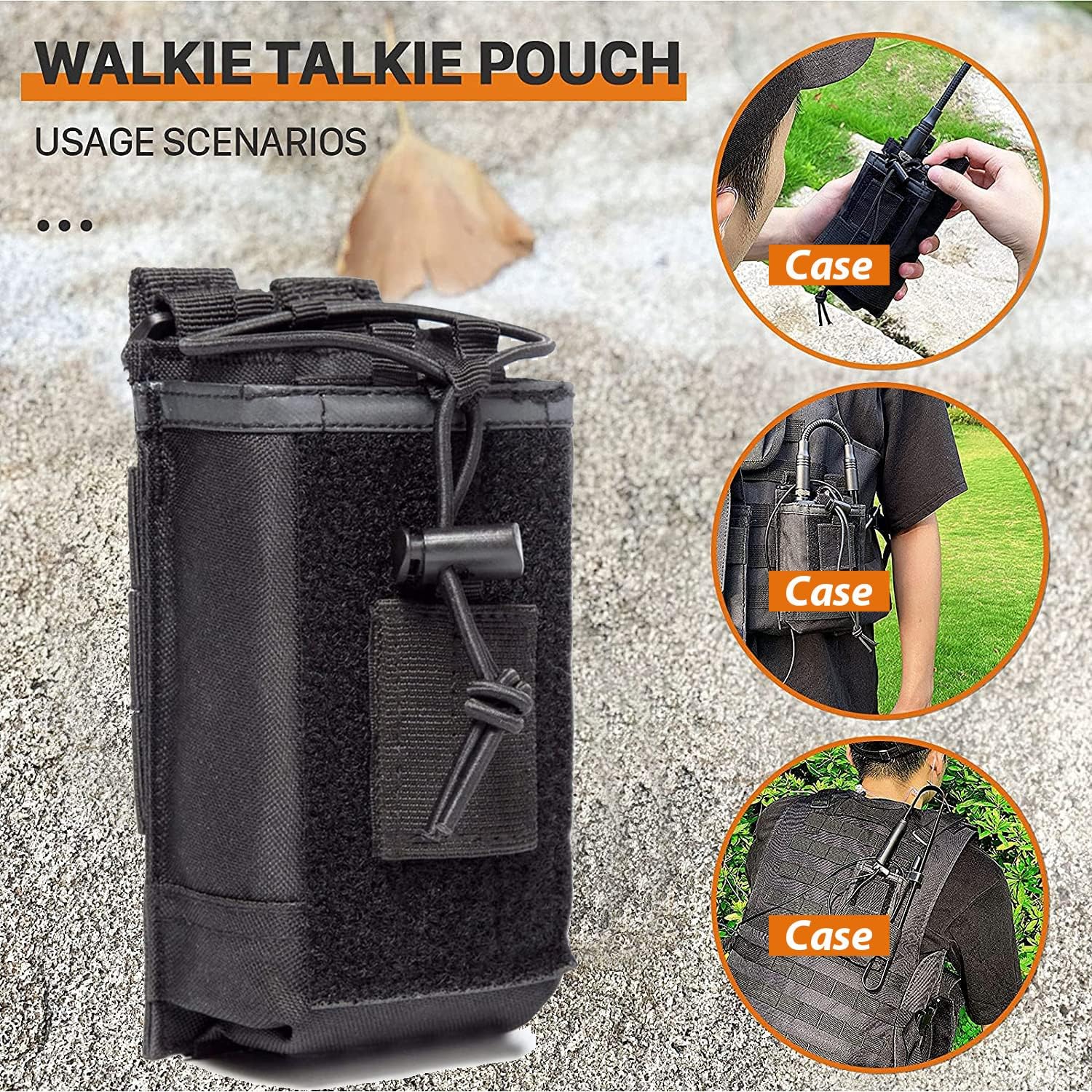
Figure 3.5: Radio Case/Pouch. This image displays the included radio case, designed for secure and convenient carrying of the UV-5R Pro radio, suitable for various usage scenarios.
A durable radio case is included to protect your device during transport and use. It can be attached to belts or tactical gear for easy access.
4. Setup
4.1. Battery Installation
- Align the battery pack with the grooves on the back of the radio.
- Slide the battery pack upwards until it clicks into place.
- To remove, press the battery release latch (usually at the bottom of the battery) and slide the battery downwards.
4.2. Antenna Attachment
- Screw the antenna clockwise into the connector on the top of the radio until it is finger-tight. Do not overtighten.
- Ensure the antenna is securely attached before operation to prevent damage and ensure optimal signal.
4.3. Charging the Battery
- Connect the power adapter to the charging base.
- Plug the power adapter into an AC outlet.
- Place the radio with the battery installed into the charging base. The charging indicator light will typically turn red while charging and green when fully charged.
- A full charge typically takes 4-5 hours. Do not overcharge the battery for extended periods.
5. Operating Instructions
5.1. Power On/Off and Volume Control
- Power On: Rotate the volume knob (located on top of the radio) clockwise until you hear a click.
- Power Off: Rotate the volume knob counter-clockwise until you hear a click.
- Volume Adjustment: Rotate the volume knob clockwise to increase volume and counter-clockwise to decrease volume.
5.2. Channel Selection
- The UV-5R Pro supports both Frequency Mode (VFO) and Channel Mode (MR).
- Press the VFO/MR button to switch between modes.
- In Channel Mode, use the UP/DOWN arrow keys or the keypad to select a stored channel.
- In Frequency Mode, enter the desired frequency directly using the keypad.
5.3. Transmitting and Receiving
- To transmit, press and hold the PTT (Push-To-Talk) button on the side of the radio or the handheld microphone. Speak clearly into the microphone.
- Release the PTT button to stop transmitting and return to receive mode.
- Ensure you are on an appropriate frequency or channel before transmitting.
5.4. Power Output Adjustment
The UV-5R Pro offers multiple power output options (High, Medium, Low) up to 8W. This allows you to adapt to communication needs at different distances and environments, conserving battery life when high power is not required.
- Access the power setting through the radio's menu. Consult the on-screen menu for specific navigation steps.
- Select the desired power level (High, Medium, or Low).
5.5. Programming with CHIRP Software
For advanced channel management and customization, use the included programming cable and CHIRP software. CHIRP is a free, open-source program that allows you to manage your radio's memory channels, frequencies, and other settings from your computer.
- Install the necessary drivers for the programming cable on your computer.
- Download and install the latest version of CHIRP software.
- Connect the programming cable to your computer's USB port and to the radio's accessory port.
- Turn on the radio.
- Launch CHIRP and follow the software's instructions to read data from the radio, make changes, and write data back to the radio.
Note: Detailed instructions for CHIRP software can be found on the official CHIRP website or through online resources.
6. Maintenance
- Cleaning: Use a soft, damp cloth to clean the radio's exterior. Do not use harsh chemicals or abrasive cleaners.
- Battery Care: Store the battery in a cool, dry place when not in use. Avoid fully discharging the battery frequently to prolong its lifespan.
- Antenna: Ensure the antenna connection is clean and free of debris. Avoid bending or stressing the antenna.
- Storage: When storing the radio for extended periods, remove the battery and store it separately.
7. Troubleshooting
| Problem | Possible Cause | Solution |
|---|---|---|
| Radio does not power on. | Battery is low or not installed correctly. | Charge the battery or re-install it securely. |
| Cannot transmit or receive. | Incorrect frequency/channel, antenna not connected, or low battery. | Verify frequency/channel, ensure antenna is secure, charge battery. |
| Poor audio quality. | Weak signal, incorrect squelch setting, or damaged microphone/speaker. | Adjust squelch, move to a better signal area, check microphone/speaker connections. |
| Programming issues with CHIRP. | Incorrect cable drivers, wrong COM port, or radio not in programming mode. | Install correct drivers, select proper COM port in CHIRP, ensure radio is on. |
8. Specifications
| Feature | Detail |
|---|---|
| Brand | BAOFENG |
| Model Number | UV-5R Pro |
| Color | Black |
| Number of Channels | 999 |
| Special Features | Dual Band, Long Range, Multiple Power Output Options (up to 8W) |
| Frequency Range | VHF/UHF (420-450MHz) |
| Talking Range Maximum | 8 Miles (approximate, depends on terrain and conditions) |
| Voltage | 7.4 Volts |
| Water Resistance Level | Water Resistant |
| Battery Type | 3800mAh Li-ion (Model: BL-5L) |
| Battery Average Life | 18 Hours (typical usage) |
| Item Weight | 250 Grams |
| Impedance | 50 Ohms |
| Tuner Type | UHF/VHF |
| Manufacturer | Fujian Baofeng Electronics Co., Ltd |
9. Warranty and Support
BAOFENG offers a comprehensive warranty program for your UV-5R Pro radio:
- Radio Body: 2-year warranty.
- Accessories: 1-year warranty.
- Return Policy: 30-day no-reason return policy.
- Post-Warranty Service: Maintenance services are available at your cost after the warranty period.
For any questions, technical assistance, or warranty claims, please contact BAOFENG customer support through the Amazon platform for a prompt response within 12 hours. Please provide your product model and purchase details when contacting support.


