
1. Introduction
This manual provides comprehensive instructions for the SV3C Outdoor 5MP PTZ WiFi Security Camera. Please read this manual carefully before installation and operation to ensure proper use and optimal performance of your device. Keep this manual for future reference.
2. Product Features
- Pan/Tilt/Zoom (PTZ) & 5x Optical Zoom: Enjoy a wide viewing angle with 355° horizontal pan and 90° vertical tilt. The 5x optical zoom allows for detailed magnification without loss of image quality. Control camera movement and zoom remotely via the dedicated application on your smartphone, tablet, or PC.
- Advanced AI Motion Detection & Real-time Notifications: Equipped with intelligent human detection to accurately identify human figures, reducing false alarms from insects, light changes, or animals. Customize detection sensitivity and specific monitoring areas. Upon detection, the camera records 15-second clips, sends real-time notifications to your smartphone, and can send email alerts.
- Enhanced Night Vision & Durability: Features 10 high-quality infrared and white LED lights, providing clear night vision up to 50 meters. Supports both black-and-white infrared night vision and full-color night vision. The robust aluminum construction ensures IP66 waterproof performance, making it suitable for various outdoor weather conditions.
- Remote Access & Two-Way Audio: Connect the camera to your network via wired (LAN) or wireless (Wi-Fi) connection. Access real-time video feeds and control the camera from anywhere using your PC, smartphone, or tablet. The built-in microphone and speaker enable two-way audio communication, allowing you to listen and speak through the camera.
- Versatile Applications: This camera is designed for a wide range of security applications, including monitoring driveways for car vandalism, securing gardens, enhancing store security, and providing surveillance for home childcare or elderly care.
- Certifications & Support: The product is PSE and technical conformity certified for safe use in Japan. It comes with a 12-month quality warranty and lifetime free technical support.
3. Product Overview
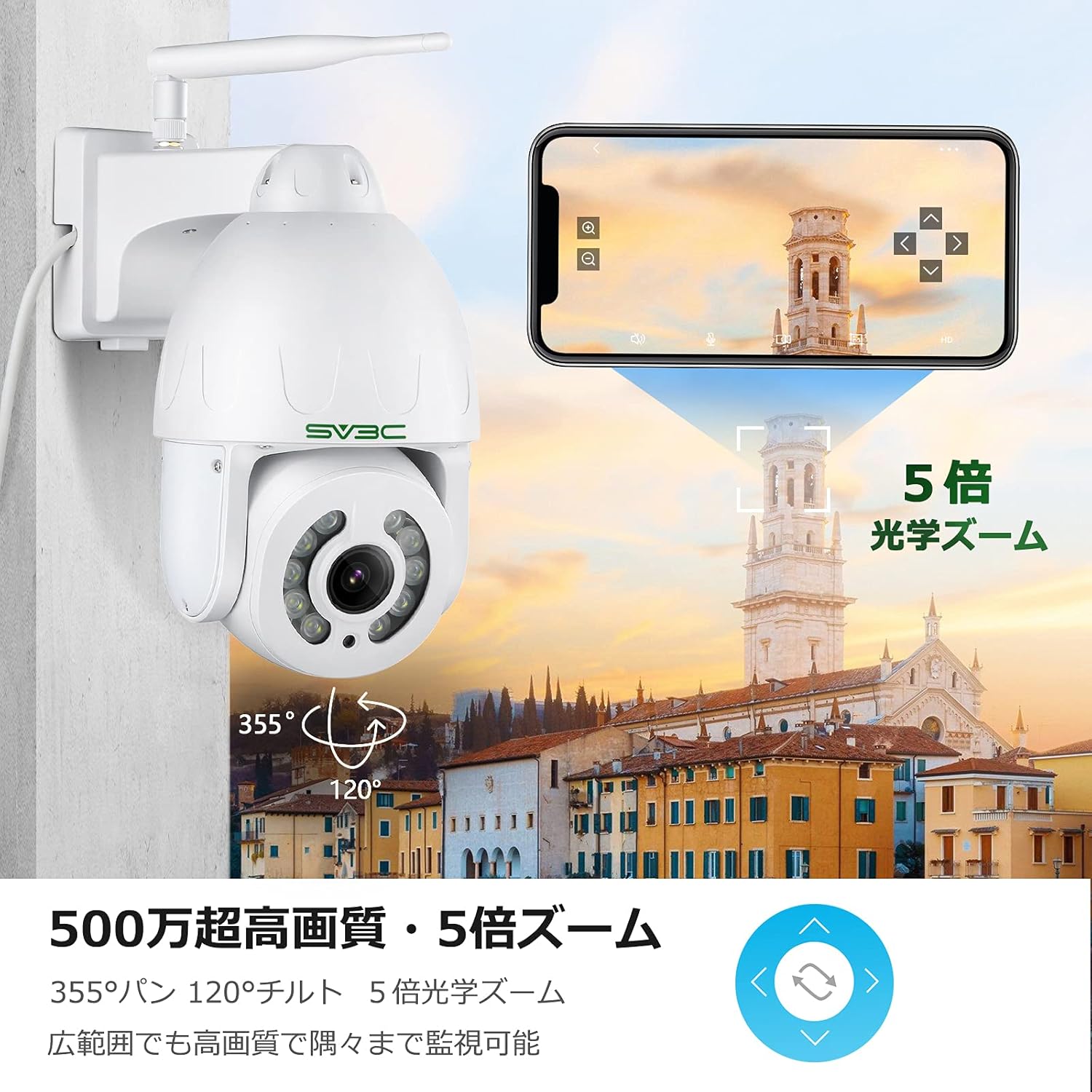






4. Package Contents
Please check the package contents upon receipt. If any items are missing or damaged, contact customer support immediately.
- SV3C Outdoor 5MP PTZ WiFi Security Camera (Model: aaa)
- Power Adapter
- Mounting Screws and Wall Plugs
- Waterproof Kit for Network Cable
- Quick Start Guide
5. Setup Instructions
5.1. Powering On the Camera
- Connect the power adapter to the camera's power input port.
- Plug the power adapter into a power outlet. The camera will power on and perform a self-test, indicated by its rotation.
- Wait for the camera to complete its startup sequence. You may hear a voice prompt indicating it's ready for network configuration.
5.2. App Installation and Initial Setup
- Download the recommended mobile application (e.g., 'CamHipro' or 'HiP2P Client' for PC) from your device's app store or the official SV3C website.
- Register an account and log in to the application.
- Add the camera to the app by scanning the QR code on the camera or manually entering its UID.
- Follow the on-screen prompts to connect the camera to your Wi-Fi network. Ensure your Wi-Fi network is 2.4GHz, as 5GHz is not supported by this device.
- Once connected, you should see the live feed from your camera in the app.
5.3. Physical Installation
- Choose a suitable outdoor location for installation, ensuring a clear view and strong Wi-Fi signal.
- Use the provided mounting template to mark drill holes on the wall or ceiling.
- Drill the holes and insert the wall plugs.
- Secure the camera bracket to the wall/ceiling using the mounting screws.
- Attach the camera to the bracket and adjust its angle as needed.
- If using a wired connection, connect an Ethernet cable to the camera's LAN port and use the waterproof kit to protect the connection.
6. Operating Instructions
6.1. Live View
Open the app and select your camera to view the live feed. You can pan, tilt, and zoom using the controls on the screen.
6.2. Two-Way Audio
Tap the microphone icon in the app to speak through the camera's speaker. Tap the speaker icon to listen to audio from the camera's microphone.
6.3. Recording and Playback
The camera supports MicroSD card recording. Insert a MicroSD card (up to 128GB recommended) into the designated slot. Recordings can be viewed and downloaded via the app's playback function.
6.4. Motion Detection Settings
Navigate to the camera settings in the app to configure motion detection. You can adjust sensitivity, define detection zones, and enable AI human detection for more accurate alerts.
7. Maintenance
- Cleaning: Regularly clean the camera lens with a soft, dry cloth to ensure clear image quality. Do not use harsh chemicals.
- Firmware Updates: Check the app periodically for firmware updates. Keeping the firmware updated ensures optimal performance and security.
- Power Supply: Ensure the camera receives a stable power supply. Avoid frequent power interruptions.
- Network Connection: Verify your Wi-Fi signal strength regularly, especially if experiencing connectivity issues.
8. Troubleshooting
| Problem | Possible Cause | Solution |
|---|---|---|
| Camera offline | No power, weak Wi-Fi signal, network issue | Check power connection, move camera closer to router, restart router/camera |
| Cannot connect to Wi-Fi | Incorrect Wi-Fi password, 5GHz network, camera too far from router | Verify password, ensure 2.4GHz network, improve signal strength |
| Frequent false alarms | High sensitivity, detection zone too wide, non-human motion | Adjust sensitivity, refine detection zones, enable AI human detection |
| Poor image quality | Dirty lens, low network bandwidth | Clean lens, ensure stable internet connection |
9. Specifications
- Model: aaa
- Video Resolution: 5 Megapixels
- Zoom: 5x Optical Zoom
- Pan/Tilt Range: Pan 355°, Tilt 90°
- Night Vision: Up to 50 meters (Infrared & Color Night Vision)
- Connectivity: Wi-Fi (2.4GHz only), Wired LAN, ONVIF
- Waterproof Rating: IP66
- Motion Detection: AI Human Detection, Motion Sensor
- Audio: Two-Way Audio
- Storage: MicroSD Card (up to 128GB), Cloud Storage (subscription may be required)
- Video Compression: Smart H.265, MPEG-4
- Material: Metal
- Dimensions: 19.3 x 19 x 2 cm
- Weight: Approx. 1.2 kg
- Power: DC 12V (Power Adapter included)
10. Warranty and Support
Your SV3C Outdoor 5MP PTZ WiFi Security Camera is covered by a 12-month quality warranty from the date of purchase. SV3C also provides lifetime free technical support.
For any questions, issues, or technical assistance, please contact SV3C customer support through the following channels:
- Email: [Insert SV3C Support Email Here]
- Website: SV3C Official Store on Amazon.co.jp
Please have your model number (aaa) and purchase information ready when contacting support.


