
1. Introduction
Thank you for choosing the hoco. ES55 Songful TWS Wireless Headset. This manual provides detailed instructions on how to set up, operate, and maintain your new wireless earbuds. Please read this manual carefully before use to ensure optimal performance and longevity of your device.
2. Package Contents
Ensure all items are present in your package:
- hoco. ES55 Songful TWS Wireless Headset (Left and Right Earbuds)
- Charging Case
- Charging Cable
- Ear Cushions (various sizes)
- User Manual (this document)
3. Product Overview
Familiarize yourself with the components of your hoco. ES55 Songful headset.
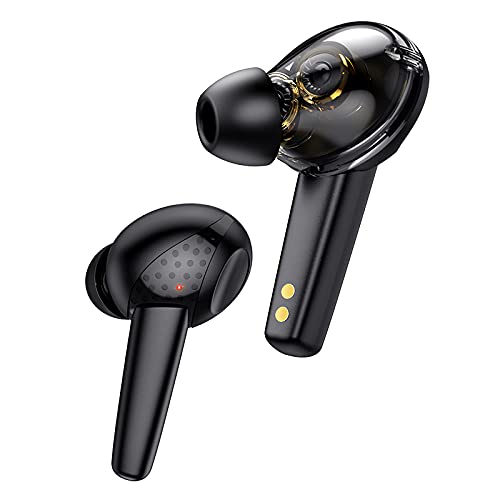
Figure 3.1: The hoco. ES55 Songful TWS Wireless Headset earbuds. These are in-ear style earbuds, black in color, with a transparent section revealing internal components and gold charging contacts at the base of the stem.
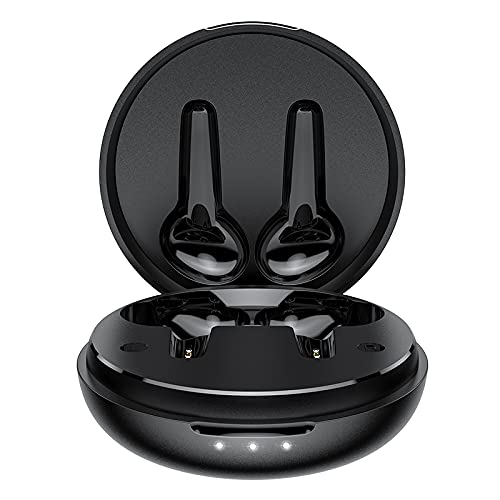
Figure 3.2: The hoco. ES55 Songful charging case shown open, revealing the molded slots for the left and right earbuds. The case is black and circular, with three LED indicator lights on the front edge.
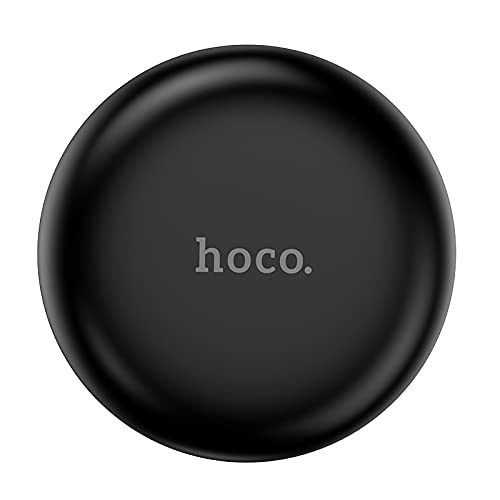
Figure 3.3: The hoco. ES55 Songful charging case shown closed. It is a compact, circular black case with the "hoco." logo subtly embossed on the top surface.
4. Charging the Headset
Before first use, fully charge both the earbuds and the charging case.
- Charging the Case: Connect the provided charging cable to the charging port on the case and to a USB power source (e.g., computer, wall adapter). The LED indicators on the case will illuminate to show charging status. A full charge for the case takes approximately 1.5 hours.
- Charging the Earbuds: Place the earbuds into their respective slots in the charging case. Ensure the charging contacts align. The earbuds will automatically begin charging. A full charge for the earbuds takes approximately 1 hour.
The charging case has a battery capacity of 400mAh, and each headset has a 35mAh battery. A full charge provides approximately 4 hours of talk/music time and up to 200 hours of standby time.
5. Pairing with a Device
Follow these steps to pair your hoco. ES55 Songful headset with your Bluetooth-enabled device:
- Initial Pairing:
- Ensure the charging case is charged and the earbuds are inside.
- Open the charging case. The earbuds will automatically enter pairing mode, indicated by a flashing LED light on one or both earbuds.
- On your device (smartphone, tablet, etc.), go to the Bluetooth settings and turn Bluetooth on.
- Search for available devices. You should see "hoco. ES55 Songful" or a similar name appear in the list.
- Select "hoco. ES55 Songful" to connect. Once connected, a voice prompt will confirm successful pairing, and the earbud LED lights will stop flashing.
- Reconnecting: Once paired, the earbuds will automatically connect to the last paired device when taken out of the charging case and Bluetooth is enabled on your device.
- Single Earbud Use: Either earbud can be used independently. Simply take one earbud out of the case, and it will enter pairing mode or connect to the last paired device.
The headset uses Bluetooth v5.1 technology for stable and efficient wireless communication.
6. Operating the Headset
The hoco. ES55 Songful headset features intuitive controls for managing calls and music.
- Play/Pause Music: Tap the touch sensor on either earbud once.
- Next Track: Double-tap the touch sensor on the right earbud.
- Previous Track: Double-tap the touch sensor on the left earbud.
- Answer/End Call: Tap the touch sensor on either earbud once during an incoming call.
- Reject Call: Press and hold the touch sensor on either earbud for 2 seconds during an incoming call.
- Activate Voice Assistant: Triple-tap the touch sensor on either earbud to activate your device's voice assistant (e.g., Siri, Google Assistant).
- Gaming Mode (Low Latency): The headset supports a low-latency "BEAST Mode" for gaming. Refer to your device's settings or specific app instructions for activation, if applicable.
The headset is equipped with ENx Tech enabled quad microphones for clear voice calls, reducing background noise.
7. Maintenance and Care
To ensure the longevity and optimal performance of your headset, follow these maintenance guidelines:
- Keep the earbuds and charging case clean and dry. Use a soft, dry cloth to wipe them.
- Avoid exposing the device to extreme temperatures, humidity, or corrosive substances.
- Do not disassemble or attempt to repair the device yourself. This will void the warranty.
- Store the earbuds in the charging case when not in use to protect them and keep them charged.
- The earbuds are water-resistant and sweatproof, but not waterproof. Avoid submerging them in water.
8. Specifications
| Feature | Detail |
|---|---|
| Model Name | Songful |
| Bluetooth Version | v5.1 |
| Bluetooth Chip | JL AC6973 |
| Earbud Battery Capacity | 35mAh (each) |
| Charging Case Battery Capacity | 400mAh |
| Earbud Charging Time | Approx. 1 hour |
| Case Charging Time | Approx. 1.5 hours |
| Talk / Music Time | Approx. 4 hours |
| Standby Time | Approx. 200 hours |
| Driver Type | Dual Moving Coil, 6mm Dynamic Driver |
| Wireless Range | Up to 10 meters (33 feet) |
| Water Resistance | Water Resistant, Sweatproof |
| Control Method | Touch, Voice |
| Weight | 35 grams (total) |
| Dimensions | 5 x 2 x 7 cm |
9. Troubleshooting
If you encounter issues with your hoco. ES55 Songful headset, refer to the following common solutions:
- Earbuds not pairing with device:
- Ensure both earbuds are charged.
- Turn off and on Bluetooth on your device.
- Forget "hoco. ES55 Songful" from your device's Bluetooth list and attempt to pair again.
- Place earbuds back in the case, close the lid, wait a few seconds, then open to re-enter pairing mode.
- Only one earbud working:
- Ensure both earbuds are charged.
- Place both earbuds back into the charging case, close the lid, and then take them out together.
- Try resetting the earbuds (refer to manufacturer's website for specific reset instructions if not covered here).
- No sound or low volume:
- Check the volume level on both your device and the earbuds.
- Ensure the earbuds are properly connected to your device.
- Clean any debris from the earbud speaker mesh.
- Charging issues:
- Ensure the charging cable is securely connected to both the case and the power source.
- Verify the power source is functional.
- Clean the charging contacts on both the earbuds and inside the case.
10. Safety Information
Please observe the following safety precautions:
- Do not use the earbuds at excessively high volumes for prolonged periods to prevent hearing damage.
- Be aware of your surroundings when using earbuds, especially in traffic or other potentially hazardous situations.
- Keep the device away from children and pets.
- Dispose of the device and its battery responsibly according to local regulations.
11. Warranty and Support
Your hoco. ES55 Songful TWS Wireless Headset comes with a manufacturer's warranty. For detailed information regarding warranty coverage, terms, and conditions, please refer to the warranty policy provided at the time of purchase or visit the official HOCO website.
For technical support, troubleshooting assistance beyond this manual, or warranty claims, please contact HOCO customer service through their official channels.
Note: Proof of purchase may be required for warranty services.


