
1. Introduction
Thank you for purchasing the Technical Pro SPARK8GNEON Portable Bluetooth Speaker. This manual provides essential information for the safe and efficient operation of your device. Please read it thoroughly before use and retain it for future reference.
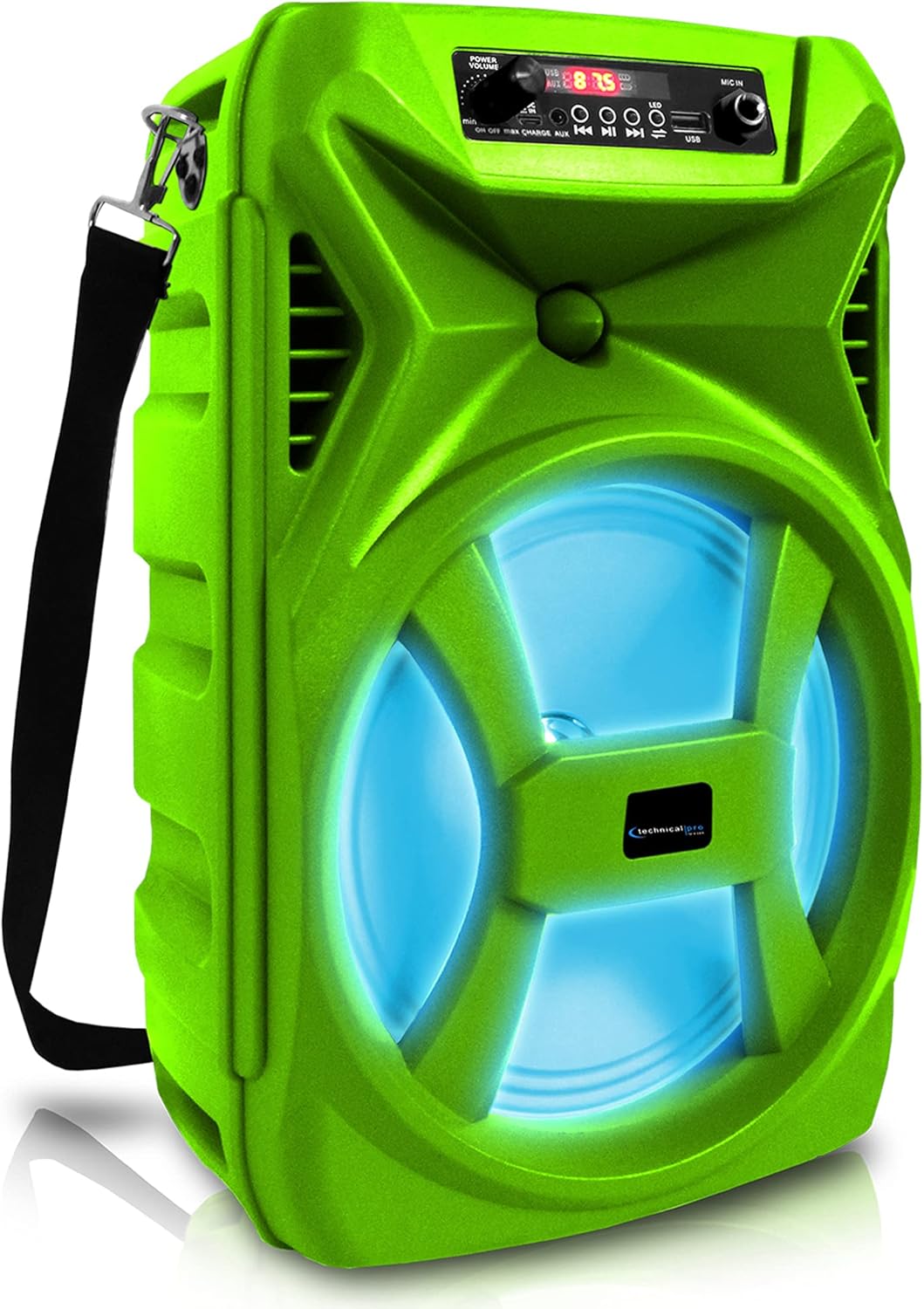
Front view of the Technical Pro SPARK8GNEON portable Bluetooth speaker, showcasing its vibrant green casing, illuminated woofer, and the top-mounted control panel.
2. Safety Information
- Do not expose the speaker to extreme temperatures, humidity, or direct sunlight.
- Avoid dropping or subjecting the speaker to strong impacts.
- Do not attempt to disassemble or modify the speaker. This will void the warranty.
- Keep the speaker away from water and other liquids.
- Use only the provided charging cable or a certified equivalent.
- Ensure proper ventilation when operating the speaker.
3. Package Contents
Please check that all items are present in the package:
- Technical Pro SPARK8GNEON Portable Bluetooth Speaker
- USB Charging Cable
- Shoulder Strap
- User Manual (this document)
4. Product Overview
Familiarize yourself with the speaker's components and controls.

An infographic detailing the main features of the Technical Pro SPARK8GNEON speaker, such as its built-in rechargeable battery, True Wireless Stereo (TWS) capability, Bluetooth compatibility, USB and card inputs, durable ABS plastic construction, and support for A2DP & AVRCP stereo Bluetooth devices.
Control Panel (Top View)
- Power Button: Press and hold to turn the speaker ON/OFF.
- Mode Button: Short press to switch between Bluetooth, USB, TF Card, and AUX modes.
- Play/Pause Button: Press to play or pause audio.
- Previous/Volume Down Button: Short press for previous track, long press to decrease volume.
- Next/Volume Up Button: Short press for next track, long press to increase volume.
- LED Light Button: Press to cycle through LED light modes or turn them off.
- USB Port: For USB flash drive playback.
- TF Card Slot: For TF (MicroSD) card playback.
- AUX Input: 3.5mm jack for external audio devices.
- Charging Port: For connecting the USB charging cable.
5. Setup
5.1 Initial Charging
- Before first use, fully charge the speaker for 8-10 hours.
- Connect the USB charging cable to the speaker's charging port and the other end to a USB power adapter (not included) or a computer's USB port.
- The charging indicator light will illuminate during charging and turn off when fully charged.
5.2 Powering On/Off
- To power ON, press and hold the Power Button until the display illuminates.
- To power OFF, press and hold the Power Button again until the display turns off.
6. Operating Instructions
6.1 Bluetooth Pairing
- Turn on the speaker. It will automatically enter Bluetooth pairing mode, indicated by a flashing Bluetooth icon on the display.
- On your mobile device (smartphone, tablet, etc.), enable Bluetooth and search for available devices.
- Select "SPARK8GNEON" from the list of devices.
- Once paired, the speaker will emit a confirmation tone, and the Bluetooth icon will stop flashing.
- You can now play audio from your device through the speaker.
6.2 USB/TF Card Playback
- Insert a USB flash drive or TF (MicroSD) card into the respective port.
- The speaker will automatically switch to USB or TF Card mode and begin playing audio files. If not, press the Mode Button to select the correct mode.
- Use the Play/Pause, Previous, and Next buttons to control playback.
6.3 AUX Input
- Connect one end of a 3.5mm audio cable (not included) to the speaker's AUX input port.
- Connect the other end to the audio output jack of your external device (e.g., MP3 player, laptop).
- Press the Mode Button to select AUX mode.
- Control playback and volume from your external device.
6.4 True Wireless Stereo (TWS) Pairing
The TWS function allows you to connect two SPARK8GNEON speakers wirelessly for a stereo sound experience.

Illustration demonstrating the True Wireless Stereo (TWS) feature, showing two Technical Pro SPARK8GNEON speakers wirelessly connected to a single smartphone for synchronized audio playback.
- Ensure both SPARK8GNEON speakers are powered on and in Bluetooth mode, but not yet paired with any device.
- On one of the speakers (this will be the primary speaker), press and hold the TWS button (if available, or a specific button designated for TWS pairing, otherwise assume it's initiated by a long press of the Mode button or a dedicated TWS button not explicitly listed but implied by feature).
- The speakers will attempt to connect to each other. A confirmation tone will sound once connected.
- Now, connect your mobile device to the primary speaker via Bluetooth as described in section 6.1.
- Audio will now play in stereo across both speakers.
6.5 LED Lights
Press the LED Light Button on the control panel to cycle through various light modes or to turn the LED lights off.
7. Maintenance
- Cleaning: Use a soft, dry cloth to clean the speaker's exterior. Do not use abrasive cleaners or solvents.
- Storage: When not in use for extended periods, store the speaker in a cool, dry place away from direct sunlight.
- Battery Care: To prolong battery life, fully charge the speaker before storing it for long periods and recharge it every 3-6 months.
8. Troubleshooting
| Problem | Possible Cause | Solution |
|---|---|---|
| Speaker does not power on. | Battery is depleted. | Charge the speaker fully. |
| No sound. | Volume is too low; incorrect mode selected; device not connected. | Increase volume on speaker and connected device; press Mode button to select correct input; ensure Bluetooth/AUX connection is established. |
| Bluetooth device cannot pair. | Speaker is not in pairing mode; device is too far; interference. | Ensure speaker is in Bluetooth pairing mode (flashing icon); move device closer to speaker; turn off other Bluetooth devices nearby. |
| TWS pairing fails. | Speakers are too far apart; one speaker already paired to a device. | Ensure speakers are within close proximity; disconnect any Bluetooth devices from both speakers before initiating TWS pairing. |
9. Specifications
- Model: SPARK8GNEON
- Power Output: 500 Watts (Peak)
- Speaker Size: 8 Inch Woofer & Tweeter
- Connectivity: Bluetooth, USB, TF Card, AUX (3.5mm)
- Bluetooth Version: (Not specified, assuming standard)
- Battery: 1 Lithium Ion battery (included)
- Battery Life: (Not specified, varies with usage)
- Charging Time: 8-10 hours (initial charge)
- Product Dimensions (L x W x H): 8.86 x 7.48 x 14.17 inches
- Item Weight: 4 pounds
- Impedance: 3 Ohm
- UPC: 817802016296

Diagram illustrating the physical dimensions of the Technical Pro SPARK8GNEON speaker, measuring 14.17 inches in height, 8.86 inches in width, and 7.48 inches in depth.
10. Warranty and Support
For warranty information or technical support, please refer to the warranty card included with your product or visit the official Technical Pro website. You may also contact Technical Pro customer service directly for assistance.
Website: Technical Pro Store on Amazon


