
1. Product Overview
This manual provides detailed instructions for the operation and maintenance of your PRUNUS J-288 and J-328 portable radios. These compact devices offer a range of features including AM/FM radio, Bluetooth connectivity (J-288), AUX input, and TF card/USB playback, designed for convenient listening on the go.

Figure 1.1: PRUNUS J-288 (bottom) and J-328 (top) portable radios. The J-288 features a telescopic antenna and a larger display, while the J-328 is more compact with a hidden antenna.
2. Key Features
2.1 PRUNUS J-328 Features
- Multifunctional: Supports FM (87.5-108MHz), AUX input, TF Card Music Play, and Recording.
- Hidden Antenna: Equipped with a portable hidden antenna that also functions as a durable lanyard.
- Easy Operation: One-key automatic scanning and saving of available radio stations.
- Rechargeable Battery: 500mAh rechargeable battery, chargeable via DC5V/500mA-2A USB adapter, computer, or power bank.
- Auto Screen Off: Prolongs battery life by automatically turning off the screen during playback.
- LOCK Button: Prevents accidental operation.

Figure 2.1: The compact size of the PRUNUS J-328, demonstrating its portability. Dimensions are approximately 93.5mm (3.68in) height, 48mm (1.88in) width, and 19mm (0.74in) depth, weighing 72g (0.15lb).
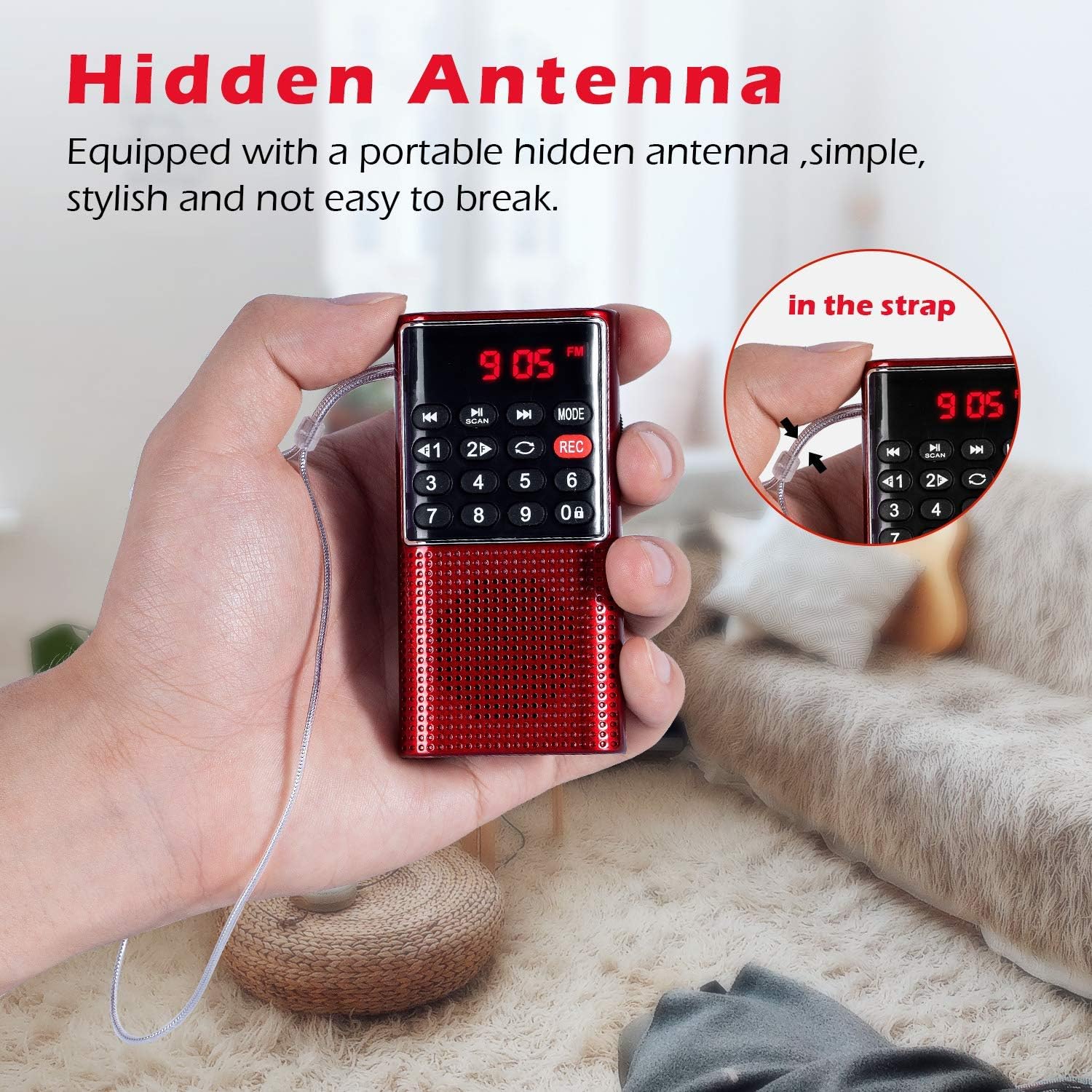
Figure 2.2: The hidden antenna of the PRUNUS J-328, designed for durability and portability, integrated into the device's strap.
2.2 PRUNUS J-288 Features
- Bluetooth & Hands-Free: Features upgraded Bluetooth 4.0 for enhanced transmission speed, automatic re-connection, and hands-free call reception.
- 5-in-1 Stereo Radio Speaker: Supports TF card, Bluetooth, AUX input, USB flash drive, and radio modes.
- Dual 3W Magnetic Speakers: Delivers clear bass and immersive surrounding stereo sound.
- Sleep Timer: Allows setting a shutdown time for automatic power off.
- Numeric Buttons: Facilitates easy and quick tuning to specific frequencies or saved stations.

Figure 2.3: The PRUNUS J-288 with its telescopic antenna extended, designed for optimal reception of radio signals.

Figure 2.4: The humanized numeric buttons on the PRUNUS J-288 allow for direct frequency input and quick access to saved stations, simplifying tuning compared to traditional rotary dials.

Figure 2.5: The PRUNUS J-288's hands-free function allows users to answer calls directly through the radio, providing convenience during listening sessions.
3. Setup and Charging
3.1 Initial Charging
Before first use, fully charge your PRUNUS radio. Both models are equipped with rechargeable batteries.
- Connect the provided USB charging cable to the radio's charging port.
- Connect the other end of the USB cable to a DC5V/500mA-2A USB adapter, a computer USB port, or a power bank.
- The charging indicator light will illuminate during charging and typically turn off or change color when fully charged.
3.2 Antenna Setup
- PRUNUS J-328: The antenna is hidden within the lanyard. For optimal FM reception, ensure the lanyard is extended and positioned for best signal.
- PRUNUS J-288: Extend the telescopic antenna fully for best AM/FM reception. Adjust its direction to improve signal strength.
4. Operating Instructions
4.1 Power On/Off
Locate the power button (usually marked with POWER or ON/OFF symbol) on your radio. Press and hold for a few seconds to turn the device on or off.
4.2 Mode Selection
Press the MODE button to cycle through available modes:
- FM Radio: Listen to FM broadcasts.
- AM Radio (J-288 only): Listen to AM broadcasts.
- Bluetooth (J-288 only): Connect to a Bluetooth-enabled device.
- AUX Input: Connect an external audio device via a 3.5mm audio cable.
- TF Card/USB Playback: Play audio files from a inserted TF card or USB flash drive.

Figure 4.1: The PRUNUS J-328 supports FM radio, MP3 format playback from TF cards, and audio input via AUX jack, offering versatile listening options.

Figure 4.2: The PRUNUS J-288 offers universal compatibility, supporting Bluetooth connectivity for smartphones/tablets, MP3 format playback from TF cards/USB drives, and audio input via AUX jack.
4.3 Radio Tuning (FM/AM)
- Automatic Scan: In FM/AM mode, press the SCAN button (or similar) to automatically scan and save all available stations. (Note for J-328: Stations cannot be changed after searching automatically).
- Manual Tuning (J-288): Use the numeric keypad to directly input the desired frequency (e.g., 106.2 for 106.2 MHz).
- Station Navigation: Use the PREV/NEXT buttons (or arrow keys) to cycle through saved stations or manually adjust frequency.
4.4 Bluetooth Operation (J-288 only)
- Switch the radio to Bluetooth mode. The display will show "BT" or a Bluetooth icon, and the radio may emit a pairing tone.
- On your mobile device, enable Bluetooth and search for "PRUNUS J-288" or similar.
- Select the radio from the list to pair. Once paired, the radio will confirm connection.
- Hands-Free Calls: When a call comes in, press the PLAY/PAUSE button to answer, and press again to end the call.
4.5 TF Card/USB Playback
- Insert a TF card or USB flash drive containing MP3 audio files into the respective slot.
- Switch the radio to TF Card or USB mode. The radio will automatically begin playing the audio files.
- Use the PREV/NEXT buttons to skip tracks and PLAY/PAUSE to control playback.
4.6 Recording Function (J-328 only)
- Ensure a TF card is inserted.
- In FM mode, press the REC button to start recording the current broadcast.
- Press REC again to stop and save the recording. Recordings are saved to the TF card.
4.7 Sleep Timer (J-288 only)
- Press the CLOCK key to access the sleep timer settings.
- Use the navigation buttons to set the desired shutdown time.
- The radio will automatically power off after the set duration.
4.8 Volume Control
Adjust the volume using the dedicated volume knob or buttons (usually marked VOL+ and VOL-).
5. Maintenance
- Cleaning: Use a soft, dry cloth to clean the radio's exterior. Do not use abrasive cleaners or solvents.
- Storage: Store the radio in a cool, dry place away from direct sunlight and extreme temperatures.
- Battery Care: To prolong battery life, avoid fully discharging the battery frequently. Charge the radio regularly, even if not in use for extended periods.
- Water Exposure: These radios are not waterproof. Avoid exposure to water or high humidity.
6. Troubleshooting
| Problem | Possible Cause | Solution |
|---|---|---|
| Radio does not turn on. | Battery is depleted. | Charge the radio fully. |
| Poor radio reception. | Weak signal; antenna not extended/positioned correctly. | Extend the antenna (J-288) or adjust lanyard position (J-328). Move to an area with better signal. |
| No sound from speakers. | Volume too low; headphones connected; incorrect mode. | Increase volume. Disconnect headphones. Ensure correct mode is selected. |
| Bluetooth (J-288) not pairing. | Radio not in pairing mode; device too far; interference. | Ensure radio is in Bluetooth mode. Move device closer. Restart both devices. |
| TF card/USB not playing. | Incorrect file format; card/drive not inserted correctly; corrupted files. | Ensure files are MP3 format. Reinsert card/drive. Try a different card/drive. |
7. Specifications
| Feature | Specification |
|---|---|
| Brand | PRUNUS |
| Models | J-288, J-328 |
| Tuner Technology | AM, FM |
| FM Frequency Range | 87.5 - 108 MHz |
| Connectivity Technology | Auxiliary, Bluetooth (J-288), USB |
| Hardware Interface | 3.5mm Audio, USB |
| Power Source | Battery Powered |
| J-328 Battery Capacity | 500mAh (rechargeable) |
| Special Features | Portable, Sleep Timer (J-288), Recording (J-328), Hands-Free (J-288) |
8. Warranty and Support
PRUNUS offers a comprehensive warranty and customer support for your radio:
- Radio Body: LIFETIME hassle-free exchange and refund.
- Radio Accessory: 60 days exchange and refund.
For any questions, issues, or warranty claims, please contact PRUNUS customer service. Refer to the product packaging or the seller's information for specific contact details.


