
Lefant U180
Lefant U180 Robot Vacuum and Mop Instruction Manual
Model: U180
1. Introduction
The Lefant U180 Robot Vacuum and Mop is an advanced cleaning device designed to simplify floor maintenance. It combines vacuuming, sweeping, and mopping functions in one compact unit, featuring smart navigation and app control for efficient and convenient cleaning.

Image: The Lefant U180 Robot Vacuum and Mop, showcasing its sleek design and included accessories like the charging dock, remote control, and mopping attachment.
2. Safety Instructions
Please read all safety instructions carefully before using the appliance. Keep this manual for future reference.
- Do not operate the robot in wet environments or near water.
- Ensure the charging dock is placed against a wall on a level surface, away from obstacles.
- Keep loose cables, curtains, and other objects that could entangle the robot out of its path.
- Do not allow children or pets to play with the robot.
- Use only the original power adapter and charging dock provided by the manufacturer.
- Regularly clean the brushes and sensors to maintain optimal performance.
3. Package Contents
Verify that all components are present in the package:
- Lefant U180 Robot Vacuum and Mop
- Charging Dock
- Power Adapter
- Remote Control
- Side Brushes (4x)
- HEPA Filters (2x)
- Sponge Filters (2x)
- Mopping Cloths (2x)
- Mopping Plate
- Magnetic Boundary Strip
- Cleaning Tool
- Instruction Manual

Image: A visual representation of all items included in the Lefant U180 Robot Vacuum and Mop package.
4. Product Overview
Familiarize yourself with the main components of the Lefant U180.
Top View
- Power/Clean Button: Press to start/pause cleaning.
- Wi-Fi Indicator: Shows network connection status.
- Dustbin Cover: Lifts to access the dustbin.
Bottom View
- Side Brushes: Sweep debris into the suction path.
- Driving Wheels: Allow the robot to move across various surfaces.
- Charging Contacts: Connect with the charging dock.
- Drop Sensors: Prevent the robot from falling down stairs.
- Floating Main Rolling Brush: Adjusts to different floor types for effective cleaning.

Image: Detailed views of the robot vacuum's top and bottom components.
5. Setup
5.1 Charging Dock Placement
Place the charging dock on a hard, level surface against a wall. Ensure there are no obstacles within 1 meter (3 feet) to the front and 0.5 meters (1.5 feet) to the sides of the dock to allow the robot to return easily.
5.2 Initial Charging
Connect the power adapter to the charging dock and plug it into a wall outlet. Place the robot onto the charging dock, ensuring the charging contacts align. The robot will begin charging, indicated by the light on the top.
5.3 App Download & Connection
Download the 'Lefant Life' app from your mobile app store. Follow the in-app instructions to connect your U180 robot vacuum to your home Wi-Fi network (2.4GHz only).
Video: Demonstrates the steps to connect the Lefant U180 to the Lefant App for smart control.
5.4 Powering On
Locate the black power button on the lateral side of the robot vacuum cleaner. Switch the button to 'I'. The top button will light up, and you will hear 3 beeps, indicating the robot is powered on.
6. Operating Instructions
The Lefant U180 offers various cleaning modes and smart features for optimal cleaning.
6.1 Cleaning Modes
Select from four cleaning modes via the app or remote control:
- Auto Clean: The robot cleans automatically using a zigzag path.
- Zigzag Clean: Cleans in a systematic zigzag pattern.
- Spot Clean: Focuses on a specific dirty area.
- Edge Clean: Cleans along walls and furniture edges.

Image: Visuals demonstrating the four distinct cleaning modes: Edge Cleaning, Spot Cleaning, Zigzag Cleaning, and Auto Cleaning.
6.2 Suction Power & Water Volume Adjustment
Adjust suction power (three modes) and water volume (three modes) through the Lefant Life app to suit different cleaning needs and floor types.

Image: Illustrates the robot vacuum's strong suction capabilities and low noise operation.
6.3 Smart Navigation & Anti-Collision
The U180 features Upgraded FreeMove Technology 2.0 with 6D built-in anti-collision infrared sensors to detect obstacles and adjust its cleaning path. Anti-dropping sensors prevent falls from stairs.

Image: Shows the robot vacuum's 360-degree detection and obstacle avoidance using FreeMove Technology 2.0.
6.4 Virtual Wall (Magnetic Strip)
Use the included magnetic boundary strip to create virtual walls, preventing the robot from entering specific areas.

Image: Depicts the use of a magnetic strip to define cleaning boundaries for the robot vacuum.
6.5 Self-Charging
The robot vacuum automatically returns to its charging base when the battery is low or cleaning is completed.
Video: An official video from Lefant showcasing the U180 Robot Vacuum and Mop's features, including its self-charging capability.
7. Maintenance
Regular maintenance ensures the longevity and optimal performance of your Lefant U180.
7.1 Dustbin & Filter Cleaning
Open the dustbin cover, remove the dustbin, and empty its contents. Clean the HEPA and sponge filters regularly with the provided cleaning tool or by tapping them gently. Do not wash HEPA filters with water.
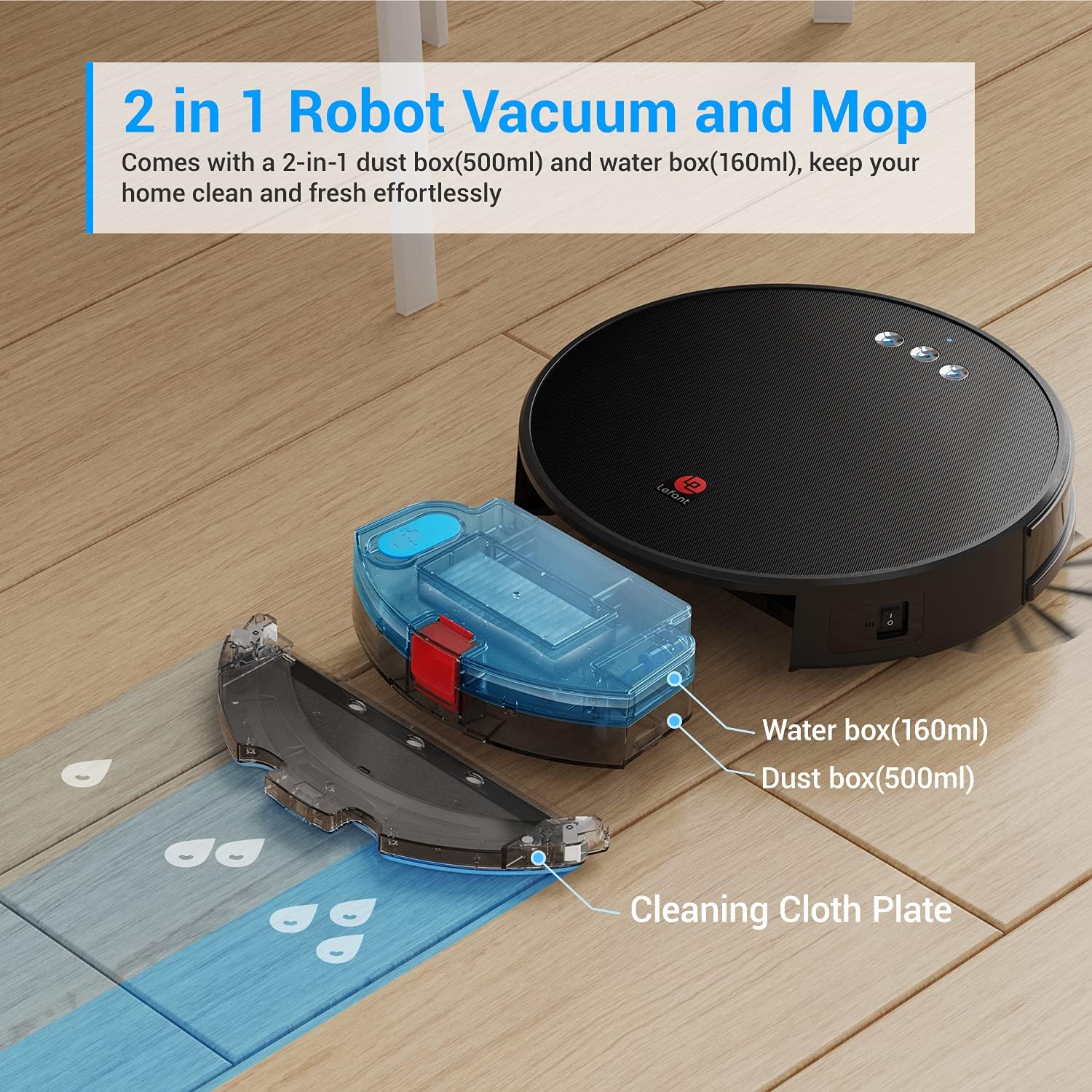
Image: Displays the 2-in-1 dust box (500ml) and water box (160ml) components of the robot vacuum.
7.2 Side Brush Cleaning/Replacement
Remove any tangled hair or debris from the side brushes. If brushes are worn, replace them with new ones from the package.
7.3 Main Rolling Brush Cleaning
The floating main rolling brush should be checked periodically for tangled hair or debris. Use the cleaning tool to cut and remove any obstructions.

Image: Illustrates the robot vacuum's mechanism for loosening, lifting, and suctioning dirt from floors.
7.4 Water Tank & Mopping Pad Maintenance
After mopping, empty any remaining water from the tank. Remove and clean the mopping pad. It can be hand-washed or machine-washed. Ensure the tank and pad are dry before reattaching.
7.5 Sensor Cleaning
Wipe the drop sensors and anti-collision sensors with a clean, dry cloth to ensure they function correctly.
8. Troubleshooting
If you encounter issues with your Lefant U180, refer to the following common problems and solutions:
| Problem | Possible Cause | Solution |
|---|---|---|
| Robot does not power on | Low battery; Power switch off | Charge the robot; Turn on the power switch. |
| Robot gets stuck frequently | Obstacles (cables, rugs); Narrow spaces | Clear obstacles; Use magnetic strip for restricted areas. |
| Poor cleaning performance | Full dustbin; Clogged filters/brushes | Empty dustbin; Clean/replace filters and brushes. |
| Robot does not charge | Charging contacts dirty; Dock unplugged | Clean charging contacts; Ensure dock is plugged in. |
| App connection issues | Incorrect Wi-Fi password; 5GHz network | Re-enter password; Ensure 2.4GHz Wi-Fi is used. |
9. Specifications
| Feature | Specification |
|---|---|
| Brand | Lefant |
| Model Name | U180 |
| Special Feature | Bagless |
| Color | Dark Black |
| Product Dimensions | 12.6"L x 12.6"W x 3.15"H |
| Dustbin Capacity | 0.5 Liters |
| Water Tank Capacity | 160ml |
| Suction Power | 3200Pa |
| Battery Life | 150 minutes |
| Control Method | App, Voice (Alexa, Google Assistant), Remote Control |
| Navigation Technology | FreeMove Technology 2.0 |
| Item Weight | 4.91 pounds |
10. Warranty and Support
The Lefant U180 Robot Vacuum and Mop comes with a 12-month worry-free protection plan. For any issues or support, please contact Lefant customer service through the Lefant Life app or visit the official Lefant website.
Lefant is committed to providing excellent customer service and support for their products.
Related documentsU180


Ask a question about this manual
Ask about setup, troubleshooting, compatibility, parts, safety, or missing instructions. Manuals+ will review the question and use this page’s manual context to help answer it.