
1. Introduction
This manual provides detailed instructions for the assembly, operation, and maintenance of your Tribesigns Computer Desk with Storage Shelves. Please read this manual thoroughly before beginning assembly to ensure correct setup and safe use of the product. Retain this manual for future reference.
2. Product Specifications
| Feature | Detail |
|---|---|
| Brand | Tribesigns |
| Model Number | fd6aa2dc-c4aa-4aa9-bb82-773bcdb15661 |
| Colour | Vintage Brown |
| Style | Industrial |
| Base Material | Wood |
| Top Material Type | Wood |
| Finish Type | Powder Coated |
| Special Feature | Storage Shelves and Drawer |
| Room Type | Office |
| Number of Drawers | 1 |
| Size (LxWxH) | 120 x 50 x 92 Centimeters |
| Number of Shelves | 3 |
| Assembly Required | Yes |
| Maximum Weight Recommendation | 50 Kilograms |
| Tools Recommended For Assembly | Screw Driver |
3. Package Contents
Upon unpacking, verify that all components and hardware are present and undamaged. The package should contain all necessary parts for assembling the Tribesigns Computer Desk, including:
- Desktop panels
- Monitor stand components
- Side shelf panels
- Metal frame components
- Drawer components
- Assembly hardware (screws, bolts, connectors)
- Assembly tools (e.g., screwdriver, if included)
If any parts are missing or damaged, please contact customer support before proceeding with assembly.
4. Safety Information
- Always assemble the desk on a soft, clean surface to prevent scratches.
- Ensure all screws and fasteners are securely tightened before use. Periodically check and re-tighten as needed.
- Do not exceed the maximum weight recommendation of 50 kilograms for the desk.
- Keep small parts and packaging materials away from children and pets to prevent choking hazards.
- Avoid standing or sitting on the desk.
- Place the desk on a level surface to prevent wobbling and instability.
5. Setup and Assembly Instructions
Assembly of the Tribesigns Computer Desk requires a screwdriver. Follow the steps below carefully.

Figure 5.1: A technical diagram illustrating the precise measurements of the Tribesigns Computer Desk, including height, width, and depth of the main desk surface, monitor stand, and side shelves. Refer to these dimensions for space planning.

Figure 5.2: This image displays the Tribesigns Computer Desk with Storage Shelves, featuring a monitor, keyboard, and various office accessories, set up in a modern home office environment.
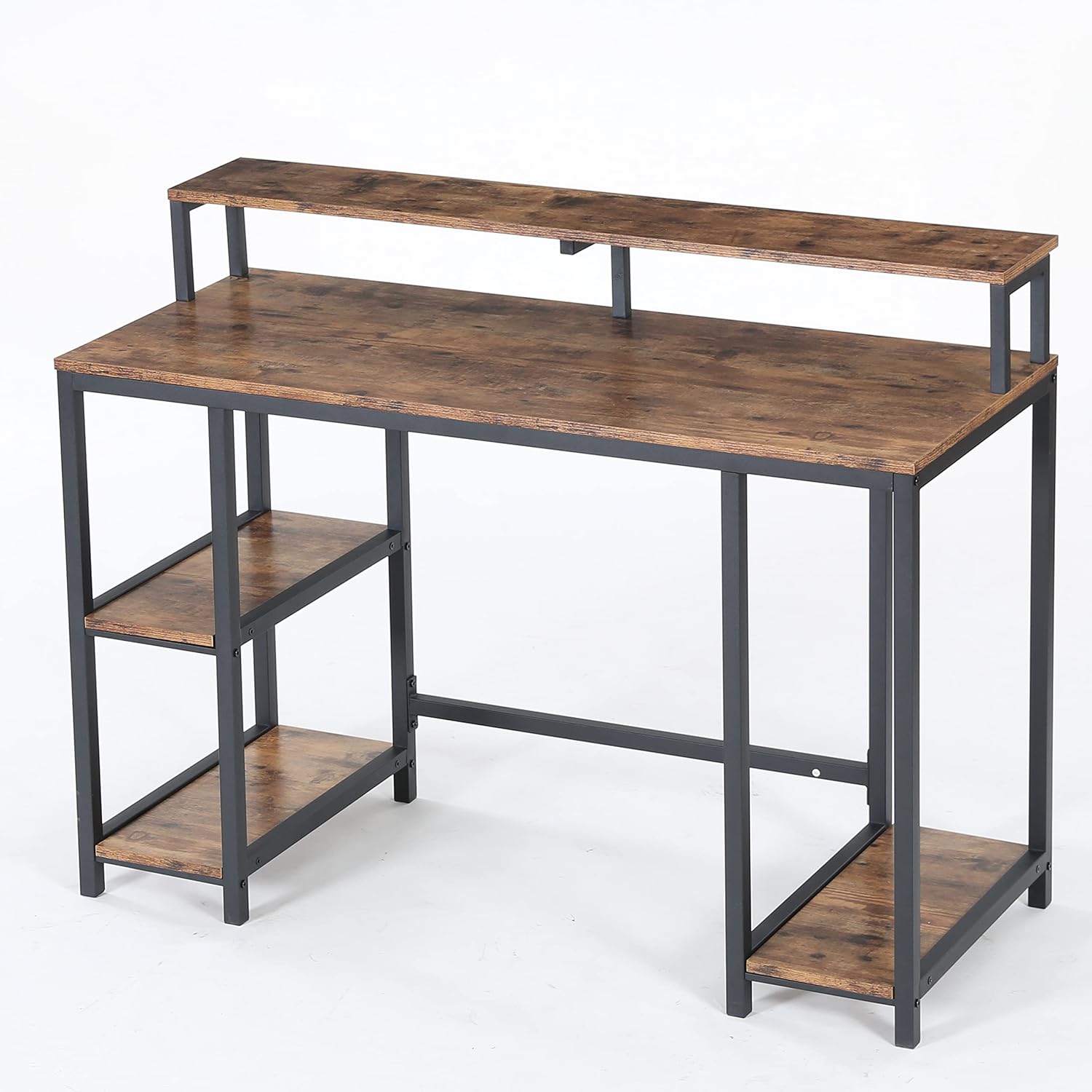
Figure 5.3: A view of the Tribesigns Computer Desk from a different angle, highlighting its industrial aesthetic with a vintage brown wood finish and black metal frame.

Figure 5.4: A close-up image focusing on the wide desktop surface and the integrated monitor stand, emphasizing the ample space available for work and display.

Figure 5.5: This image provides a close-up of the desk's storage features, including two open side shelves for books and supplies, and a dedicated open shelf designed for a computer tower (CPU).
Assembly Steps:
- Unpack and Identify Parts: Carefully remove all components from the packaging. Lay them out on a soft, clean surface. Refer to the included parts list (not provided in this manual, typically found in the product box) to identify each piece.
- Assemble the Metal Frame: Begin by connecting the main metal frame components using the provided screws and the recommended screwdriver. Ensure all connections are firm but do not fully tighten screws until the entire frame is assembled.
- Attach Side Shelves: Secure the wooden side shelf panels to the designated sections of the metal frame. Pay attention to the orientation of the shelves.
- Install the Desktop: Place the main wooden desktop panel onto the assembled frame. Align the pre-drilled holes and secure it with screws.
- Assemble the Monitor Stand: Attach the monitor stand components to the main desktop as indicated in the product's specific assembly diagram.
- Install the Drawer: If your model includes a drawer, follow the specific instructions for assembling and installing the drawer mechanism and drawer box.
- Final Tightening: Once all components are in place, systematically tighten all screws and fasteners. Do not overtighten.
- Positioning: Carefully move the assembled desk to its desired location. Ensure it is stable and level.
6. Operating Instructions
The Tribesigns Computer Desk is designed for straightforward use as a workstation. Place your computer, monitor, and other office equipment on the main desktop and monitor stand. Utilize the integrated side shelves and drawer for organizing books, documents, and supplies.

Figure 6.1: The Tribesigns Computer Desk positioned in a room, complete with a computer monitor, keyboard, and a chair, demonstrating its functional use as a workstation.

Figure 6.2: A detailed view of the Tribesigns Computer Desk's main surface, featuring a computer monitor on the elevated stand, a keyboard, mouse, and decorative items.

Figure 6.3: An illustration of two Tribesigns Computer Desks placed adjacent to each other, creating an extended workspace suitable for multiple users or a larger setup.
7. Maintenance
To maintain the appearance and longevity of your Tribesigns Computer Desk, follow these simple care instructions:
- Cleaning: Wipe surfaces with a damp cloth to remove dust and spills. Follow with a dry cloth to prevent water marks.
- Avoid Harsh Chemicals: Do not use abrasive cleaners or strong chemical solvents, as these can damage the finish.
- Protect Surfaces: Use coasters for drinks and pads under hot items to protect the desktop surface.
- Regular Checks: Periodically inspect all screws and connections to ensure they remain tight. Re-tighten if necessary.
8. Troubleshooting
If you encounter any issues with your Tribesigns Computer Desk, consider the following common solutions:
- Desk is Wobbly: Ensure the desk is placed on a level surface. Check that all assembly screws are fully tightened. Adjust any leveling feet if present.
- Missing Parts: If you find parts missing during assembly, refer to the package contents section and contact customer support for assistance. Do not attempt to substitute parts.
- Difficulty Assembling: Review the assembly instructions carefully. Ensure you are using the correct hardware for each step. Sometimes, loosening screws slightly before final tightening can help align components.
9. Warranty and Support
The Tribesigns Computer Desk comes with a Limited Warranty. For specific details regarding warranty coverage, duration, and terms, please refer to the warranty information provided with your purchase or contact Tribesigns customer support directly.
For further assistance, technical support, or to report missing/damaged parts, please contact Tribesigns customer service through their official website or the contact information provided at the point of purchase.


