
Introduction
This manual provides detailed instructions for the installation, operation, and maintenance of your EKEN V7 HD 1080P Smart WiFi Video Doorbell. Please read this manual thoroughly before using the product to ensure proper functionality and safety. Keep this manual for future reference.
Package Contents
Verify that all items listed below are included in your package. If any items are missing or damaged, please contact customer support.

Image: The EKEN V7 Video Doorbell, two blue rechargeable batteries, and a dual-slot battery charger. These are the primary components included in the package.
- EKEN V7 HD 1080P Smart WiFi Video Doorbell
- Rechargeable Batteries (2 pcs)
- Battery Charger
- Mounting Bracket
- Mounting Screws and Wall Anchors
- User Manual (this document)
Product Overview
The EKEN V7 Video Doorbell is a smart security device designed to provide real-time video monitoring and two-way audio communication with visitors at your door. It features 1080P Full HD resolution, night vision, and a wide-angle lens for comprehensive coverage.

Image: Front view of the EKEN V7 Video Doorbell, showing the camera lens, motion sensor, and illuminated doorbell button.
Key Features:
- 1080P Full HD Video: Clear video streaming and recording.
- 166° Wide-angle Lens: Broad field of view to cover your entryway.
- Night Vision: Infrared LEDs for clear visibility in low-light conditions.
- Two-Way Audio: Speak and listen to visitors remotely via the mobile app.
- PIR Motion Detection: Alerts you to movement at your door.
- Weather Resistant: Designed to withstand various weather conditions.
- 2.4G WiFi Connectivity: Connects to your home network for remote access.
- Long Battery Life: Efficient power consumption for extended use.
- Cloud Storage: Optional cloud service for video recording storage.

Image: An infographic highlighting the key features of the EKEN V7 Video Doorbell, such as 1080P Full HD, PIR Motion Detection, Night Vision, 166° Wide-angle Camera Lens, Long Battery Life, and 7 Days Free Cloud Service.

Image: A visual representation comparing the doorbell's view during the day (color) and at night (monochrome infrared), demonstrating the 166-degree wide-angle lens.
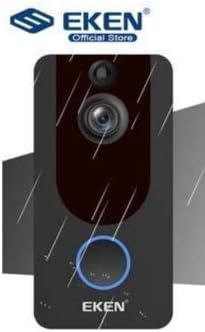
Image: The EKEN V7 Video Doorbell depicted with rain effects, illustrating its weather-resistant design suitable for outdoor installation.
Setup
1. Charging the Batteries
- Insert the two rechargeable batteries into the provided battery charger.
- Connect the charger to a power source.
- Allow the batteries to charge fully before first use. The indicator light on the charger will change when charging is complete.
2. Installing the Doorbell
- Choose a suitable location near your door, ensuring a clear view and good Wi-Fi signal.
- Use the mounting bracket as a template to mark drill holes on the wall.
- Drill holes and insert wall anchors if necessary.
- Secure the mounting bracket to the wall using the provided screws.
- Insert the charged batteries into the doorbell unit.
- Attach the doorbell unit to the mounting bracket, ensuring it clicks securely into place.
3. Connecting to Wi-Fi and App Setup
- Download the official EKEN doorbell app from your smartphone's app store (iOS or Android).
- Open the app and create an account or log in.
- Follow the in-app instructions to add your new doorbell device. This typically involves scanning a QR code on the doorbell or manually entering its ID.
- Connect the doorbell to your 2.4GHz Wi-Fi network. Ensure your phone is also connected to the same 2.4GHz network during setup.
- Once connected, you will be able to view live video, receive notifications, and adjust settings through the app.
Operating Instructions
Live View and Two-Way Audio
- Open the EKEN app on your smartphone.
- Select your doorbell from the device list to access the live video feed.
- To speak to a visitor, tap the microphone icon in the app. To listen, ensure the speaker icon is enabled.

Image: A user communicating with a delivery person at their door using the EKEN V7 Video Doorbell's two-way audio feature through the mobile application.
Motion Detection Alerts
- When motion is detected, the doorbell will send a push notification to your smartphone.
- Tap the notification to view the live feed or recorded event.
- Adjust motion sensitivity settings within the app to minimize false alerts.
Video Recording and Playback
- The doorbell automatically records video when motion is detected or the doorbell button is pressed.
- Recorded videos are stored in the cloud (subscription may be required after initial free period) or on a local SD card (if supported and installed).
- Access and playback recorded events through the app's history or event log.

Image: The EKEN V7 Video Doorbell shown next to a smartphone displaying a live 1080P Full HD video feed, illustrating remote monitoring capabilities.
Maintenance
- Cleaning: Gently wipe the camera lens and doorbell surface with a soft, damp cloth. Avoid abrasive cleaners or solvents.
- Battery Management: Recharge batteries when the app indicates low power. For optimal performance, consider having a spare set of charged batteries.
- Firmware Updates: Regularly check the app for available firmware updates for your doorbell. Updates can improve performance and add new features.
- Wi-Fi Connection: Ensure your Wi-Fi router is functioning correctly and the doorbell has a strong signal for uninterrupted operation.
Troubleshooting
- Doorbell not connecting to Wi-Fi:
- Ensure your Wi-Fi network is 2.4GHz. The doorbell does not support 5GHz networks. Check Wi-Fi password and signal strength. Try resetting the doorbell and your router.
- No motion detection alerts:
- Verify that motion detection is enabled in the app settings. Adjust sensitivity levels. Ensure the doorbell's view is not obstructed.
- Poor video quality or lag:
- Check your Wi-Fi signal strength at the doorbell's location. Move the router closer or consider a Wi-Fi extender. Ensure your internet connection is stable.
- Two-way audio not working:
- Check microphone and speaker permissions for the app on your smartphone. Ensure the doorbell's microphone and speaker are not obstructed.
- Doorbell not powering on:
- Ensure batteries are fully charged and correctly inserted. If using wired power, check connections.
Specifications
| Feature | Detail |
|---|---|
| Brand | EKEN |
| Model | V7 |
| Video Recording Resolution | 1080p Full HD |
| Photo Sensor Technology | CMOS |
| Connectivity Technology | Wi-Fi (2.4GHz only) |
| Special Features | Night Vision, Two-Way Audio, PIR Motion Detection, Weather Resistant |
| Image Stabilization | No |
| Manufacturer Reference | Ia-112 |
| ASIN | B08PMXWFF3 |
| First Available Date | December 17, 2020 |
Warranty and Support
For warranty information and technical support, please refer to the official EKEN website or contact their customer service directly. Details regarding specific warranty periods and support channels are typically provided with your purchase documentation or on the manufacturer's website.
Guaranteed software updates until: Unknown.


