
DS18 MRX1
DS18 Hydro MRX1 Marine Radio Headunit User Manual
Model: MRX1
Brand: DS18
1. Introduction
The DS18 Hydro MRX1 is a versatile marine head unit radio designed for marine and powersports environments. It offers a comprehensive set of features including Bluetooth connectivity, AM/FM radio, USB input, and AUX input. The unit is built with an IP65 waterproof rating and includes a silicone cover for enhanced protection against harsh conditions. Its easy-to-read LCD display and intuitive controls ensure a seamless audio experience.

Image 1.1: The DS18 Hydro MRX1 Marine Radio Headunit shown with its protective silicone cover.

Image 1.2: Key features of the MRX1, including IP65 waterproof rating, single zone audio control, and a 2.75-inch LCD display.
2. Package Contents
Verify that all items are present in the package before proceeding with installation.
- DS18 Hydro MRX1 Marine Radio Headunit
- Silicone Cover
- Wiring Harness
- Mounting Hardware (screws, brackets)

Image 2.1: The included silicone cover provides additional protection for the headunit.
3. Safety Information
To ensure safe operation and prevent damage, please observe the following safety guidelines:
- Power Source: Connect the unit only to a 12V DC power supply with a negative ground.
- Wiring: Ensure all wiring is correctly connected and insulated to prevent short circuits. Incorrect wiring can cause damage to the unit or vehicle.
- Water Exposure: While the unit has an IP65 waterproof rating, avoid prolonged submersion or high-pressure water jets directly on the unit. Ensure the silicone cover is properly installed in wet environments.
- Ventilation: Ensure adequate ventilation around the unit to prevent overheating, especially during extended use.
- Professional Installation: If you are unsure about any installation steps, consult a qualified professional.
4. Installation
4.1 Mounting
The DS18 Hydro MRX1 is designed for flush mounting. Ensure there is sufficient space behind the mounting surface for the unit and its wiring. The unit dimensions are approximately 4.53 x 4.53 x 2.91 inches (L x W x H).

Image 4.1: Approximate dimensions of the MRX1 unit for mounting reference.
Cut a circular opening in the desired mounting location. Secure the unit using the provided mounting hardware. Ensure a snug fit to maintain the IP65 seal.
4.2 Wiring Connections
Carefully connect the wiring harness to the corresponding inputs and outputs. Refer to the wiring diagram below for proper connections. Incorrect wiring can lead to malfunction or damage.
- Power (Yellow): Connect to a constant 12V DC power source.
- Ground (Black): Connect to a clean chassis ground.
- Accessory/Ignition (Red): Connect to a switched 12V DC power source (e.g., ignition).
- Speaker Outputs: Connect to your speakers. The unit provides 4 x 15 watts RMS at 4 ohms or 4 x 20 watts RMS at 2 ohms.
- Preamp Outputs (RCA): Front, Rear, and Subwoofer outputs are provided for connecting external amplifiers. These are 4V preamp outputs for high-quality sound.
- USB Input: For music playback and 2.1A device charging.
- AUX Input: For connecting external audio devices.
- Wired Remote Control Input: For connecting an optional wired remote.
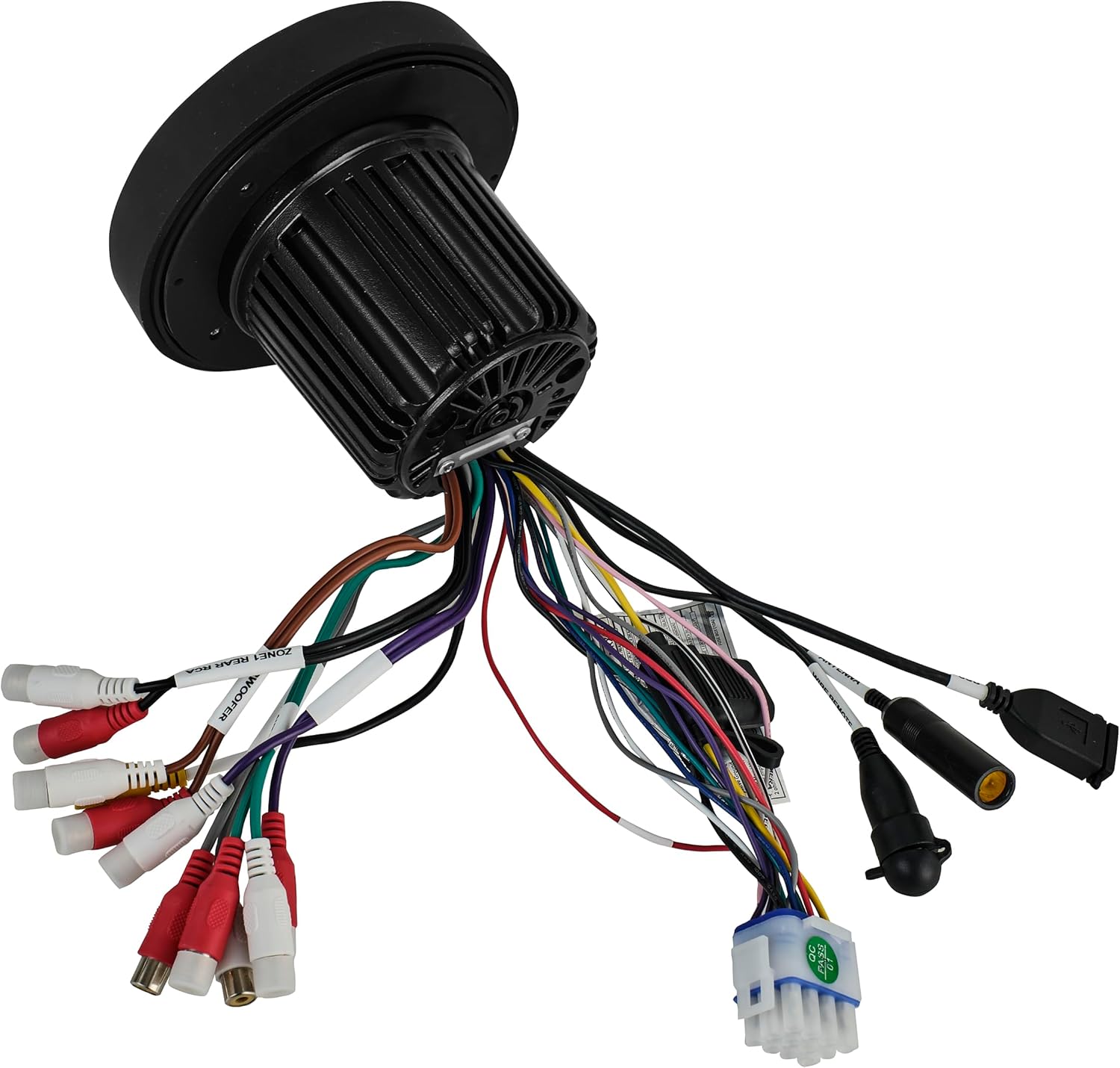
Image 4.2: The wiring harness for the DS18 Hydro MRX1, showing various connections for power, speakers, and auxiliary inputs/outputs.

Image 4.3: The MRX1 unit seamlessly integrated into a vehicle's dashboard, demonstrating a typical installation.
5. Operation
5.1 Basic Controls
The MRX1 features an intuitive control layout with a central rotary knob and illuminated buttons. The 2.75-inch LCD display provides clear visual feedback for all functions.

Image 5.1: Front view of the MRX1, showing the LCD screen, rotary knob, and control buttons.
- Power/Source Button (ⓘ/SRC): Press to turn the unit on/off. Press briefly to cycle through available audio sources (AM/FM, Bluetooth, USB, AUX).
- Rotary Knob: Turn to adjust volume. Press to access menu options or confirm selections.
- Play/Pause (⏸): Play or pause audio playback.
- Skip/Track (⏮, ⏹): Skip to the previous or next track/station.
- DISP (Display): Adjust display settings or information shown.
- PRESETS: Access radio presets or saved settings.
- BAND: Switch between AM and FM bands.
5.2 Audio Sources
The MRX1 supports multiple audio input options:
- Bluetooth: Pair your mobile device to stream audio wirelessly. The unit supports Bluetooth v4.2 for superior audio streaming and displays ID3 tag information.
- AM/FM Radio: Tune into your favorite AM/FM stations. The wideband receiver supports RDS (Radio Data System) for displaying station information.
- USB: Connect a USB drive for MP3/WMA/WAV file playback. The USB port also provides 2.1A charging for compatible devices.
- AUX Input: Connect any audio device with a 3.5mm audio output.

Image 5.2: The MRX1 supports AUX input and Bluetooth connectivity for versatile audio playback.
5.3 Sound Settings
Access the sound settings menu to customize your audio experience:
- Equalizer (EQ): Adjust bass and treble levels.
- Subwoofer Control: Adjust subwoofer output level and low-pass filter (80/120/160Hz).
- Balance/Fader: Adjust audio distribution between left/right and front/rear speakers.
- Loudness: Enhance bass and treble at low volumes.
6. Maintenance
Regular maintenance helps ensure the longevity and optimal performance of your DS18 Hydro MRX1.
- Cleaning: Use a soft, damp cloth to clean the unit's surface. Avoid abrasive cleaners or solvents that could damage the finish or display.
- Silicone Cover: Periodically inspect the silicone cover for any tears or damage. Ensure it is properly seated to maintain the unit's waterproof integrity.
- Connections: Check all wiring connections periodically to ensure they are secure and free from corrosion, especially in marine environments.
- Waterproofing: While the unit is IP65 rated, always ensure the silicone cover is in place and all connections are sealed when operating in wet conditions.
7. Troubleshooting
If you encounter issues with your DS18 Hydro MRX1, refer to the following common problems and solutions:
| Problem | Possible Cause | Solution |
|---|---|---|
| No Power | Blown fuse; Incorrect wiring; Loose power connection. | Check and replace fuse; Verify all power and ground connections; Ensure wiring is secure. |
| No Sound Output | Volume too low; Mute function active; Incorrect speaker wiring; Amplifier not powered (if applicable). | Increase volume; Deactivate mute; Check speaker connections; Verify amplifier power. |
| Bluetooth Not Connecting | Unit not in pairing mode; Device too far; Bluetooth disabled on device. | Ensure unit is in Bluetooth pairing mode; Move device closer; Enable Bluetooth on your device. |
| Poor Radio Reception | Antenna not connected; Weak signal area; Interference. | Check antenna connection; Try tuning to a stronger station; Move away from sources of electrical interference. |
| USB Not Reading | Unsupported file format; Damaged USB drive; USB drive too large. | Ensure files are MP3/WMA/WAV; Try a different USB drive; Check USB drive capacity limits (refer to specifications). |
8. Specifications
| Feature | Detail |
|---|---|
| Model Number | MRX |
| Product Dimensions | 4.53 x 4.53 x 2.91 inches |
| Item Weight | 2 pounds |
| Output Power | 4 x 15W RMS @ 4 Ohm / 4 x 20W RMS @ 2 Ohm (160 Watts Max) |
| Preamp Outputs | 3 Zones (Front, Rear, Subwoofer), 4 Volts |
| Waterproof Rating | IP65 |
| Display Technology | LCD (2.75-inch) |
| Connectivity Technologies | Bluetooth, USB, AUX |
| Bluetooth Version | v4.2 |
| Radio Frequency | AM/FM (up to 108 MHz) |
| USB Charging | 2.1 Amp |
| Compatible Devices | Amplifier |
| Color | Black |
| Manufacturer | DS18 |
| Date First Available | November 12, 2020 |
9. Warranty and Support
For warranty information, technical support, or service inquiries regarding your DS18 Hydro MRX1 Marine Radio Headunit, please contact DS18 customer service directly. Refer to the official DS18 website or your purchase documentation for the most current contact details and warranty terms.
You can also visit the DS18 Store on Amazon for additional product information and resources.
Related documentsMRX1


Ask a question about this manual
Ask about setup, troubleshooting, compatibility, parts, safety, or missing instructions. Manuals+ will review the question and use this page’s manual context to help answer it.