Introduction
This manual provides essential instructions for the safe and efficient operation of your Technical Pro STAGE28 Dual 8" Rechargeable LED Bluetooth Speaker. Please read this manual thoroughly before using the product and retain it for future reference.
Package Contents
Verify that all items are present in the package:
- Technical Pro STAGE28 Speaker Unit
- Wireless Handheld Microphone
- Speaker Stand (Tripod)
- Charging Cable (DC5V)
- Instruction Manual (this document)
Setup
1. Charging the Speaker
Before initial use, fully charge the speaker's built-in rechargeable battery. Connect the provided charging cable to the DC5V IN port on the rear panel of the speaker and to a suitable power source. The charging status indicator will show when the unit is charging.

Image: Rear control panel detail, highlighting the DC5V IN port.
2. Assembling the Speaker Stand
Unfold the tripod legs of the speaker stand. Adjust the height to your preference and secure it using the locking mechanism. Place the STAGE28 speaker securely onto the top pole of the stand.

Image: The included speaker tripod stand.
3. Microphone Preparation
Ensure the wireless handheld microphone has fresh batteries installed. The microphone can be stored in the dedicated compartment on the rear of the speaker when not in use.
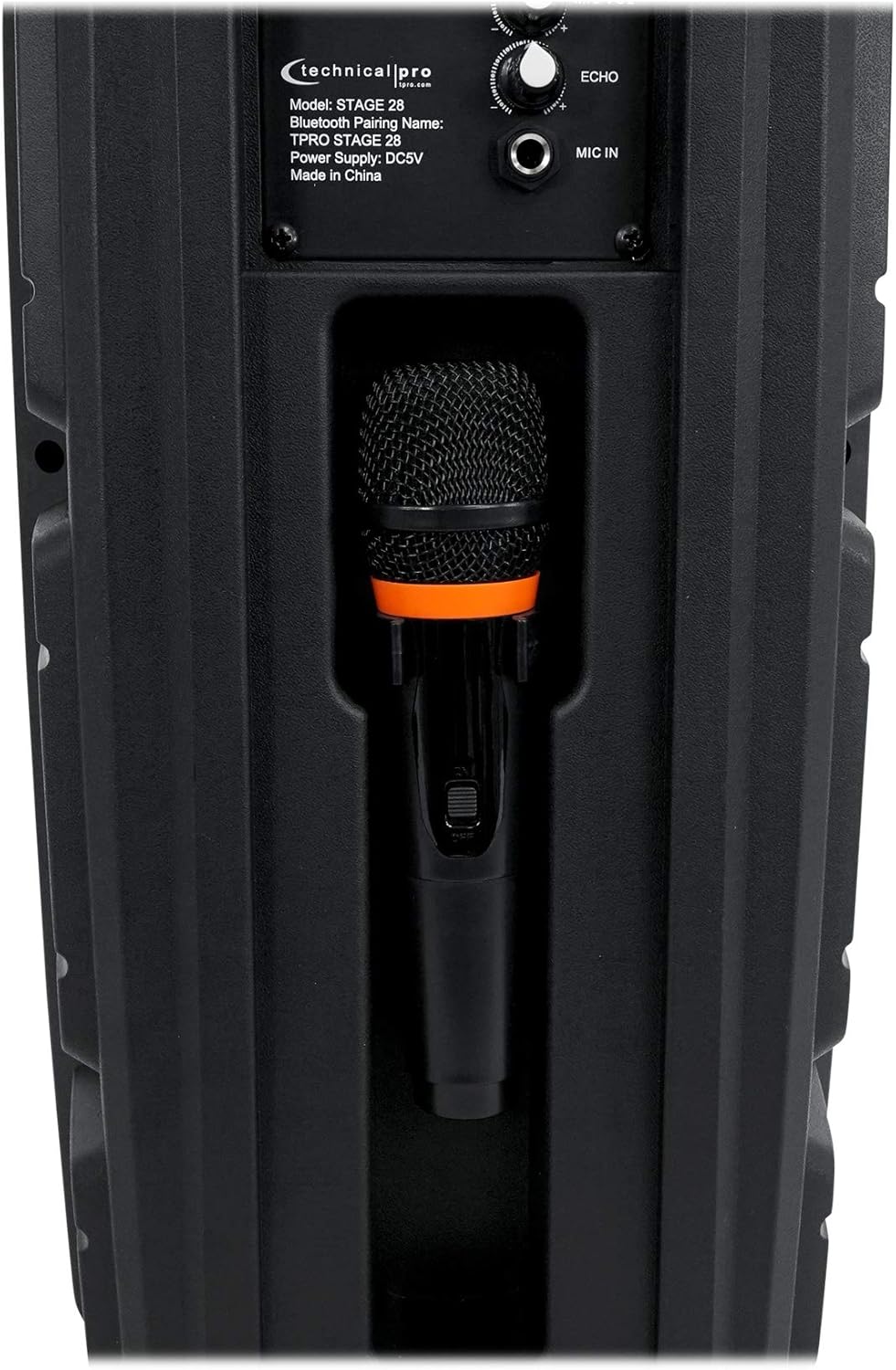
Image: Microphone storage compartment on the speaker's rear.
Operating Instructions
1. Power On/Off and Volume Control
Rotate the POWER/VOLUME knob clockwise to turn the speaker on and increase the master volume. Rotate counter-clockwise to decrease volume and turn off the speaker.

Image: Full rear panel of the speaker with controls.
2. Bluetooth Pairing
- Turn on the speaker. The display will show "BLUE" indicating Bluetooth mode.
- Enable Bluetooth on your audio device (smartphone, tablet, etc.).
- Search for available devices and select "TPRO STAGE 28" from the list.
- Once paired, the speaker will emit a confirmation tone.
- The Bluetooth range is approximately 30 feet (9 meters).
3. True Wireless Stereo (TWS) Function
To connect two STAGE28 speakers for TWS stereo sound:
- Ensure both STAGE28 speakers are powered on and in Bluetooth mode.
- On one of the speakers (this will be the primary unit), press and hold the TWS button. The speaker will search for another STAGE28 unit.
- Once connected, both speakers will play audio in stereo from a single Bluetooth source.
4. USB/TF Card Playback
Insert a USB flash drive or TF (microSD) card (up to 64GB) containing .mp3 audio files into the respective USB or TF port. The speaker will automatically switch to USB/TF mode and begin playback. Use the Previous/Next buttons to navigate tracks.
5. FM Radio Operation
Press the MODE/LIGHT button to cycle through input modes until "FM" appears on the display. Press and hold the Play/Pause button to auto-scan and save available FM stations. Use the Previous/Next buttons to switch between saved stations.
6. Aux Input
Connect an external audio device using a 1/8" (3.5mm) audio cable to the AUX input port. Press the MODE/LIGHT button to select AUX mode.
7. Microphone Usage
Plug the wireless microphone receiver (if applicable) or a wired microphone into the MIC IN 1/4" input. Adjust the microphone volume using the MIC VOL knob and add echo effect with the ECHO knob.
8. LED Lights
The speaker features LED lights on its woofers. Press the MODE/LIGHT button briefly to toggle the LED lights on or off, or to change light modes.

Image: Front view of the speaker with LED lights active.
Maintenance
- Cleaning: Use a soft, dry cloth to clean the speaker's exterior. Do not use abrasive cleaners or solvents.
- Battery Care: To prolong battery life, avoid fully discharging the battery frequently. Recharge the speaker regularly, even if not in use for extended periods. Store in a cool, dry place.
- Storage: When storing the speaker, ensure it is turned off and disconnected from power. Keep it in a dry environment away from extreme temperatures.
Troubleshooting
| Problem | Possible Cause | Solution |
|---|---|---|
| Speaker does not power on. | Battery is discharged. Power/Volume knob is off. | Charge the speaker. Rotate the POWER/VOLUME knob clockwise to turn on. |
| No sound from speaker. | Volume is too low. Incorrect input mode selected. Audio source not playing. | Increase master volume. Ensure correct input mode (Bluetooth, USB, AUX, FM). Check audio source device. |
| Bluetooth device cannot pair. | Speaker not in Bluetooth mode. Device too far. Previously paired device connected. | Ensure speaker is in Bluetooth mode ("BLUE" on display). Move device closer (within 30 ft). Disconnect from other devices. |
| Microphone not working. | Microphone not connected. MIC VOL knob is low. Microphone batteries are dead. | Ensure microphone is properly connected to MIC IN. Increase MIC VOL. Replace microphone batteries. |
Specifications
| Model: | STAGE28 |
| Peak Power: | 1000 Watts |
| Woofers: | Dual 8" LED Woofers |
| Tweeter: | Piezo Horn Tweeter |
| Battery: | Built-in Rechargeable |
| Inputs: | Bluetooth, USB, TF Card, FM Radio, Aux (1/8"), Microphone (1/4") |
| USB/TF Card Max Size: | 64GB |
| Supported Audio Files: | .mp3 |
| Bluetooth Version: | v2.0 with EDR |
| Bluetooth Range: | 30 Feet (9 meters) |
| Frequency Response: | 50Hz-20kHz |
| Impedance: | 4 Ohms |
| Sensitivity: | 95 ±2dB (1W@1M) |
| Product Dimensions (H x W x D): | 22" x 9.5" x 7.5" (55.9 cm x 24.1 cm x 19.1 cm) |
| Product Weight: | 8.5 lbs (3.86 kg) |
| Power Supply: | DC5V |
Warranty and Support
For warranty information and technical support, please refer to the documentation provided at the point of purchase or contact the retailer/manufacturer directly. Keep your proof of purchase for warranty claims.


