
1. Introduction
Thank you for choosing the Cecotec Ready Warm 8400 Bladeless Connected Heater. This manual provides essential information for the safe and efficient operation, maintenance, and troubleshooting of your new heater. Please read it thoroughly before use and keep it for future reference.

Image: The Cecotec Ready Warm 8400 Bladeless Connected Heater in a home setting, showcasing its sleek design and digital display.
2. Important Safety Instructions
To reduce the risk of fire, electric shock, or injury, always follow these basic precautions:
- Read all instructions before using this heater.
- Do not use this heater outdoors. It is designed for indoor use only.
- This heater is hot when in use. To avoid burns, do not let bare skin touch hot surfaces.
- Keep combustible materials, such as furniture, pillows, bedding, papers, clothes, and curtains at least 1 meter (3 feet) from the front of the heater and keep them away from the sides and rear.
- Extreme caution is necessary when any heater is used by or near children or invalids and whenever the heater is left operating and unattended.
- Always unplug the heater when not in use.
- Do not operate any heater with a damaged cord or plug or after the heater malfunctions, has been dropped or damaged in any manner. Return heater to authorized service facility for examination, electrical or mechanical adjustment, or repair.
- Do not run cord under carpeting. Do not cover cord with throw rugs, runners, or similar coverings. Arrange cord away from traffic area and where it will not be tripped over.
- Do not insert or allow foreign objects to enter any ventilation or exhaust opening as this may cause an electric shock or fire, or damage the heater.
- To prevent a possible fire, do not block air intakes or exhaust in any manner. Do not use on soft surfaces, like a bed, where openings may become blocked.
- A heater has hot and arcing or sparking parts inside. Do not use it in areas where gasoline, paint, or flammable liquids are used or stored.
- Use this heater only as described in this manual. Any other use not recommended by the manufacturer may cause fire, electric shock, or injury to persons.
- Always plug heaters directly into a wall outlet/receptacle. Never use with an extension cord or relocatable power tap (outlet/power strip).
- This heater includes an automatic shut-off safety feature if it tips over.
3. Product Overview
The Cecotec Ready Warm 8400 is a bladeless, connected heater designed for efficient indoor heating. It features a digital display and touch controls for easy operation.
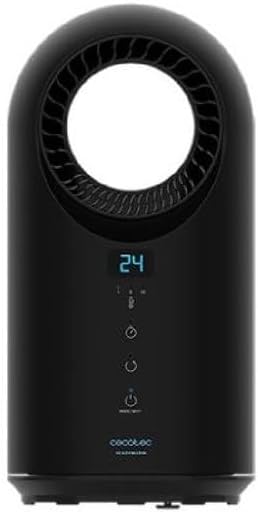
Image: Front view of the heater, highlighting the control panel and bladeless air outlet.
Control Panel and Display
The heater features an intuitive control panel with a digital display. The display shows the current temperature and selected settings. The touch buttons allow you to adjust settings directly on the unit.

Image: Detailed view of the bladeless air outlet and digital temperature display.
- Digital Display: Shows current temperature, timer, and mode indicators.
- Power Button: Turns the unit on or off.
- Mode Button: Cycles through heating modes (e.g., low, medium, high heat, fan only).
- Temperature Adjustment Buttons: Increases or decreases the desired temperature.
- Timer Button: Sets the operating timer.
- Wi-Fi Indicator: Shows connection status.
4. Setup
- Unpacking: Carefully remove the heater from its packaging. Retain packaging for storage or future transport.
- Placement: Place the heater on a firm, level surface. Ensure there is at least 1 meter (3 feet) of clear space around the heater from walls, furniture, and other objects to allow for proper airflow and prevent fire hazards. Do not place it near water sources or in high humidity areas.
- Power Connection: Plug the power cord directly into a grounded 220-240V AC electrical outlet. Do not use extension cords or power strips.
5. Operating Instructions
5.1 Basic Operation
- Power On/Off: Press the Power button (U) on the control panel to turn the heater on or off. The digital display will illuminate when the unit is on.
- Adjusting Temperature: Use the temperature adjustment buttons (+ / −) to set your desired room temperature. The heater will automatically adjust its heating output to maintain this temperature.
- Selecting Mode: Press the Mode button to cycle through available heating modes (e.g., Low Heat, High Heat) or a fan-only mode. The selected mode will be indicated on the display.

Image: User interacting with the heater's touch control panel.
5.2 Timer Function
The timer function allows you to set a specific operating duration for the heater.
- While the heater is on, press the Timer button.
- Each press will increase the operating time in increments (e.g., 1 hour, 2 hours, up to a maximum).
- The display will show the set timer duration. The heater will automatically turn off once the set time has elapsed.
5.3 Connected Features (Wi-Fi & App Control)
The Ready Warm 8400 can be controlled remotely via a smartphone application, offering enhanced convenience and scheduling options.

Image: Smartphone showing a control app, demonstrating the heater's connected functionality.
- Download App: Download the official Cecotec smart home application from your device's app store (e.g., Google Play Store or Apple App Store).
- Pairing: Follow the in-app instructions to pair your heater with your home Wi-Fi network. Ensure your heater is within range of your Wi-Fi router.
- Remote Control: Once paired, you can control the heater's power, temperature, modes, and set schedules from your smartphone, even when you are away from home.
6. Maintenance
Regular cleaning helps maintain the heater's performance and extends its lifespan.
- Before Cleaning: Always unplug the heater from the power outlet and allow it to cool down completely before cleaning.
- Exterior Cleaning: Wipe the exterior surfaces of the heater with a soft, damp cloth. Do not use abrasive cleaners, solvents, or harsh chemicals, as these can damage the finish.
- Air Inlets/Outlets: Use a soft brush or a vacuum cleaner with a brush attachment to gently remove dust and debris from the air inlets and outlets. Ensure these areas remain clear for optimal performance.
- Storage: If storing the heater for an extended period, clean it thoroughly and store it in its original packaging in a cool, dry place.
7. Troubleshooting
If you encounter issues with your heater, refer to the following common problems and solutions:
| Problem | Possible Cause | Solution |
|---|---|---|
| Heater does not turn on. | No power supply; Power button not pressed; Safety switch activated. | Check if the power cord is securely plugged in. Ensure the wall outlet is functional. Press the Power button. Check if the heater has tipped over and reset it. |
| No heat output. | Incorrect mode selected; Temperature setting too low. | Ensure a heating mode is selected (not fan-only). Increase the desired temperature setting above the current room temperature. |
| Heater makes unusual noise. | Obstruction in air vents; Internal component issue. | Unplug the heater and check for any obstructions in the air inlets/outlets. If the noise persists, contact customer support. |
| Wi-Fi connection fails. | Incorrect Wi-Fi password; Heater out of range; Router issue. | Ensure correct Wi-Fi password. Move heater closer to router. Restart router. Follow app's pairing instructions carefully. |
8. Specifications
| Feature | Specification |
|---|---|
| Brand | Cecotec |
| Model Number | 05371 |
| Product Dimensions (L x W x H) | 41.5 x 22 x 22.5 cm |
| Weight | 2.5 Kilograms |
| Power | 1500 Watts |
| Voltage | 28 Volts (Note: Standard operating voltage for heaters is typically 110-120V or 220-240V. Please verify with product labeling.) |
| Automatic Shut-off | Yes |
| Number of Speeds | 3 |
| Noise Level | 10 Decibels |
| Special Feature | Bladeless, Connected (Wi-Fi) |
| Form Factor | Tower |
| Heating Method | Convection |
| Intended Use | Indoor |
9. Warranty and Support
For technical assistance, warranty claims, or to inquire about spare parts, please contact Cecotec customer support through their official website or the contact information provided with your purchase.
Spare parts for this model are indicated to be available for up to 10 years from the date of purchase.
Please retain your proof of purchase for any warranty-related inquiries.


