
1. Introduction
This manual provides detailed instructions for the installation, operation, and maintenance of your eufy Security Smart Wi-Fi Add-On Video Doorbell 2K (Model T8210). Please read this manual thoroughly before using the product to ensure proper functionality and safety.
2. What's in the Box
Verify that all components are present in your package:
- Video Doorbell 2K (Battery-Powered)
- Quick Start Guide
3. Setup
3.1 Pre-installation Requirements
- A eufy HomeBase 1, 2, 3, or E is required for operation (not included).
- Ensure your Wi-Fi network is stable and accessible at the installation location.
3.2 Installation Steps
- Charge the Doorbell: Fully charge the doorbell battery before installation.
- Download the eufy Security App: Search for 'eufy Security' in your mobile app store and install it.
- Add Device: Follow the in-app instructions to add your Video Doorbell to your HomeBase system. The app will guide you through the pairing process.
- Mount the Doorbell: Securely mount the doorbell to your desired location using the provided mounting bracket and screws. The doorbell can be battery-powered or continuously wired (8~24V, >10VA power source required).

Image: The eufy Security Video Doorbell 2K installed on a wall.
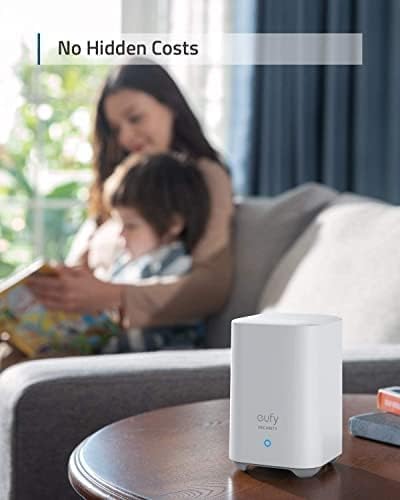
Image: The eufy HomeBase, which is required for the doorbell's operation.
4. Operating Instructions
4.1 Live View and Two-Way Audio
- Access the live 2K video feed from your doorbell via the eufy Security app.
- Utilize the two-way audio feature to communicate with visitors at your door from anywhere.
- The 4:3 aspect ratio provides a head-to-toe view of visitors.

Image: Clear 2K resolution footage of people approaching the door.
4.2 Motion Detection and Alerts
- The doorbell features advanced human detection to reduce false alarms.
- Customize activity zones in the app to focus detection on specific areas.
- Receive instant notifications on your smartphone when motion is detected or the doorbell is pressed.

Image: Human detection feature distinguishing between people and pets.
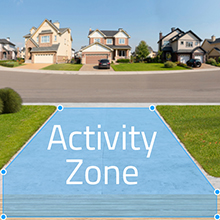
Image: Setting up custom activity zones for motion detection.
4.3 Video Storage
- Recordings are stored locally on your HomeBase, ensuring privacy and no monthly fees.
- Access and review recorded events through the eufy Security app.
5. Maintenance
5.1 Battery Management
The doorbell's battery can last up to six months on a single charge, depending on usage and environmental factors. When the battery is low, you will receive a notification via the eufy Security app. To recharge, detach the doorbell from its mounting bracket and connect it to a USB charger.

Image: Visual representation of the doorbell's battery status and connection to HomeBase.
5.2 Cleaning
To maintain optimal performance, regularly clean the camera lens and the doorbell's exterior with a soft, damp cloth. Avoid using harsh chemicals or abrasive materials.
6. Troubleshooting
6.1 Connectivity Issues
- No Connection: Ensure your HomeBase is powered on and connected to the internet. Check the distance between the doorbell and HomeBase; excessive distance or obstructions can affect signal strength.
- Frequent Disconnections: Try relocating your HomeBase closer to the doorbell or reducing Wi-Fi interference from other devices.
6.2 Alerts Not Received
- Check App Settings: Verify that notifications are enabled for the eufy Security app on your smartphone.
- Review Activity Zones: Ensure that motion is occurring within the defined activity zones.
- Adjust Sensitivity: Increase motion detection sensitivity in the app if events are being missed.
6.3 Poor Video Quality
- Clean Lens: Dust or smudges on the camera lens can degrade video quality. Clean it gently with a soft cloth.
- Network Speed: Ensure your internet connection has sufficient upload speed for optimal 2K streaming.
7. Specifications
| Model Number | T8210 |
| Video Capture Resolution | 2K |
| Indoor/Outdoor Usage | Outdoor |
| Compatible Devices | HomeBase 1, 2, 3, E |
| Power Source | Battery Powered (Wired option: 8~24V, >10VA) |
| Connectivity Protocol | Wi-Fi |
| Controller Type | APP Control |
| Mounting Type | Door Mount |
| Color | Black |
| Item Dimensions (L x W x H) | 5.51 x 2.13 x 1.1 inches |
| Item Weight | 7.5 ounces |
| International Protection Rating | IP65 |
| Special Feature | Motion Sensor |
8. Warranty and Support
For warranty information and technical support, please refer to the official eufy Security website or contact their customer service. The Quick Start Guide included in your package also contains relevant support contact details.


