
1. Product Overview
The Waterdrop RF10-UF is a 0.01 micron replacement filter cartridge designed for specific Waterdrop under-sink water filtration systems. This filter utilizes innovative multistage filtration to reduce various contaminants while retaining beneficial minerals.

Image 1: Waterdrop RF10-UF Replacement Filter Cartridge.
Key Features:
- 0.01 Micron Ultrafiltration: Filters out most bacteria larger than 0.01 µm.
- Multistage Filtration: Reduces chlorine, taste, odor, heavy metals, chemical pollutants, and sediment.
- Long Service Life: Up to 1 year or 11,000 gallons when used with municipal water. Actual results may vary based on water quality.
- Improved Clogging Resistance: Upgraded filtration area enhances capability and minimizes clogging risk.
- Material: Constructed with lead-free, BPA-free materials. Activated carbon is derived from natural coconut shells.
2. Compatibility
This replacement filter is compatible with the following Waterdrop under-sink water filter systems:
- Waterdrop 10UA (ASIN B083NPW1DN)
- Waterdrop 10UA-UF (ASIN B085G1D2TW)
- Waterdrop 10UB (ASIN B089CKQGL1)
- Waterdrop 10UB-UF (ASIN B085FQVMCW)

Image 2: Visual guide to Waterdrop filter compatibility and sizes.
3. Setup and Installation (Replacement)
Follow these steps to replace your Waterdrop RF10-UF filter cartridge:
- Turn off Water Supply: Locate the cold water supply valve under your sink and turn it off to stop the water flow to the filter system.
- Relieve Pressure: Open the filtered water faucet to release any remaining pressure in the system. Allow water to drain until it stops.
- Remove Old Filter: Twist the old filter cartridge counter-clockwise to unlock it from the filter head. Gently pull it down to remove. Be prepared for a small amount of water spillage.
- Prepare New Filter: Remove the protective cap from the new Waterdrop RF10-UF filter cartridge.
- Install New Filter: Align the new filter cartridge with the filter head and push it upwards. Twist it clockwise until you feel a hard stop, indicating it is securely locked in place.
- Restore Water Supply: Slowly turn the cold water supply valve back on.
- Flush the System: Open the filtered water faucet and let the water run for at least 5 minutes to flush the new filter. This removes air and any carbon fines.

Image 3: The filter replacement process involves a simple twist to remove and install.
4. Operating
Once installed, the Waterdrop RF10-UF filter operates automatically with your compatible under-sink system. Simply open your dedicated filtered water faucet to dispense purified water. The filter works to reduce contaminants as water passes through its multiple stages.
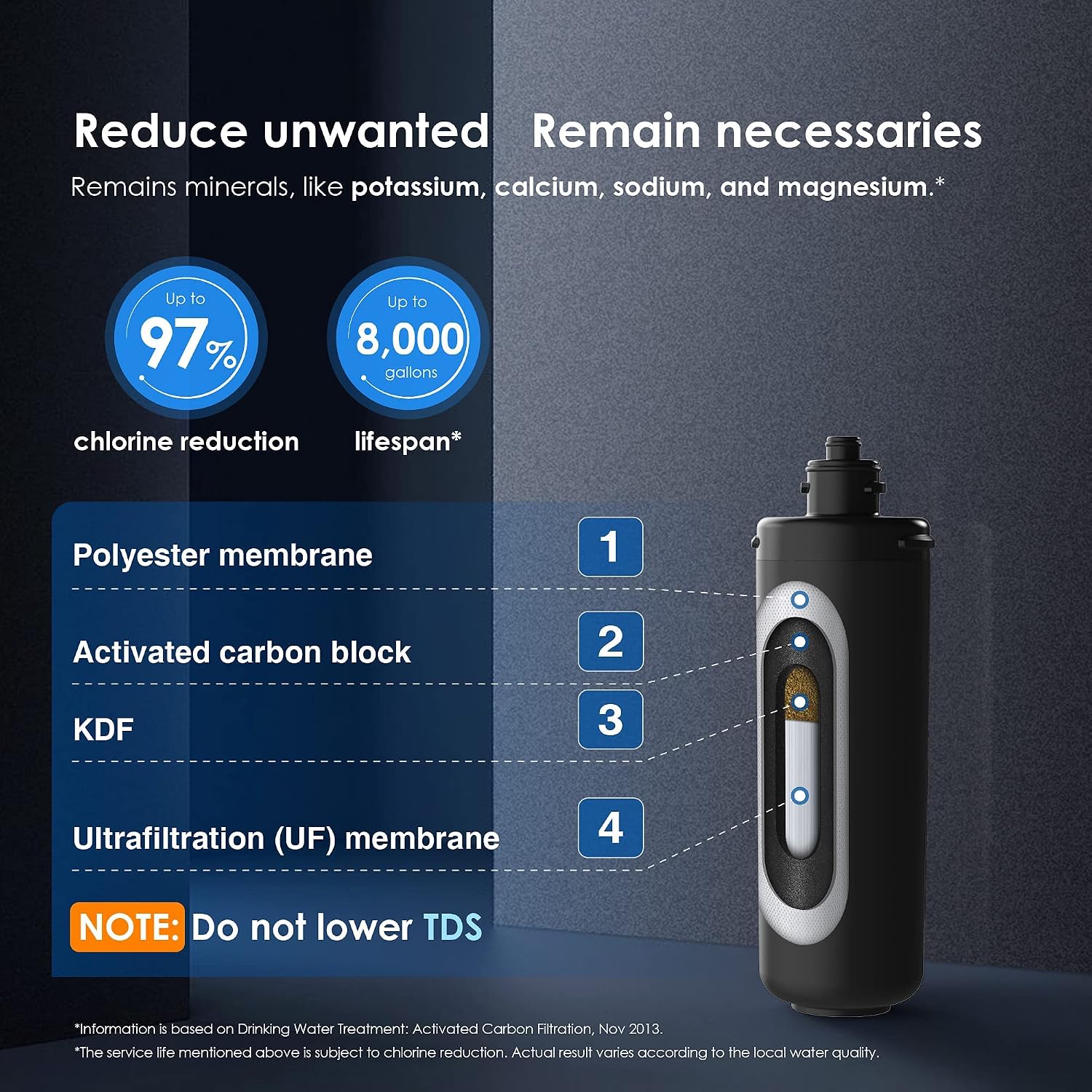
Image 4: Diagram illustrating the multi-stage filtration process, including polyester membrane, activated carbon block, KDF, and ultrafiltration membrane. Note: This filter does not lower TDS.

Image 5: The filter features 4 stages of filtration, including 0.01 micron ultrafiltration for bacteria reduction.

Image 6: The filter reduces various contaminants such as pathogens, microbes, bacteria, chloramines, turbidity, odor, cyst, copper, sand, rust, worms, and large particles.
5. Maintenance
Regular filter replacement is crucial for optimal performance and water quality.
Filter Service Life:
- The RF10-UF filter has a maximum service life of 1 year or 11,000 gallons.
- This service life is based on chlorine reduction and municipal water quality. Actual results may vary depending on local water conditions and usage.
- Replace the filter promptly when the service life is reached or if you notice a significant decrease in water flow or quality.
Refer to the 'Setup and Installation' section for detailed filter replacement instructions.
6. Troubleshooting
Reduced Water Flow:
- A slight reduction in water pressure is normal when using a filtration system, as water must pass through the filter media.
- If water flow significantly decreases before the end of the filter's stated service life, it may indicate that the filter is clogged due to high sediment levels in your water. Consider replacing the filter earlier.
- Ensure all connections are secure and lines are not kinked, which can restrict water flow.
Water Leakage:
- Ensure the filter cartridge is correctly seated and twisted clockwise until it locks firmly into the filter head.
- Check all water line connections for tightness.
Unusual Taste or Odor:
- If you notice an unusual taste or odor after installation, ensure the filter has been properly flushed for the recommended 5 minutes.
- If the issue persists, the filter may be exhausted and require replacement.
7. Specifications
| Attribute | Value |
|---|---|
| Model Number | WD-RF10 |
| Filtration Accuracy | 0.01 µm |
| Material | Carbon Fiber |
| Product Dimensions | 3.6"D x 3.6"W x 10"H |
| Item Weight | 3 ounces (85 Grams) |
| Service Life | 1 year or 11,000 gallons (subject to chlorine reduction) |
| External Testing Certification | Tested by third-party laboratory against NSF/ANSI 42 and 53 standards |
| Compatible Water Purifier Models | Waterdrop WD-10UA, WD-10UA-UF, WD-10UB, WD-10UB-UF |
8. Warranty and Support
For questions regarding installation, compatibility, or any other product inquiries, please contact Waterdrop customer service.

Image 7: Contact customer service for assistance with installation or compatibility questions.
Waterdrop products typically come with a manufacturer's warranty. Please refer to the product packaging or the official Waterdrop website for specific warranty terms and conditions.
Manufacturer: Waterdrop
Return Policy: This product is eligible for a refund/replacement within 2026 days.


