
Marea B58006/5
Marea B58006/5 Smartwatch User Manual
Comprehensive instructions for setup, operation, and maintenance.
Introduction
This manual provides detailed instructions for the Marea B58006/5 Smartwatch. Please read this guide thoroughly before using your device to ensure proper operation and to maximize its features. This smartwatch is designed to be compatible with smartphones and includes features such as a pedometer and camera functionality.
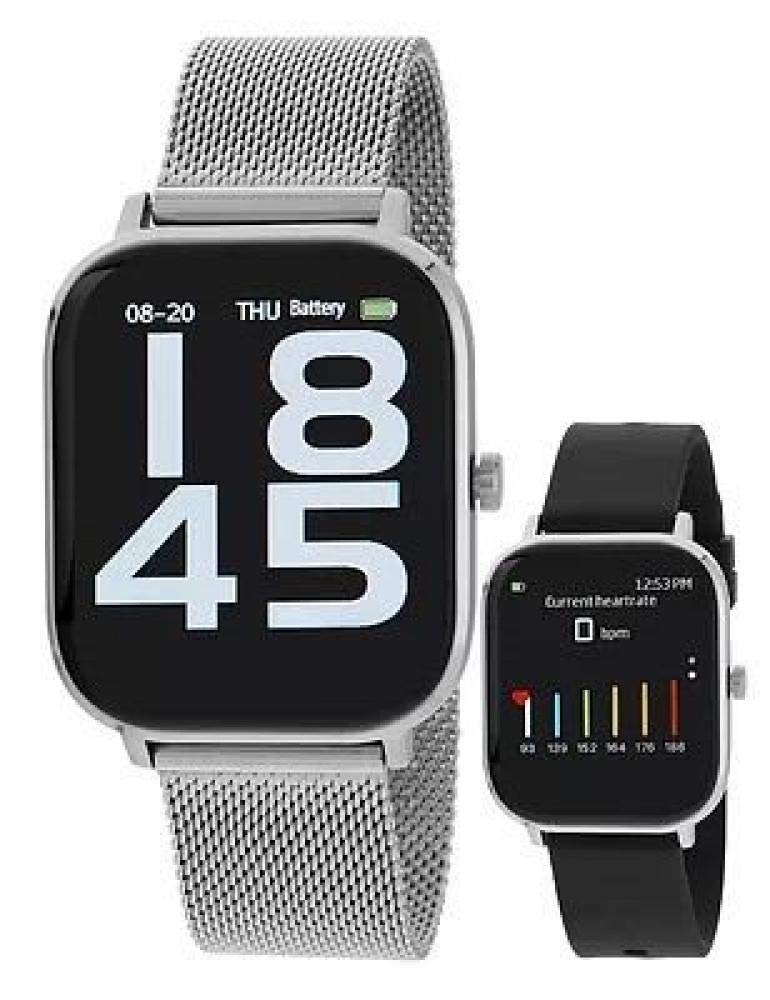
The image displays the Marea B58006/5 smartwatch. The main watch features a silver rectangular case with a silver mesh strap, showing the time '08-20 THU Battery 18 45'. A smaller view of the watch is also shown with a black silicone strap, displaying a heart rate monitor interface with 'Current heartrate 0 bpm' and a bar graph.
Setup
1. Charging the Device
Before initial use, fully charge your Marea B58006/5 smartwatch. Connect the charging cable to the designated charging port on the watch and to a USB power source. The screen will indicate charging status. A full charge typically takes approximately 2 hours.
2. Powering On/Off
- To power on: Press and hold the side button until the screen illuminates.
- To power off: Press and hold the side button, then select the 'Power Off' option on the screen.
3. Pairing with a Smartphone
- Download the official Marea smartwatch application from your smartphone's app store (iOS or Android).
- Ensure Bluetooth is enabled on your smartphone.
- Open the Marea application and follow the on-screen instructions to add a new device.
- Select "Marea B58006/5" from the list of available devices.
- Confirm the pairing request on both your smartphone and the smartwatch.
4. Strap Replacement
Your Marea B58006/5 smartwatch comes with an additional strap. To replace the strap, locate the quick-release pins on the underside of the watch where the strap connects to the watch case. Slide the pin to detach the current strap and attach the new strap by aligning the pin with the lug holes and releasing it.
Operating Instructions
Navigation
- Touch Screen: Swipe left, right, up, or down to navigate through menus and features. Tap to select an option.
- Side Button: Press to return to the home screen or wake the device. Long press for power options.
Key Features
The Marea B58006/5 Smartwatch offers several functionalities:
- Pedometer: Tracks your steps, distance, and calories burned. Access this feature from the main menu or a dedicated widget.
- Camera Control: Use your smartwatch as a remote shutter for your smartphone's camera. Open the camera control feature on the watch and activate your smartphone's camera.
- Notifications: Receive alerts for calls, messages, and app notifications directly on your wrist. Ensure notification permissions are granted in the Marea app.
- Time Display: The 1.54-inch rectangular screen displays time, date, and battery status.
- Heart Rate Monitor: Monitor your heart rate throughout the day.
Maintenance
- Cleaning: Wipe the watch screen and body with a soft, dry, lint-free cloth. Avoid using harsh chemicals or abrasive materials.
- Water Resistance: Refer to the product specifications for water resistance ratings. Avoid submerging the watch unless explicitly stated as waterproof.
- Storage: Store the smartwatch in a cool, dry place when not in use. Avoid extreme temperatures.
- Battery Care: To prolong battery life, avoid fully discharging the battery frequently. Charge the device regularly. The battery composition is Silver Oxide.
Troubleshooting
- Watch not powering on: Ensure the watch is fully charged. Connect it to the charger for at least 30 minutes.
- Unable to pair with smartphone:
- Check if Bluetooth is enabled on your smartphone.
- Ensure the Marea app is installed and running.
- Restart both the smartwatch and your smartphone.
- Ensure the watch is within Bluetooth range of your phone.
- Notifications not appearing:
- Verify notification permissions are enabled for the Marea app in your smartphone settings.
- Check if 'Do Not Disturb' mode is active on either device.
- Pedometer not tracking steps accurately: Ensure the watch is worn snugly on your wrist. Recalibrate the pedometer through the Marea app if available.
Specifications
| Feature | Detail |
|---|---|
| Brand | Marea |
| Model Number | B58006/5 |
| Screen Size | 1.54 Inches |
| Display Shape | Rectangular |
| Special Features | Camera Control, Pedometer |
| Compatible Devices | Smartphone |
| Wireless Communication | Bluetooth |
| Battery Composition | Silver Oxide |
| Target Audience | Unisex, Adult |
Warranty and Support
For warranty information and customer support, please refer to the documentation included with your purchase or visit the official Marea website. Keep your proof of purchase for warranty claims.
For further assistance, you may contact Marea customer service through their official channels.
Related documentsB58006/5


Ask a question about this manual
Ask about setup, troubleshooting, compatibility, parts, safety, or missing instructions. Manuals+ will review the question and use this page’s manual context to help answer it.