
1. Introduction
This manual provides essential instructions for the safe and efficient use of your Xiaomi Mi LED TV L65M5-5ASP. Please read this manual thoroughly before operating the television and retain it for future reference. This 65-inch 4K Ultra HD Smart TV features an Android operating system, offering a wide range of entertainment options and connectivity.
2. Safety Information
Observe the following safety precautions to prevent damage to the TV and ensure personal safety:
- Power Source: Connect the TV only to an AC power outlet with the correct voltage as indicated on the TV's label.
- Ventilation: Ensure adequate ventilation around the TV. Do not block ventilation openings.
- Water and Moisture: Do not expose the TV to rain, moisture, or excessive humidity. Do not place objects filled with liquids, such as vases, on the TV.
- Heat Sources: Keep the TV away from heat sources such as radiators, heat registers, stoves, or other appliances that produce heat.
- Cleaning: Unplug the TV from the power outlet before cleaning. Use a soft, dry cloth. Do not use liquid cleaners or aerosol cleaners.
- Servicing: Do not attempt to service this product yourself. Refer all servicing to qualified service personnel.
- Mounting: When mounting the TV on a wall, follow the instructions provided by the wall mount manufacturer and ensure proper installation.
3. Package Contents
Verify that all items are present in the package:
- Xiaomi Mi LED TV L65M5-5ASP (65-inch)
- Remote Control
- Power Cable
- TV Stands (2 units)
- Screws for TV Stands
- User Manual (this document)
4. Product Overview
Front View
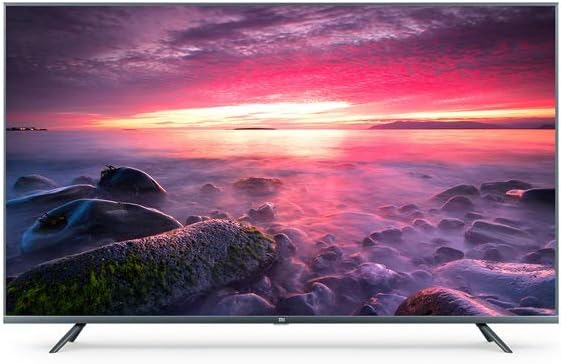
Image: Front view of the Xiaomi Mi LED TV L65M5-5ASP, showcasing the display and slim bezels.
Angled Front View

Image: Angled front view of the Xiaomi Mi LED TV L65M5-5ASP, highlighting the screen and stand design.
Back View

Image: Rear view of the Xiaomi Mi LED TV L65M5-5ASP, showing the port area and VESA mounting points.
Side View

Image: Side profile of the Xiaomi Mi LED TV L65M5-5ASP, illustrating its thin design.
Ports and Connections
The TV features various ports for connecting external devices:
- HDMI Ports: For connecting high-definition devices like Blu-ray players, game consoles, or set-top boxes.
- USB Ports (3 total): For connecting USB storage devices to play media or for software updates.
- Ethernet (LAN) Port: For a wired internet connection.
- Antenna/Cable Input: For connecting an antenna or cable TV signal.
- Audio Output: For connecting external audio systems.
5. Setup
5.1 Assembling the TV Stands
- Carefully place the TV face-down on a soft, flat surface to prevent screen damage.
- Identify the left and right stands.
- Align each stand with the corresponding slots on the bottom of the TV.
- Secure each stand with the provided screws using a screwdriver.
5.2 Initial Power On and Setup Wizard
- Connect the power cable to the TV and then to a power outlet.
- Press the Power button on the remote control or on the TV.
- The TV will display the initial setup wizard. Follow the on-screen prompts to:
- Select your preferred language.
- Connect to a Wi-Fi network or use an Ethernet cable for a wired connection.
- Sign in with your Google account to access Android TV features and apps.
- Scan for available TV channels (if connecting an antenna/cable).
- Agree to terms and conditions.
6. Operating the TV
6.1 Remote Control Functions
The remote control allows you to navigate the TV's features:
- Power Button: Turns the TV on or off.
- Volume +/-: Adjusts the sound level.
- Channel +/-: Changes TV channels.
- Navigation Buttons (Up/Down/Left/Right): Moves cursor or selection.
- OK/Enter Button: Confirms selection.
- Back Button: Returns to the previous screen.
- Home Button: Accesses the Android TV home screen.
- Input Button: Selects input sources (HDMI, AV, etc.).
- Google Assistant Button: Activates voice commands.
6.2 Smart TV Features (Android TV)
Your Xiaomi Mi LED TV runs on Android TV, providing access to a variety of applications and services:
- App Store: Download and install apps from the Google Play Store.
- Streaming Services: Access pre-installed or downloadable streaming apps like Netflix.
- Google Assistant: Use voice commands to search for content, control smart home devices, and get information.
- Chromecast Built-in: Cast content from your smartphone or tablet directly to the TV.
6.3 Connectivity
The TV supports various connectivity options:
- Wi-Fi: Connect wirelessly to your home network for internet access.
- Bluetooth: Pair with Bluetooth-enabled devices such as headphones, speakers, or game controllers.
- USB: Play media files from USB drives or connect compatible peripherals.
- HDMI: Connect external video sources for high-quality audio and video transmission.
7. Maintenance
7.1 Cleaning the TV
- Screen: Gently wipe the screen with a soft, lint-free cloth. For stubborn marks, slightly dampen the cloth with water or a specialized screen cleaner (do not spray directly on the screen).
- Casing: Use a soft, dry cloth to wipe the TV casing. Avoid abrasive materials or chemical cleaners.
- Always unplug the TV before cleaning.
7.2 Storage
If storing the TV for an extended period, ensure it is:
- Stored in a cool, dry place.
- Protected from dust and extreme temperatures.
- Kept in its original packaging if possible, to prevent damage.
8. Troubleshooting
Refer to the following table for common issues and their solutions:
| Problem | Possible Cause | Solution |
|---|---|---|
| No power | Power cable not connected; Power outlet not working | Check power cable connection; Test outlet with another device |
| No picture, but sound is present | Incorrect input source selected; External device issue | Press the 'Input' button on the remote to select the correct source; Check external device connections |
| No sound, but picture is present | Volume muted or too low; External audio system issue | Increase volume; Check if TV is muted; Verify external audio system connections |
| Cannot connect to Wi-Fi | Incorrect password; Router issue; TV too far from router | Re-enter Wi-Fi password; Restart router; Move TV closer to router or use Ethernet |
| Remote control not working | Dead batteries; Obstruction; Remote not paired | Replace batteries; Remove obstructions; Re-pair remote if necessary (refer to TV settings) |
If the issue persists after attempting these solutions, please contact customer support.
9. Specifications
| Feature | Specification |
|---|---|
| Brand | XIAOMI |
| Model Number | S0227634 (L65M5-5ASP) |
| Screen Size | 65 Inches |
| Display Technology | LED |
| Resolution | 4K (Ultra HD) |
| Refresh Rate | 120 hertz |
| Operating System | Android |
| Special Features | Smart / Internet |
| Connectivity Technology | Bluetooth, Ethernet, HDMI, USB, Wi-Fi |
| Total USB Ports | 3 |
| Supported Internet Services | Netflix |
| Included Components | Remote control, Power cable |
| Image Format | 16:9 |
10. Warranty and Support
Your Xiaomi Mi LED TV L65M5-5ASP is covered by a limited warranty. For detailed warranty terms and conditions, please refer to the warranty card included with your product or visit the official Xiaomi support website. For technical assistance, troubleshooting beyond this manual, or service requests, please contact Xiaomi customer support.


