
1. Product Overview
The Inkbird ISC-007BW is a smart BBQ temperature controller designed to automate and monitor the cooking temperature of your grill or smoker. It features both WiFi and Bluetooth connectivity, allowing for remote monitoring and control via a dedicated mobile application. This kit includes the main controller unit, a fan, three temperature probes, and necessary accessories for operation.

Figure 1: Complete Inkbird ISC-007BW Kit showing the controller, fan, power adapter, three probes, and carrying case.
1.1 Included Components
- One (1) ISC-007BW Controller Unit
- One (1) Power Adapter
- One (1) Blast Pipe (Fan)
- Three (3) Temperature Probes (1 ambient probe, 2 food probes)
- Two (2) Dampers
- One (1) User Manual (this document)
2. Key Features
- WiFi & Bluetooth Connectivity: Monitor and control your cook from anywhere using the Inkbird Pro app.
- One-Dial Operation: Simple and intuitive control of settings directly on the device.
- Powerful Fan & Variable Speed: The integrated fan automatically adjusts its speed to maintain the desired temperature within your smoker or grill.
- Alarm Function: The controller will sound an alarm when the target temperature is reached, or if temperatures go outside set ranges.
- App Control & Data Storage: Manage settings, view real-time data, and access historical cooking data through the Inkbird Pro mobile application.
- Fast Responding & Accurate Readout: Equipped with high-quality probes for precise and rapid temperature measurements.

Figure 2: The ISC-007BW controller demonstrating its single-dial operation for setting and controlling temperature.

Figure 3: The ISC-007BW controller connected to a smoker, illustrating the powerful fan's role in temperature regulation.

Figure 4: The ISC-007BW controller displaying an alarm notification, indicating the meat has reached its target temperature.

Figure 5: A smartphone screen showing the Inkbird Pro app interface, demonstrating Wi-Fi and Bluetooth connectivity for controlling the ISC-007BW.

Figure 6: Close-up view of the Inkbird temperature probes inserted into meat on a grill, highlighting their fast response and accurate readout capabilities.
3. Setup Guide
Follow these steps for the initial setup of your Inkbird ISC-007BW controller:
- Unpack Components: Carefully remove all items from the packaging and verify that all included components are present.
- Connect Power: Plug the power adapter into the controller's power input port and then into a standard electrical outlet.
- Connect Fan: Insert the blast pipe (fan) into the designated fan port on the controller. Ensure it is securely connected.
- Connect Probes: Insert the temperature probes into the probe ports (P1, P2, Grill) on the side of the controller. The ambient probe typically connects to the "Grill" port, while the food probes connect to "P1" and "P2".
- Install Dampers: Attach the dampers to your grill or smoker's air intake vent as per your grill's instructions. The fan will connect to one of these dampers.
- Download App: Search for "Inkbird Pro" in your mobile device's app store (iOS or Android) and download the application.
- Pair Device: Open the Inkbird Pro app, create an account if necessary, and follow the in-app instructions to pair your ISC-007BW controller via Bluetooth and then connect it to your home WiFi network.
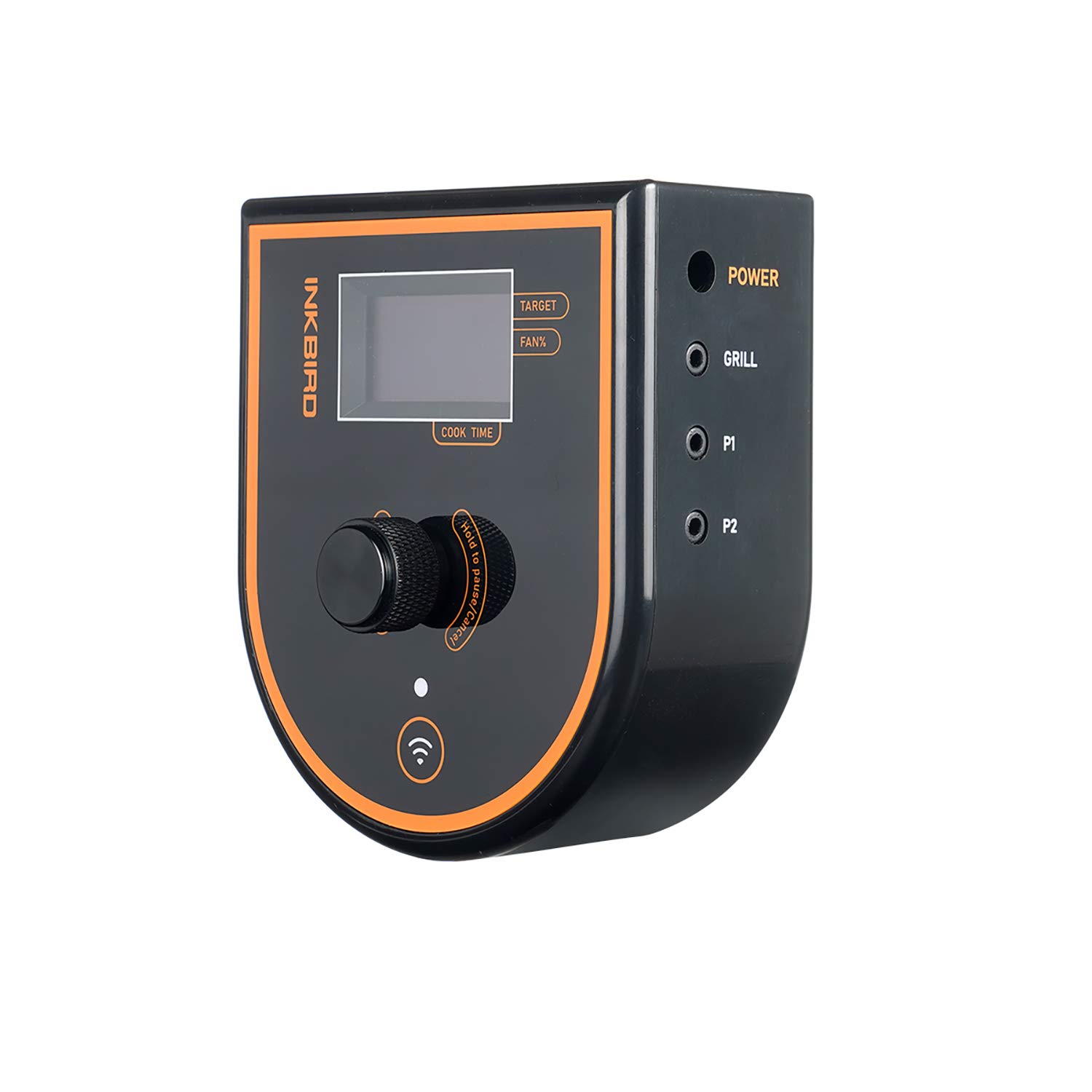
Figure 7: The ISC-007BW controller with the blast pipe (fan) attached, ready for connection to a smoker.

Figure 8: The ISC-007BW controller fully assembled with power, fan, and all three temperature probes connected, displaying initial readings.
4. Operating Instructions
4.1 Basic Operation (On-Device)
- Power On/Off: Press and hold the power button to turn the device on or off.
- Navigate Menus: Rotate the central dial to scroll through options on the display.
- Select/Confirm: Press the central dial to select an option or confirm a setting.
- Set Target Temperature: Navigate to the "TARGET" setting, rotate the dial to adjust the desired temperature, and press to confirm.
- Monitor Fan Speed: The "FAN%" display indicates the current fan output percentage.
- View Cook Time: The "COOK TIME" display shows the elapsed cooking time.
4.2 App Operation (Inkbird Pro)
- Real-time Monitoring: View current temperatures for all connected probes on your smartphone.
- Set Alarms: Configure high/low temperature alarms for each probe.
- Graphing: Access historical temperature data in graph format.
- Preset Temperatures: Utilize pre-programmed temperature settings for various types of meat and doneness levels.
- Manual Fan Control: Adjust fan speed manually if desired, overriding automatic control.
- Notifications: Receive push notifications on your phone for alarms or status changes.
5. Maintenance and Care
- Probes: The temperature probes are designed for high heat but should be hand washed only. Do not immerse the probe cables or the probe connection points in water. Wipe clean with a damp cloth.
- Controller Unit: Wipe the controller unit with a soft, dry cloth. Do not use abrasive cleaners or immerse the unit in water.
- Fan: Ensure the fan is free from debris. If necessary, gently clean the fan blades with a soft brush or cloth.
- Storage: Store the ISC-007BW kit in a cool, dry place when not in use. The included carrying case is ideal for protecting the components.
- Oven Safe: Note that the probes are oven safe, but the main controller unit is not.
6. Troubleshooting
| Problem | Possible Cause | Solution |
|---|---|---|
| Device won't power on. | Power adapter not connected or faulty; power outlet issue. | Ensure power adapter is securely connected. Try a different power outlet. |
| Inaccurate temperature readings. | Probe not fully inserted; probe damaged; probe tip not properly placed. | Ensure probes are fully inserted into ports. Check probe for visible damage. Ensure probe tip is in the center of the thickest part of the meat (for food probes) or away from direct heat (for ambient probe). |
| Fan not operating. | Fan not connected; fan port issue; target temperature already reached. | Verify fan is securely connected. Check if the target temperature has been met, as the fan will stop once target is reached. |
| Cannot connect to WiFi/Bluetooth. | Incorrect network password; device too far from router/phone; app issues. | Double-check WiFi password. Move device closer to router/phone. Restart the app and the controller. Ensure Bluetooth is enabled on your phone. |
7. Specifications
- Brand: Inkbird
- Model: ISC-007BW
- Special Feature: Alarm
- Color: Green (Controller Unit)
- Outer Material: Acrylonitrile Butadiene Styrene (ABS)
- Display Type: Digital
- Connectivity Technology: Bluetooth, WiFi
- Product Care Instructions: Oven Safe (probes), Hand Wash Only (probes), Wipe clean (controller)
- Unit Count: 1 Kit
- Compatibility: Designed for use with various kamado-style grills and smokers, including Big Green Egg, Kamado Joe, WSM, Kettle, and Akorn.
8. Warranty and Support
Inkbird products are manufactured to high-quality standards and are backed by a standard manufacturer's warranty. For specific warranty details, technical support, or service inquiries, please refer to the official Inkbird website or contact Inkbird customer support directly.
You can find more information and support resources by visiting the Inkbird Store on Amazon.


