
Introduction
The PETLIBRO Automatic Pet Feeder PLAF001 is designed to provide a convenient and reliable feeding solution for your cats and small dogs. This feeder ensures your pet receives meals on a consistent schedule and in controlled portions, promoting healthy eating habits and offering peace of mind for pet owners. Its features include a generous 4-liter food capacity, a 10-second voice recording function to call your pet, and a dual power supply system for uninterrupted operation.

Image: The PETLIBRO Automatic Pet Feeder PLAF001, a white device with a digital display, next to a cat eating from its stainless steel bowl.
Setup
Follow these steps to set up your PETLIBRO Automatic Pet Feeder:
- Unboxing and Initial Assembly: Carefully remove all components from the packaging. Ensure you have the main feeder unit, food tray, power adapter, and desiccant bag.
- Install Food Tray: Attach the stainless steel food bowl to the feeder base. It should click securely into place.
- Power Supply: Connect the 5V AC adapter to the feeder and plug it into a wall outlet. For backup power during outages, insert three D-size alkaline batteries (not included) into the battery compartment at the bottom of the unit. The feeder will primarily use AC power, switching to battery power automatically if AC power is lost.
- Add Desiccant: Open the top lid of the feeder. Locate the desiccant compartment on the underside of the lid. Place the desiccant bag inside to help keep the food fresh. Close the lid securely, ensuring the lock function is engaged to prevent pets from opening it.
- Fill Food Tank: Pour dry pet food into the 4-liter food tank. The tank can hold approximately 1.4 kg of food. Ensure the food kibble size is between 2-10mm (0.07-0.4 inches) for optimal dispensing.
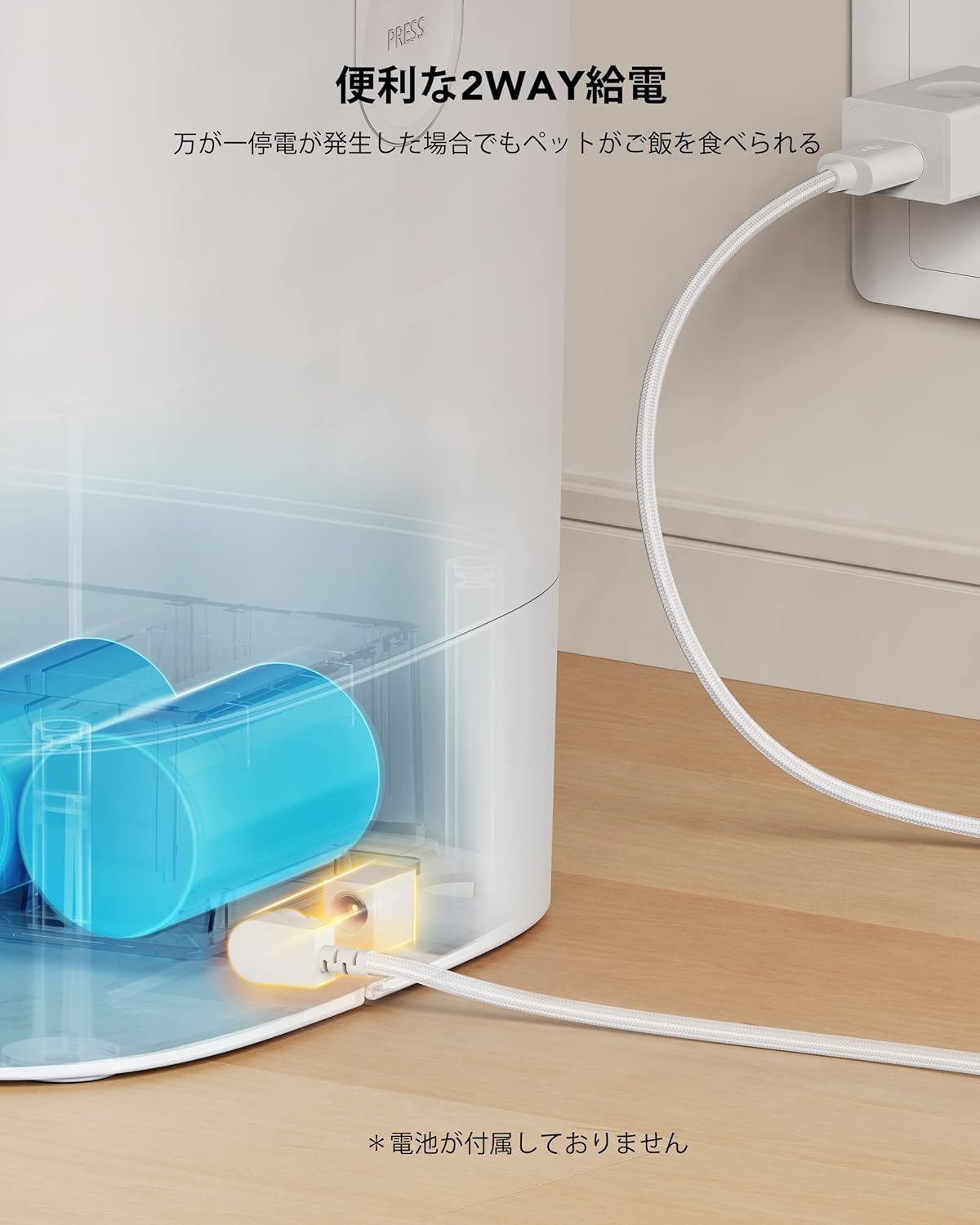
Image: The PETLIBRO Automatic Pet Feeder highlighting its 2-way power supply option, showing both AC adapter and battery compartments.
Video: This video demonstrates the assembly and program settings for the PETLIBRO Automatic Pet Feeder, including initial setup steps.
Operating Instructions
The PETLIBRO Automatic Pet Feeder offers customizable feeding schedules and voice recording features.
- Unlock the Control Panel: Press and hold the lock button (usually represented by a padlock icon) for 3 seconds to unlock the control panel.
- Set Current Time: Press the settings button (gear icon) to enter time setting mode. Use the up/down arrow buttons to adjust the hour and minute. Press the settings button again to confirm.
- Set Meal Times and Portions: The feeder allows for 1 to 4 meals per day, with 1 to 9 portions per meal. Press the settings button to cycle through meal settings (MEAL 1, MEAL 2, etc.). For each meal, use the up/down arrows to set the feeding time and the number of portions. Confirm each setting with the settings button.
- Record Voice Message: Press and hold the microphone button for 3 seconds to begin recording a 10-second voice message. This message will play at each scheduled feeding time to alert your pet. Release the button to stop recording. Press the microphone button once to play back the recorded message.
- Manual Feeding: To dispense food manually, press and hold the manual feed button (often a paw print or food icon) for 3 seconds. One portion of food will be dispensed.

Image: A cat eating from the PETLIBRO Automatic Pet Feeder, illustrating the voice recording feature that calls the pet to eat.

Image: A cat attempting to open the PETLIBRO Automatic Pet Feeder, demonstrating the secure lid lock mechanism.
Maintenance
Regular cleaning and maintenance ensure the longevity and hygiene of your pet feeder.
- Cleaning the Food Bowl: The stainless steel food bowl is removable and dishwasher-safe for easy cleaning. Wash regularly to prevent bacterial growth.
- Cleaning the Food Tank: The food tank can be detached from the main unit for thorough cleaning. Ensure the tank is empty before removal. Wash with mild soap and water, then dry completely before reattaching. Do not wash the main base unit.
- Replacing Desiccant: Replace the desiccant bag every 2-4 weeks to maintain food freshness and prevent moisture buildup.
- Paddle and Rotor Replacement: If the food dispensing paddle or rotor needs replacement, refer to the video below for detailed instructions. This involves loosening screws to remove the old parts and securing the new ones.

Image: A visual guide demonstrating the four-step process for disassembling and cleaning the PETLIBRO Automatic Pet Feeder components, excluding the base unit.
Video: This video provides instructions on how to replace the paddle and rotor components of the PETLIBRO Automatic Pet Feeder.
Troubleshooting
If you encounter issues with your feeder, try the following solutions:
- Food Not Dispensing:
- Check if the food tank is empty.
- Ensure the food kibble size is appropriate (2-10mm). Larger kibble may cause blockages.
- Verify that the paddle and rotor are correctly installed and not obstructed.
- Clean the dispensing chute for any food residue.
- Power Issues:
- Confirm the AC adapter is securely plugged in.
- Check battery levels if operating on backup power. Replace batteries if necessary.
- Settings Not Saving: The feeder has a memory function, so settings should be retained even if power is interrupted. If settings are lost, ensure batteries are installed and functional, or contact support.
- Resetting All Settings: To clear all programmed settings, press and hold the up arrow button (or the settings button, depending on model variation) for 3-5 seconds while the unit is unlocked. The display should reset to default.
Specifications
| Feature | Detail |
|---|---|
| Brand | PETLIBRO |
| Model Number | PLAF001 |
| Target Species | Dogs, Cats |
| Pet Breed Size | Medium Breeds |
| Life Stage | All Life Stages |
| Color | White |
| Size | AF001-11W |
| Capacity | 4 Liters |
| Quantity | 1 |
| Special Features | Voice Recording, Timer Function, 10-second Voice Recording, 4L Large Capacity, Desiccant Included, 2-Way Power Supply |
| Batteries Required | No (for primary operation, 3 D-size alkaline batteries for backup, sold separately) |
| Material | Body: Food-grade ABS resin, Bowl: Stainless steel |
| ASIN | B08CXLCFGV |
Warranty Information
PETLIBRO products typically come with a standard manufacturer's warranty covering defects in materials and workmanship. Please refer to the warranty card included in your product packaging or visit the official PETLIBRO website for specific warranty terms and conditions, including duration and coverage details. Keep your purchase receipt as proof of purchase for warranty claims.
Customer Support
For any questions, technical assistance, or support regarding your PETLIBRO Automatic Pet Feeder, please contact PETLIBRO customer service. You can usually find contact information (email, phone, or live chat) on the official PETLIBRO website or through the retailer where you purchased the product. Have your model number (PLAF001) and purchase details ready when contacting support.


