
VIZIO V51x-J6
VIZIO V-Series 5.1 Home Theater Sound Bar User Manual
Model: V51x-J6
Introduction
The VIZIO V-Series 5.1 Home Theater Sound Bar system is designed to deliver an immersive audio experience for your home entertainment. This system includes a sound bar, a wireless subwoofer, and two satellite speakers, providing 5.1-channel surround sound with Dolby Audio and DTS Digital Surround support. It offers versatile connectivity options including HDMI ARC and Bluetooth for seamless integration with your devices.

Image: The complete VIZIO V-Series 5.1 Home Theater Sound Bar system, showcasing the soundbar, wireless subwoofer, and two compact satellite speakers.
What's in the Box
Verify that all components are present in your package:
- Soundbar
- Wireless Subwoofer
- Remote Control
- 2 Satellite Speakers
- Power Cables (for Soundbar and Subwoofer)
- HDMI Cable
- Optical Audio Cable
- RCA to 3.5mm Audio Cable (for satellite speakers)
- Quick Start Guide
Setup
1. Placement
Optimal placement of your sound system components is crucial for the best audio experience.
- Soundbar: Place the soundbar centrally below your TV. Ensure it is not obstructed.
- Wireless Subwoofer: Position the subwoofer anywhere in the room, preferably in a corner or near a wall for enhanced bass. Ensure it is within wireless range of the soundbar.
- Satellite Speakers: Connect the satellite speakers to the wireless subwoofer using the provided RCA cables. Place them behind your main listening area, one on the left and one on the right, facing towards the listener for optimal surround sound.

Image: A visual representation of a typical 5.1 home theater setup, illustrating the recommended positions for the soundbar, wireless subwoofer, and two satellite speakers relative to the viewing area.
2. Connections
Connect the soundbar to your TV and other devices using the appropriate cables.
- HDMI ARC (Recommended): Connect one end of the HDMI cable to the HDMI ARC port on your soundbar and the other end to the HDMI ARC/eARC port on your TV. This allows for high-quality audio and control via your TV remote.
- Optical Audio: If your TV does not have an HDMI ARC port, connect the optical audio cable from the soundbar's Optical In port to your TV's Optical Out port.
- Auxiliary (AUX): For connecting devices with a 3.5mm audio output, use an AUX cable.
- USB: The USB port is available for playing audio files from a USB drive.
- Power: Connect the power cables to the soundbar and wireless subwoofer, then plug them into a power outlet.

Image: The back panel of the wireless subwoofer, displaying the power input and the RCA output jacks for connecting the satellite speakers.
3. Wireless Subwoofer Pairing
The wireless subwoofer should automatically pair with the soundbar upon initial power-up. If pairing fails:
- Ensure both the soundbar and subwoofer are powered on.
- Press and hold the "Pair" button on the back of the subwoofer for 5 seconds. The LED indicator on the subwoofer will flash.
- On the soundbar, press and hold the "Bluetooth" button for 5 seconds. The LED indicators on the soundbar will flash.
- Once paired, the LED on the subwoofer will turn solid white.
Operating Instructions
1. Basic Controls
The soundbar features on-device controls and comes with a remote control for comprehensive operation.
- Power Button: Turns the soundbar system on or off.
- Input Button: Cycles through available audio inputs (HDMI ARC, Optical, Bluetooth, AUX, USB).
- Volume Up/Down: Adjusts the overall volume level.
- Bluetooth Button: Initiates Bluetooth pairing mode.

Image: The top surface of the VIZIO soundbar, highlighting the integrated power, input, volume, and Bluetooth control buttons.
2. Remote Control Functions
The included remote control provides full access to all system settings and features.
- Display: The remote features a small LCD screen to show current settings and input.
- EQ Button: Cycles through preset equalizer modes (e.g., Movie, Music, Dialogue).
- Level Button: Adjusts individual channel levels (e.g., Bass, Treble, Center, Surround, Subwoofer).
- Effect Button: Activates or deactivates audio effects like DTS Virtual:X.
- Mute Button: Mutes or unmutes the audio.
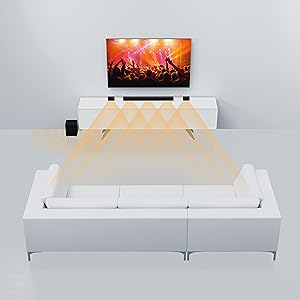
Image: The remote control for the VIZIO soundbar, featuring an LCD display at the top and clearly labeled buttons for input selection, volume, EQ, level adjustments, and sound effects.
3. Bluetooth Streaming
To stream audio from your Bluetooth-enabled device:
- Press the Bluetooth button on the soundbar or remote. The soundbar's LED indicators will pulse.
- On your device, enable Bluetooth and search for "VIZIO V51x-J6".
- Select the soundbar from the list to pair. Once connected, the soundbar's LEDs will stop pulsing and remain solid.

Image: A smartphone screen showing a music application, positioned next to the VIZIO soundbar, illustrating the Bluetooth streaming capability.
4. Voice Assistant Compatibility
The V51x-J6 is compatible with voice assistant devices. Connect your voice assistant device to the soundbar via the AUX VA port for integrated control and audio playback through the sound system.
Maintenance
Proper care ensures the longevity and performance of your VIZIO sound system.
- Cleaning: Use a soft, dry, lint-free cloth to clean the surfaces of the soundbar, subwoofer, and satellite speakers. Do not use liquid cleaners or aerosol sprays.
- Ventilation: Ensure adequate airflow around all components. Do not block ventilation openings.
- Environment: Avoid placing the system in direct sunlight, near heat sources, or in areas with high humidity or dust.
- Cables: Periodically check all cable connections to ensure they are secure and free from damage.
Troubleshooting
If you encounter issues, refer to the following common solutions:
| Problem | Solution |
|---|---|
| No power | Ensure power cables are securely connected to the soundbar/subwoofer and a working power outlet. |
| No sound |
|
| Subwoofer not pairing | Refer to the "Wireless Subwoofer Pairing" section in Setup. Ensure subwoofer is within range and free from interference. |
| Distorted sound |
|
| Remote not working | Replace batteries. Ensure no obstructions between remote and soundbar. |
Specifications
Key technical specifications for the VIZIO V-Series 5.1 Home Theater Sound Bar (V51x-J6):
- Model Name: V51x-J6
- Speaker Type: Surround Sound, Soundbar, Subwoofer
- Surround Sound Channel Configuration: 5.1
- Included Components: Soundbar, Subwoofer, Remote, Satellite speakers
- Product Dimensions (Soundbar): 3.2"D x 36"W x 2.28"H
- Item Weight: 5 Pounds
- Connectivity Technology: Auxiliary, HDMI, Bluetooth, Wi-Fi (for voice assistant compatibility)
- Wireless Communication Technology: Bluetooth
- Subwoofer Connectivity Technology: Wireless
- Subwoofer Diameter: 5 Inches
- Speaker Maximum Output Power: 50 Watts
- Signal-to-Noise Ratio: 96 dB
- Frequency Response: 20000 Hz
- Control Method: Voice (via compatible voice assistant), Remote
- Power Source: AC
- Batteries: 1 Lithium Ion battery required (included for remote)

Image: A diagram illustrating the key dimensions of the VIZIO V-Series 5.1 Sound Bar components, including the soundbar, subwoofer, and satellite speakers.
Warranty and Support
This VIZIO product comes with a Limited Warranty. For detailed warranty information, product registration, and technical support, please refer to the official VIZIO website or the full user manual PDF available for download. You can also contact VIZIO customer support directly for assistance.
Official User Manual (PDF): Download Here
Official User Guide (PDF): Download Here
Related documentsV51x-J6


Ask a question about this manual
Ask about setup, troubleshooting, compatibility, parts, safety, or missing instructions. Manuals+ will review the question and use this page’s manual context to help answer it.