
Product Overview
The FLEXISPOT EN2 Electric Standing Desk is designed to provide a versatile and ergonomic workspace. This whole-piece standing desk features a motorized height adjustment system, programmable memory presets, and integrated power solutions to enhance productivity and comfort.

Image: The FLEXISPOT EN2 Electric Standing Desk in a home office, showcasing its spacious black tabletop and black frame. Two computer monitors are set up on the desk, with a chair positioned for sitting. A water cooler is visible to the left.
Safety and Important Information
- Always follow the assembly instructions carefully.
- Use the desk on a stable surface.
- Keep the desk away from heat sources.
- Do not exceed the maximum weight recommendation of 154 pounds (55 kg) for the desk surface.
- Keep children and pets away from the desk when it is in motion.
- Assembly may require an electric drill, which is not included.
Setup and Assembly
The FLEXISPOT EN2 desk is designed for straightforward assembly. Ensure all parts are present and refer to the detailed instructions provided in the packaging. An electric drill may be required for certain steps.
Assembly Steps Overview:
- Unpack all components and verify against the parts list.
- Assemble the desk frame, attaching the feet and crossbeam.
- Attach the desktop to the assembled frame using the provided screws.
- Install the control panel and connect all necessary cables.
- Attach the removable desktop power outlet and cable management device.
For a visual guide on assembly, please refer to the video below:
Video: A seller-provided video demonstrating the assembly process of a FLEXISPOT electric standing desk, showing the frame construction and desktop attachment.
Operating Instructions
Height Adjustment:
The desk features a 6-button digital controller for easy height adjustment. Use the up and down arrows to manually adjust the desk height. The motorized system adjusts smoothly from 28.1 inches to 45.7 inches.
Memory Presets:
The controller includes four programmable memory presets (buttons 1, 2, 3, 4). To set a preset:
- Adjust the desk to your desired height using the up/down arrows.
- Press and hold one of the number buttons (1-4) until the display flashes or beeps, indicating the height is saved.
- To recall a saved height, simply press the corresponding number button.
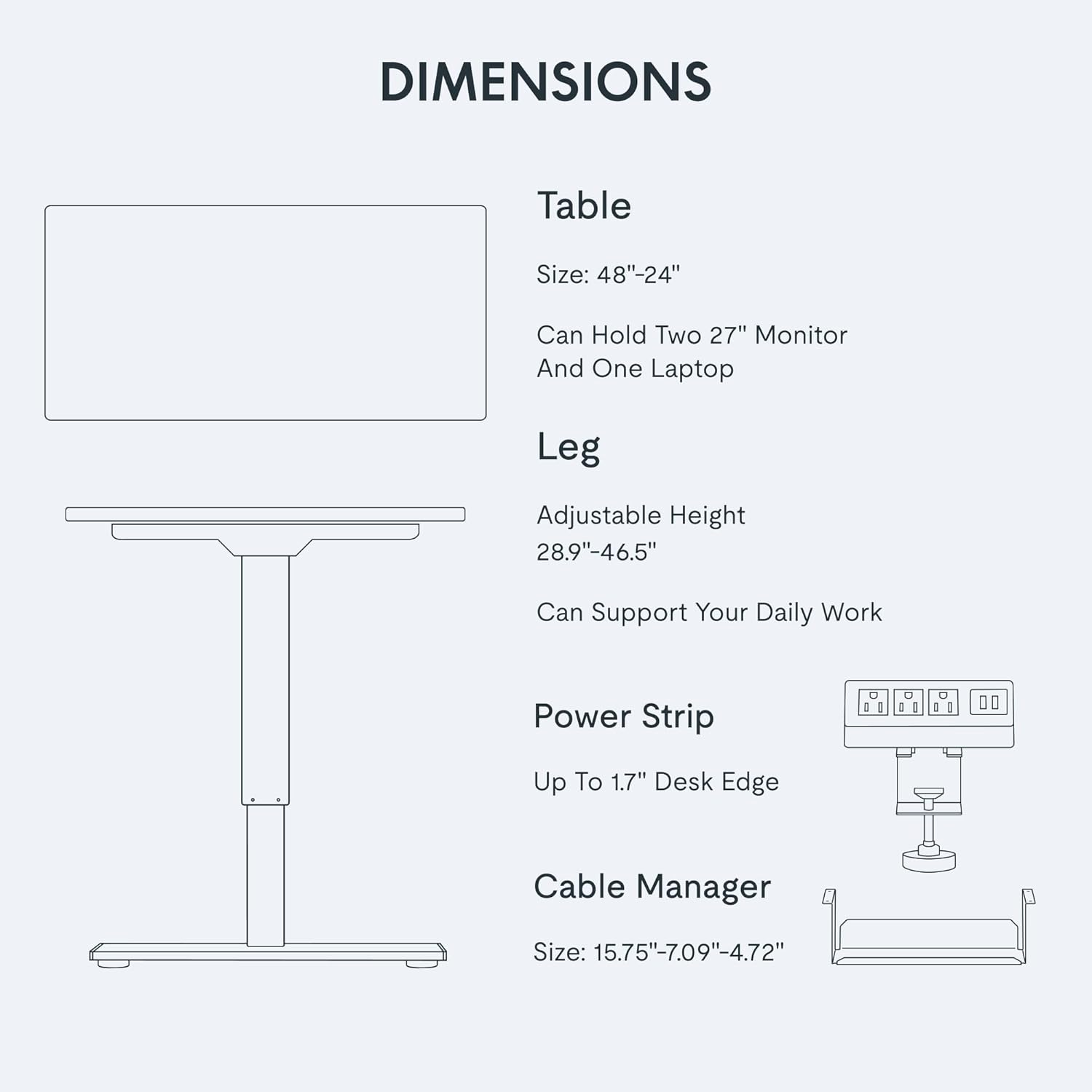
Image: A close-up view of the FLEXISPOT EN2's digital control panel, highlighting the LED display, up/down arrows, and four height setting buttons.
Removable Desktop Power Outlet:
The desktop is equipped with 3 AC power outlets and 2 USB charging ports. This unit can be clipped to the back or side of your desk for convenient access to power for your electronic devices.
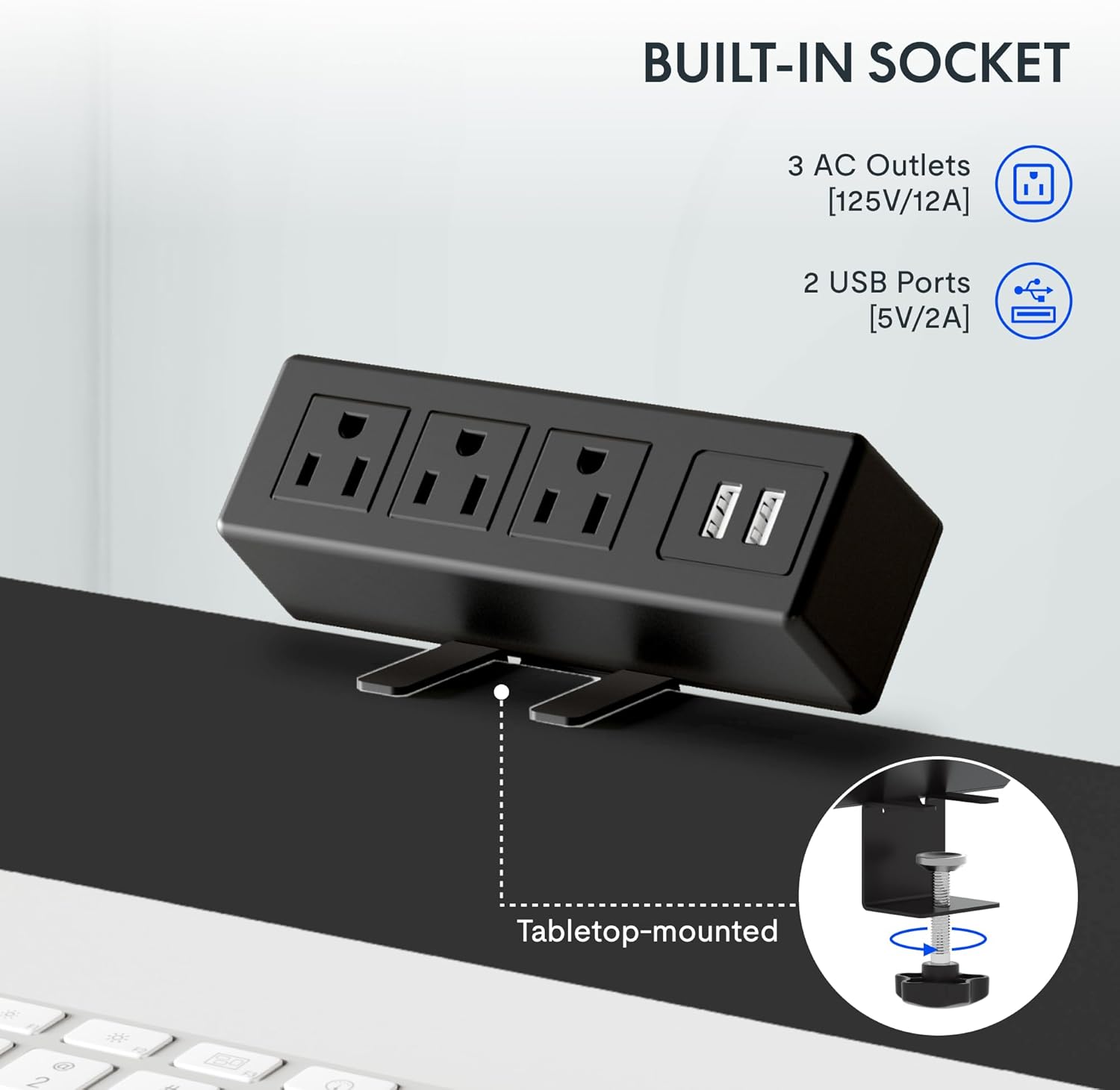
Image: A detailed shot of the removable desktop power outlet, showing its three AC outlets and two USB ports, designed to clamp onto the desk edge.
Maintenance
To ensure the longevity and optimal performance of your FLEXISPOT EN2 desk, follow these maintenance guidelines:
- Cleaning: Wipe the desktop surface with a soft, damp cloth. Avoid abrasive cleaners or harsh chemicals that may damage the finish.
- Motor Care: The motor is designed for quiet operation. Avoid obstructing the motor or lifting mechanisms.
- Cable Management: Regularly check and organize cables using the provided cable management device to prevent tangles and damage.
- Weight Distribution: Distribute weight evenly across the desktop to prevent strain on the motor and frame.
Troubleshooting
If you encounter any issues with your FLEXISPOT EN2 desk, refer to the following common troubleshooting tips:
- Desk Not Moving:
- Check if the power cord is securely plugged into both the desk and the wall outlet.
- Ensure there are no obstructions preventing the desk from moving up or down.
- Reset the system by unplugging the desk for 10 seconds and then plugging it back in.
- Uneven Movement:
- Verify that the desk is placed on a level surface.
- Ensure weight is evenly distributed on the desktop.
- Noise During Operation:
- A quiet motor operation (less than 50 dB) is normal. Excessive noise may indicate an obstruction or loose component. Inspect the moving parts for any issues.
If problems persist, please contact customer support.
Specifications
| Feature | Detail |
|---|---|
| Brand | FLEXISPOT |
| Model Number | EN2 |
| Desktop Dimensions | 48"W x 24"D |
| Height Adjustment Range | 28.1" to 45.7" |
| Maximum Weight Capacity | 154 pounds (55 kg) |
| Desktop Material | FSC-Certified Wood |
| Frame Material | Industrial-grade Steel |
| Noise Level | Less than 50 dB |
| Power Outlet | 3 AC outlets, 2 USB charging ports |
| Controller Type | 6-button digital with 4 memory presets |
Warranty and Support
FLEXISPOT provides the following warranty for your EN2 Electric Standing Desk:
- 5-Year Warranty: Covers frames, motors, and other mechanical devices.
- 2-Year Warranty: Covers controllers, switches, and electronics.
For technical support, warranty claims, or any questions regarding your product, please visit the official FLEXISPOT website or contact their customer service department. Keep your purchase receipt for warranty validation.
You can find more information and support on the FLEXISPOT Store on Amazon.


