
1. Introduction and Overview
The WANPTEK DPS3010U is a high-precision, adjustable DC power supply designed for various applications requiring stable and reliable power. It features a clear 4-digit LED display that simultaneously shows voltage, current, and power output.
- USB Quick Charge: Equipped with a built-in fast charging protocol identification chip, supporting USB fast charging for compatible devices.
- Safe Operation: Incorporates multiple protection mechanisms including Over-Voltage Protection (OVP), Over-Current Protection (OCP), Over-Temperature Protection, and an enhanced short-circuit alarm function.
- Adjustable Output: Both output voltage and current can be continuously adjusted from 0 up to their nominal values, with options for fine and coarse adjustments for precise control.
- Clear Display: The 4-digit LED display provides high accuracy readings for voltage, current, and power, ensuring easy monitoring during operation.
- Wide Application: Suitable for a broad range of uses, including mobile phone and computer repair, electrical maintenance, scientific research in laboratories, and industrial production lines.

Figure 1.1: Front view of the WANPTEK DPS3010U DC Power Supply, showing the LED display and control knobs.
2. Setup
2.1 Unpacking and Inspection
Carefully remove the power supply and all accessories from the packaging. Inspect all components for any signs of damage during transit. If any damage is found, contact your supplier immediately.
2.2 Package Contents
The standard package for the DPS3010U includes:
- 1 × WANPTEK DPS3010U DC Power Supply Unit
- 1 × Power Cord
- 1 × Alligator Clip Test Lead
- 1 × User Manual (English)

Figure 2.1: The DPS3010U power supply shown with its standard accessories: power cord, alligator clip test leads, and user manual.
2.3 Power Connection
- Ensure the power supply's input voltage switch on the rear panel is set to the correct voltage for your region (115V or 230V).
- Connect the provided power cord to the power socket on the rear panel of the unit.
- Plug the other end of the power cord into a grounded AC power outlet.

Figure 2.2: Rear panel details, highlighting the cooling fan, input voltage switch (115V/230V), power socket, and fuse box.
3. Operating Instructions
3.1 Front Panel Controls
Familiarize yourself with the front panel controls and indicators:
- Display Screen: Shows Voltage (V), Current (A), and Power (W).
- V-COARSE / V-FINE: Knobs for coarse and fine adjustment of output voltage.
- A-COARSE / A-FINE: Knobs for coarse and fine adjustment of output current.
- Quick Charge (USB): USB port for fast charging compatible devices.
- C.V. / C.C. Indicators: LEDs indicating Constant Voltage (C.V.) or Constant Current (C.C.) operating mode.
- OCP Indicator: LED indicating Over-Current Protection is active.
- Power Switch: Turns the unit ON/OFF.
- Output Terminals: Positive (+, Red), Negative (-, Black), and Ground (GND, Green) terminals for connecting loads.
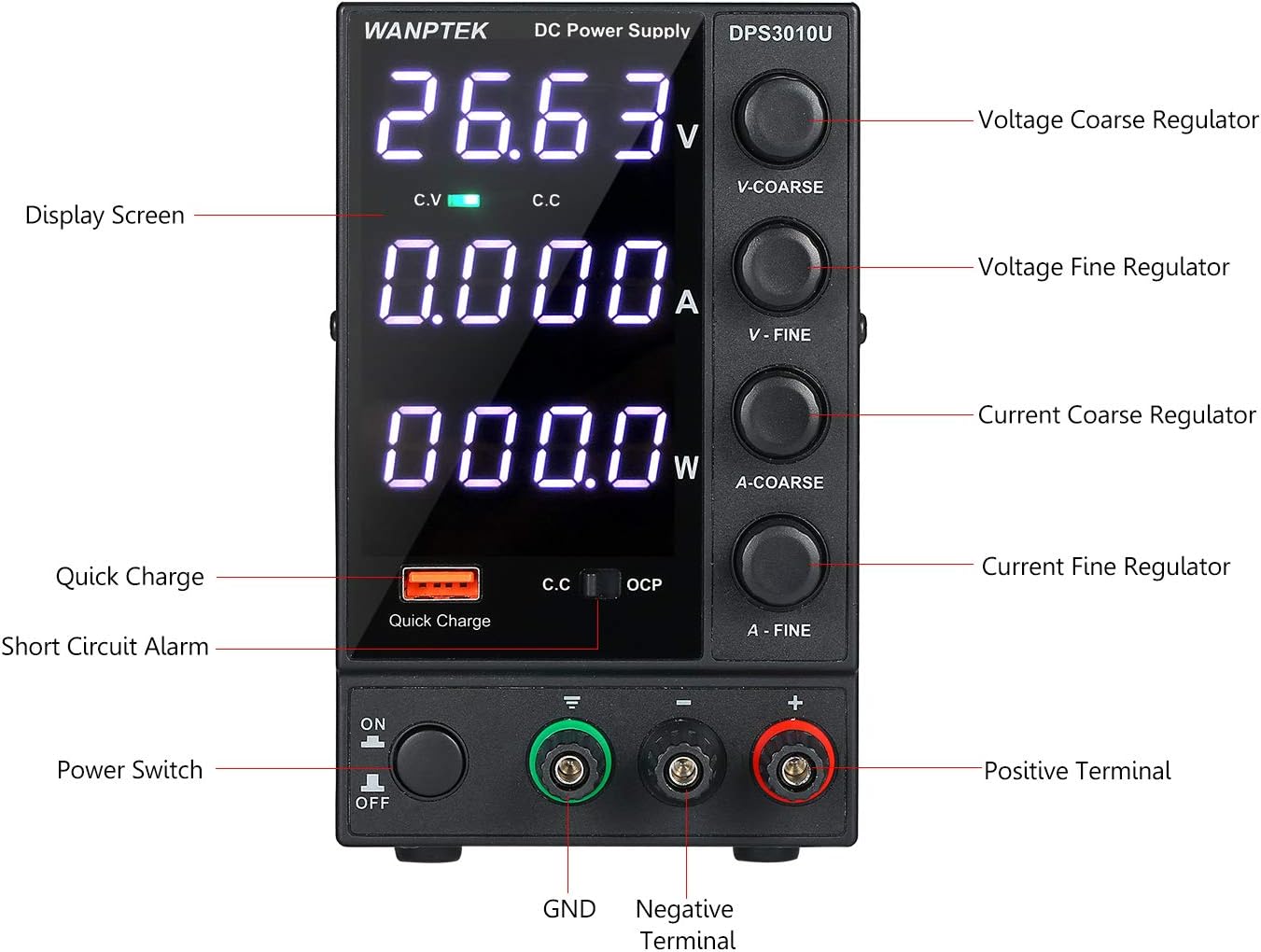
Figure 3.1: Detailed view of the front panel with labels for all controls and indicators.
3.2 Basic Operation
- Power On: Press the Power Switch to turn on the unit. The LED display will illuminate.
- Adjust Voltage: Use the V-COARSE knob for large voltage adjustments and the V-FINE knob for precise adjustments. Observe the voltage reading on the display.
- Adjust Current Limit: Use the A-COARSE knob for large current limit adjustments and the A-FINE knob for precise adjustments. This sets the maximum current the power supply will deliver.
- Connect Load: Connect your device or circuit to the output terminals. Ensure correct polarity (Positive to Positive, Negative to Negative).
- Monitor Output: The display will show the actual voltage, current, and power being delivered to the load. The C.V. or C.C. indicator will light up to show the operating mode.
- USB Quick Charge: For fast charging, connect your USB-compatible device to the Quick Charge port. The power supply's built-in chip will identify the fast charging protocol.
4. Maintenance
4.1 General Care
- Keep the power supply clean and free from dust. Use a soft, dry cloth for cleaning. Do not use liquid cleaners or solvents.
- Avoid operating the unit in environments with excessive dust, humidity, or extreme temperatures.
- Do not block the ventilation openings. Ensure adequate airflow around the unit.
4.2 Cooling System
The DPS3010U is equipped with an internal cooling fan to dissipate heat during operation. Ensure the fan intake and exhaust vents are clear of obstructions to maintain optimal performance and prevent overheating.

Figure 4.1: Side view illustrating the cooling fan and intended airflow path for heat dissipation.
4.3 Fuse Replacement
If the unit fails to power on, check the fuse located in the fuse box on the rear panel. Replace it with a fuse of the same type and rating (3 Ampere).
5. Troubleshooting
5.1 Protection Modes
The power supply incorporates several protection features to safeguard both the unit and the connected load:
- Current Limiting Protection: When the load current exceeds the set current limit, the power supply will enter Constant Current (C.C.) mode, limiting the output current to the set value.
- Short Circuit Alarm Stop Output and Self-Recovery: In case of a short circuit at the output terminals, the unit will stop outputting power and trigger an alarm. Once the short circuit is removed, the unit will automatically recover and resume normal operation.
- Over-Voltage Protection (OVP) / Over-Current Protection (OCP) / Over-Temperature Protection: These internal protections will shut down the output if voltage, current, or internal temperature exceed safe limits.

Figure 5.1: Visual representation of the USB Quick Charging and Short Circuit Protection features.
5.2 Common Issues and Solutions
| Problem | Possible Cause | Solution |
|---|---|---|
| No power when switched on | Power cord not connected, fuse blown, input voltage switch incorrect. | Check power cord connection. Replace fuse if blown. Verify input voltage switch setting. |
| No output voltage/current | Output terminals not connected, voltage/current set to zero, protection mode active. | Ensure load is properly connected. Adjust voltage/current knobs. Check for short circuits or overloads. |
| Unit overheats | Blocked ventilation, excessive load. | Ensure vents are clear. Reduce load or operate within specified limits. |
6. Specifications
Detailed technical specifications for the WANPTEK DPS3010U:
| Parameter | Value |
|---|---|
| Model | DPS3010U |
| Output Voltage | 0-30V |
| Output Current | 0-10A |
| Output Power | 300W |
| Auxiliary Output | USB Quick Charging 18W (supports multiple fast charging protocols) |
| Input Voltage | AC 230V ± 10%, 50Hz; AC 115V ± 10%, 60Hz |
| Operating Temperature | 0~40°C; Humidity: <80% RH |
| Storage Temperature | -10~70°C; Humidity: <70% RH |
| Voltage Stability (CV) | ≤0.1% ± 3mV |
| Load Stability (CV) | ≤0.1% ± 3mV |
| Ripple Noise (CV) | ≤20mVrms (Effective value) |
| Current Stability (CC) | ≤0.1% ± 3mA |
| Load Stability (CC) | ≤0.2% ± 3mA |
| Ripple Noise (CC) | ≤5mA (Effective value) |
| Protection Mode | Current limiting protection / short circuit alarm stop output and self-recovery |
| Display | Four-digit digital tube, three-window display (Voltage, Current, Power) |
| Display Accuracy | 0.5% ± 3 digits |
| Display Resolution (Voltage) | 0.01V |
| Display Resolution (Current) | 0.001A |
| Fuse | 3A |
| Product Dimensions (L×W×H) | 246 × 90 × 152 mm (9.68 × 3.54 × 5.98 inches) |
| Product Weight | 1571 grams (55.42 ounces) |

Figure 6.1: Manufacturer's specification table for DPS series power supplies, including the DPS3010U.

Figure 6.2: Dimensional drawing of the DPS3010U, showing length, width, and height measurements.
7. Warranty and Support
Information regarding product warranty and customer support was not provided in the available product data. Please refer to the documentation included with your purchase or contact the manufacturer directly for warranty details and technical assistance.


