
1. Introduction
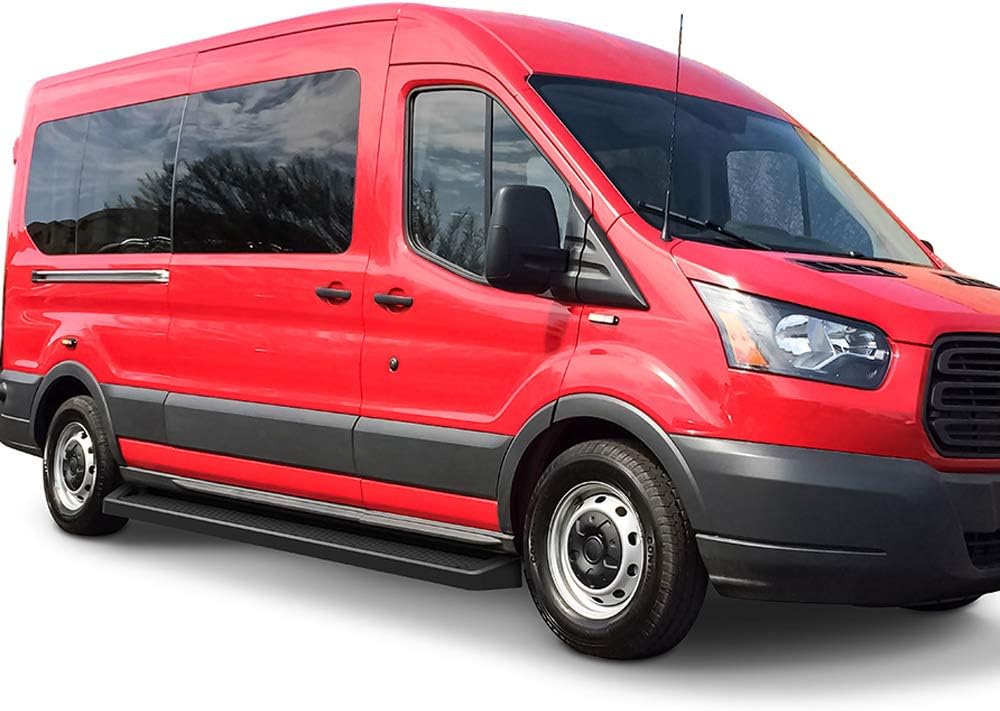
This manual provides detailed instructions for the proper installation, operation, and maintenance of your APS 6-inch Aluminum Black Running Boards. Please read this manual thoroughly before beginning installation to ensure correct procedure and safe use. These running boards are designed for specific Ford Transit Full Size Van 3-Door models from 2015 to 2026, excluding the 2022-2026 E-Transit.
2. Safety Information
Always prioritize safety during installation and use. Failure to follow safety guidelines may result in injury or damage to the product or vehicle.
- Wear appropriate personal protective equipment, including safety glasses and gloves, during installation.
- Ensure the vehicle is parked on a level surface and the parking brake is engaged before starting installation.
- Do not exceed the maximum weight limit of 500 pounds for these running boards.
- Regularly inspect all mounting hardware for tightness and signs of wear or damage.
- Keep hands and clothing clear of moving parts if the vehicle is lifted during installation.
3. Package Contents
Verify that all components are present before beginning installation:
- Pair of Side Steps (Running Boards)
- Mounting Brackets Kit
- Instruction Manual (this document)
4. Tools Required
The following tools are typically required for installation:
- Socket Wrench Set
- Open-End Wrench Set
- Drill (for drilling required mounting points)
- Drill Bits (appropriate sizes for mounting hardware)
- Measuring Tape
- Marker or Scribe
- Safety Glasses
- Gloves
5. Installation Instructions
These running boards feature an easy DIY rocker panel mount design. Drilling is required for proper installation on your Ford Transit van.
5.1. Pre-Installation Steps
- Unpack all components and verify against the package contents list.
- Read through all instructions before starting.
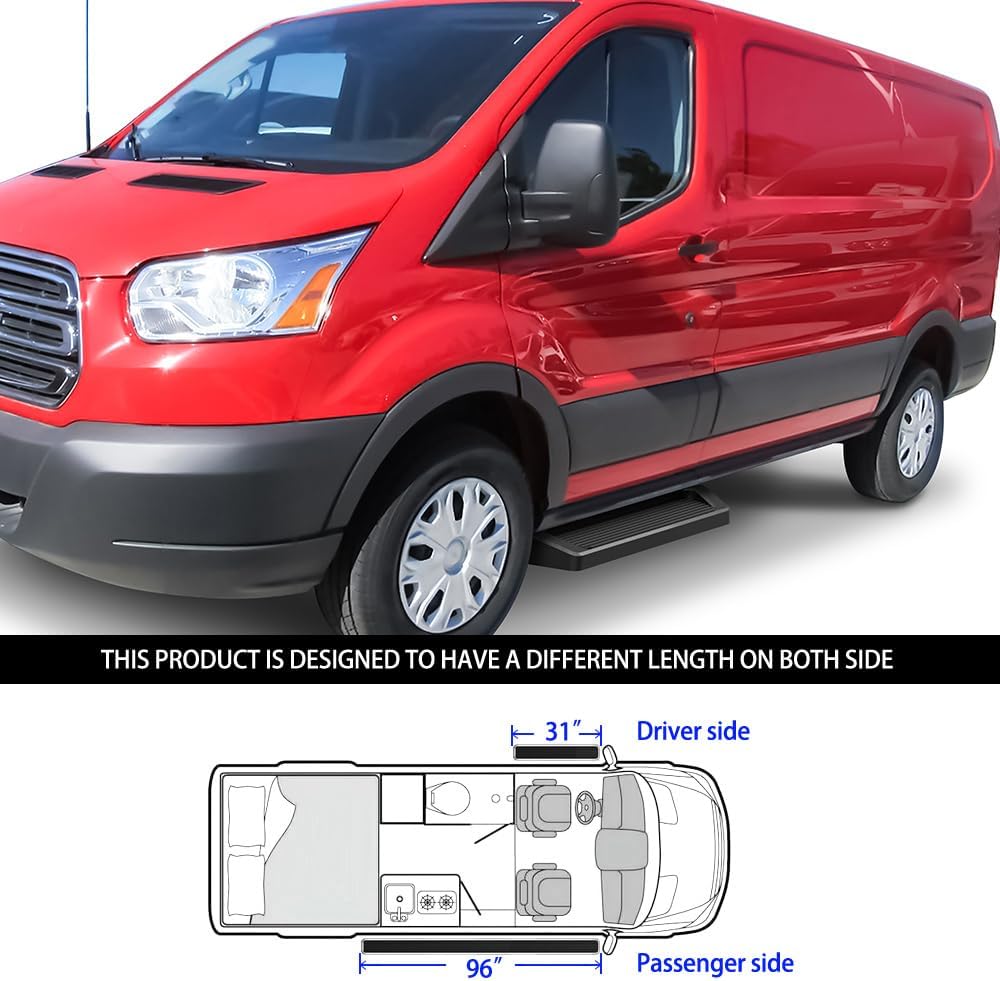
- Identify the driver and passenger side running boards. Note that these running boards are designed with different lengths for each side: approximately 31 inches for the driver's side and 96 inches for the passenger's side.
5.2. Mounting Bracket Installation
- Locate the designated mounting points on the vehicle's rocker panel. These points may be pre-drilled or require drilling.
- If drilling is required, carefully measure and mark the drill locations according to the provided template or vehicle-specific instructions (refer to the PDF manual for precise details if available).
- Drill pilot holes, then enlarge to the appropriate size for the mounting hardware.
- Attach the mounting brackets to the vehicle using the supplied hardware. Do not fully tighten at this stage.
5.3. Running Board Attachment
- Carefully position the running board onto the installed mounting brackets.
- Secure the running board to the brackets using the provided hardware.
- Adjust the running board for proper alignment and levelness.
- Once aligned, fully tighten all mounting hardware for both the brackets and the running boards. Ensure all bolts are torqued to the manufacturer's specifications (refer to the PDF manual for specific torque values if available).
5.4. Post-Installation Check
- Double-check all fasteners to ensure they are securely tightened.
- Test the stability of the running boards by applying moderate weight.
- Remove any tools or debris from the work area.


5.5. Installation Video Reference
The following video provides a general demonstration of running board installation and functionality, similar to the iBoard design used in APS running boards. While not specific to your exact vehicle model, it can offer helpful visual guidance.
6. Operation
These running boards provide a stable step for easier entry and exit from your vehicle. Step onto the board firmly and centrally. The anti-slip high-grip tread pad ensures secure footing in various weather conditions. Always ensure the running boards are clear of obstructions before stepping on them.
7. Maintenance
Regular maintenance will prolong the life and appearance of your running boards:
- Cleaning: Wash the running boards regularly with mild soap and water. Avoid abrasive cleaners or harsh chemicals that could damage the powder-coated finish.
- Inspection: Periodically inspect all mounting hardware (bolts, nuts, brackets) for tightness. Re-tighten any loose fasteners to prevent rattling or instability.
- Damage Check: Check for any signs of damage, such as bends, cracks, or excessive wear on the step pads. Replace damaged components immediately.
8. Troubleshooting
If you encounter any issues, refer to the following common problems and solutions:
| Problem | Possible Cause | Solution |
|---|---|---|
| Running board feels loose or rattles | Loose mounting hardware | Inspect and re-tighten all bolts and nuts on the mounting brackets and running boards. |
| Unusual noise during vehicle movement | Loose hardware or contact with vehicle body | Check all mounting points for tightness. Ensure running boards are not making contact with the vehicle's undercarriage or body panels. |
| Difficulty stepping on the board | Obstruction or damage | Clear any debris from the step surface. Inspect for physical damage that might affect its integrity. |
9. Specifications
| Feature | Detail |
|---|---|
| Model Number | IB-FR405N-1 |
| Material | 6061 Aircraft Aluminum |
| Exterior Finish | Matte Black Powder Coated Finish |
| Dimensions (L x W x H) | 96 x 6 x 3.25 inches (Passenger side) / 31 x 6 x 3.25 inches (Driver side) |
| Item Weight | 41.5 Pounds |
| Weight Limit | 500 Pounds |
| Vehicle Service Type | Van (Ford Transit 2015-2026 Full Size Van 3-Door, Excludes 2022-2026 E-Transit) |
| Installation Type | Rocker Panel Mount (Drilling Required) |
10. Warranty Information
This APS product comes with a Limited 3-Year Warranty. This warranty covers defects in material and workmanship under normal use. For specific terms, conditions, and claim procedures, please refer to the official warranty documentation provided with your purchase or contact APS customer support.
11. Customer Support
If you have any questions regarding the installation, operation, maintenance, or warranty of your APS Running Boards, please contact APS customer support. Refer to your purchase documentation for contact details or visit the official APS website for assistance.


