
Introduction
This user manual provides detailed instructions for the NOKBABO iPad Keyboard Case, designed to enhance your iPad's functionality by transforming it into a versatile laptop-like device. It features a built-in keyboard with a multi-touch touchpad, 360° rotation, and 180° flip capabilities, offering multiple viewing angles and usage modes. Please read this manual carefully before using the product to ensure proper operation and maintenance.

Image: The NOKBABO iPad Keyboard Case with an iPad, highlighting the backlit keyboard and touchpad functionality.
Compatibility
The NOKBABO iPad Keyboard Case is compatible with the following iPad models:
- iPad 9th Generation 2021 (Models: A2602, A2603, A2604, A2605)
- iPad 8th Generation 2020 (Models: A2270, A2428, A2429, A2430)
- iPad 7th Generation 2019 (Models: A2200, A2197, A2198)
- iPad Air 3rd Generation 2019 (Models: A2123, A2152, A2153, A2154)
- iPad Pro 10.5 inch 2017 (Models: A1701, A1709, A1852)
Please verify your iPad model number on the back of your device to ensure compatibility.
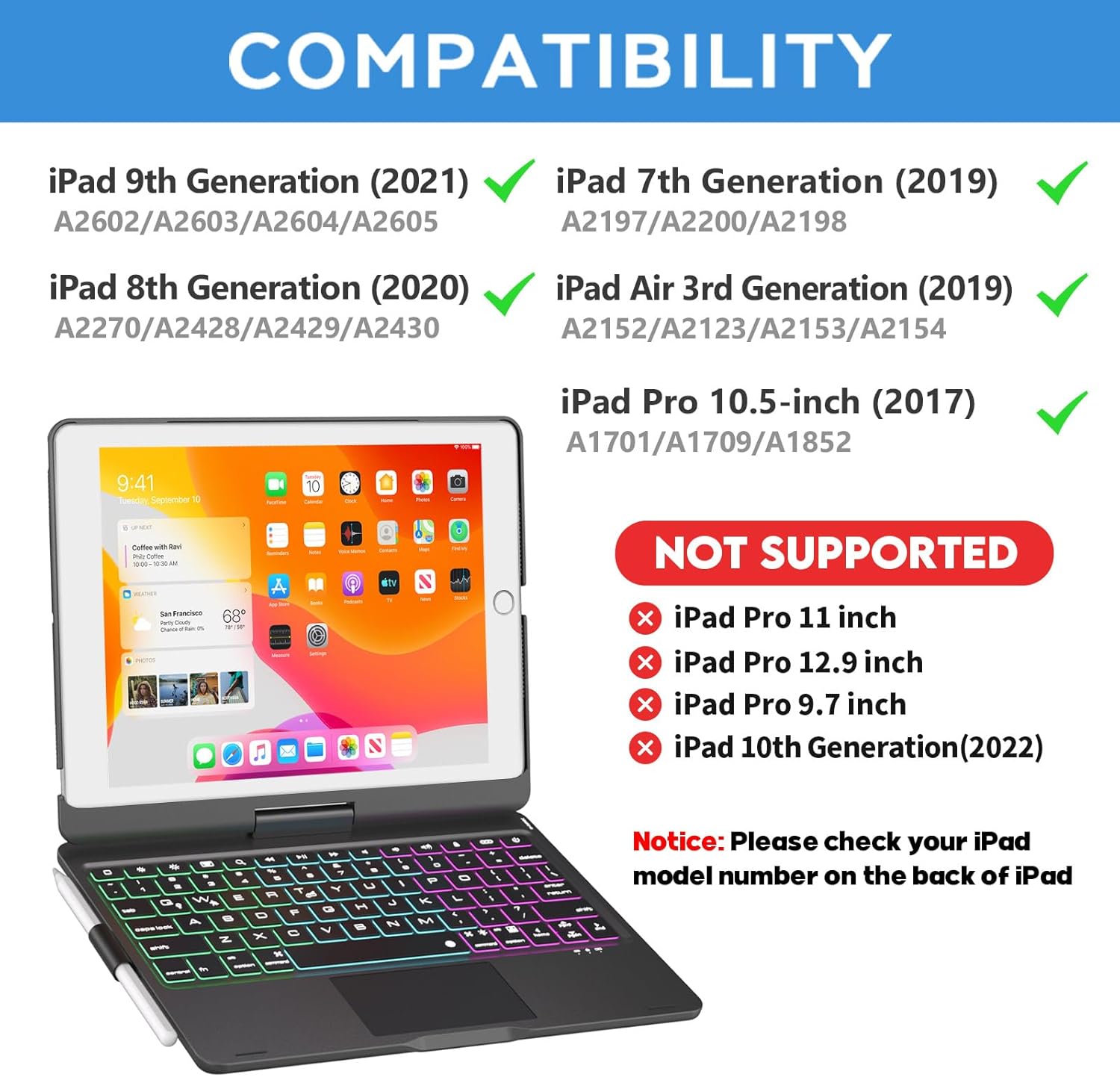
Image: Visual guide detailing compatible iPad models for the keyboard case.
What's in the Box
Upon unboxing, please ensure all items are present:
- 10.2 inch iPad case with keyboard
- Type-C Cable
- User Manual
Setup
1. Inserting Your iPad
Gently align your iPad with the case's frame and press firmly until it snaps securely into place. Ensure all corners are properly seated to provide full protection.
2. Charging the Keyboard
Before first use, fully charge the keyboard. Connect the provided Type-C cable to the charging port on the keyboard and a USB power adapter (not included). The charging indicator light will illuminate during charging and turn off when fully charged. Charging time is approximately 2.5 hours.

Image: Illustration of the keyboard's Type-C charging port and cable connection.
3. Bluetooth Pairing
- Turn on the keyboard by sliding the power switch to the 'ON' position. The indicator light will flash.
- On your iPad, go to Settings > Bluetooth.
- Turn on Bluetooth. Your iPad will search for available devices.
- Select "Bluetooth Keyboard" or similar from the list of devices.
- Once connected, the indicator light on the keyboard will turn off.
Operating Instructions
Keyboard Functions
The keyboard features 78 standard keys and dedicated iOS/iPadOS shortcut keys for enhanced productivity.
- Backlight Control: Press the Light Bulb key to cycle through 7 different backlight colors. Press Fn + Light Bulb to adjust brightness levels (3 modes) or turn the backlight off.
- Touchpad: The built-in multi-touch touchpad supports various gestures for navigation, scrolling, and selection, eliminating the need for an external mouse.
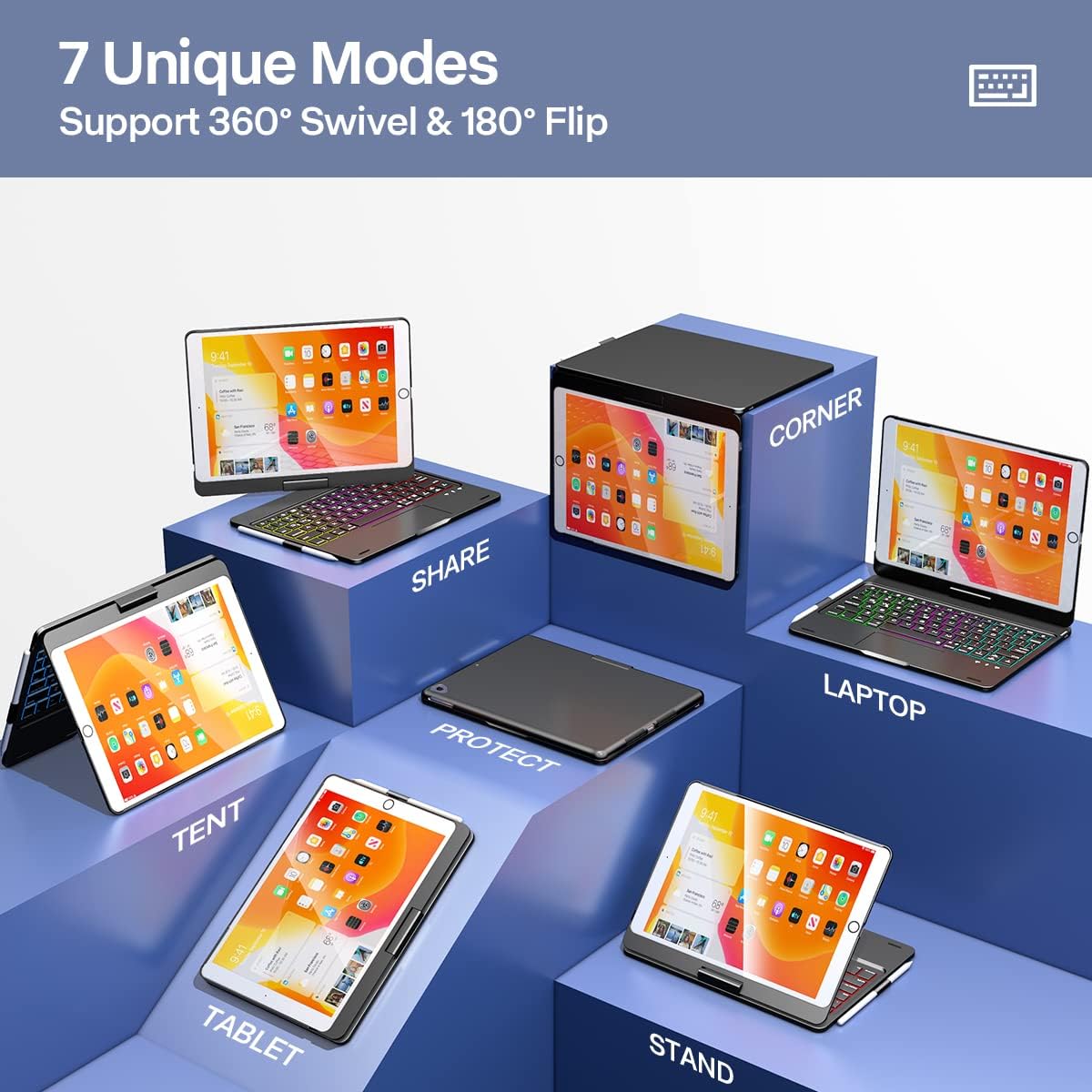
Image: Detailed view of the keyboard's backlit keys and integrated touchpad.
360° Rotation and 180° Flip
The unique hinge design allows for full 360° rotation of your iPad and a 180° flip, providing unparalleled versatility for various tasks and viewing preferences.

Image: Visual representation of the 360-degree rotation feature.

Image: Visual representation of the 180-degree flip feature.
Usage Modes
Leverage the case's flexibility to switch between 7 unique modes:
- Laptop Mode: Traditional laptop setup for typing and productivity.
- Tablet Mode: Fold the keyboard back for a pure tablet experience.
- Tent Mode: Ideal for watching videos or presentations.
- Stand Mode: Perfect for viewing content without the keyboard in the way.
- Share Mode: Rotate the screen to share content with others.
- Protect Mode: Close the case to fully protect your iPad.
- Corner Mode: Unique angle for specific viewing needs.
Image: Demonstrates the 7 unique modes supported by the keyboard case.
Wake / Sleep Feature
The case supports automatic wake/sleep functionality. Opening the case will wake your iPad, and closing it will put your iPad to sleep, conserving battery life.

Image: Visual explanation of the wake/sleep function.
Maintenance
To ensure the longevity and optimal performance of your NOKBABO iPad Keyboard Case, follow these maintenance guidelines:
- Cleaning: Use a soft, damp cloth to wipe the exterior of the case. For the keyboard, use a dry, lint-free cloth. Avoid harsh chemicals or abrasive cleaners.
- Storage: When not in use for extended periods, store the case in a cool, dry place. Ensure the keyboard is turned off to conserve battery.
- Protection: The case features a premium hardshell design for full protection. Avoid dropping the device or exposing it to extreme temperatures or liquids.
Image: Depiction of the case's robust hardshell construction and integrated pencil holder.
Troubleshooting
If you encounter issues with your NOKBABO iPad Keyboard Case, refer to the following common solutions:
- Keyboard Not Connecting:
- Ensure the keyboard is charged and turned on.
- Verify Bluetooth is enabled on your iPad.
- Forget the device in your iPad's Bluetooth settings and attempt to re-pair.
- Restart both your iPad and the keyboard.
- Backlight Not Working:
- Press the Light Bulb key to activate the backlight.
- Ensure the keyboard has sufficient battery charge.
- Touchpad Unresponsive:
- Ensure the touchpad is enabled (if there's a dedicated function key for it, refer to keyboard layout).
- Clean the touchpad surface.
- Reconnect the Bluetooth connection.
- Keys Not Responding:
- Ensure the keyboard is properly connected via Bluetooth.
- Check for low battery on the keyboard.
Specifications
| Feature | Detail |
|---|---|
| Model Number | f102ats+b |
| Product Dimensions | 10.2 x 7.8 x 0.7 inches |
| Item Weight | 1.9 pounds |
| Connectivity Technology | Bluetooth |
| Keyboard Description | Multi Functional |
| Special Features | 360 Degree Rotated, Backlit, Rechargeable, Trackpad |
| Number of Keys | 78 |
| Keyboard Backlighting Color Support | RGB (7 colors) |
| Battery Type | Lithium Ion |
| Charging Time | Approx. 2.5 hours |
| Working Time (with backlight off) | Up to 150 hours |
| Standby Time | Over 180 days |
Image: The ultra-thin profile of the keyboard case, emphasizing its lightweight and portable design.
Warranty and Support
NOKBABO provides 12 months of product services and lifelong technical support for this iPad Keyboard Case. If you have any questions or require assistance, please do not hesitate to contact NOKBABO customer support. Your inquiries will typically be answered within 12 hours.
For support, please refer to the contact information provided on the product packaging or the official NOKBABO website.

