
1. Introduction
This manual provides detailed instructions for the safe installation, operation, and maintenance of your Utilitech 6-Pack Canless Color Choice Dimmable Recessed Downlight. Please read all instructions carefully before beginning installation and retain this manual for future reference.
1.1 Safety Information
- Always turn off power at the circuit breaker before installation, removal, or servicing.
- Consult a qualified electrician if you are unsure about any part of the installation process.
- Ensure all electrical connections comply with local codes and ordinances.
- Do not install in areas with direct exposure to water spray unless specifically rated for such conditions. This product is rated for indoor and outdoor use.
- Do not attempt to modify the product. Any modifications may void the warranty and create a safety hazard.
- Wear appropriate safety gear, including safety glasses and gloves, during installation.
2. Package Contents
Verify that all components are present before beginning installation.
- 6 x Canless Tethered Downlights
- 6 x Trim Kits
- Instruction Manual (this document)
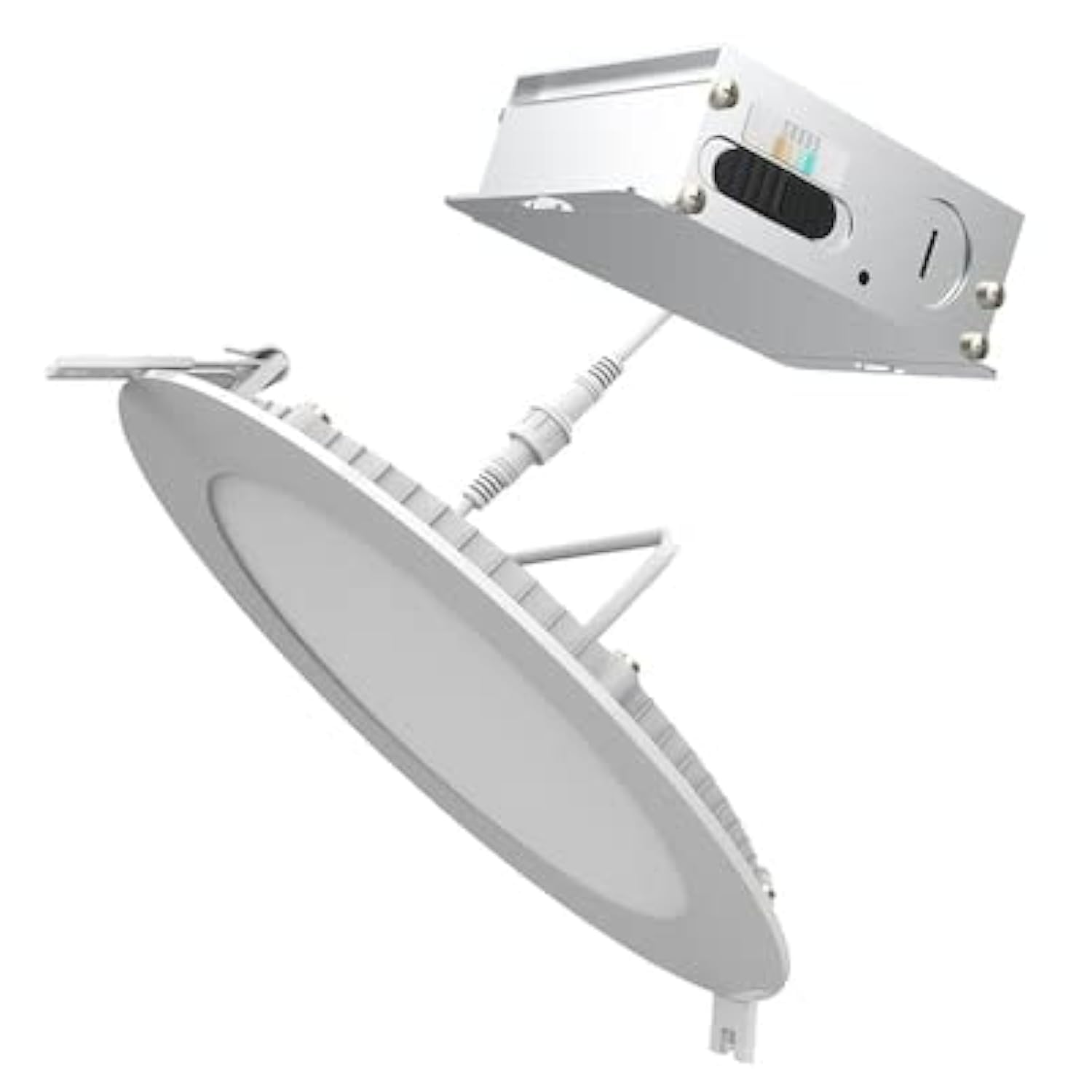
Image 2.1: Contents of the Utilitech 6-Pack Canless Recessed Downlight Kit. Includes the downlights and trim kits.
3. Setup and Installation
These canless recessed downlights are designed for easy installation without the need for an existing recessed can or junction box. They are suitable for low plenum clearance applications.
3.1 Tools Required (Not Included)
- Hole Saw (appropriate size for 5-inch or 6-inch fixture, refer to instruction sheet for exact dimension)
- Wire Strippers
- Screwdriver
- Safety Glasses
- Gloves
3.2 Installation Steps
- Turn Off Power: Before starting, ensure the power to the installation area is turned off at the circuit breaker.
- Cut Hole: Using a hole saw, cut a hole in the drywall at the desired location. Refer to the separate instruction sheet for the precise hole dimension required for your 5-inch or 6-inch fixture.
- Run Wiring: Run the electrical wire cable from the direct line voltage to the location of the canless retrofit kit.
- Connect Wiring: Open the knockout on the canless retrofit kit's quick connect terminal. Connect the line voltage wires to the quick connect terminal. Ensure proper polarity (Live, Neutral, Ground).
- Daisy Chain (Optional): If installing multiple downlights, you can daisy chain additional wire from the quick connect terminal through another knockout to your next canless retrofit kit.
- Insert Fixture: Gently push the spring-loaded clips on the downlight fixture through the cut hole in the ceiling.
- Secure Fixture: The springs will pull up on the retrofit kit, securing it firmly against the ceiling for an airtight seal.
- Restore Power: Once all fixtures are installed and secured, restore power at the circuit breaker.
4. Operating Instructions
This downlight features Color Choice (5CCT) and dimmable functionality.
4.1 Color Temperature Selection (5CCT)
The fixture allows you to select from five color temperatures (2700K to 6500K). The color temperature switch is located on the fixture itself, typically on the driver box or the back of the light. Before final installation into the ceiling, select your desired color temperature. Once installed, you may need to remove the fixture to change the setting.
- 2700K: Warm White, similar to incandescent light.
- 3000K: Soft White, slightly cooler than 2700K.
- 4000K: Cool White, neutral white light.
- 5000K: Bright White, daylight-like appearance.
- 6500K: Daylight, very cool white with a bluish tint.
4.2 Dimming Functionality
This downlight is dimmable. To utilize the dimming feature, ensure you have a compatible LED dimmer switch installed on the circuit. Refer to your dimmer switch's instructions for proper operation.
5. Maintenance
The Utilitech Canless Recessed Downlight requires minimal maintenance.
- Cleaning: Ensure power is off before cleaning. Wipe the fixture with a soft, dry, or slightly damp cloth. Do not use abrasive cleaners or solvents.
- LEDs: The integrated LED light source is designed for long life and is not user-replaceable.
6. Troubleshooting
If you experience issues with your downlight, refer to the following common problems and solutions:
| Problem | Possible Cause | Solution |
|---|---|---|
| Light does not turn on. | No power to the fixture. Loose wiring connection. Faulty switch. | Check circuit breaker. Verify all wire connections are secure (power off first). Test the switch with another device. |
| Light flickers or dims improperly. | Incompatible dimmer switch. Loose wiring. | Ensure dimmer is LED compatible. Check wiring connections (power off first). |
| Incorrect color temperature. | Color temperature switch set incorrectly. | Turn off power, carefully remove fixture, adjust 5CCT switch to desired setting, reinstall. |
7. Specifications
| Feature | Detail |
|---|---|
| Brand | Utilitech |
| Model Number | LLEDR6XT/5CCT/6 |
| Product Dimensions | 7.1"L x 7.1"W x 1.3"H |
| Color | White |
| Light Source Type | Integrated LED |
| Wattage | 65 Watts (Equivalent) |
| Brightness | 65 Lumens (Note: This seems low for 65W equivalent, usually 65W equivalent is around 800 lumens. User should verify actual lumen output from product packaging if available.) |
| Color Temperature (CCT) | 2700K - 6500K (5CCT Selectable) |
| Dimmable | Yes |
| Installation Type | Flush Mount, Canless Recessed |
| Indoor/Outdoor Usage | Indoor, Outdoor |
| Power Source | Hardwired |
| Efficiency | Energy Star Certified |
| Certification | ETL |
| Material | Plastic (Shade) |
| Item Weight | 6 pounds (for the pack) |
8. Warranty and Support
For warranty information or technical support, please refer to the documentation included with your purchase or contact Utilitech customer service. Keep your proof of purchase for warranty claims.


