
Introduction
This manual provides essential instructions for the proper setup, operation, and maintenance of your Stack-On PFS-012-BG-E Personal Fire Safe. Please read this manual thoroughly before using your safe to ensure optimal performance and security. Keep this manual for future reference.
The Stack-On PFS-012-BG-E is a personal fire-resistant safe designed to protect your valuables. It features an electronic lock for secure access.
Important Safety Information
- Do not store the emergency override keys inside the safe. Keep them in a secure, separate location.
- Ensure the safe is placed on a stable, level surface.
- This safe is fire-resistant, but not water-resistant. Protect it from water exposure.
- Keep children away from the safe and do not allow them to operate the lock.
- Always verify the safe door is securely closed and locked after use.
What's in the Box
Upon unpacking, please verify that all components are present:
- Stack-On PFS-012-BG-E Personal Fire Safe
- Emergency Override Keys (2)
- User Manual (this document)
- Mounting Hardware (if applicable, check packaging)

Image: The Stack-On PFS-012-BG-E Personal Fire Safe, shown closed with its electronic keypad on the front door.
Setup
1. Battery Installation
The electronic lock requires batteries to operate. Locate the battery compartment, typically on the inside of the safe door or behind the keypad. Insert the specified number and type of batteries (usually AA or AAA, refer to the compartment label) ensuring correct polarity.
- Open the safe door using the emergency override key if it's locked.
- Locate the battery compartment cover.
- Install new batteries, observing the correct (+) and (-) orientation.
- Replace the battery compartment cover.
2. Initial Code Setting
Before first use, you must set your personal access code.
- With the safe door open, press the red or green reset button located on the inside of the door, near the hinge. A beep will sound, and the indicator light on the keypad will flash.
- Within 5 seconds, enter your desired 3-8 digit code on the keypad.
- Press the "A" or "B" button (or a designated confirmation button, refer to keypad markings) to confirm. A successful setting will be indicated by a beep and a green light.
- Test the new code several times with the door open before closing it.
3. Mounting (Optional)
For added security, the safe can be bolted to a floor or wall. Mounting hardware may be included. Consult a professional if you are unsure about proper installation.
- Choose a suitable location, ensuring the mounting surface can support the safe's weight.
- Mark the drilling points through the pre-drilled holes in the safe's back or bottom.
- Drill pilot holes into the mounting surface.
- Secure the safe using the provided hardware.
Operating Instructions
Opening the Safe with Your Code
- Enter your personal 3-8 digit code on the electronic keypad.
- Press the "A" or "B" button (or designated confirmation button).
- If the code is correct, a green light will illuminate, and you will hear a beep.
- Within 5 seconds, turn the handle clockwise (or counter-clockwise, depending on model) to open the door.
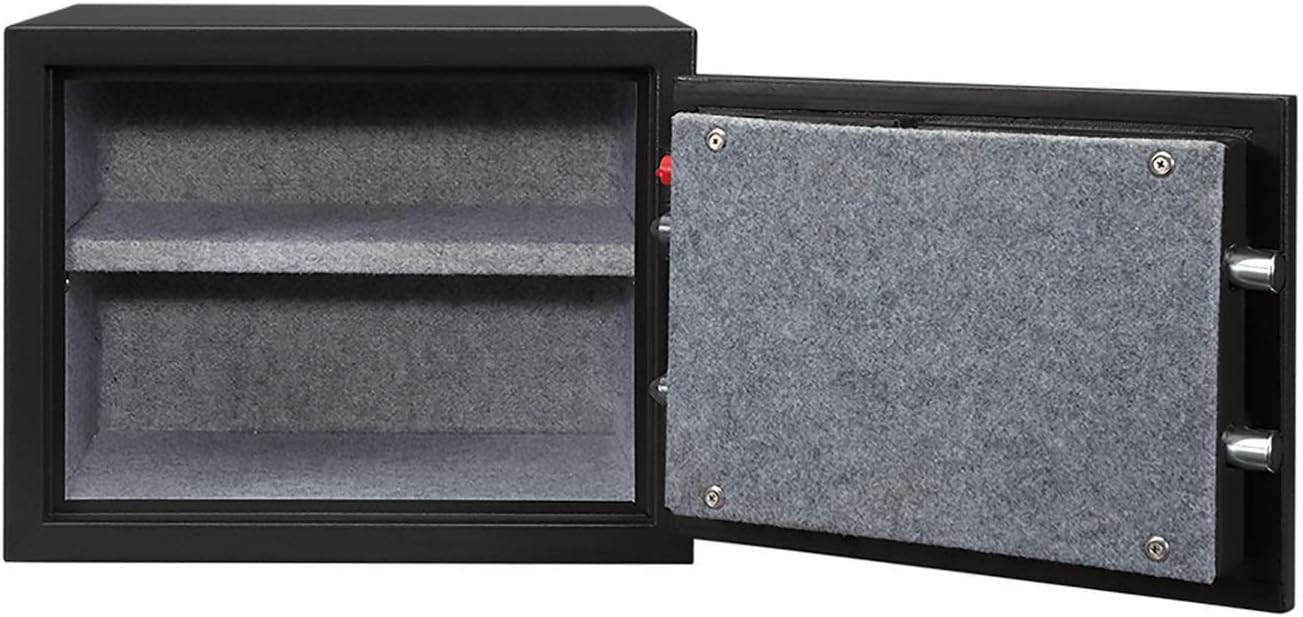
Image: The Stack-On PFS-012-BG-E Personal Fire Safe shown with its door open, revealing the interior with an adjustable shelf.
Closing and Locking the Safe
- Close the safe door firmly.
- Turn the handle counter-clockwise (or clockwise) to engage the locking bolts.
- The safe is now locked. No code entry is required to lock the safe.
Using Emergency Override Keys
In case of battery failure or forgotten code, the safe can be opened using the emergency override keys.
- Locate the keyhole, usually concealed behind a removable cover on the keypad or door.
- Insert the emergency override key and turn it.
- While holding the key turned, rotate the handle to open the door.
- Remember to store these keys outside the safe.
Maintenance
- Battery Replacement: Replace batteries annually or when the low battery indicator (if present) illuminates. Always use new, high-quality alkaline batteries.
- Cleaning: Wipe the exterior of the safe with a soft, damp cloth. Avoid abrasive cleaners or solvents. Do not spray liquids directly onto the keypad.
- Door Mechanism: Periodically check the door hinges and locking bolts for any obstructions or signs of wear. Do not lubricate the electronic lock mechanism.
Troubleshooting
Safe Does Not Open with Code
- Incorrect Code: Ensure you are entering the correct personal code. Try re-entering slowly and carefully.
- Low Batteries: Replace the batteries with new ones. If the batteries are completely dead, use the emergency override key.
- Time Limit Exceeded: After entering the code, you typically have a few seconds to turn the handle. Ensure you turn the handle promptly.
- Lockout Mode: Repeated incorrect entries may trigger a lockout period. Wait for the lockout period to expire (usually 5-10 minutes) before trying again.
Keypad Not Responding
- Dead Batteries: Replace the batteries.
- Loose Connection: Check that the battery compartment cover is securely closed and batteries are properly seated.
Door Does Not Close Properly
- Obstruction: Check for any items inside the safe that might be preventing the door from closing fully.
- Misalignment: Ensure the safe is on a level surface. If mounted, check that mounting bolts are not causing distortion.
Specifications
| Model Name | PFS-012-BG-E |
| Brand | Stack-On |
| Lock Type | Electronic |
| Material | Alloy Steel |
| Special Feature | Fire Resistant |
| Mounting Type | Freestanding, Tabletop |
| Item Weight | 50 Pounds |
| Water Resistance Level | Not Water Resistant |
| Alarm | Lock |
| External Dimensions (L x W x H) | 16.5 x 15 x 12 inches (approximate package dimensions, actual product dimensions may vary slightly) |
| Capacity | 0.8 cubic feet |
Warranty and Support
For warranty information, please refer to the warranty card included with your product or visit the official Stack-On website. For technical support or assistance with your safe, please contact Stack-On customer service directly. Contact details are typically available on the manufacturer's website or product packaging.
Note: Keep your purchase receipt as proof of purchase for warranty claims.