1. Product Overview
The JJC Metal Hand Grip L Bracket is designed to enhance the handling and functionality of your Fujifilm X-Pro3, X-Pro2, or X-Pro1 camera. Constructed from high-quality aluminum alloy, this sturdy and durable grip provides a more comfortable and secure hold, especially during extended shooting sessions. Its design integrates seamlessly with the camera body, offering both ergonomic benefits and practical features.

Figure 1: JJC Metal Hand Grip L Bracket attached to a Fujifilm X-Pro3 camera, offering a more comfortable and secure hold.
2. Key Features
- Enhanced Grip: Provides a more comfortable and secure hold for your camera, reducing fatigue during prolonged use.
- Battery and Memory Card Access: Features a large opening on the bottom, allowing direct access to the battery and memory card compartments without removing the grip.
- Arca Swiss Type Quick Release Plate: The base of the grip incorporates an Arca Swiss Type design, enabling quick and secure mounting to compatible tripods.
- 1/4"-20 Tripod Socket: Includes a standard 1/4"-20 tripod socket for mounting on other tripods or accessories.
- Speaker Hole: Designed with a speaker hole to ensure clear audio output from your camera.
- Hand Strap Connection: Allows for the attachment of a hand strap (sold separately) for additional security.
- Durable Construction: Made from high-quality aluminum alloy with microfiber leather on the grip for a premium feel and anti-slip properties.
- LCD Screen Clearance: Does not obstruct the usage of your camera's fold-out LCD screen.

Figure 2: The grip offers a more comfortable and secure hold.

Figure 3: Bottom view showing access to battery/memory card, speaker hole, and tripod socket.
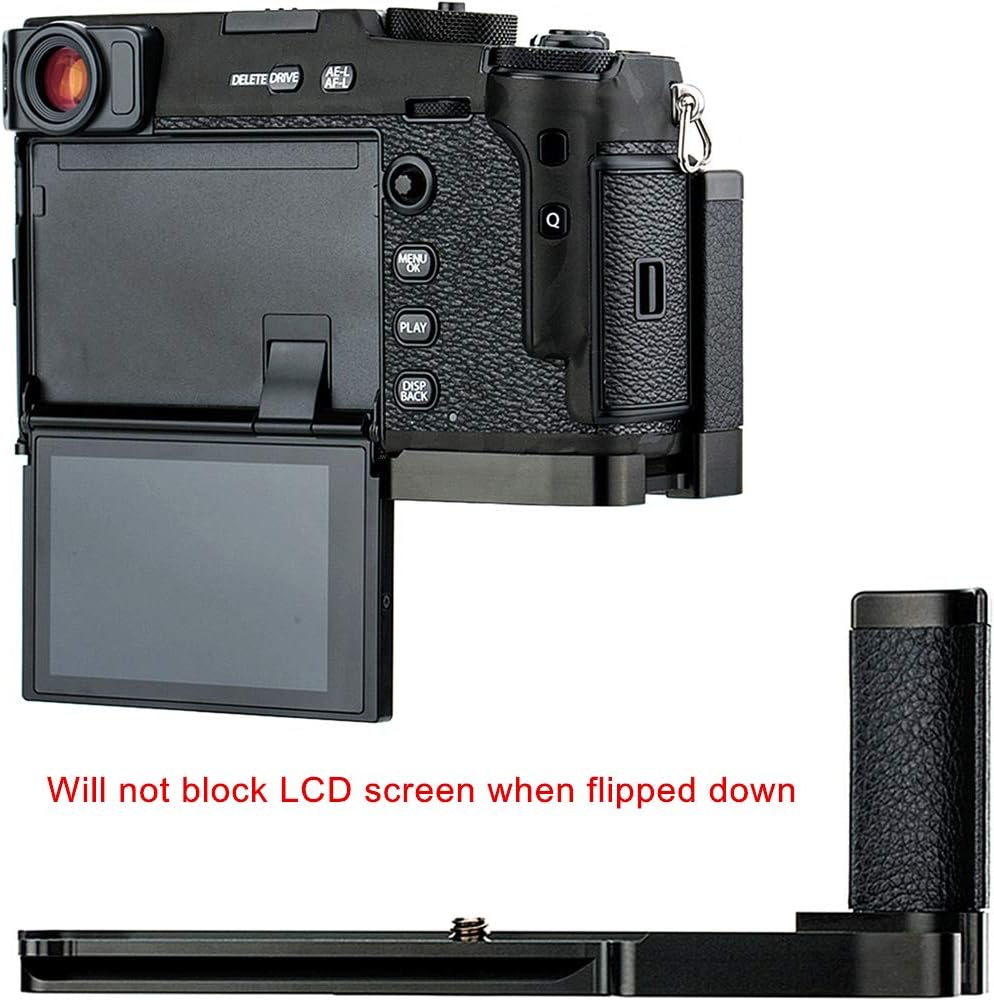
Figure 4: The grip does not block the LCD screen when flipped down.

Figure 5: Eyelet design for connecting a hand strap.

Figure 6: The grip adopts an Arca Swiss Type quick release plate design.
3. Compatibility
This JJC Metal Hand Grip L Bracket is specifically designed for the following Fujifilm camera models:
- Fujifilm X-Pro3
- Fujifilm X-Pro2
- Fujifilm X-Pro1
4. Installation Instructions
Follow these steps to correctly install the JJC Metal Hand Grip L Bracket onto your Fujifilm X-Pro series camera:
- Identify Screw Position: The grip has two possible screw positions on its base. For Fujifilm X-Pro1, use the screw position closer to the camera's front. For Fujifilm X-Pro2 and X-Pro3, use the screw position closer to the camera's rear. Refer to Figure 7 for visual guidance.
- Align the Grip: Carefully align the grip with the bottom of your camera, ensuring the screw hole on the grip matches the tripod socket on your camera.
- Secure the Grip: Insert the provided screw into the appropriate hole and tighten it securely using a coin or a flat-head screwdriver until the grip is firmly attached to the camera. Do not overtighten.

Figure 7: Screw positions for Fujifilm X-Pro1 and X-Pro2/X-Pro3.
Installation Video Guide
Video 1: Demonstrates the installation process and key features of the JJC Metal Hand Grip L Bracket for Fujifilm X-Pro series cameras.
5. Operation
Once installed, the JJC Metal Hand Grip L Bracket enhances your camera's usability in several ways:
- Improved Handling: The ergonomic design provides a more substantial and comfortable grip, making it easier to hold your camera steady for both horizontal and vertical shooting.
- Quick Battery/Memory Card Access: The strategically placed opening allows you to change batteries or memory cards quickly without needing to remove the entire grip, minimizing downtime during shoots.
- Tripod Mounting: Utilize the integrated Arca Swiss Type quick release plate for fast and secure mounting to compatible tripods. For other tripods, use the standard 1/4"-20 tripod socket.
- Hand Strap Integration: Attach a compatible hand strap to the designated eyelet for added security and comfort, especially when carrying the camera for extended periods.
6. Care and Maintenance
To ensure the longevity and optimal performance of your JJC Metal Hand Grip L Bracket, follow these care and maintenance guidelines:
- Cleaning: Wipe the metal surfaces with a soft, dry cloth. For the microfiber leather grip, use a slightly damp cloth if necessary, then dry thoroughly. Avoid harsh chemicals or abrasive cleaners.
- Storage: Store the grip in a clean, dry environment away from extreme temperatures and direct sunlight when not in use.
- Inspection: Periodically check the mounting screw for tightness to ensure the grip remains securely attached to your camera.
- Avoid Impact: While durable, avoid dropping the grip or subjecting it to strong impacts, which could cause damage.
7. Troubleshooting
If you encounter any issues with your JJC Metal Hand Grip L Bracket, refer to the following common troubleshooting tips:
- Grip Feels Loose: Ensure the mounting screw is fully tightened. Check that the correct screw position was used for your specific camera model (X-Pro1 vs. X-Pro2/X-Pro3).
- Difficulty Accessing Battery/Memory Card: Verify that the grip is correctly aligned and installed. The opening should directly correspond to your camera's compartment door.
- Camera Not Mounting Securely to Tripod: If using an Arca Swiss compatible tripod, ensure the quick release clamp is fully engaged with the grip's base. If using the 1/4"-20 socket, ensure the tripod screw is fully tightened.
- LCD Screen Obstruction: The grip is designed not to obstruct the fold-out LCD screen. If you experience obstruction, double-check the installation and ensure the camera's screen mechanism is functioning correctly.
If these steps do not resolve your issue, please contact customer support.
8. Specifications
| Material | Aluminum Alloy, Microfiber Leather |
| Compatible Cameras | Fujifilm X-Pro3, X-Pro2, X-Pro1 |
| Tripod Mount | Arca Swiss Type Quick Release Plate, 1/4"-20 Thread |
| Dimensions (Approx.) | 5.98 x 2.76 x 2.52 inches (15.19 x 7.01 x 6.40 cm) |
| Weight (Approx.) | 3.21 ounces (91 grams) |
9. Warranty and Support
JJC products are manufactured to high-quality standards. For warranty information or technical support, please refer to the documentation included with your purchase or visit the official JJC website. Keep your proof of purchase for any warranty claims.
If you require further assistance, please contact your retailer or JJC customer service directly.


