
AVMATRIX PVS0615
AVMatrix PVS0615 User Manual
Portable Multi-Format Video Switcher with 15.6" LCD Monitor
1. Introduction
The AVMatrix PVS0615 is an all-in-one 6-channel video switcher designed for professional video production. It integrates video switching, audio mixing, and video recording capabilities, making it suitable for a wide variety of live events, seminars, and broadcasts. Featuring a built-in 15.6-inch Full HD LCD monitor, the PVS0615 offers a compact and portable solution for multi-camera setups.
This manual provides comprehensive instructions for the setup, operation, maintenance, and troubleshooting of your AVMatrix PVS0615 video switcher. Please read this manual thoroughly before operating the device to ensure proper use and to maximize its performance and longevity.
2. Safety Information
To prevent damage to the product and to ensure the safety of the user, please observe the following precautions:
- Power Supply: Use only the specified power adapter (DC 12V 5A) provided with the unit. Using an incorrect power supply may cause damage or fire.
- Ventilation: Ensure adequate ventilation around the unit. Do not block ventilation openings. Overheating can lead to malfunction.
- Moisture: Do not expose the unit to rain, moisture, or excessive humidity. Keep liquids away from the device.
- Cleaning: Disconnect power before cleaning. Use a soft, dry cloth. Do not use liquid or aerosol cleaners.
- Handling: Handle the unit with care. Avoid dropping or subjecting it to strong impacts.
- Servicing: Do not attempt to service this product yourself. Refer all servicing to qualified service personnel.
3. Package Contents
Verify that all items listed below are included in your package:
- AVMatrix PVS0615 Video Switcher Unit
- 12V 5A Power Adapter
- Carry-on Suitcase (as shown in accessories image)
- User Manual (this document)

4. Product Overview
The AVMatrix PVS0615 features a comprehensive control panel and a built-in monitor for efficient operation.
4.1 Front Panel and Display

The front panel includes the main control surface with input selection buttons, transition controls (T-Bar, AUTO, CUT), audio faders, and various function buttons for effects like PIP/POP and keying. The integrated 15.6-inch Full HD LCD monitor displays the multiview output, showing all input sources, program output, and preview output simultaneously.


4.2 Rear Panel Connections
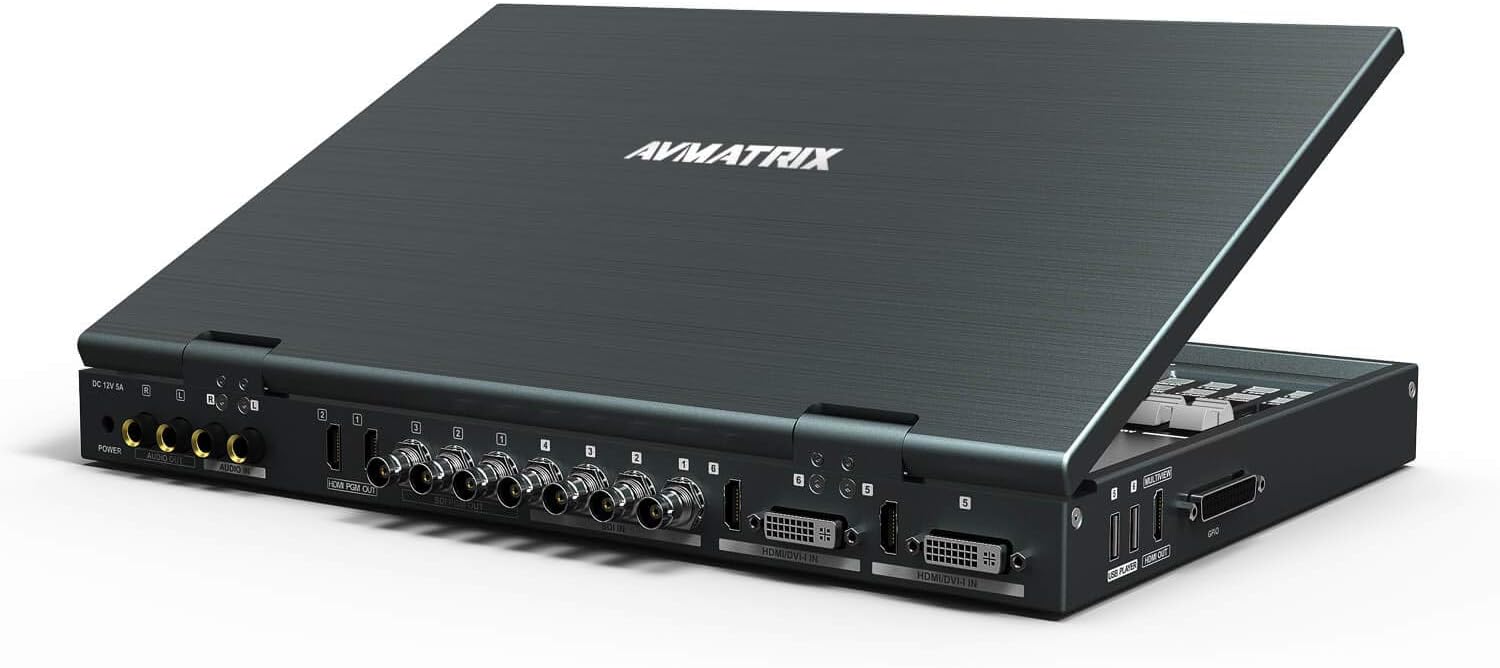
The rear panel provides all necessary input and output connections:
- Video Inputs: 4x SDI, 2x DVI-I/HDMI/VGA/USB
- Program Outputs: 3x SDI (1x AUX), 2x HDMI
- Multiview Output: 1x HDMI
- Audio: TRS audio input/output, SDI/HDMI/USB embedded audio support
- Control: LAN (RJ45) for network control, SD Card Slot for recording
- Power: DC 12V power input
5. Setup
Follow these steps for initial setup of your PVS0615:
- Unpack: Carefully remove the PVS0615 unit and all accessories from its packaging.
- Placement: Place the unit on a stable, flat surface with adequate ventilation. Ensure no vents are obstructed.
- Connect Power: Connect the provided 12V 5A power adapter to the DC 12V input on the rear panel of the PVS0615, then plug the adapter into a suitable power outlet.
- Connect Video Inputs: Connect your video sources (cameras, computers, media players) to the SDI, DVI-I, HDMI, VGA, or USB input ports on the rear panel. The unit will auto-detect input formats.
- Connect Video Outputs: Connect your program displays or recorders to the SDI PGM Out or HDMI PGM Out ports. Connect an external multiview monitor to the HDMI Multiview Out port if desired.
- Connect Audio: If using external audio, connect your audio sources to the TRS audio input.
- Insert SD Card: For recording, insert a compatible SD card into the SD card slot on the rear panel.
- Power On: Press the power button on the front panel to turn on the unit. The LCD monitor will illuminate, and the system will boot up.
6. Operating Instructions
This section details the primary functions and operations of the PVS0615.
6.1 Input Selection and Switching
- Input Buttons: Use the numbered buttons (1-6) on the control panel to select the desired input source for Preview (PVW) and Program (PGM).
- Transitions:
- CUT: Instantly switch from Preview to Program.
- AUTO: Perform a transition (MIX, FADE, WIPE) at a preset speed.
- T-Bar: Manually control the speed and direction of transitions.
- Transition Effects: Select desired transition effects such as MIX, FADE, or WIPE using the dedicated buttons.
6.2 Audio Mixing
The PVS0615 includes an integrated audio mixer.
- Audio Faders: Adjust the volume levels of individual audio inputs using the faders on the left side of the control panel.
- Audio Monitoring: Monitor audio levels on the LCD display or via the headphone output.
- Embedded Audio: The unit supports embedded audio from SDI, HDMI, and USB inputs.
6.3 Keying Functions (Luma Key / Chroma Key)
Create virtual studio effects using the keying features.
- Luma Key: Used to key out a specific brightness level.
- Chroma Key: Used to key out a specific color (e.g., green screen or blue screen).
- Refer to the on-screen menu for detailed settings and adjustments for keying parameters.
6.4 Picture-in-Picture (PIP) / Picture-on-Picture (POP)
Display multiple video sources simultaneously.
- PIP/POP Buttons: Activate and configure PIP/POP modes.
- Adjustment: Adjust the size, position, and border of the PIP/POP windows via the menu system.
6.5 Recording
Record your program output directly to an SD card.
- SD Card: Ensure a compatible SD card is inserted.
- Recording Format: Records PGM video up to 1080p60.
- Start/Stop: Use the dedicated record button or menu option to start and stop recording.
7. Maintenance
Proper maintenance ensures the longevity and optimal performance of your PVS0615.
- Cleaning:
- Always disconnect power before cleaning.
- Use a soft, dry, lint-free cloth to wipe the exterior surfaces.
- For the LCD screen, use a screen-specific cleaning solution and a microfiber cloth. Do not spray liquid directly onto the screen.
- Avoid using abrasive cleaners, solvents, or strong chemicals.
- Ventilation: Regularly check that the ventilation openings are clear of dust and debris. Use compressed air to gently clear any blockages.
- Storage: When not in use for extended periods, store the unit in its carry-on suitcase in a cool, dry place, away from direct sunlight and extreme temperatures.
8. Troubleshooting
This section addresses common issues you might encounter with your PVS0615.
| Problem | Possible Cause | Solution |
|---|---|---|
| No power | Power cable not connected; Power adapter faulty; Power outlet issue. | Ensure power cable is securely connected. Test power adapter with another device. Try a different power outlet. |
| No video input displayed | Incorrect cable connection; Input source not active; Input format not supported; Incorrect input selected. | Check all video cable connections. Ensure input source is powered on and outputting video. Verify input format is within supported specifications. Select the correct input channel on the switcher. |
| No audio output | Audio levels too low; Incorrect audio input selected; Output device issue. | Adjust audio faders. Ensure the correct audio input is active. Check connections to your audio output device (speakers, headphones). |
| Recording not working | SD card full or incompatible; SD card not inserted correctly; Recording format issue. | Check SD card capacity and format (FAT32 recommended). Reinsert SD card. Ensure recording resolution/frame rate is supported. |
| Unit freezes or becomes unresponsive | Temporary software glitch; Overheating. | Perform a power cycle (turn off, wait 10 seconds, turn on). Ensure proper ventilation and operating temperature. |
If the problem persists after attempting these solutions, please contact AVMatrix customer support.
9. Specifications
Detailed technical specifications for the AVMatrix PVS0615:
| Feature | Detail |
|---|---|
| Model | PVS0615 |
| Display | 15.6 inch FHD LCD (1920x1080 resolution) |
| Video Inputs | 4x 3G/HD/SD-SDI, 2x HDMI/DVI/VGA/USB |
| PGM Outputs | 3x 3G/HD/SD-SDI (1x AUX), 2x HDMI |
| Multiview Output | 1x HDMI (1080p 60) |
| Input Format Auto-Detection | Yes |
| Output Format Selectable | Yes (1080p 50/60/30/25/24, 1080i 50/60) |
| Transitions | T-Bar/AUTO/CUT, MIX/FADE/WIPE effects |
| Keying | Luma Key, Chroma Key |
| PIP/POP | Adjustable size and position |
| Recording | Record PGM video to SD card, up to 1080p60 |
| Audio Mixer | TRS audio & SDI, HDMI, USB embedded audio |
| Power Supply | DC 12V 5A, 33W |
| Dimensions (W x D x L) | 10.7"W x 1.72"D x 14.76"L (approx. 27.2cm x 4.4cm x 37.5cm) |
| Weight | 8.38 Pounds (approx. 3.8 kg) |
| Operation Temperature | -20°C ~ 60°C |
| Storage Temperature | -30°C ~ 70°C |

10. Warranty and Support
AVMatrix products are designed for reliability and performance. For warranty information and technical support, please refer to the official AVMatrix website or contact their customer service.
Official Website: www.avmatrix.net
You can also visit the official AVMATRIX store on Amazon for product information and support resources: AVMATRIX Amazon Store
For specific inquiries, please use the contact information provided on the official website.
Related documentsPVS0615


Ask a question about this manual
Ask about setup, troubleshooting, compatibility, parts, safety, or missing instructions. Manuals+ will review the question and use this page’s manual context to help answer it.