
1. Introduction
The iRV Technology iRV32V2 is a versatile wall-mount RV radio stereo system designed to provide comprehensive entertainment and connectivity options for your recreational vehicle. This unit supports a wide range of media formats including AM/FM radio, CD, DVD, MP3, and MP4. It features HDMI input and output with Audio Return Channel (ARC), Digital 2.1 and Surround Sound capabilities, Bluetooth connectivity, Consumer Electronics Control (CEC), and Near Field Communication (NFC) for quick pairing. With its 3-zone audio distribution and smartphone app control, the iRV32V2 offers a modern and convenient audio-visual experience.

Figure 1: iRV32V2 RV Stereo with its remote control, showcasing the main unit and its dedicated remote for convenient operation.
2. What's in the Box
Upon unpacking your iRV32V2 RV Radio Stereo, please verify that all the following components are included:
- iRV32V2 Main Unit
- Remote control
- Power Harness
- Speaker harness
- User's Manual (this document)
- End Caps

Figure 2: The remote control and essential wiring harnesses provided with the iRV32V2 unit, crucial for installation and operation.
3. Setup and Installation
Proper installation is crucial for optimal performance of your iRV32V2 unit. It is recommended to consult a professional for installation if you are unfamiliar with RV electrical systems.
3.1. Dimensions
Before installation, ensure adequate space for the unit. The dimensions are approximately:
- Product Dimensions: 7.8 x 5.5 x 7 inches (L x W x H)
- Item Weight: 3.7 pounds

Figure 3: Detailed measurements of the iRV32V2 unit, providing essential information for mounting and space planning.
3.2. Wiring Connections
Connect the provided power and speaker harnesses to the corresponding ports on the rear of the unit and to your RV's electrical and speaker systems. Ensure all connections are secure and correctly polarized to prevent damage.

Figure 4: The rear panel of the iRV32V2, showing the various connection points for power, speakers, and other audio/video inputs and outputs.
For detailed wiring diagrams and specific installation steps, please refer to the full User Manual PDF available at: iRV32V2 User Manual PDF.
4. Operating Instructions
Familiarize yourself with the controls and functions of your iRV32V2 stereo system.
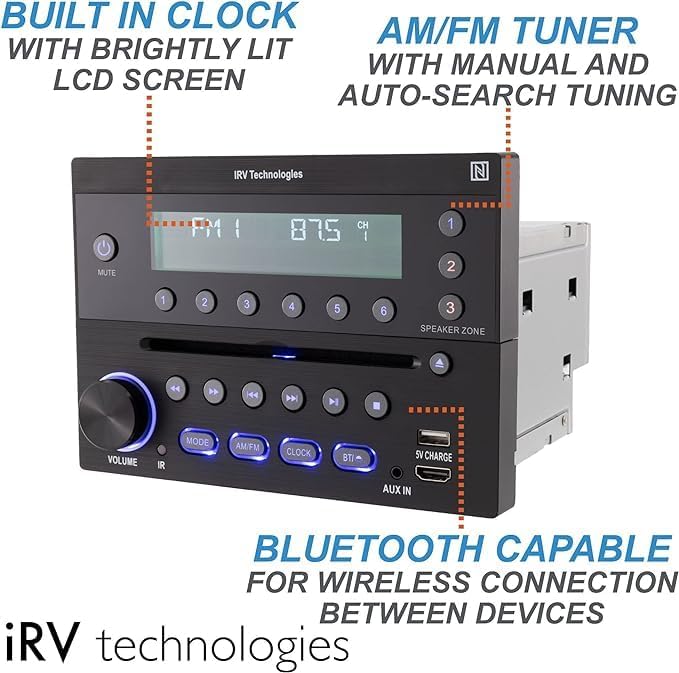
Figure 5: Front panel of the iRV32V2, illustrating key features such as the built-in clock, AM/FM tuner, and Bluetooth controls.
4.1. Basic Controls
- Power/Mute Button: Press to turn the unit on/off. Press briefly to mute/unmute audio.
- Volume Knob: Rotate to adjust the audio volume.
- Mode Button: Cycle through available audio sources (AM/FM, CD, DVD, USB, AUX, Bluetooth, HDMI).
- AM/FM Button: Directly switch to AM or FM radio mode.
- Clock Button: Display and set the time.
- BT/I Button: Activate Bluetooth pairing mode or switch to Bluetooth input.
- Speaker Zone Buttons (1, 2, 3): Independently control audio output to different speaker zones.
4.2. Bluetooth Connectivity
The iRV32V2 features Bluetooth 4.1 for wireless audio streaming and NFC for quick pairing.
- Pairing via Bluetooth Button: Press the dedicated BT/I button to enter pairing mode. Search for 'iRV32V2' on your smart device and connect.
- Pairing via NFC: Tap your NFC-enabled smartphone to the NFC label on the unit for instant Bluetooth pairing.
4.3. App Control
Download the free iRV app from your Android or Apple app store. The app transforms your smartphone into a wireless remote control, allowing you to manage various functions of the stereo system remotely.
4.4. HDMI and CEC
The unit includes HDMI input and output with ARC (Audio Return Channel) and CEC (Consumer Electronics Control) functionality. CEC allows you to control multiple HDMI-connected devices (e.g., TV, DVD player) with a single remote, simplifying your entertainment setup.
4.5. USB Charging
The integrated USB port provides 5V charging for both Android and Apple devices, allowing you to conveniently charge your smartphone or tablet while enjoying your media.
5. Maintenance
To ensure the longevity and optimal performance of your iRV32V2 RV Radio Stereo, follow these general maintenance guidelines:
- Cleaning: Use a soft, dry cloth to clean the unit's exterior. For stubborn marks, a slightly damp cloth can be used, followed by a dry one. Avoid abrasive cleaners, solvents, or strong chemicals.
- Ventilation: Ensure that the ventilation openings on the unit are not blocked to prevent overheating.
- Disc Tray: Keep the CD/DVD disc tray free of dust and debris. Handle discs by their edges to avoid fingerprints and scratches.
- Environmental Conditions: Avoid exposing the unit to extreme temperatures, direct sunlight for prolonged periods, or excessive moisture.
6. Troubleshooting
If you encounter issues with your iRV32V2 unit, refer to the following common troubleshooting steps:
| Problem | Possible Cause | Solution |
|---|---|---|
| Unit does not power on. | No power supply; Blown fuse; Incorrect wiring. | Check power connections and RV's power source. Inspect and replace any blown fuses. Verify wiring according to the installation instructions. |
| No sound from speakers. | Volume too low; Mute activated; Incorrect speaker zone selected; Loose speaker wires. | Increase volume. Deactivate mute. Ensure correct speaker zones are enabled. Check all speaker wire connections. |
| Bluetooth pairing fails. | Device too far; Bluetooth not enabled on device; Unit not in pairing mode. | Move device closer to the unit. Ensure Bluetooth is active on your device. Press the BT/I button to put the unit into pairing mode. |
| Remote control not working. | Dead batteries; Obstruction between remote and unit; Incorrect remote mode. | Replace remote batteries. Remove any obstructions. Ensure remote is pointed directly at the unit's IR sensor. |
| Poor radio reception. | Antenna not connected or damaged; Weak signal area. | Check antenna connection. Extend or adjust antenna position. |
If the problem persists after attempting these solutions, please contact iRV Technologies customer support for further assistance.
7. Specifications
Detailed technical specifications for the iRV32V2 RV Radio Stereo:
| Feature | Specification |
|---|---|
| Model Number | IRV32V2 |
| Product Dimensions (L x W x H) | 7.8 x 5.5 x 7 inches |
| Item Weight | 3.7 pounds |
| Connectivity Technology | Bluetooth, Wireless |
| Wireless Communication Technologies | Bluetooth, Infrared, AM/FM |
| Special Features | Built-In AM/FM Antenna, NFC Bluetooth quick link, Built-In Clock, App control, HDMI IN/OUT CEC |
| Display Technology | LCD |
| Color | Metal brushed black |
| Manufacturer | ATP Products Inc. |
| Speaker Type | Stereo |
| Frequency | 0.2 MHz |
8. Warranty and Support
For warranty information and technical support, please refer to the documentation included with your purchase or contact ATP Products Inc., the manufacturer of iRV Technologies products. You can also find additional support resources and the full user manual PDF on the product's official support page or through the retailer where the product was purchased.
Manufacturer: ATP Products Inc.
User Manual PDF: https://manuals.plus/m/1449a57dc827c40fe23b29d6a8d7717941bc59789b4301ab03b438a09eefe394

