
1. Introduction
The Fenton FPC8T is a versatile and portable wireless speaker designed for various audio applications. It features 100W of power, Bluetooth connectivity for wireless audio streaming, an integrated MP3 player, and dynamic LED lighting effects. This speaker is equipped with an extendable handle and wheels for easy transport, making it suitable for outdoor use, parties, or public speaking. A wired microphone and remote control are included for enhanced functionality, including a vocal echo effect.
2. Safety Instructions
- Read all instructions carefully before operating the device.
- Keep the device away from water, moisture, and extreme temperatures.
- Do not open the casing; there are no user-serviceable parts inside. Refer all servicing to qualified personnel.
- Use only the specified power adapter for charging.
- Ensure proper ventilation to prevent overheating.
- Avoid placing heavy objects on the speaker.
- Do not expose the battery to excessive heat or direct sunlight.
3. Package Contents
Verify that all items are present in the package:
- Fenton FPC8T Portable Speaker
- Wired Microphone
- Remote Control
- USB Charging Cable
- User Manual (this document)

Image: The Fenton FPC8T portable speaker shown with its wired microphone and remote control, illustrating the main components included in the package.

Image: A close-up view of the wired microphone, featuring an on/off switch and a standard audio jack connector.

Image: The remote control for the FPC8T speaker, showing buttons for mute, mode, repeat, track control, volume adjustment, EQ, and numeric input.
4. Product Overview
The Fenton FPC8T is designed for portability and ease of use. It features a robust casing, an integrated battery, and a control panel for managing audio sources and settings.
4.1. Control Panel
The top panel of the speaker houses all essential controls and input ports.

Image: A detailed view of the FPC8T's control panel, showing knobs for microphone volume and echo, a master volume knob, an LED display, media control buttons, USB and Micro-SD card slots, an AUX input, and a microphone input jack.
- MIC VOL: Adjusts the microphone volume.
- ECHO: Adjusts the echo effect level for the microphone.
- VOLUME: Master volume control for all audio sources.
- MODE: Switches between Bluetooth, USB, Micro-SD, and AUX input modes.
- Play/Pause: Controls playback for USB/Micro-SD and Bluetooth.
- Previous/Next: Skips tracks for USB/Micro-SD and Bluetooth.
- USB Port: For connecting USB flash drives.
- Micro-SD Slot: For inserting Micro-SD cards.
- AUX Input: 3.5mm jack for connecting external audio devices.
- MIC IN: 6.3mm jack for connecting the wired microphone.
- DC 5V IN: Charging port for the speaker.
- CHARGE/FULL Indicator: Shows charging status.
4.2. Portability Features
The FPC8T is designed for easy movement.
- Extendable Handle: Allows for comfortable pulling of the speaker.
- Wheels: Facilitate smooth transport.
- Integrated Battery: Provides power for use without a mains connection.
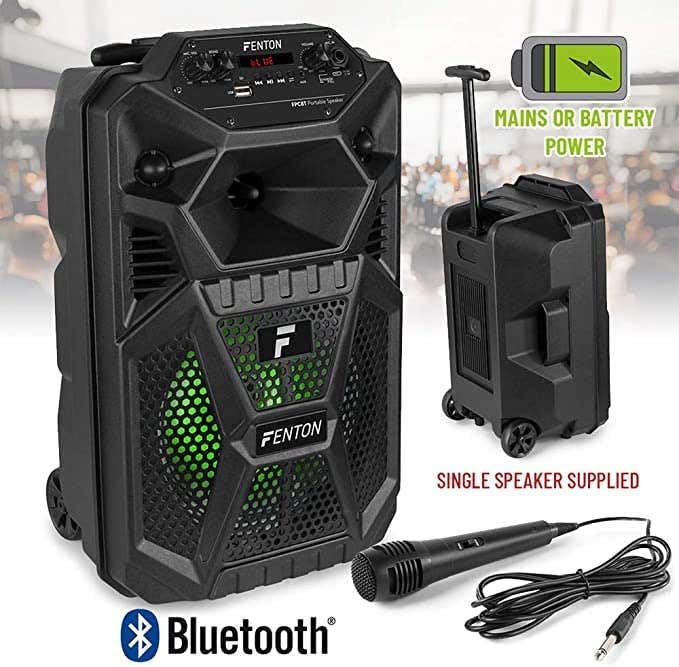
Image: The Fenton FPC8T speaker with icons indicating its battery and mains power capabilities, Bluetooth connectivity, and included microphone and remote control. The speaker is shown with its extendable handle and wheels.
5. Setup
5.1. Charging the Battery
Before first use, fully charge the speaker's internal battery.
- Connect the USB charging cable to the DC 5V IN port on the speaker.
- Connect the other end of the USB cable to a compatible USB power adapter (not included) or a powered USB port.
- The CHARGE indicator light will illuminate during charging. It will turn FULL when the battery is fully charged.
5.2. Powering On/Off
Locate the power switch on the control panel.
- To power on, slide the switch to the 'ON' position.
- To power off, slide the switch to the 'OFF' position.
5.3. Connecting the Microphone
The included wired microphone can be connected for vocal use.
- Insert the microphone's 6.3mm jack into the MIC IN port on the control panel.
- Adjust the MIC VOL and ECHO knobs to your desired levels.
6. Operating Instructions
6.1. Bluetooth Mode
Stream audio wirelessly from your smartphone, tablet, or other Bluetooth-enabled devices.
- Power on the speaker. The speaker will automatically enter Bluetooth mode or you can press the 'MODE' button until 'BLUE' appears on the display.
- Enable Bluetooth on your device and search for available devices.
- Select 'FPC8T' from the list of devices to pair. A confirmation sound will indicate successful pairing.
- Start playing music on your device. The audio will stream through the FPC8T speaker.
- Adjust the volume using the 'VOLUME' knob on the speaker or your connected device.

Image: The Fenton FPC8T speaker positioned next to a smartphone, illustrating its Bluetooth connectivity for wireless music playback.
6.2. USB/Micro-SD Playback
Play MP3 audio files directly from a USB flash drive or Micro-SD card.
- Insert a USB flash drive into the USB port or a Micro-SD card into the Micro-SD slot.
- The speaker will automatically switch to USB/Micro-SD mode and begin playing audio. If not, press the 'MODE' button to select the correct source.
- Use the Play/Pause and Previous/Next buttons on the control panel or remote control to manage playback.
6.3. AUX Input
Connect external audio devices using a 3.5mm audio cable.
- Connect one end of a 3.5mm audio cable (not included) to the AUX IN port on the speaker.
- Connect the other end to the headphone jack or audio output of your external device (e.g., MP3 player, laptop).
- Press the 'MODE' button until 'AUX' appears on the display.
- Play audio from your external device.
6.4. Microphone Usage and Echo Effect
Use the wired microphone for announcements or karaoke.
- Ensure the microphone is connected to the MIC IN port.
- Adjust the 'MIC VOL' knob to control the microphone's output level.
- Turn the 'ECHO' knob clockwise to increase the echo effect for vocals, or counter-clockwise to reduce it.
6.5. LED Light Effects
The speaker features integrated LED lights that enhance the listening experience.
- The LED lights automatically activate when the speaker is powered on.
- The lights will cycle through various colors and patterns, synchronizing with the music.

Image: The Fenton FPC8T speaker displaying active green LED lighting behind its front grille, indicating the light effects feature.

Image: The Fenton FPC8T speaker displaying active red LED lighting behind its front grille, showcasing another color option of the light effects.

Image: The Fenton FPC8T speaker displaying active blue LED lighting behind its front grille, demonstrating a third color in its light effects sequence.
6.6. Remote Control Functions
The included remote control provides convenient access to various functions.
| Button | Function |
|---|---|
| MUTE | Mutes or unmutes the audio output. |
| MODE | Switches between input sources (Bluetooth, USB, Micro-SD, AUX). |
| REPE | Repeats the current track or all tracks. |
| SCAN | Scans for radio stations (if applicable, not explicitly mentioned for this model). |
| Play/Pause | Plays or pauses the current track. |
| Previous/Next | Skips to the previous or next track. |
| EQ | Cycles through equalizer presets. |
| VOL- / VOL+ | Decreases or increases the master volume. |
| 0-9 | Direct track selection (for USB/Micro-SD). |
| PLAY RECO / RECO | Playback or record function (if applicable, not explicitly mentioned for this model). |
7. Maintenance
7.1. Cleaning
- Always power off the device and disconnect it from the power source before cleaning.
- Use a soft, dry cloth to wipe the exterior surfaces.
- Do not use liquid cleaners, aerosols, or abrasive chemicals, as these may damage the finish or internal components.
7.2. Battery Care
- To prolong battery life, avoid fully discharging the battery frequently.
- If the speaker will not be used for an extended period, charge it to approximately 50% and store it in a cool, dry place. Recharge every 3-6 months to prevent deep discharge.
8. Troubleshooting
If you encounter issues with your Fenton FPC8T speaker, refer to the following common problems and solutions:
| Problem | Possible Cause | Solution |
|---|---|---|
| No power | Battery is depleted; Power switch is off. | Charge the speaker; Ensure the power switch is in the 'ON' position. |
| No sound | Volume is too low; Incorrect input mode selected; Device not paired (Bluetooth); Cable not connected (AUX/MIC). | Increase volume; Press 'MODE' to select correct input; Re-pair Bluetooth device; Check cable connections. |
| Bluetooth pairing fails | Speaker not in pairing mode; Device too far; Interference. | Ensure speaker is in Bluetooth mode; Move device closer; Turn off other Bluetooth devices. |
| Microphone not working | Microphone not connected; MIC VOL is low; Microphone switch is off. | Ensure microphone is fully plugged in; Increase MIC VOL; Check if the microphone's own switch is 'ON'. |
| USB/Micro-SD not playing | Incorrect file format; Drive/card not inserted correctly; Corrupted files. | Ensure files are MP3 format; Re-insert drive/card; Try different files or storage device. |
9. Specifications
| Feature | Specification |
|---|---|
| Power Output | 100 W |
| Woofer Size | 8 inches |
| Battery | 3.7 V - 1.5 Ah (Integrated) |
| Connectivity | Bluetooth, USB, Micro-SD, AUX (3.5mm), Microphone (6.3mm) |
| Special Features | LED Light Effects, Microphone Echo Effect, Extendable Handle, Wheels |
| Dimensions (L x W x H) | 19.5 x 22 x 34 cm (7.68 x 8.66 x 13.39 inches) |
| Weight | 3.45 kg (7.6 lbs) |
| Power Input | 5V via USB |
| Compatible Devices | Laptop, Smartphone, Tablet |
10. Warranty and Support
This product is covered by a standard manufacturer's warranty. Please refer to the warranty card included in your package or contact your retailer for specific warranty terms and conditions. For technical support or service inquiries, please contact the Fenton customer service department or visit their official website.


