
1. Introduction
The EPEVER TRIRON 4210N is an advanced Maximum Power Point Tracking (MPPT) solar charge controller designed for efficient and reliable solar power system management. This modular-designed regulator is an updated version of the Tracer A/AN Series, offering enhanced functionality and user experience. It is suitable for various applications including communication base stations, household systems, street lighting systems, field monitoring, and RV solar systems.
Key features include:
- Modular Design: Allows integration with different display and interface modules for varied functional requirements. Automatically identifies and loads drivers for various modules.
- Advanced MPPT Technology: Minimizes Maximum Power Point (MPP) loss rate and time, quickly tracking the MPP of the PV array to maximize energy harvest from solar modules under diverse conditions, with an efficiency no less than 99.5%.
- Battery Compatibility: Supports 7 battery types: Sealed (AGM), Gel, Flooded, Lead-acid User, LiFePO4 Lithium, Li(NiCoMn)O2 Lithium, and Lithium User (9~34V).
- Dual 5V DC USB Output: Provides direct charging for electronic devices.
- RS485 Communication: Master and slave RS485 communication modules enable reading load or inverter operating data and controlling inverter switches via a relay interface.
- Intuitive Interface: Features three color-coded indicators for PV, Battery, and Load status, and five buttons for easy adjustment and browsing of system parameters.
2. Product Overview
2.1 Product Function Diagram
The diagram below illustrates the various connections and functionalities of the EPEVER TRIRON 4210N MPPT Solar Charge Controller within a typical solar power system.

Figure 2.1: EPEVER TRIRON 4210N Product Function Diagram. Shows connections for solar panels, battery, DC load, power inverter, and communication interfaces (USB, RS485, MT50, eBox-BLE-01, eBox-WIFI-01).
2.2 Modular Design and Accessories
The TRIRON N series features a modular design, allowing for easy combination and replacement of various modules to suit specific needs. Optional accessories, such as different display and communication modules, can be purchased separately to enhance functionality.

Figure 2.2: EPEVER TRIRON 4210N Removable Collocation. Illustrates the modular components of the controller, including the main unit, display module, and communication module.
2.3 Product Dimensions
Understanding the physical dimensions of the controller is important for installation planning.

Figure 2.3: EPEVER TRIRON 4210N Product Size. Shows the length (L: 257mm), width (W: 183mm), and height (H: 67mm) of the TRIRON 4210N controller.
3. Setup and Installation
Proper installation is crucial for the safe and efficient operation of your solar charge controller. Follow these steps carefully.
3.1 Mounting the Controller
Mount the controller on a vertical surface in a well-ventilated area. Ensure there is sufficient space around the unit for heat dissipation.
Video 3.1: POW-M80/M100-PRO Installation and Wiring Guide. This video demonstrates the physical mounting of a similar MPPT solar charge controller to a wall using screws, and the subsequent wiring process.
3.2 Wiring Connections
Follow the wiring diagram and instructions below for connecting your solar panels, battery, and load. Always connect the battery first, then the solar panels, and finally the load. Disconnect in the reverse order.

Figure 3.1: EPEVER TRIRON 4210N Wiring Diagram. Shows the correct connection order for solar panels, battery, and load, including optional components like breakers, fuses, and inverters.
- Connect the Battery: Connect the positive and negative terminals of the battery to the corresponding battery terminals on the controller. Ensure appropriate circuit breakers are installed.
- Connect the Load: Connect the positive and negative terminals of your DC load to the load terminals on the controller.
- Connect the Solar Panels: Connect the positive and negative terminals of your solar array to the PV input terminals on the controller.
Important: Ensure all connections are secure and correct polarity is observed to prevent damage to the controller or other components.
Video 3.2: POWLAND 120A MPPT Solar Charge Controller Unboxing and Basic Connections. This video demonstrates the unboxing of a similar MPPT solar charge controller and the basic steps for connecting battery and solar panel cables.
3.3 Parallel Communication Setup (Optional)
For systems requiring multiple controllers to operate in parallel, a communication cable is used to synchronize settings. The controller with the smallest code becomes the main controller.
Video 3.3: Parallelism Guide for POW-M80/M100-PRO Controllers. This video illustrates how to assemble and connect parallel communication cables between multiple solar charge controllers and set the parallel code for synchronization.
4. Operating Instructions
The TRIRON 4210N features an intuitive LCD display and five buttons for easy operation and monitoring.
4.1 LCD Display and Buttons
The LCD provides real-time information about your solar system, including PV voltage/current, battery voltage/current, generated energy, and load status. The five buttons allow navigation and parameter adjustment.
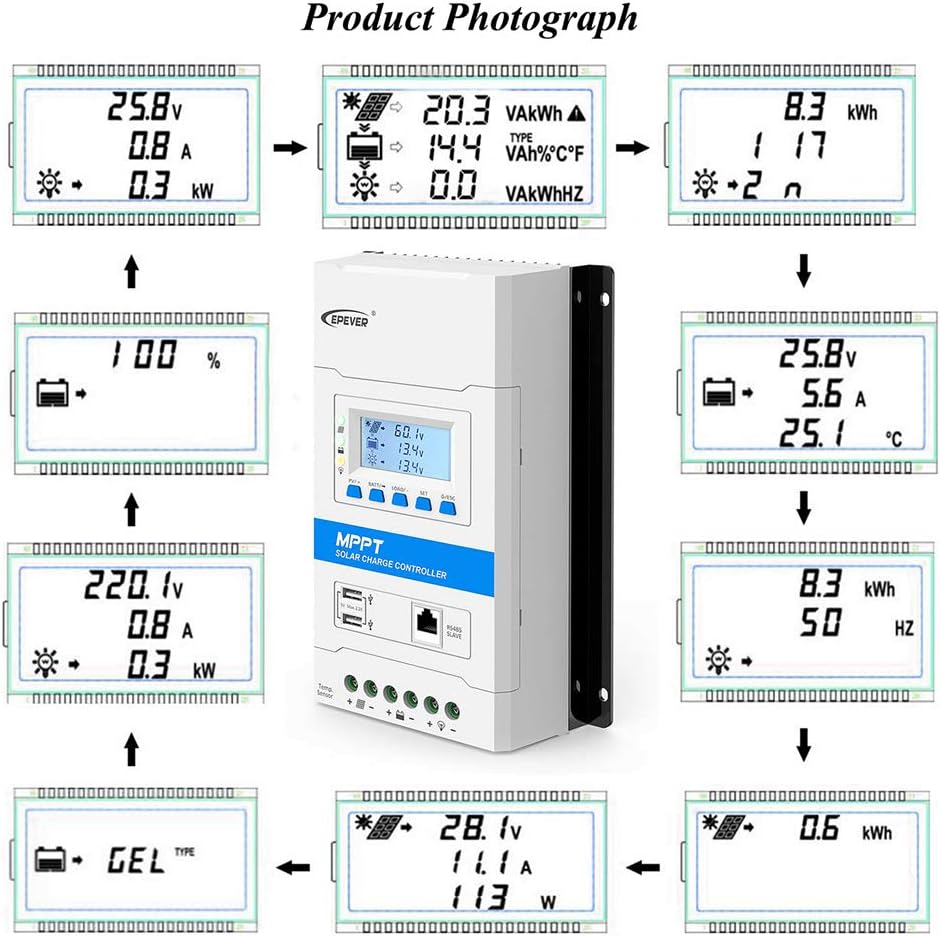
Figure 4.1: EPEVER TRIRON 4210N LCD Display. Shows various screens displaying system parameters like PV voltage, battery voltage, current, and temperature.
- PV/SET Button: Used to browse PV parameters and enter/save settings.
- BAT+/BAT- Buttons: Used to adjust battery parameters and navigate menus.
- LOAD+/LOAD- Buttons: Used to control load output and navigate menus.
- ESC Button: Exits current menu or cancels an operation.
- ENTER Button: Confirms selection or enters a menu.
4.2 Battery Type Selection
The controller supports various battery types. It is essential to select the correct battery type for optimal charging and battery longevity. The TRIRON 4210N supports Sealed (AGM), Gel, Flooded, Lead-acid User, LiFePO4 Lithium, Li(NiCoMn)O2 Lithium, and Lithium User (9~34V).
Refer to the detailed specifications for specific voltage parameters for each battery type.
5. Maintenance
Regular maintenance ensures the longevity and optimal performance of your solar charge controller.
- Cleanliness: Keep the controller clean and free from dust and debris. Use a dry cloth for cleaning.
- Ventilation: Ensure adequate airflow around the controller. Do not block ventilation openings. Proper cooling is essential, especially under high load conditions.
- Connection Checks: Periodically inspect all wiring connections for tightness and corrosion. Loose connections can lead to power loss or overheating.
- Firmware Updates: Check the manufacturer's website for any available firmware updates to ensure your controller has the latest features and bug fixes.
6. Troubleshooting
This section addresses common issues you might encounter with your EPEVER TRIRON 4210N MPPT Solar Charge Controller.
- No Display/Power: Check battery connections and ensure the battery circuit breaker is closed. Verify battery voltage is within the controller's operating range.
- No Charging from PV: Ensure solar panels are connected correctly and receiving sufficient sunlight. Check PV input voltage and current on the display. Verify PV circuit breaker is closed.
- Load Not Working: Check load connections and ensure the load output is enabled on the controller. Verify load current draw is within the controller's limits.
- Incorrect Battery Charging: Confirm the correct battery type is selected in the controller settings. Incorrect settings can lead to under or overcharging.
- Communication Issues: If using external communication modules (e.g., RS485, Bluetooth), ensure they are correctly connected and the appropriate software/app is installed and configured.
If issues persist, consult the full user manual or contact EPEVER customer support.
7. Specifications
Below are the detailed electrical parameters and general specifications for the EPEVER TRIRON 4210N MPPT Solar Charge Controller.
7.1 Electrical Parameters

Figure 7.1: EPEVER TRIRON N Series Electrical Parameters Table. Provides detailed specifications for various TRIRON N models, including the 4210N.
| Parameter | Value (TRIRON 4210N) |
|---|---|
| Nominal System Voltage | 12/24VDC Auto Work |
| Rated Charge Current | 40A |
| Rated Discharge Current | 40A |
| Battery Input Voltage Range | 8~32V |
| Max. PV Open Circuit Voltage | 100V (Min operating environment temp); 92V (25°C environment temp) |
| MPP Voltage Range | (Vbat+2V)~72V |
| Max. PV Input Power | 520W/12V; 1040W/24V |
| Battery Type | Sealed / Gel / Flooded; LiFePO4 / Li-NiCoMn / User |
| Equalize Charge Voltage (Lead-acid) | Sealed: 14.6V, Flooded: 14.8V, User-defined: 9~17V |
| Boost Charge Voltage (Lead-acid) | Gel: 14.2V, Sealed: 14.4V, Flooded: 14.6V, User-defined: 9~17V |
| Float Charge Voltage (Lead-acid) | Gel/Sealed/Flooded: 13.8V, User-defined: 9~17V |
| Low Voltage Reconnect Voltage (Lead-acid) | Gel/Sealed/Flooded: 12.6V, User-defined: 9~17V |
| Low Voltage Disconnect Voltage (Lead-acid) | Gel/Sealed/Flooded: 11.1V, User-defined: 9~17V |
| Boost Charge Voltage (Li-battery) | LiFePO4: 14.4V; Li-NiCoMn: 12.4V; User: 9~17V |
| Float Charge Voltage (Li-battery) | LiFePO4: 13.6V; Li-NiCoMn: 11.8V; User: 9~17V |
| Low Voltage Reconnect Voltage (Li-battery) | LiFePO4: 12.4V; Li-NiCoMn: 10.40V; User: 9~17V |
| Low Voltage Disconnect Voltage (Li-battery) | LiFePO4: 11.0V; Li-NiCoMn: 9.20V; User: 9~17V |
7.2 General Specifications
- Operating Temperature: -20°C to +60°C
- Display Type: LCD
- Item Weight: 4.86 pounds (2.21 Kilograms)
- Package Dimensions: 12.05 x 8.11 x 3.9 inches
- Manufacturer: EPEVER
- UPC: 732376583329
- ASIN: B081Q75DG4
8. Warranty and Support
For detailed warranty information, please refer to the documentation included with your product or visit the official EPEVER website. Extended protection plans may be available for purchase.
For technical support, frequently asked questions, and additional resources, please visit the EPEVER Store on Amazon or contact EPEVER customer service directly.


