
1. Product Overview
The Runleader HM058A is a multi-functional digital device designed to monitor engine hours, RPMs, and provide maintenance reminders for various gasoline-powered equipment. It features a multi-color backlit display, initial hour setting capability, and a waterproof design for durability in diverse environments.

Image 1.1: Runleader HM058A Hour Meter Tachometer with its inductive wire.
2. Key Features
- Multi-Functionality: Integrates tachometer, hour meter, service timers (SVC), and job timers (JOB).
- Hour Meter (TOT): Displays total engine run time (0-999999H) with 0.1-hour accuracy. Non-resettable.
- Tachometer (RPM): Measures real-time RPM, records maximum RPM, and allows programmable RPM alerts.
- Maintenance Reminders: Programmable service interval timer (SVC: 0-2000H/OFF) and resettable job timer (JOB) for specific tasks like oil changes.
- Initial Hours Settable: Allows users to set an initial total hour value, useful when replacing an existing meter.
- Multi-Color Backlit Display: Enhances visibility in various lighting conditions.
- Waterproof: IP67 rated for protection against water and dust.
- Battery Replaceable: Uses a CR2045 battery, with a low battery reminder.
- User Shutdown: Device can be manually turned off to conserve battery.
- Data Retention: All data is retained even after shutdown or battery replacement.
- Two Optional Systems (DSP-1/DSP-2): Offers different display modes for hours and RPMs.
3. Setup and Installation
3.1 Wiring the Inductive Cable
The device operates by detecting ignition pulses from the spark plug wire. Wrap the inductive cable around the spark plug wire of your engine. For optimal signal detection, wrap the cable at least 5 times. Ensure the connection is secure.
3.2 Mounting the Device
The HM058A can be mounted using either stick-on adhesive or screws.
- Stick-on Mounting: Clean the mounting surface thoroughly. Apply the adhesive pad to the back of the meter and firmly press it onto the desired location.
- Screw-on Mounting: Use appropriate screws to secure the meter through its mounting holes to a stable surface.

Image 3.1: Illustration of engine signal connection and two mounting options (stick-on and screw-on).
3.3 Initial Settings
Before first use, configure the device according to your engine type and desired settings.
- Setting Firing Patterns: The device supports various engine firing patterns. Access the menu to select the correct pattern (e.g., 1P1R, 2P1R, etc.) that matches your engine's ignition system. This ensures accurate RPM readings.
- Setting Initial Hours (TOT): If replacing an old hour meter, you can set the initial total hours. This allows for continuity of records. Refer to the detailed instructions for navigating the menu to set this value.

Image 3.2: Display showing programmable firing patterns for different engine types.

Image 3.3: The display indicating the initial time setting function.
4. Operating Instructions
4.1 Display Modes
The HM058A cycles through various display modes, showing different parameters.
- Total Hours (TOT): When the engine is off, the display shows the total accumulated operating hours. This value is permanent and cannot be reset.
- Real-time RPM: When the engine is running, the display shows the current engine revolutions per minute.
- Service Timer (SVC): A countdown timer for scheduled maintenance. Once set, it will alert you when the service interval is due.
- Job Timer (JOB): A resettable timer used to measure the duration of a specific task or work job.
- Maximum RPM (MAX RPM): Displays the highest RPM recorded during operation. This value can be reset.
- RPM Alert (ALERT RPM): A programmable alert that flashes the display and shows a warning icon if the engine RPM exceeds a set limit.

Image 4.1: The display showing total hours (TOT) when the engine is off, and real-time RPM when the engine is running.

Image 4.2: Displays for the Service Timer (SVC) and Job Timer (JOB) functions.
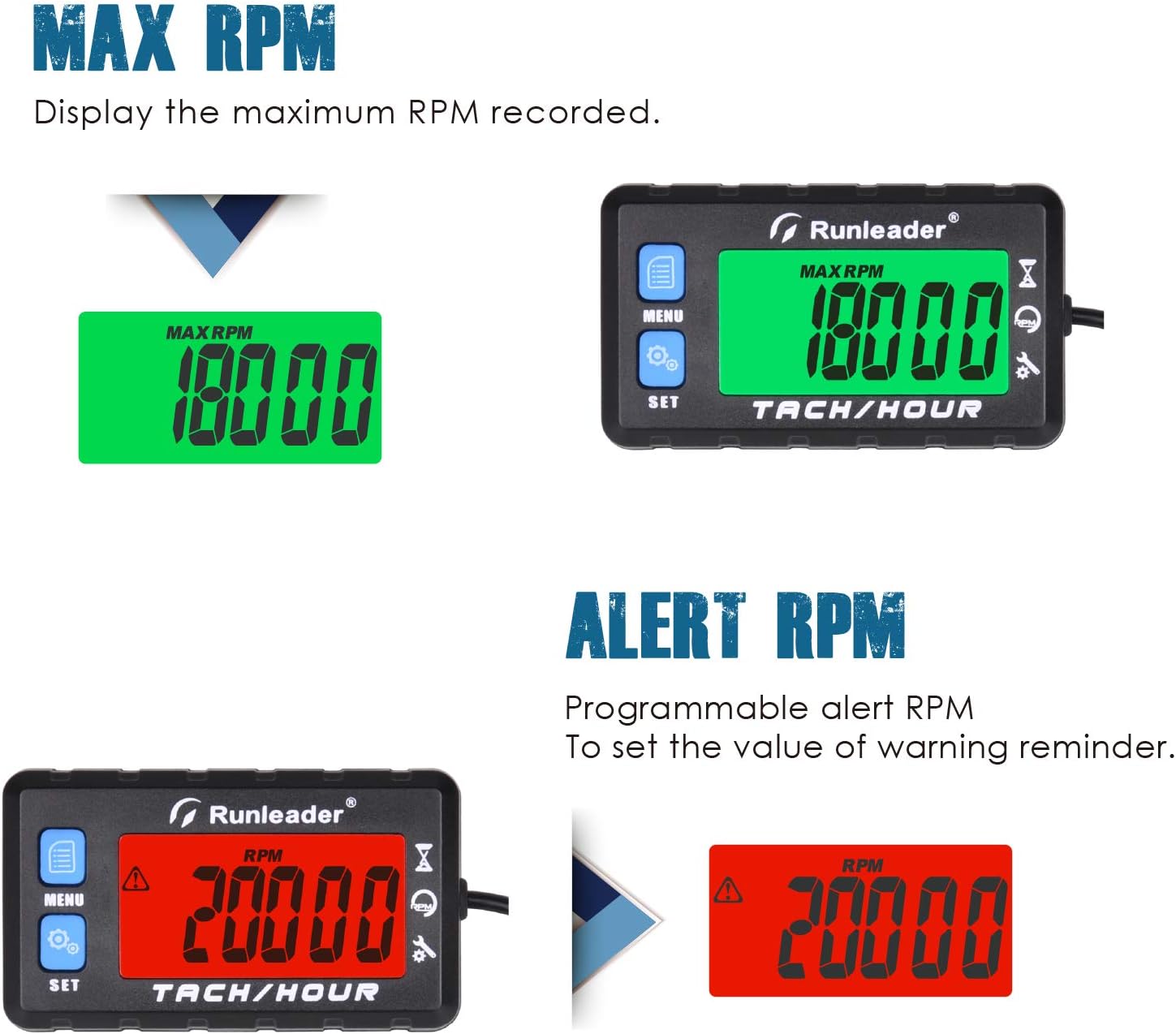
Image 4.3: Displays showing the maximum recorded RPM and the programmable RPM alert.
4.2 Menu Navigation
Use the MENU and SET buttons to navigate through the display modes and adjust settings. Refer to the quick start guide included with your product for specific button press sequences for each function.
4.3 Backlight Modes
The device offers three backlight modes:
- L-Auto: Backlight automatically turns off after a period of inactivity.
- L-On: Backlight remains continuously on.
- L-Off: Backlight is turned off.
Adjust the backlight mode via the menu settings to suit your viewing preferences and conserve battery life.

Image 4.4: The display illustrating the three available backlight modes: L-Off, L-Auto, and L-On.
4.4 User Shutdown
To manually shut down the LCD display, press the MENU button and the SET button simultaneously. This feature helps conserve battery when the device is not in active use.
4.5 Two Operating Systems (DSP-1 and DSP-2)
The HM058A offers two distinct operating systems:
- DSP-1: Hours and RPMs related functions are displayed directly and can be viewed continuously.
- DSP-2: Hours related functions and RPMs related functions can be locked, and only the function data under the module can be displayed and viewed. The hours module and RPMs module have different colors of backlight display.

Image 4.5: Comparison of DSP-1 and DSP-2 operating systems, showing different display behaviors and backlight colors.
5. Maintenance
5.1 Battery Replacement
The HM058A uses a replaceable CR2045 lithium metal battery. When the battery level is low, the device will display a 'BAL-Lo' warning. To replace the battery:
- Locate the battery compartment on the back of the device.
- Carefully open the compartment.
- Remove the old CR2045 battery.
- Insert a new CR2045 battery, ensuring correct polarity.
- Close the battery compartment securely to maintain the waterproof seal.

Image 5.1: Illustration of the IP67 waterproof rating and the CR2045 battery for replacement.
5.2 Service Reminders
Utilize the SVC and JOB timers to track and manage your equipment's maintenance schedule. Set the SVC timer for regular service intervals (e.g., every 50 hours for an oil change) and the JOB timer for specific tasks. Reset the JOB timer after completing a task.
6. Troubleshooting
- No Display/Blank Screen:
- Check battery level. Replace if 'BAL-Lo' is displayed or if the screen is completely blank.
- Ensure the device is not in user shutdown mode (press MENU and SET simultaneously to reactivate).
- Inaccurate RPM Readings:
- Verify the inductive cable is wrapped securely around the spark plug wire, with at least 5 wraps.
- Confirm the correct engine firing pattern is selected in the settings. An incorrect pattern will lead to inaccurate RPM.
- Ensure the spark plug wire is not damaged or excessively shielded, which could interfere with signal detection.
- Hour Meter Not Accumulating:
- Ensure the engine is running and the tachometer is displaying RPMs. If RPMs are not detected, hours will not accumulate.
- Check the inductive cable connection as described for RPM issues.
- Difficulty with Menu Navigation:
- Refer to the detailed instruction manual provided with the product for specific button functions and menu trees.
- Practice navigating the menu when the engine is off to become familiar with the interface.
7. Specifications
| Feature | Specification |
|---|---|
| Brand | Runleader |
| Model Number | RL-HM058A |
| Material | Acrylonitrile Butadiene Styrene (ABS) |
| Dimensions (L x W x H) | 2.95 x 0.8 x 1.69 inches |
| Item Weight | 3.74 ounces (106 Grams) |
| Hour Meter Range | 0-999999H |
| Hour Meter Accuracy | 0.1 hours |
| Service Timer (SVC) Range | 0-2000H / OFF |
| Battery Type | 1 Lithium Metal battery (CR2045, included) |
| Waterproof Rating | IP67 |
| Certifications | CE, ROHS |
| UPC | 791352513002 |
8. Warranty and Support
8.1 Warranty Information
This Runleader HM058A Hour Meter Tachometer comes with a 2-year warranty from the date of purchase. This warranty covers manufacturing defects and ensures the product functions as described under normal use. Please retain your proof of purchase for warranty claims.
8.2 Customer Support
For technical assistance, troubleshooting, or warranty inquiries, please contact Runleader customer support. Refer to the contact information provided in your product packaging or visit the official Runleader website for support resources.


