
WORKPRO W136017AU
WORKPRO 7.2V Cordless Hedge Trimmer and Grass Shear User Manual
Model: W136017AU | Brand: WORKPRO
1. Introduction
Thank you for choosing the WORKPRO 7.2V Cordless Hedge Trimmer and Grass Shear. This versatile 2-in-1 tool is designed for efficient and convenient garden maintenance, allowing you to easily switch between grass cutting and hedge trimming tasks. Its lightweight design and cordless operation provide maximum maneuverability. Please read this manual thoroughly before operation to ensure safe and effective use of the product.
2. Safety Instructions
WARNING: Read all safety warnings and instructions. Failure to follow the warnings and instructions may result in electric shock, fire, and/or serious injury.
General Safety
- Always wear appropriate personal protective equipment (PPE), including safety glasses, gloves, and sturdy footwear, when operating the tool.
- Keep children and bystanders away while operating the tool. Distractions can cause you to lose control.
- Do not operate power tools in explosive atmospheres, such as in the presence of flammable liquids, gases, or dust.
- Avoid unintentional starting. Ensure the switch is in the off-position before connecting to battery pack, picking up or carrying the tool.
- Maintain a firm grip on the tool with both hands during operation.
Battery Safety
- Recharge only with the charger specified by the manufacturer.
- Do not expose battery pack or tool to fire or excessive temperature. Exposure to fire or temperature above 130°C (265°F) may cause explosion.
- Do not short-circuit the battery terminals.
- Store the battery pack in a cool, dry place away from direct sunlight.
Blade Safety
- Keep hands and feet away from cutting blades.
- Ensure the safety key is removed when the tool is not in use or when changing blades.
- Inspect blades for damage before each use. Do not use if blades are bent or cracked.
- Always use the correct blade for the intended task (grass shear for grass, hedge trimmer for hedges).
3. Components Overview
Familiarize yourself with the main components of your WORKPRO Cordless Hedge Trimmer and Grass Shear:

Figure 3.1: Key Components of the Tool
- Ergonomic Grip: Designed for comfortable and secure handling.
- Charger LED-indicator: Displays battery charging status.
- Security Key: A removable key that disengages the battery for enhanced safety, especially around children.
- Grass Cutter Blade: 90mm wide blade for trimming grass and small weeds.
- ON/Off Switch: Activates and deactivates the tool.
- Safety Lock: Prevents accidental starting of the tool.
- Blade Quick Release System: Allows for easy and quick blade changes.
- Drive Cover Release Button: Used to open the drive cover for blade removal/installation.
4. Setup
4.1 Charging the Battery
The tool is equipped with a 7.2V, 1500mAh Lithium-ion battery. Before first use, or after extended storage, fully charge the battery.
- Ensure the tool is switched OFF.
- Connect the charger to a standard power outlet.
- Insert the charger plug into the charging port on the tool. The LED indicator on the charger will illuminate to show charging status.
- Allow approximately 3 hours for a full charge. The LED indicator will change or turn off when charging is complete.

Figure 4.1: Tool with Charger and Blades
4.2 Installing and Changing Blades
The tool comes with two interchangeable blades: a grass shear blade and a hedge trimmer blade. Always ensure the security key is removed before changing blades.

Figure 4.2: Blade Dimensions
- Remove Security Key: Pull out the security key from its slot to prevent accidental activation.
- Open Drive Cover: Press the Drive Cover Release Button and lift the drive cover.
- Remove Current Blade (if applicable): Carefully lift the installed blade from its position.
- Install New Blade: Align the new blade (either grass shear or hedge trimmer) with the drive mechanism and gently press it into place until it clicks securely.
- Close Drive Cover: Lower the drive cover until it snaps shut.
- Insert Security Key: Re-insert the security key into its slot. The tool is now ready for use.
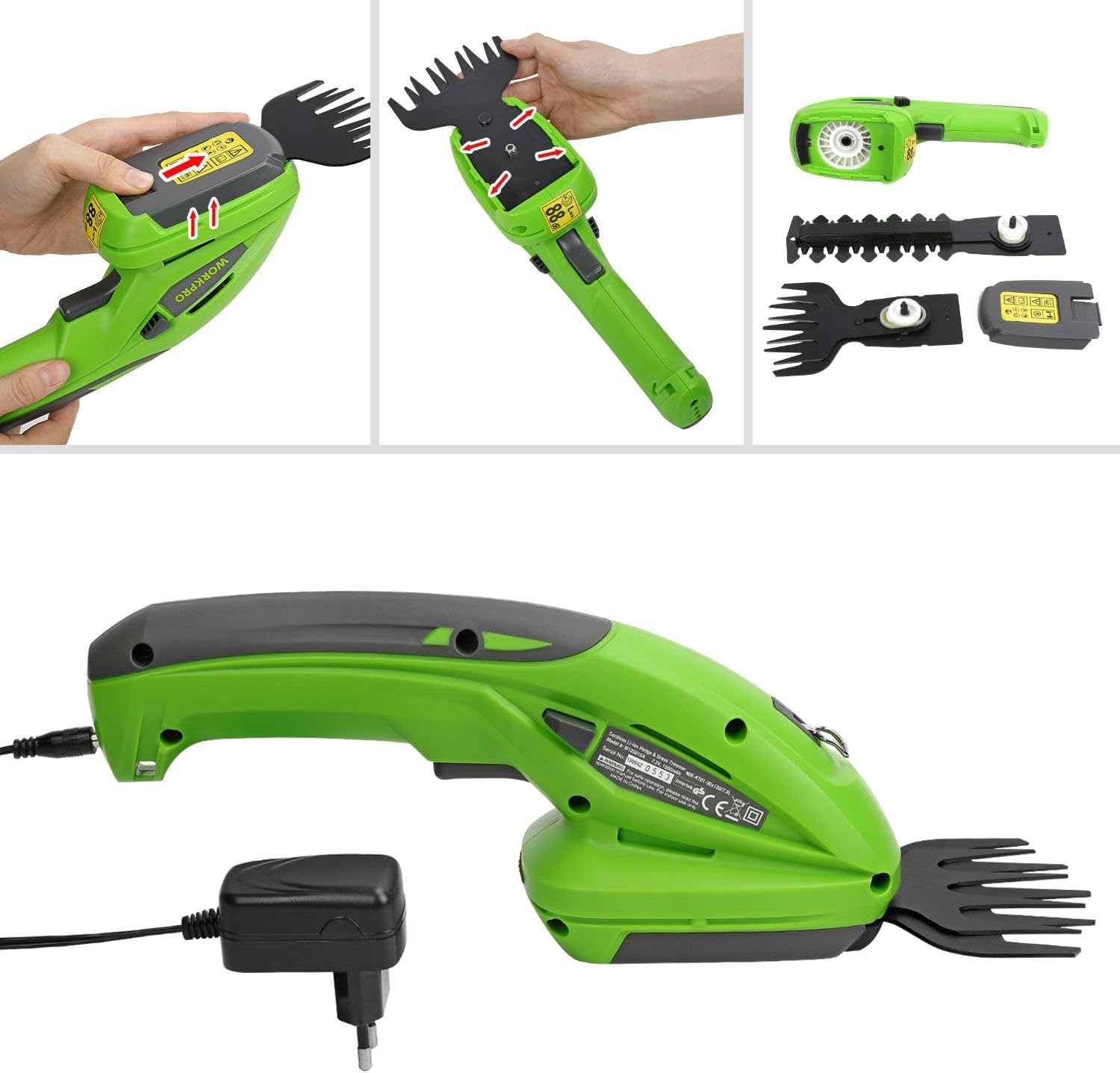
Figure 4.3: Blade Changing Procedure
5. Operating Instructions
5.1 General Operation
- Ensure the security key is fully inserted.
- To start the tool, press and hold the Safety Lock button, then press the ON/Off Switch. Release the Safety Lock button once the tool starts.
- To stop the tool, release the ON/Off Switch.
5.2 Grass Trimming (with Grass Shear Blade)
Use the 90mm grass shear blade for precise trimming of grass edges, small patches of lawn, or around obstacles.
- Hold the tool firmly with the grass shear blade parallel to the ground.
- Move the tool slowly and steadily along the area to be trimmed.
- Avoid forcing the blade through thick or wet grass, as this can strain the motor and reduce battery life.

Figure 5.1: Grass Trimming in Progress
5.3 Hedge Trimming (with Hedge Trimmer Blade)
Use the 120mm hedge trimmer blade for shaping and pruning small hedges, shrubs, and bushes.
- Hold the tool firmly with the hedge trimmer blade positioned at the desired cutting angle.
- Move the tool in a smooth, sweeping motion across the hedge.
- Do not attempt to cut branches thicker than 8mm (tooth distance).
- For best results, trim small amounts at a time rather than attempting to cut large sections at once.

Figure 5.2: Hedge Trimming in Progress
6. Maintenance
Regular maintenance ensures the longevity and optimal performance of your tool.
6.1 Cleaning
- Always remove the security key and disconnect the charger before cleaning.
- Use a stiff brush or cloth to remove grass clippings and debris from the blades and housing.
- Apply a light coat of machine oil to the blades after each use to prevent rust and ensure smooth operation.
- Do not use water or abrasive cleaners on the tool.
6.2 Storage
- Store the tool and charger in a dry, secure location, out of reach of children.
- Ensure the battery is partially charged (around 50%) before long-term storage to maintain battery health.
- Store the blades with their protective covers on to prevent accidental injury and blade damage.
7. Troubleshooting
If you encounter issues with your tool, refer to the following common problems and solutions:
| Problem | Possible Cause | Solution |
|---|---|---|
| Tool does not start | Battery is not charged Security key not inserted Safety lock not engaged correctly | Charge the battery fully Ensure security key is fully inserted Press safety lock before pressing ON/Off switch |
| Poor cutting performance | Blades are dull or dirty Attempting to cut material too thick Battery low | Clean and oil blades; consider replacement if dull Do not exceed recommended cutting capacity Recharge battery |
| Tool stops during operation | Battery is depleted Overload protection activated | Recharge battery Reduce cutting load; allow tool to cool down |
8. Specifications
| Feature | Specification |
|---|---|
| Model Number | W136017AU |
| Brand | WORKPRO |
| Voltage | 7.2 Volts (DC) |
| Battery Type | Lithium-ion |
| Battery Capacity | 1500mAh |
| Charge Time | Approx. 3 hours |
| Grass Blade Width | 90 mm |
| Hedge Blade Length | 120 mm |
| Hedge Blade Tooth Distance | 8 mm |
| Weight | 1.06 Kilograms |
| Dimensions (L x W x H) | 13.5 x 27 x 9 cm |
| Material | Rubber (handle), Alloy Steel (blade) |
| UPC | 820909760047 |
9. Warranty and Support
WORKPRO products are manufactured to high-quality standards. For any questions, technical assistance, or warranty claims, please contact WORKPRO customer support. Keep your purchase receipt as proof of purchase.
For further assistance, please refer to the contact information provided with your product packaging or visit the official WORKPRO website.
Related documentsW136017AU


Ask a question about this manual
Ask about setup, troubleshooting, compatibility, parts, safety, or missing instructions. Manuals+ will review the question and use this page’s manual context to help answer it.