
Introduction
Thank you for choosing the Hoco E39 Wireless Headset. This manual provides detailed instructions to help you set up, operate, and maintain your headset for optimal performance. Please read this manual carefully before use and retain it for future reference.
Product Overview
The Hoco E39 is a wireless in-ear headset designed for mobile phone compatibility, offering a seamless audio experience with its Bluetooth V5.0 connectivity and integrated microphone.

Figure 1: Hoco E39 Wireless Headset with its charging case and packaging.

Figure 2: Detailed view of a single Hoco E39 earbud, highlighting its design.

Figure 3: The Hoco E39 earbud alongside its charging case.
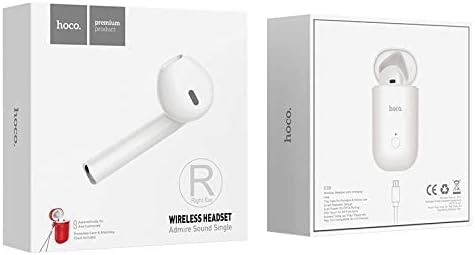
Figure 4: Front and back views of the Hoco E39 product packaging.
Setup
1. Charging the Headset
- Place the earbuds into the charging case.
- Connect the charging case to a DC 5V power source using the provided charging cable.
- The earbuds will fully charge in approximately 50 minutes. The charging case will fully charge in approximately 1 hour.
- A battery status display is available for Apple phones and some Android phones.
2. Bluetooth Pairing
- Ensure the earbuds are charged.
- Open the charging case. The earbuds will automatically enter pairing mode.
- On your mobile device, enable Bluetooth and search for available devices.
- Select "Hoco E39" from the list of devices to connect.
- Once connected, you will hear an audio prompt, and the indicator light on the earbuds will change.
Operating Instructions
The Hoco E39 Wireless Headset features touch controls for various functions.
Power On/Off
- Power On: Open the charging case, or touch and hold the touch area on the earbuds for a few seconds.
- Power Off: Place the earbuds back into the charging case and close the lid, or touch and hold the touch area on the earbuds for a few seconds until they power off.
Music Playback
- Play/Pause: Single tap the touch area on either earbud.
- Next Track: Double tap the right earbud.
- Previous Track: Double tap the left earbud.
Call Management
- Answer/End Call: Single tap the touch area on either earbud.
- Reject Call: Touch and hold the touch area on either earbud for 2 seconds.
Voice Assistant
- Activate Voice Assistant: Triple tap the touch area on either earbud.
Maintenance
- Cleaning: Use a soft, dry cloth to clean the earbuds and charging case. Avoid using liquids or abrasive cleaners.
- Storage: Store the headset in its charging case when not in use to protect it from dust and damage. Keep it in a cool, dry place.
- Battery Care: To prolong battery life, avoid fully discharging the battery frequently. Charge the headset regularly, even if not in active use.
Troubleshooting
Headset not pairing:
- Ensure the earbuds are charged.
- Turn off Bluetooth on your device and turn it back on.
- Forget "Hoco E39" from your device's Bluetooth list and try pairing again.
- Restart your mobile device.
No sound from earbuds:
- Check the volume level on your mobile device.
- Ensure the earbuds are properly connected to your device.
- Try playing audio from a different application or source.
Charging issues:
- Ensure the charging cable is securely connected to both the case and the power source.
- Try using a different charging cable or power adapter.
- Clean the charging contacts on the earbuds and inside the case with a dry cotton swab.
Specifications
| Feature | Specification |
|---|---|
| Brand | Hoco |
| Model | E39 |
| Wireless Version | V5.0 BK |
| Operating Protocols | A2DP, Avrcp |
| Charging Voltage | DC 5V |
| Earphone Battery Capacity | 30mAh |
| Charging Case Battery Capacity | 180mAh |
| Earphone Charging Time | Approx. 50 minutes |
| Charging Case Charging Time | Approx. 1 hour |
| Talk/Music Playback Time | 3 hours |
| Standby Time | 120 hours |
| Earphone Dimensions (L x W x H) | 53 x 30 x 21 mm |
| Earphone Weight | 16g |
| Control Method | Touch |
| Form Factor | In-ear |
| Noise Control | Active Noise Cancellation |
| Sensitivity | 91 dB |
| Material | Plastic |
| Compatible Devices | Mobile Phones |
| Color | White |
| Included Components | Protective case, User Manual, Charging Cable, Ear Cushions |
Warranty and Support
For warranty information or technical support, please refer to the documentation provided with your purchase or contact your retailer. Keep your proof of purchase for any warranty claims.


