
1. Safety Instructions
Always read and understand all safety warnings, instructions, illustrations, and specifications provided with this power tool. Failure to follow all instructions listed below may result in electric shock, fire, and/or serious injury.
1.1 General Safety
- Always wear appropriate personal protective equipment, including eye protection, hearing protection, and gloves.
- Keep your work area clean and well-lit. Cluttered or dark areas invite accidents.
- Do not operate power tools in explosive atmospheres, such as in the presence of flammable liquids, gases, or dust.
- Keep children and bystanders away while operating a power tool. Distractions can cause you to lose control.
1.2 Battery Safety
- Use only the specified charger for the battery pack. Using any other charger may create a risk of injury and fire.
- Do not disassemble, open, or shred battery packs.
- Protect battery packs from heat and fire. Avoid storage in direct sunlight.
- In case of battery leakage, avoid contact with skin and eyes. If contact occurs, wash with plenty of water and seek medical advice.
WARNING: This product can expose you to chemicals which are known to the State of California to cause cancer and birth defects or other reproductive harm. For more information go to www.P65Warnings.ca.gov.
2. Product Overview
The Einhell TE-CD 18/2 Li Kit is a versatile cordless drill/driver designed for various tasks around the home, workshop, and garage. It is part of the Einhell Power X-Change family, allowing for battery interchangeability across a wide range of tools.
2.1 Key Features
- Power X-Change System: Utilizes the 18-Volt battery system, providing compatibility with all Einhell Power X-Change tools and garden equipment.
- Torque Adjustment: Features 21 torque settings and a 2-speed gearing system, allowing precise control for different materials and applications. Maximum torque of 44 Nm.
- Ergonomic Design: Equipped with a soft grip handle for comfortable and extended operation, reducing user fatigue.
- Integrated LED Light: An LED light is included to illuminate the work area, improving visibility in dimly lit spaces.
- Quick-Stop Function: Ensures immediate stopping of the chuck for enhanced safety and control.
2.2 Included Components
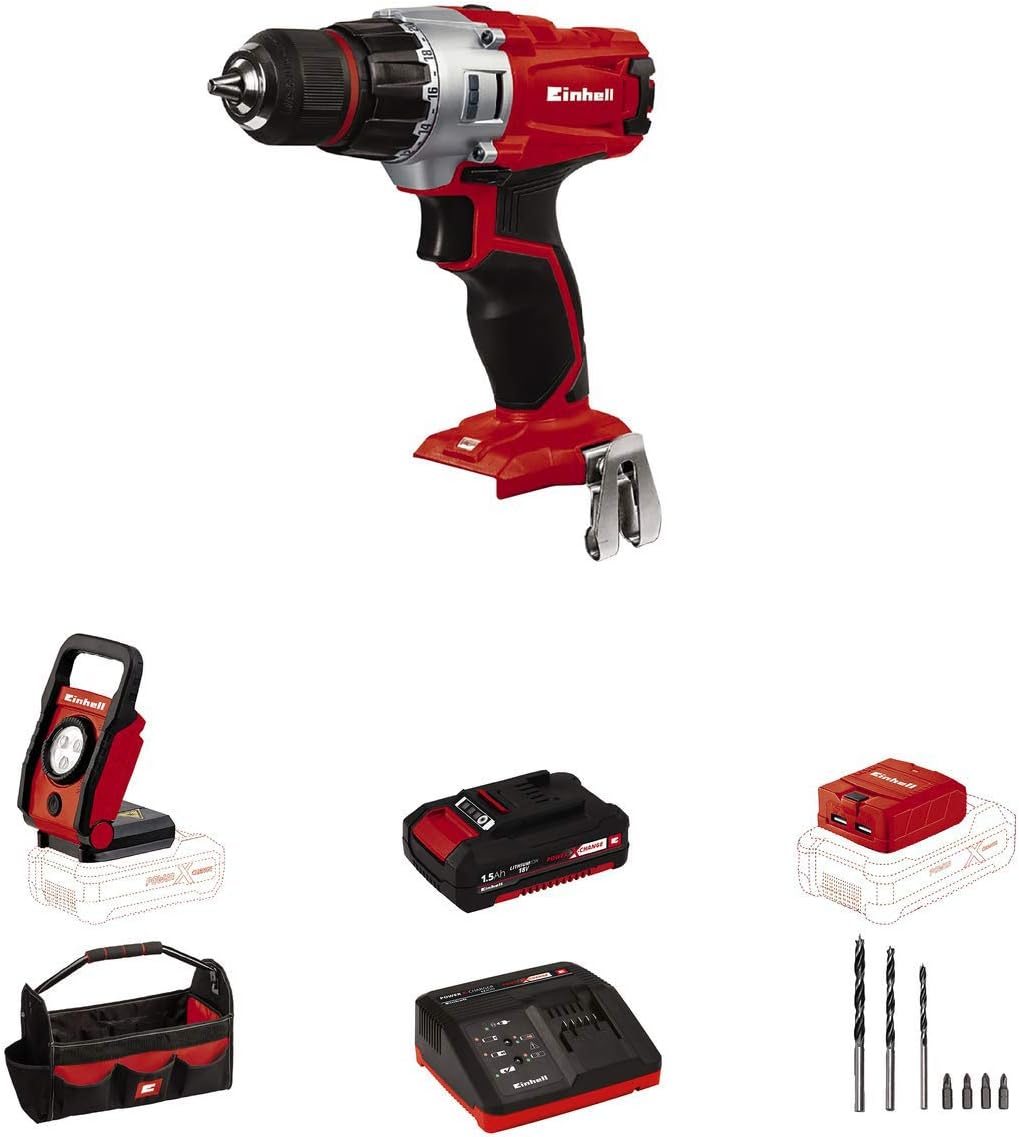
- Cordless Drill/Driver (TE-CD 18/2 Li)
- 1.5 Ah Lithium-Ion Battery
- Fast Charger
- Screw Driver/Drill Bits (3 drill bits, 4 Phillips screwdriver bits)
- LED Lamp (TE-CL 18Li)
- USB Charger Adapter (with 1A and 2.1A 5V ports)
- Belt Clip
- Tool Bag for transport and storage


3. Setup
3.1 Charging the Battery
- Connect the fast charger to a standard 110V power outlet.
- Slide the 1.5 Ah Lithium-Ion battery onto the charger until it clicks into place.
- The charger's indicator lights will show the charging status. A fully discharged 1.5 Ah battery typically charges in approximately 30 minutes.
- Once fully charged, remove the battery from the charger.
3.2 Attaching/Removing the Battery
- To attach: Align the battery with the base of the drill/driver and slide it in until it locks securely.
- To remove: Press the battery release button(s) on the sides of the battery and slide it out.
3.3 Installing Drill/Screwdriver Bits
- Ensure the drill/driver is switched off and the direction switch is in the center (locked) position.
- Twist the keyless chuck counter-clockwise to open the jaws.
- Insert the desired drill or screwdriver bit into the chuck.
- Twist the chuck clockwise to tighten the jaws securely around the bit. Ensure the bit is centered and firmly held.
4. Operating Instructions
4.1 Selecting Speed and Torque
- Speed Selection: Use the gear selector switch on top of the drill to choose between two speeds: Low speed (Gear 1, approx. 0-350 RPM) for high torque applications like driving screws, and High speed (Gear 2, approx. 0-1250 RPM) for faster drilling.
- Torque Setting: Rotate the torque collar behind the chuck to select the desired torque setting (1-20) or the drill mode (drill icon). Lower settings are for smaller screws or softer materials, while higher settings and drill mode are for larger screws or drilling.
4.2 Drilling and Screwdriving
- Select the appropriate speed and torque setting for your task.
- Set the direction switch (forward/reverse) to the desired rotation. For driving screws or drilling, set it to forward.
- Position the bit on the workpiece.
- Press the trigger switch to start the drill. The integrated LED light will illuminate the work area.
- Apply steady, even pressure. For screwdriving, release the trigger once the screw is flush or the clutch engages. For drilling, continue until the desired depth is reached.
4.3 Using the LED Lamp
- Attach a charged Power X-Change battery to the base of the LED lamp.
- Press the power button on the lamp to turn it on. The lamp offers two settings for diffusion, allowing adjustment of the light spread.
- The lamp can be positioned to direct light precisely where needed, enhancing visibility in dark or confined spaces.
4.4 Using the USB Charger Adapter
- Attach a charged Power X-Change battery to the USB charger adapter.
- Connect your USB-powered device (e.g., smartphone, tablet) to one of the two USB ports (1A or 2.1A) on the adapter.
- The adapter will begin charging your device, providing portable power from your Einhell battery.


4.5 Official Product Videos
5. Maintenance
5.1 Cleaning
- Regularly clean the ventilation slots of the tool to prevent overheating.
- Wipe the tool's exterior with a soft, damp cloth. Do not use harsh cleaning agents or solvents.
- Clean the chuck jaws periodically to ensure proper gripping of bits.
5.2 Storage
- Store the tool and batteries in a dry, cool place, away from direct sunlight and moisture.
- For long-term storage, ensure batteries are partially charged (around 50%) to maintain their lifespan.
- Keep all components in the provided tool bag to protect them from dust and damage.
6. Troubleshooting
This section addresses common issues you might encounter with your Einhell TE-CD Power X-Change drill/driver kit.
| Problem | Possible Cause | Solution |
|---|---|---|
| Tool does not start | Battery not charged or improperly inserted | Ensure battery is fully charged and correctly inserted until it clicks. |
| Battery not charging | Charger not plugged in, faulty charger, or faulty battery | Check power connection. Test charger with another battery if available. If issue persists, contact customer support for battery/charger replacement. |
| Reduced power/performance | Battery low, incorrect torque setting, or dull bit | Recharge battery. Adjust torque setting higher or switch to drill mode. Replace or sharpen drill/screwdriver bit. |
| Chuck not holding bit securely | Chuck jaws dirty or worn | Clean chuck jaws. Ensure bit shank is clean. If wear is significant, chuck may need replacement. |
| Overheating | Blocked ventilation slots or continuous heavy use | Clean ventilation slots. Allow tool to cool down during prolonged use. |
7. Specifications
| Feature | Specification |
|---|---|
| Brand | Einhell |
| Model Number | TE-CD Power X-Change |
| Power Source | Battery Powered |
| Voltage | 18.00 Volts |
| Battery Capacity | 1.5 Amp Hours |
| Battery Cell Type | Lithium Ion |
| Maximum Rotational Speed | 1250 RPM |
| Number of Speeds | 2 |
| Maximum Torque | 44 Newton Meters |
| Maximum Chuck Size | 10 Millimeters |
| Item Weight | 3.4 Pounds |
| Product Dimensions | 16.9"L x 6.5"W x 11.4"H |
| Color | Red, Silver, Black |
8. Warranty and Support
Einhell warrants all new products for two years from the date of purchase. This warranty covers defects in materials and workmanship under normal use.
For warranty claims, technical support, or any inquiries regarding your Einhell product, please refer to the contact information provided in your product packaging or visit the official Einhell USA website.


