
Bluedio H-T-19
Bluedio Bluetooth 5.0 Over-Ear Headphones User Manual
Model: H-T-19 | Brand: Bluedio
Introduction
This manual provides detailed instructions for the Bluedio Bluetooth 5.0 Over-Ear Headphones. It covers product features, setup, operation, maintenance, and troubleshooting to ensure optimal performance and user experience.
What's in the Box
- Bluedio HT wireless headphones
- Micro USB charging cable
- 3.5mm Audio cable
- User manual
Product Overview
Familiarize yourself with the various components and controls of your Bluedio headphones.

Figure 1: Headset Overview with labeled components.
- Volume Up Button: Increases audio volume.
- Volume Down Button: Decreases audio volume.
- LED Indicator: Displays device status (e.g., pairing, connected, charging).
- Power/MF Button (Multi-Function Button): Powers on/off, controls playback, answers/ends calls.
- Wheel Switch: Used for previous/next track selection.
- USB Charging Socket: For charging the headphones.
- Microphone: Built-in for calls and voice commands.
- Audio Jack (3.5mm): For wired audio connection.
Setup
Charging the Headphones
Before first use, fully charge your headphones. Use the provided Micro USB charging cable to connect the headphones to a power source.

Figure 2: Long Working Time and Battery.
- Battery Capacity: 650 mAh
- Charging Time: Approximately 1 hour for a full charge.
- Music Playback Time: Up to 40 hours on a full charge.
- Talk Time: Up to 45 hours on a full charge.
- Standby Time: Up to 30 days.
Pairing with Your Mobile Phone
Follow these steps to pair your Bluedio headphones with your device via Bluetooth:

Figure 3: Bluetooth Pairing Guide.
- Keep the distance between the headset and your mobile phone within 1 meter. The closer, the better.
- When the headset is off (if not, turn off the headphones first), press and hold the Power/MF Button for 5 seconds or so, only when you see the blue light stays on (instead of blinking), can you release the button. The headset is in pairing mode.
- Switch on the Bluetooth of your mobile phone, add/search devices.
- When "H" or "Bluedio" appears, select it. If asked for a pass code: Enter "0000".
Attention:
If pairing is not successful within 60 seconds, the LED goes out and the headset is out of pairing mode. Repeat the pairing procedure.
Operating Instructions
Music Playback
The headphones feature a Hurricane turbine housing design for powerful bass resonance and CD lossless sound with SNR up to 98dB for crystal-clear audio.

Figure 4: High-Fidelity Audio Experience.
- Play/Pause: Press the Power/MF Button once.
- Next Track: Use the Wheel Switch forward.
- Previous Track: Use the Wheel Switch backward.
- Volume Control: Use the Volume Up/Down buttons.
- Music Sharing: Connect another headphone (e.g., Bluedio Shooting Brake) via the 3.5mm audio cable to share music instantly. (Recommended to use earphones with impedance of at least 32Ω).
Call Management
The built-in microphone and echo suppression ensure clear communication during calls.
- Answer/End Call: Press the Power/MF Button once.
- Reject Call: Press and hold the Power/MF Button for 2 seconds.
- Redial Last Number: Double-press the Power/MF Button.
Voice Prompts and Smart Features
The headphones offer voice prompts in multiple languages and integrate with cloud services for enhanced functionality.

Figure 5: Voice Prompt and Bluetooth 5.0 Features.
- Voice Prompt Languages: English, Chinese, Spanish, French. Switch by pressing the Power/MF Button and Volume Down Button simultaneously.
- Cloud Service Integration: Supports Baidu Cloud Engine and Amazon Cloud. Download the Bluedio APP to access your AWS account for music, weather, news, and agenda.
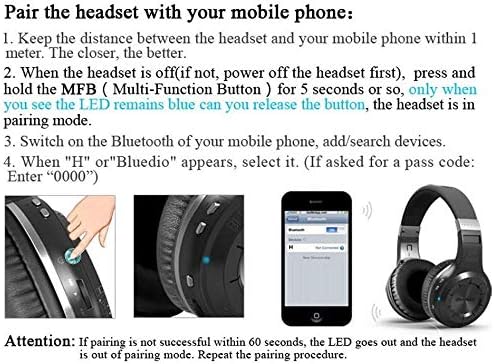
Figure 6: Smart Features with Cloud Service.
Specifications
| Feature | Detail |
|---|---|
| Bluetooth Version | 5.0 |
| Support Profiles | A2DP, AVRCP, HTSP, HTFP |
| Communication Distance | 10 Meters |
| Dynamic Range | 118 dB |
| Drive Unit | 57 mm |
| Horn Impedance | 16 Ω |
| Total Harmonic Distortion (THD) | <0.5% |
| Battery Capacity | 650 mAh |
| Music Playback Time | 40 hours |
| Talk Time | 45 hours |
| Standby Time | 30 days |
| Charging Time | 1 hour |
| Dimensions | 7.09 x 6.69 x 1.97 inches |
| Item Weight | 15.5 ounces |
| Noise Control | Active Noise Cancellation |
| Headphones Jack | 3.5 mm Jack |
| Control Type | Media Control, Voice |
Maintenance
Proper maintenance ensures the longevity and performance of your headphones.
- Cleaning: Gently wipe the earcups and headband with a soft, dry cloth. Do not use harsh chemicals or abrasive materials.
- Storage: Store the headphones in a cool, dry place away from direct sunlight and extreme temperatures. When not in use, it is recommended to store them in a protective case to prevent damage.
- Battery Care: Avoid fully discharging the battery frequently. For long-term storage, charge the battery to about 50% every few months.
- Cable Management: Handle the charging and audio cables carefully to prevent kinks or damage.
Troubleshooting
If you encounter issues with your headphones, refer to the following common solutions:
- Cannot Pair:
- Ensure the headphones are fully charged.
- Make sure the headphones are in pairing mode (blue LED stays on).
- Turn off and on the Bluetooth on your device.
- Clear previous Bluetooth connections on your device.
- Try pairing with a different device to rule out device-specific issues.
- No Sound:
- Check the volume level on both the headphones and your connected device.
- Ensure the headphones are properly paired and connected.
- If using a wired connection, ensure the 3.5mm audio cable is fully inserted into both the headphones and the audio source.
- Try restarting both the headphones and the audio source device.
- Poor Sound Quality:
- Move closer to your connected device to avoid interference or being out of range.
- Ensure there are no physical obstructions between the headphones and the device.
- Check if the audio source quality is high.
- Headphones Not Turning On:
- Ensure the headphones are fully charged.
- Press and hold the Power/MF button for a longer duration (e.g., 5-7 seconds).
Warranty and Support
Bluedio offers a comprehensive warranty and support for your product.
- Return Policy: 30 days with no reason to return for your Bluedio Bluetooth headphone.
- Warranty: 12 Months worry-free warranty.
- For further assistance or warranty claims, please refer to the contact information provided in your product packaging or visit the official Bluedio support website.
Ask a question about this manual
Ask about setup, troubleshooting, compatibility, parts, safety, or missing instructions. Manuals+ will review the question and use this page’s manual context to help answer it.